
BLAUX 30888
BLX Earbuds - Wireless Bluetooth 5.1 Earbuds User Manual
Model: 30888 | Brand: BLAUX
1. Ifihan
Thank you for choosing BLX Earbuds. These True Wireless Stereo (TWS) earbuds are designed to provide a seamless and high-quality audio experience with the convenience of Bluetooth 5.1 technology. This manual will guide you through the setup, operation, and maintenance of your new earbuds to ensure optimal performance and longevity.
2. Ohun ti o wa ninu Apoti
Jọwọ ṣayẹwo awọn akoonu package lati rii daju pe gbogbo awọn ohun kan wa:
- BLX Wireless Earbuds (Left and Right)
- Alailowaya Ngba agbara Case
- Micro USB Ngba agbara USB
- Silicone Ear Tips (Small, Medium, Large)
- Itọsọna olumulo
3. Ọja Ipariview
The BLX Earbuds offer a compact and ergonomic design for comfortable, all-day wear. The included charging case provides extended battery life and convenient storage.
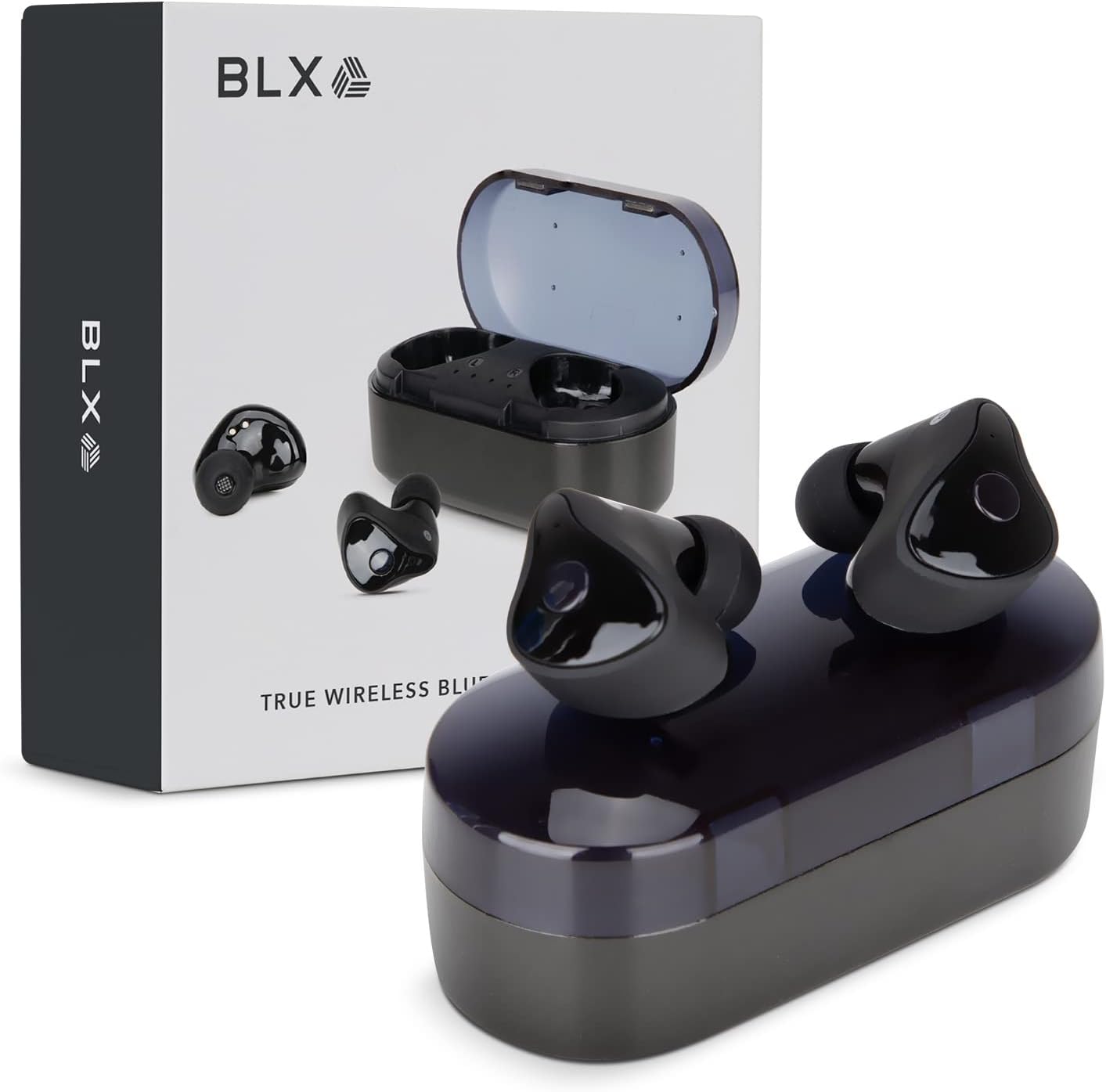
Image: BLX Earbuds, charging case, and product packaging.
3.1 Key Awọn ẹya ara ẹrọ
- Sitẹrio Alailowaya otitọ (TWS): Enjoy a completely wireless audio experience with independent earbuds.
- Bluetooth 5.1 Imọ-ẹrọ: Provides a stable and efficient wireless connection with a range of up to 10 meters.
- Pipọpọ iyara: Earbuds automatically connect to your device once removed from the charging case.
- Awọn iṣakoso Fọwọkan Intuitive: Manage music playback, calls, and voice assistants with simple taps.
- IPX4 Omi Resistance: Designed to withstand sweat and splashes, making them suitable for workouts and outdoor activities.
- Gbohungbohun ti a ṣe sinu: Nṣiṣẹ ipe ti ko ni ọwọ ati ibaraenisepo oluranlọwọ ohun.

Image: BLX Earbuds demonstrating true wireless freedom with Bluetooth 5.1, fast pairing, and a 10-meter range.

Aworan: Alaye view of a BLX Earbud highlighting its smart touch control capabilities for various functions.

Image: A person running while wearing BLX Earbuds, emphasizing their IPX4 water resistance for sweat and splashes, and the portability of the compact charging case.

Image: A woman wearing a BLX Earbud, with an illustration of the three included silicone ear tip sizes (11mm, 12mm, 13mm) to help users find their perfect fit.

Image: A woman enjoying music with BLX Earbuds, illustrating the battery performance: 4.5 hours of listening time, up to 18 hours with the charging case, and a 1-hour full charge time for the case.

Image: A close-up of a BLX Earbud, emphasizing its clear immersive audio quality with a frequency response range of 20Hz to 20KHz.

Image: BLX Earbuds depicted with icons for Google Assistant and Siri, along with a built-in microphone icon, indicating hands-free voice assistant capabilities.
4. Eto
4.1 Ngba agbara si Earbuds ati Ọran
Before first use, fully charge the BLX Earbuds and their charging case.
- Fi àwọn agbekọri sínú àpótí ìgbóná. Rí i dájú pé wọ́n wà ní ipò tó tọ́ ní àwọn ihò wọn (L fún òsì, R fún ọ̀tún).
- Connect the Micro USB charging cable to the charging port on the case and the other end to a USB power source (e.g., computer, wall adapter).
- The indicator lights on the charging case will illuminate to show charging status. A full charge for the case takes approximately 1 hour.
- Once fully charged, disconnect the charging cable. The earbuds will charge automatically when placed in the powered case.
4.2 Sisopọ pẹlu Ẹrọ Rẹ
BLX Earbuds feature auto-pairing technology for quick and easy connection.
- Ensure the charging case is charged and your device's Bluetooth is enabled.
- Ṣii apoti gbigba agbara. Awọn agbekọri yoo tan ina laifọwọyi ati tẹ ipo sisopọ pọ sii.
- On your device (smartphone, tablet, laptop), go to the Bluetooth settings and search for available devices.
- Select "BLX Earbuds" from the list of found devices.
- Once connected, your device will confirm the pairing, and the earbuds will be ready for use.
- Fun awọn lilo atẹle, awọn agbekọri yoo sopọ laifọwọyi si ẹrọ ti o so pọ ti o kẹhin nigbati o ba yọ kuro ninu ọran naa.
4.3 Finding the Perfect Fit
A proper fit is crucial for sound quality and comfort. Experiment with the included silicone ear tips (Small, Medium, Large) to find the size that best seals your ear canal.
- Fi rọra fi agbekọri sinu odo eti rẹ.
- Twist slightly to secure it in place. The earbud should feel snug and comfortable without causing pressure.
- If the sound quality is poor or the earbuds feel loose, try a different size ear tip.
5. Operating Your BLX Earbuds
The BLX Earbuds utilize touch controls for easy management of audio and calls.
5.1 Agbara Tan / Pa
- Agbara Tan: Ṣii apoti gbigba agbara, ati awọn agbekọri yoo tan ina laifọwọyi.
- Agbara Pa: Gbe awọn agbekọri naa pada sinu apoti gbigba agbara ki o pa ideri naa. Wọn yoo pa ina laifọwọyi ati bẹrẹ gbigba agbara.
5.2 Sisisẹsẹhin Orin
| Iṣe | Iṣakoso |
|---|---|
| Ṣiṣẹ / Sinmi | Fọwọ ba ẹyọkan lori boya agbekọri |
| Next Track | Fọwọ́ kan etí ọ̀tún lẹ́ẹ̀mejì |
| Ti tẹlẹ Track | Fọwọ́ kan etí òsì lẹ́ẹ̀mejì |
5.3 ipe Management
| Iṣe | Iṣakoso |
|---|---|
| Idahun/Pari Ipe | Fọwọ ba ẹyọkan lori boya agbekọri |
| Kọ Ipe | Tẹ mọlẹ boya agbekọri fun iṣẹju meji 2 |
5.4 Iranlọwọ ohun
| Iṣe | Iṣakoso |
|---|---|
| Mu Oluranlọwọ Ohun ṣiṣẹ (Siri, Oluranlọwọ Google, ati bẹbẹ lọ) | Fọwọ ba meteta lori boya agbekọri |
5.5 Iṣakoso iwọn didun
Volume control is managed directly through your connected device (phone, tablet, laptop).
6. Itọju
Proper care and maintenance will extend the life of your BLX Earbuds.
6.1 Ninu
- Lo asọ ti o gbẹ, asọ ti ko ni lint lati nu afikọti ati apoti gbigba agbara.
- Fun awọn imọran eti, yọ wọn kuro ninu awọn afikọti ati ki o sọ di mimọ pẹlu ojutu ọṣẹ kekere kan ti o ba jẹ dandan, lẹhinna fi omi ṣan daradara ki o gbẹ patapata ṣaaju ki o to tunpo.
- Maṣe lo awọn afọmọ abrasive, ọti-lile, tabi awọn nkan ti kemikali.
- Rii daju gbigba agbara awọn olubasọrọ lori awọn agbekọri mejeeji ati apoti jẹ mimọ ati laisi idoti.
6.2 Ibi ipamọ
Nigbati o ko ba wa ni lilo, nigbagbogbo tọju awọn afikọti sinu apoti gbigba agbara wọn lati daabobo wọn lati eruku, ibajẹ, ati lati jẹ ki wọn gba agbara.
6.3 Omi Resistance (IPX4)
Your BLX Earbuds are rated IPX4, meaning they are resistant to splashing water from any direction. This makes them suitable for:
- Sweaty workouts
- Light rain or splashes
Akiyesi pataki:
- IPX4 rating does NOT mean the earbuds are waterproof. Do not submerge them in water.
- Do not wear them while swimming, showering, or in heavy rain.
- If the earbuds get wet, wipe them dry immediately before placing them back in the charging case.
7. Laasigbotitusita
If you encounter issues with your BLX Earbuds, try the following solutions:
7.1 Àwọn Etí Àfikún Tí Kò Sopọ̀ Mọ́ tàbí Tí Kò Sopọ̀ Mọ́
- Rii daju pe awọn agbekọri mejeeji ti gba agbara.
- Rii daju pe Bluetooth ti ṣiṣẹ lori ẹrọ rẹ.
- Place the earbuds back in the case, close the lid, wait a few seconds, then open the lid again to re-enter pairing mode.
- Forget/delete "BLX Earbuds" from your device's Bluetooth list and try pairing again.
- Move the earbuds closer to your device (within 10 meters).
7.2 Ko si Ohun tabi Iwọn kekere
- Ṣayẹwo ipele iwọn didun lori ẹrọ ti a ti sopọ.
- Rii daju pe awọn agbekọri ti sopọ daradara si ẹrọ rẹ.
- Nu eyikeyi idoti kuro lati apapo agbọrọsọ agbekọri.
- Gbiyanju ohun ti ndun lati ohun elo ti o yatọ tabi orisun.
7.3 Agbekọri Ọkan Ko Ṣiṣẹ
- Gbe awọn agbekọri mejeeji pada sinu apoti gbigba agbara, pa ideri naa, lẹhinna ṣi i lẹẹkansi.
- Rii daju pe awọn agbekọri mejeeji ti gba agbara.
- Gbiyanju lati tun awọn agbekọri naa tunto (tọkasi ti olupese website or support for specific reset instructions if needed).
7.4 Ngba agbara Ko si gbigba agbara
- Rii daju pe okun gbigba agbara ti sopọ ni aabo si ọran mejeeji ati orisun agbara.
- Gbiyanju ibudo USB miiran tabi adapter ogiri.
- Rí i dájú pé okùn gbigba agbara náà kò bàjẹ́.
8. Awọn pato
| Ẹya ara ẹrọ | Ẹ̀kúnrẹ́rẹ́ |
|---|---|
| Orukọ awoṣe | 30888 |
| Asopọmọra Technology | Ailokun (Bluetooth 5.1) |
| Alailowaya Ibiti | Ti o to awọn mita 10 |
| Idahun Igbohunsafẹfẹ | 20 Hz - 20,000 Hz |
| Igbesi aye batiri (Earbuds) | Approx. 4.5 Hours (listening time) |
| Igbesi aye batiri (pẹlu apoti gbigba agbara) | Approx. 18 Hours total |
| Akoko gbigba agbara (Ila) | Isunmọ. 1 Wakati |
| Omi Resistance Ipele | IPX4 (Atako omi) |
| Gbohungbohun | Built-In, Bidirectional |
| Iṣakoso Iru | Iṣakoso ifọwọkan |
| Awọn ẹrọ ibaramu | Cellphones, Tablets, Laptops (iOS, Android, PC) |
| Ohun elo | Ṣiṣu |
| Iwọn Nkan | 44 giramu |
| Ọja Mefa | 9.9 x 9.9 x 3.8 cm |
9. Atilẹyin ọja & Atilẹyin
BLAUX products are manufactured to high standards and undergo rigorous testing. For information regarding warranty coverage, technical support, or service inquiries, please visit the official BLAUX webojula tabi kan si wọn onibara iṣẹ taara.
O le wa alaye diẹ sii ati atilẹyin ni BLAUX Store on Amazon.
Ask a question about this manual
Ask about setup, troubleshooting, compatibility, parts, safety, or missing instructions. Manuals+ will review the question and use this page’s manual context to help answer it.