
1. Ifihan
Thank you for choosing the Radwag WTC 15/C1/K Load Cell Scale. This precision balance is designed for accurate weighing, counting, and checkweighing applications in various industrial and scientific environments. This manual provides essential information for the correct installation, operation, and maintenance of your device. Please read it thoroughly before use to ensure optimal performance and safety.
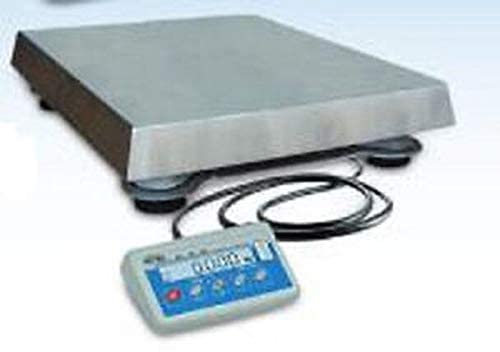
Figure 1: Radwag WTC 15/C1/K Load Cell Scale. This image displays the complete scale unit, including the weighing platform and the integrated display panel.
2. Awọn Itọsọna Aabo
Observe the following safety precautions to prevent injury and damage to the device:
- Operate the scale only in a stable, level environment free from excessive vibrations, drafts, and extreme temperature fluctuations.
- Do not exceed the maximum capacity of 15 kg. Overloading can damage the weighing mechanism.
- Pa iwọn naa kuro ni awọn aaye itanna eletiriki.
- Lo oluyipada agbara nikan ti a pese pẹlu ẹrọ naa.
- Do not attempt to open or repair the scale yourself. Refer all servicing to qualified personnel.
- Ensure the weighing platform is clean and free of debris before each use.
3. irinše Loriview
The Radwag WTC 15/C1/K Load Cell Scale typically includes the following components:
- Ẹka Iwọn: The main body housing the weighing mechanism and electronics.
- Platform Ìwọ̀n: A removable stainless steel platform (14.1 x 11.4 inches) for placing items to be weighed.
- Ifihan LCD: A backlit LCD display for showing weight readings, function modes, and other information.
- Ibi iwaju alabujuto: Buttons for operating various functions (e.g., ON/OFF, TARE, MODE).
- Adapter agbara: For connecting the scale to a power source.
4. Ni ibẹrẹ Oṣo
4.1 Ṣiṣii silẹ
Fi ìṣọ́ra yọ gbogbo àwọn èròjà kúrò nínú àpótí náà. Pa àpótí náà mọ́ fún ìrìnàjò tàbí ìtọ́jú lọ́jọ́ iwájú.
4.2 Ibi
Place the scale on a firm, level, and stable surface. Avoid locations near air conditioning vents, open windows, or vibrating machinery that could affect measurement accuracy.
4.3 Ipele ipele
Use the adjustable feet at the bottom of the scale to ensure it is perfectly level. Check the bubble level indicator (if present) to confirm proper leveling.
4.4 Asopọ agbara
Connect the power adapter to the scale's power input port and then plug it into a suitable electrical outlet. Allow the scale to warm up for at least 30 minutes after connecting power for optimal stability.
5. Awọn ilana Iṣiṣẹ
5.1 Titan / Pa a
Tẹ awọn TAN/PA button to turn the scale on. Press and hold the TAN/PA bọtini lati pa asekale.
5.2 Ìwọ̀n Ìpìlẹ̀
- Turn on the scale. Wait for the display to show '0.000g' or '0.00g'.
- Place the item to be weighed directly onto the center of the stainless steel weighing platform.
- Read the stable weight value displayed on the LCD.
5.3 Tare Išė
Láti wọn ohun kan nínú àpótí kan, lo iṣẹ́ Tare:
- Gbé àpótí òfo náà sí orí pẹpẹ ìwọ̀n.
- Tẹ awọn Tọju button. The display will reset to '0.000g'.
- Add the item to be weighed into the container. The display will show the net weight of the item.
5.4 Counting Function
The scale supports parts counting. Refer to the on-screen menu or specific button for activating and configuring the counting mode. Typically, you will place a known quantity of items (e.g., 10, 20, 50 pieces) to establish a sample weight, then the scale can count larger quantities of identical items.
5.5 Checkweighing Function
The checkweighing function allows you to determine if a weighed item falls within a predefined weight range (e.g., too light, acceptable, too heavy). Consult the scale's menu or dedicated button to set the upper and lower weight limits for checkweighing.
6. Itọju ati Itọju
6.1 Ninu
Mọ iwọnwọn nigbagbogbo pẹlu asọ, damp cloth. For stubborn dirt, use a mild detergent. Do not use abrasive cleaners, solvents, or immerse the scale in water. Ensure no liquids enter the scale's internal components.
6.2 Ibi ipamọ
When not in use for extended periods, store the scale in a dry, dust-free environment at room temperature. If possible, use the original packaging for protection.
6.3 Idiwọn
Regular calibration ensures the accuracy of your scale. The WTC 15/C1/K may feature internal or external calibration options. Refer to the on-screen menu for calibration procedures. External calibration typically requires certified calibration weights.
7. Laasigbotitusita
| Isoro | Owun to le Fa | Ojutu |
|---|---|---|
| Awọn kika aiduro | Vibrations, drafts, unstable surface, temperature changes. | Relocate the scale to a stable environment. Close windows/doors. Allow scale to acclimatize. |
| Display shows 'OVERLOAD' | Iwọn ju agbara ti o pọju lọ. | Remove excess weight immediately. Do not exceed 15 kg. |
| Iwọn ko ni tan-an | Ko si agbara, ohun ti nmu badọgba ti ko tọ, asopọ alaimuṣinṣin. | Check power cable connection. Ensure outlet is functional. Try a different power adapter if available and compatible. |
| Awọn kika ti ko pe | Needs calibration, dirty platform, scale not level. | Perform calibration. Clean the weighing platform. Level the scale. |
8. Imọ ni pato
- O pọju Agbara: 15 kg
- Kẹta: 5 g
- Platform Ìwọ̀n: Stainless Steel (14.1 x 11.4 inches)
- Ifihan: Afẹyinti LCD
- Awọn iṣẹ: Weighing, Counting, Checkweighing
- Ohun elo: Irin Alagbara (pítímù)
- Olupese: Radwag
- UPC: 810000396818
9. Atilẹyin ọja ati Support
For warranty information, please refer to the documentation provided with your purchase or contact Radwag customer support directly. If you encounter any issues not covered in this manual or require technical assistance, please visit the Radwag Store on Amazon tabi kan si olupin agbegbe rẹ.