
1. Ifihan
Thank you for choosing the ENUOSUMA Retro FM Radio. This device combines classic aesthetics with modern functionality, offering FM radio, Bluetooth 5.0 connectivity, an alarm clock, and multiple media playback options. Its compact and portable design, along with a built-in rechargeable battery, makes it suitable for various environments.
This manual provides detailed instructions for setting up and operating your radio to ensure optimal performance and user experience.

olusin 1: Iwaju view of the ENUOSUMA Retro FM Radio, featuring a wooden casing, a black control panel with an LCD display showing '23:26', a speaker grille, and various buttons for alarm, mode, track control, and a rotary knob for power/volume and select/pause.
2. Package Awọn akoonu
Jọwọ ṣayẹwo package fun awọn nkan wọnyi:
- 1 x ENUOSUMA Retro FM Radio (Bluetooth Speaker)
- 1 x Okun Olohun
- 1 x Okun Ngba agbara USB (Iru-C)
- 1 x Itọsọna olumulo
3. Awọn ẹya Ọja
- Iṣiṣẹ Ipo Olona: FM Radio, Bluetooth 5.0, Clock, Alarm.
- Ohun Didara to gaju: Built-in 5W stereo speaker with 3D stereo audio.
- Awọn itaniji Meji: Set two independent alarms with snooze function.
- Ifihan Digital: Clear LCD display for time, mode, and frequency.
- Npe ni Ọwọ: Integrated microphone for Bluetooth calls.
- Awọn aṣayan Iṣawọle Ọpọ: TF card slot, USB port, AUX input.
- Apẹrẹ to gbe: Compact size with a 2000mAh rechargeable battery for up to 9 hours of playtime.
- Ẹwà Àtijọ́: Distinctive wooden casing for a classic look.
4. Awọn iṣakoso ati awọn ibudo loriview
Familiarize yourself with the buttons and ports on your ENUOSUMA Retro FM Radio:
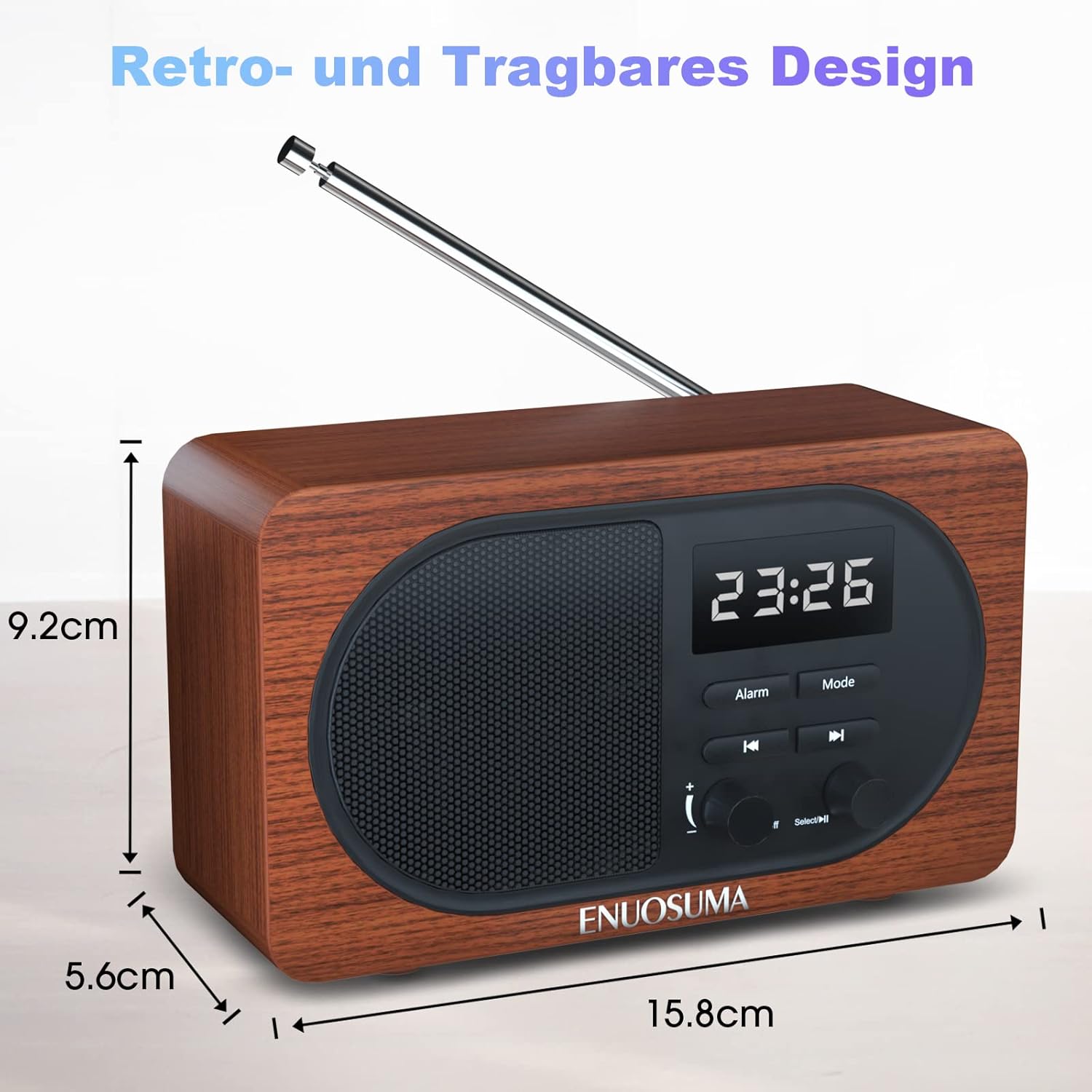
Figure 2: Detailed diagram labeling the front controls and rear ports of the ENUOSUMA Retro FM Radio.
- Power ON/OFF / Volume +/-: Rotate to adjust volume. Press and hold to power on/off.
- Select / Pause: Press to select or pause playback. Long press in FM mode for auto-search.
- Išẹ itaniji: Button to set and manage alarms.
- Ipo: Press to switch between FM, Bluetooth, TF Card, USB, and AUX modes.
- Tẹlẹ Orin: Press to go to the previous track (in media playback modes) or tune down (in FM mode).
- Orin t’okan: Press to go to the next track (in media playback modes) or tune up (in FM mode).
- Iṣagbewọle Aux: Jack 3.5mm fun awọn ẹrọ ohun ita.
- USB Disk Port: For USB flash drives with audio files.
- Iho Kaadi TF: For MicroSD/TF cards with audio files.
- Ibudo Ngba agbara Iru-C: Fun gbigba agbara ti abẹnu batiri.
- Gbohungbohun (MIC): Fun ipe ti ko ni ọwọ.
5. Eto
5.1 Gbigba agbara akọkọ
Before first use, fully charge the radio. Connect the supplied Type-C USB charging cable to the Type-C Charging Port (10) on the back of the radio and the other end to a USB power adapter (not included) or a computer's USB port. The charging indicator will show the charging status.
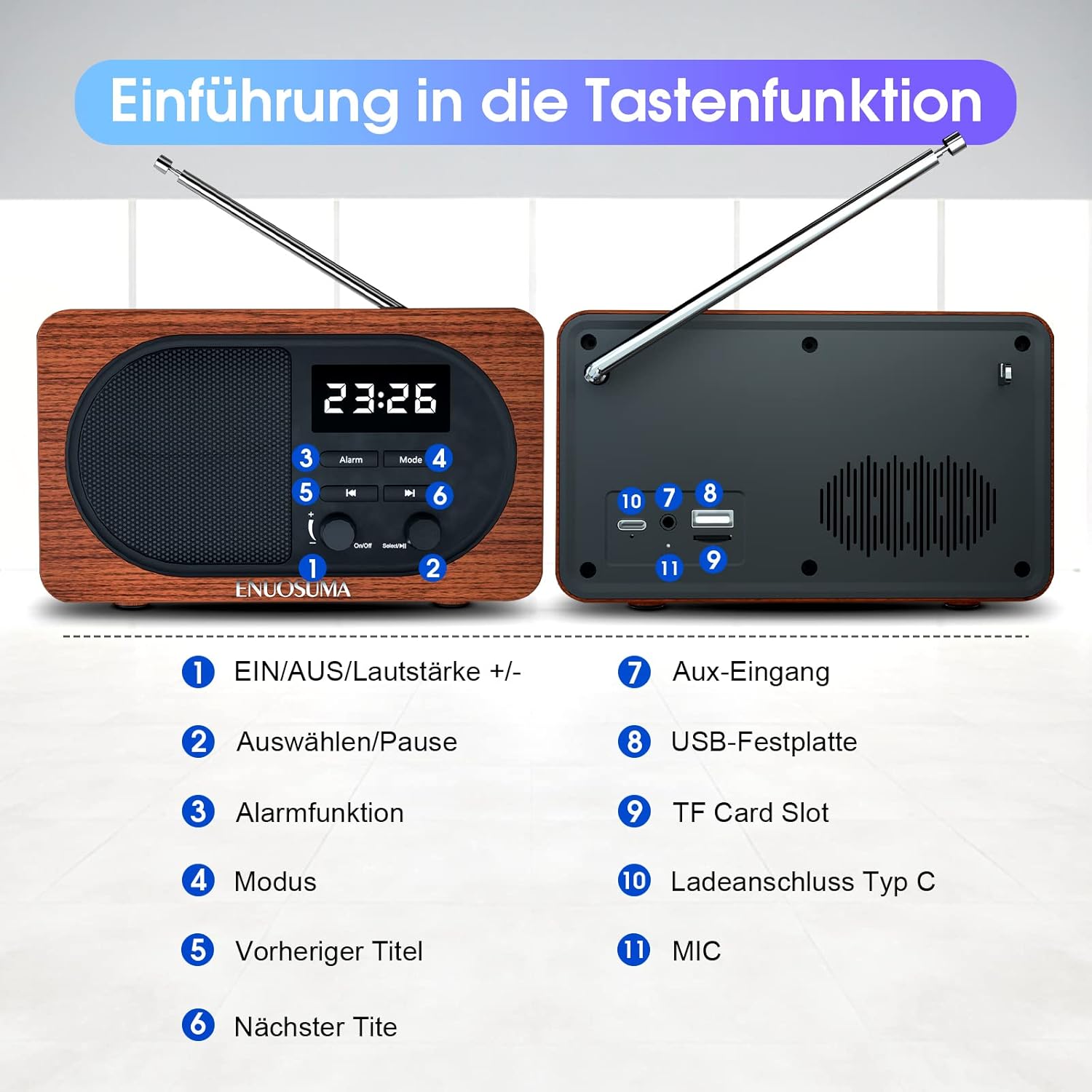
Figure 3: The radio's Type-C port can be used for charging the device. The image also illustrates the snooze function and the extendable antenna.
6. Awọn ilana Iṣiṣẹ
6.1 Agbara Tan / Pa ati Iṣakoso iwọn didun
- Agbara Tan: Press and hold the Power ON/OFF / Volume +/- knob (1) until the display lights up.
- Agbara Pa: Press and hold the Power ON/OFF / Volume +/- knob (1) again.
- Atunse iwọn didun: Rotate the Power ON/OFF / Volume +/- knob (1) clockwise to increase volume and counter-clockwise to decrease volume.
6.2 Aṣayan ipo
Press the 'Mode' button (4) repeatedly to cycle through available modes: FM Radio, Bluetooth, TF Card, USB, and AUX.
6.3 FM Radio isẹ
- Tẹ Ipo FM sii: Press the 'Mode' button (4) until 'FM' is displayed.
- Fa Antenna: For best reception, fully extend the telescopic antenna located on the back of the radio.
- Wiwa ikanni aladaaṣe: Long press the 'Select / Pause' button (2). The radio will automatically scan and store available FM stations. The number of stations found depends on signal strength.
- Itọsọna Afowoyi: In FM mode, briefly press the 'Previous Track' (5) or 'Next Track' (6) buttons to fine-tune the frequency.
- Ṣawari awọn Ibudo Ti a Fi Pamọ: After an auto-search, briefly press 'Previous Track' (5) or 'Next Track' (6) to cycle through stored stations.
6.4 Sisopọ Bluetooth
- Tẹ Ipo Bluetooth sii: Press the 'Mode' button (4) until 'Bluetooth' or 'BT' is displayed, and you hear an audible prompt. The radio will enter pairing mode.
- Mu Bluetooth ṣiṣẹ lori Ẹrọ Rẹ: On your smartphone, tablet, or other Bluetooth-enabled device, go to Bluetooth settings and enable Bluetooth.
- Yan Ẹrọ: Look for 'ENUOSUMA' (or similar name) in the list of available devices and select it to pair.
- Ìmúdájú: Once paired, you will hear a confirmation sound from the radio. You can now play audio from your device through the radio.

Figure 4: The radio supports Bluetooth 5.0 for wireless connection to devices such as smartphones, laptops, and tablets.
6.5 Alarm Clock Setup
- Akoko Eto: In clock mode, press and hold the 'Alarm' button (3) to enter time setting. Use 'Previous Track' (5) and 'Next Track' (6) to adjust hours and minutes, and 'Select / Pause' (2) to confirm and move to the next setting.
- Ilana wakati 12/24: The radio supports both 12-hour and 24-hour time formats. This can typically be toggled during time setting or via a dedicated setting.
- Eto Itaniji: Briefly press the 'Alarm' button (3) to select Alarm 1 or Alarm 2. Press and hold the 'Alarm' button (3) to set the alarm time. Use 'Previous Track' (5) and 'Next Track' (6) to adjust, and 'Select / Pause' (2) to confirm.
- Iṣẹ́ lẹ́ẹ̀kọ̀ọ̀kan: When the alarm sounds, press any button (except power off) to activate the 5-minute snooze function.

Figure 5: This infographic highlights the 12/24 hour time display, clock and FM modes, built-in microphone, and various input interfaces.
6.6 Media Playback (TF Card, USB, AUX)
- Kaadi TF/ Sisisẹsẹhin USB: Insert a TF card into the TF Card Slot (9) or a USB flash drive into the USB Disk Port (8) with compatible audio files. The radio will automatically switch to the respective mode or you can select it using the 'Mode' button (4). Use 'Previous Track' (5), 'Next Track' (6), and 'Select / Pause' (2) for playback control.
- Iṣawọle AUX: Connect an external audio device (e.g., MP3 player, smartphone) to the Aux Input (7) using the supplied audio cable. Select AUX mode using the 'Mode' button (4). Audio will be played through the radio's speaker.
Iṣẹ́ 6.7 Láìsí Ọwọ́
When connected via Bluetooth to a smartphone, the built-in Microphone (11) allows you to answer and make calls directly through the radio. Use the 'Select / Pause' button (2) to answer or end calls.
7. Itọju
- Jeki ẹrọ naa gbẹ. Yago fun ifihan si omi tabi ọriniinitutu pupọ.
- Fi aṣọ rírọrùn tó gbẹ nu rédíò náà. Má ṣe lo àwọn ohun ìfọṣọ tàbí àwọn ohun èlò ìfọṣọ.
- Tọ́jú rédíò náà sí ibi tí ó tutù tí ó sì gbẹ nígbà tí a kò bá lò ó fún ìgbà pípẹ́.
- Ma ṣe gbiyanju lati tunto tabi tun ẹrọ naa funrararẹ. Tọkasi awọn oṣiṣẹ iṣẹ ti o peye.
8. Laasigbotitusita
| Isoro | Owun to le Fa | Ojutu |
|---|---|---|
| Redio ko ṣiṣẹ. | Batiri kekere tabi ko si agbara. | Charge the radio using the Type-C USB cable. Ensure the charging cable is properly connected. |
| Gbigba FM ti ko dara. | Antenna not extended, weak signal area. | Fully extend the telescopic antenna. Try repositioning the radio to an area with better signal reception. |
| Ẹrọ Bluetooth ko le so pọ. | Radio not in pairing mode, Bluetooth off on device, device too far. | Ensure the radio is in Bluetooth mode. Make sure Bluetooth is enabled on your device and it's within range (approx. 10 meters). Restart both devices. |
| Kò sí ohùn láti inú káàdì TF/USB. | Incorrect mode, unsupported file ìṣètò, ìbàjẹ́ files. | Ensure the radio is in TF Card or USB mode. Check if the audio files are in a supported format (e.g., MP3). Try another TF card or USB drive. |
| Cannot set time/alarm. | Ìtẹ̀lé bọ́tìnì tí kò tọ́. | Refer to section 6.5 for detailed instructions on setting time and alarms. Ensure you are pressing and holding the correct buttons as indicated. |
9. Awọn pato
| Ẹya ara ẹrọ | Sipesifikesonu |
|---|---|
| Brand | ENUOSUMA |
| Nọmba awoṣe | BS22 |
| Ọja Mefa | 16 x 5.8 x 9.3 cm |
| Iwọn Nkan | 0.64 kilo |
| Asopọmọra Technology | Bluetooth 5.0, USB, AUX |
| Pataki Awọn ẹya ara ẹrọ | Audio Input, FM Radio, Alarm Clock, Built-in Microphone |
| Agbọrọsọ o wu Power | 5 Wattis (sitẹrio) |
| Iwọn Igbohunsafẹfẹ FM | Titi di 108 MHz |
| Agbara Batiri | 2000mAh |
| Akoko ere | Titi di wakati 9 |
| Gbigba agbara Port | Iru-C USB |
10. Atilẹyin ọja ati Support
ENUOSUMA products are designed for reliability and performance. If you encounter any product quality problems or require assistance, please contact our customer service team. We are committed to providing 24-hour customer support to address your concerns.
Jọwọ ṣe idaduro ẹri rira rẹ fun awọn iṣeduro atilẹyin ọja.