
1. Ifihan
This manual provides essential information for the safe and effective use of your Canon PowerShot G1 X Mark III Digital Camera. Please read this manual thoroughly before using the camera and retain it for future reference.

olusin 1.1: Iwaju view of the Canon PowerShot G1 X Mark III Digital Camera with the lens extended. This image displays the camera's compact body, the integrated zoom lens, and the Canon branding.
The PowerShot G1 X Mark III is an advanced compact camera featuring a 24.2MP APS-C CMOS sensor and a DIGIC 7 image processor. It is designed for high-quality still photography and Full HD video recording, offering a versatile 3x optical zoom lens and Dual Pixel CMOS AF for precise focusing.
2. Ohun ti o wa ninu Apoti
Jẹrisi pe gbogbo awọn nkan wọnyi wa ninu package rẹ:
- Canon PowerShot G1 X Mark III Digital Camera
- Canon NB-13L Lithium-Ion Battery Pack (3.6V, 1250mAh)
- Canon CB-2LH Battery Charger for NB-13L Li-Ion Batteries
- Lẹnsi fila
- Lẹnsi fila Okun
- NS-DC12 Neck Strap
- Strap Adapter for NS-DC12
- Micro HDMI USB
3. Eto
3.1. Ngba agbara ati fifi batiri sii
- Insert the NB-13L battery into the CB-2LH charger.
- Pulọọgi ṣaja sinu iṣan agbara kan. Atọka gbigba agbara yoo tan imọlẹ.
- Ni kete ti gbigba agbara ba ti pari, atọka yoo yipada tabi paa. Yọ batiri kuro.
- Open the battery compartment cover on the camera.
- Insert the charged battery into the camera, ensuring correct orientation. Close the cover securely.
3.2. Fifi kaadi iranti sii
The camera supports SD, SDHC, and SDXC memory cards. For optimal performance, especially with video recording and continuous shooting, use a UHS Speed Class 3 (U3) card.
- Ṣii ideri iho kaadi iranti.
- Fi kaadi iranti sii pẹlu aami ti nkọju si iwaju kamẹra titi yoo fi tẹ si aaye.
- Pa ideri kaadi iranti pa ni aabo.
3.3. So Ọrun Ọrun
Thread the NS-DC12 neck strap through the strap adapters and then through the camera's strap mounts. Ensure both ends are securely fastened to prevent accidental drops.
3.4. Agbara akọkọ Lori ati Awọn Eto Ipilẹ
Tẹ awọn TAN/PA button to power on the camera. Follow the on-screen prompts to set the date, time, and language. These settings are crucial for proper image file isakoso.
4. Ṣiṣẹ kamẹra
4.1. Awọn iṣakoso kamẹra ti pariview

olusin 4.1: Top view of the camera, illustrating the mode dial, hot shoe, and various control dials for quick adjustments.

olusin 4.2: Ẹyìn view of the camera, highlighting the LCD screen, electronic viewfinder, and the arrangement of control buttons for menu navigation and settings.
Familiarize yourself with the camera's buttons and dials. The mode dial on the top allows selection of various shooting modes, including Program AE, Shutter-priority AE, Aperture-priority AE, Manual, and Automatic modes. Dedicated dials provide direct adjustment of exposure compensation and other settings.
4.2. Ipilẹ Photography
Lati ya aworan:
- Turn the mode dial to your desired shooting mode (e.g., AUTO fun awọn eto aifọwọyi).
- Frame your subject using the electronic viewOluwari tabi iboju LCD.
- Press the shutter button halfway down to focus. The camera uses Dual Pixel CMOS AF for fast and accurate phase-detection autofocus.
- Tẹ bọtini titiipa ni kikun lati ya aworan naa.
4.3. Gbigbasilẹ fidio
The camera supports Full HD 1080p video recording at up to 60 frames per second in MP4 format.
- Set the camera to video recording mode (if applicable, or press the dedicated video record button).
- Tẹ bọtini igbasilẹ fidio lati bẹrẹ gbigbasilẹ.
- Tẹ bọtini naa lẹẹkansi lati da gbigbasilẹ duro.
4.4. Using the LCD Monitor and Electronic Viewoluwari

olusin 4.3: Apa view of the camera with the vari-angle touchscreen LCD extended, demonstrating its flexibility for various shooting angles.
The camera features a 3.0-inch vari-angle touchscreen LCD, allowing for flexible shooting angles and intuitive control. You can also use the built-in 2.36m-dot OLED electronic viewfinder for a clear view, paapaa ni awọn ipo imọlẹ.
4.5. Flash ti a ṣe sinu rẹ
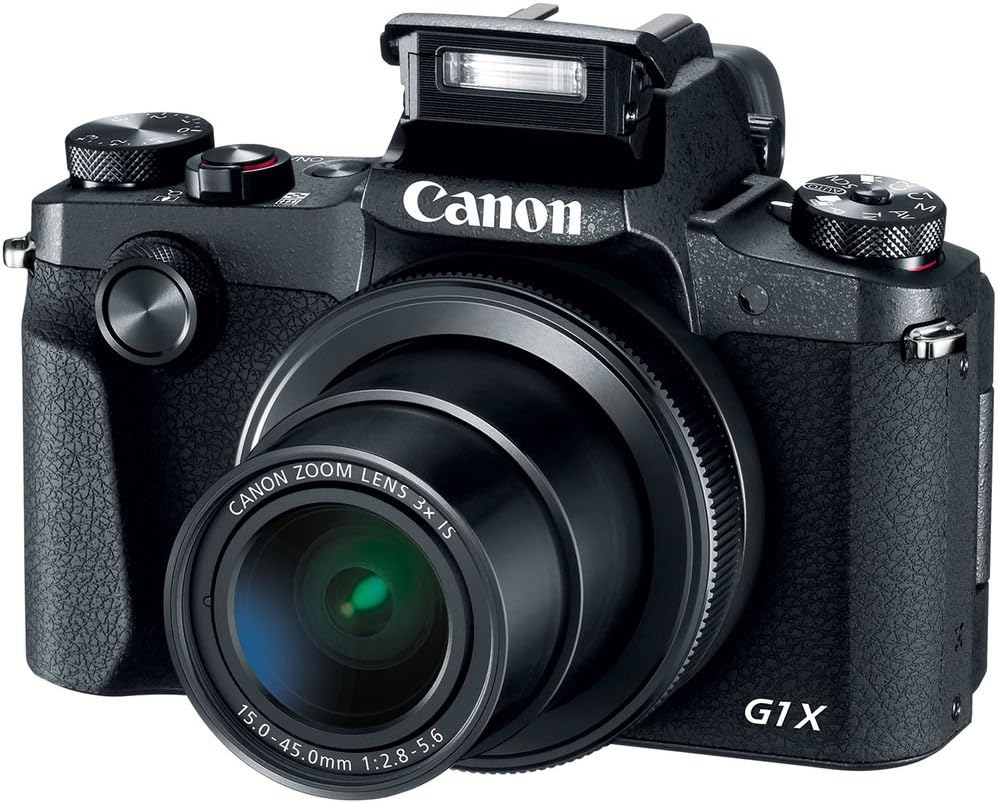
olusin 4.4: Iwaju view of the camera with the pop-up flash in the raised position, ready for use in low-light conditions.
The camera includes a built-in pop-up flash. To activate it, press the flash release button. Flash modes include Auto, On, Slow Synch, and Off. The hot shoe allows for external flash units.
4.6. Asopọmọra
The PowerShot G1 X Mark III offers Wi-Fi, NFC, and Bluetooth connectivity for transferring images to smart devices and remote control. Refer to the camera's menu for pairing instructions.
5. Itọju
5.1. Ninu Kamẹra
- Lo asọ rirọ, ti ko ni lint lati nu ara kamẹra mọ.
- Fún lẹ́ńsì àti ìbòjú LCD, lo aṣọ ìfọmọ́ lẹ́ńsì pàtàkì àti omi ìfọmọ́. Yẹra fún àwọn kẹ́míkà líle.
- Use a blower brush to remove dust from the lens and sensor area (when exposed).
5.2. Itọju batiri
- Gba agbara si batiri ni kikun ṣaaju lilo kọọkan.
- Tọju awọn batiri ni itura, aye gbigbẹ nigbati ko si ni lilo.
- Yago fun ṣiṣafihan awọn batiri si awọn iwọn otutu to gaju.
5.3. Ibi ipamọ
Nígbà tí o bá ń tọ́jú kámẹ́rà fún ìgbà pípẹ́, yọ bátìrì àti káàdì ìrántí kúrò. Tọ́jú kámẹ́rà náà sí ibi gbígbẹ tí kò ní eruku, ó sàn kí o fi sínú àpò kámẹ́rà.
6. Laasigbotitusita
| Isoro | Owun to le Fa / Solusan |
|---|---|
| Kamẹra ko ṣiṣẹ. | Batiri le jẹ idinku tabi fi sii lọna ti ko tọ. Rii daju pe batiri ti gba agbara ati pe o joko daradara. |
| Ko le ya awọn aworan. | Memory card may be full, locked, or not inserted. Check card status and free space. |
| Awọn aworan jẹ blurry. | Check focus settings. Ensure sufficient light. Use image stabilization or a tripod if necessary. |
| Filaṣi ko ina. | Flash may be set to 'Off' or in a mode where it does not fire automatically. Check flash settings. |
7. Awọn pato
- Sensọ: 24.2 MP APS-C CMOS Sensor
- Aworan isise: DIGIC 7
- Lẹnsi: 24-72mm (35mm Equivalent) 3x Optical Zoom, f/2.8-5.6
- Iduroṣinṣin aworan: Opitika
- Idojukọ: Dual Pixel CMOS AF (Phase Detection)
- Ibiti ISO: 100-25600 (Fífẹ̀ sí i)
- Ibon Tesiwaju: Titi di 9fps
- Gbigbasilẹ fidio: Full HD 1080p ní 60 fps (MP4)
- Viewoluwari: 2.36m-dot OLED Electronic Viewoluwari
- LCD: 3.0" Vari-Angle Touchscreen LCD (1280 x 720 resolution)
- Asopọmọra: Built-In Wi-Fi, NFC, Bluetooth, Micro HDMI
- Media Ibi ipamọ: SD, SDHC, SDXC (UHS-I compatible)
- Batiri: NB-13L Lithium-Ion
- Awọn iwọn (Isunmọ): 4.53 x 3.00 x 2.36 inches (115 x 76 x 60 mm)
- Ìwọ̀n (Fún): 14.0 oz (399 g) with battery and memory card
- Ikole: Dust- and Water-Resistant
8. Atilẹyin ọja ati Support
This product is covered by a 90-day limited warranty. For warranty claims or technical support, please refer to the official Canon support channels or contact your retailer.