
1. Ifihan
Thank you for choosing the 1Mii RT5066 Wireless Audio Transmitter Receiver. This kit provides a high-fidelity, low-latency solution for wirelessly transmitting audio from your source devices to your audio output systems. Enjoy crystal-clear sound and flexible connectivity without the clutter of cables.

Àwọn ẹ̀rọ Atẹ̀jáde àti Olùgbà Ohun Aláìlókùn 1Mii RT5066.
2. Ohun ti o wa ninu Apoti
- 1Mii RT5066 Wireless Audio Transmitter + Receiver
- RCA to 3.5 Male Audio Cable * 2
- RCA Audio Cable * 2
- DC 5V Power Cable + Power Adapter * 2
- Eriali * 2

All components included in the 1Mii RT5066 package.
3. Awọn ẹya Ọja
- Gbigbe ohun Alailowaya: Wirelessly sends audio to powered speakers, subwoofers, amplifiers, soundbars, home theater systems, or stereos.
- Gbigbe Ibi Gigun: Supports 2.4 GHz technology with antennae reaching up to 320 feet (100 meters) outdoors and 100-200 feet (30-50 meters) indoors.
- HiFi Audio & Low Delay: Delivers high-quality audio (better than CD quality) with less than 20ms delay, ensuring clear, stable, noise-free, and synchronized sound.
- Asopọ ti o rọ: Transmitter connects to any audio source with 3.5mm AUX and RCA output. Receiver connects to any home stereo, amp, or powered wired speaker with 3.5mm AUX and RCA input.
- Pulọọgi & Ṣiṣẹ: Simple to use; connect to power, and units will automatically power on and connect.

Extended long-range capability of the 1Mii RT5066.

Zero latency for perfect audio and video synchronization.
4. Eto Itọsọna
Follow these steps to set up your 1Mii RT5066 Wireless Audio Transmitter Receiver kit:
4.1 So Agbekalẹ naa pọ
- Connect the DC 5V power cable to the Transmitter unit and plug the other end into a power adapter.
- Connect the Transmitter to your audio source (e.g., TV, PC, CD player, MP4 player) using the appropriate RCA or 3.5mm AUX audio cable. Use the 'Audio In' ports on the Transmitter.
4.2 Nsopọ Olugba
- Connect the DC 5V power cable to the Receiver unit and plug the other end into a power adapter.
- Connect the Receiver to your audio output device (e.g., powered speaker, amplifier, soundbar) using the appropriate RCA or 3.5mm AUX audio cable. Use the 'Audio Out' ports on the Receiver.
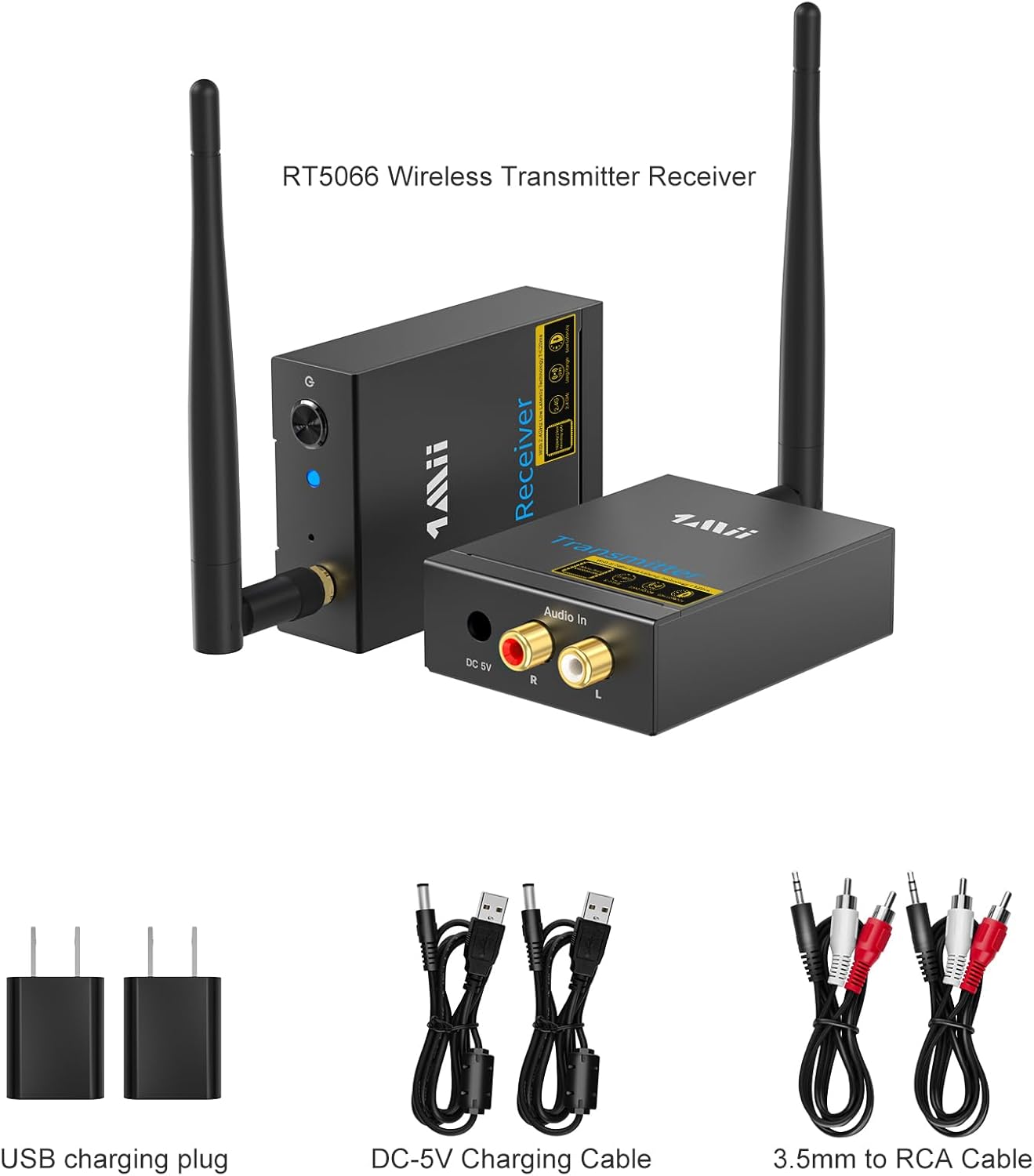
Diagram illustrating the plug and play setup for the transmitter and receiver.
4.3 Oṣo Video Itọsọna
Video: 1Mii Wireless Transmitter Receiver Kit Instructions for Use. This video provides a visual guide on how to set up the transmitter and receiver units.
Video: RT5066 Wireless Audio Transmitter and Receiver. A comprehensive overview of the product and its setup.
5. Awọn ilana Iṣiṣẹ
Once both the transmitter and receiver are powered on, they will automatically pair. The indicator lights on both units will turn solid blue, indicating a successful connection.
5.1 Sisopọ ilana
Video: How to Pair the RT5066 Receiver and the Transmitter? This video demonstrates the automatic pairing process.
If one unit is turned off or loses power, the other unit's light will flash red and blue. To re-establish the connection, ensure both units are powered on. They should automatically re-pair.
6. Itọju
Láti rí i dájú pé ọkọ̀ 1Mii RT5066 rẹ pẹ́ tó àti pé ó ń ṣiṣẹ́ dáadáa, jọ̀wọ́ tẹ̀lé àwọn ìlànà ìtọ́jú wọ̀nyí:
- Jeki awọn ẹrọ naa di mimọ nipa fifẹ wọn pẹlu asọ ti o gbẹ.
- Yago fun ṣiṣafihan awọn iwọn si awọn iwọn otutu to gaju, ọriniinitutu, tabi oorun taara.
- Do not disassemble the units. Any repairs should be performed by qualified personnel.
- Rii daju pe fentilesonu to dara ni ayika awọn ẹya lati ṣe idiwọ igbona.
7. Laasigbotitusita
If you encounter issues with your 1Mii RT5066, refer to the following common problems and solutions:
7.1 Pairing Issues / Indicator Light Flashing Red and Blue
If the indicator light on either the receiver or transmitter flashes red and blue and cannot be paired, you may need to reset the units. We recommend resetting the receiver first, then the transmitter.
Video: How to Reset the Receiver and Transmitter? This video guides you through the reset process.
7.2 Audio Loss or Cutout
- Ensure the units are within the recommended transmission range (320ft outdoors, 100-200ft indoors).
- Obstacles such as walls, metal objects, or other 2.4GHz devices (like Wi-Fi routers) can affect signal strength and range. Try repositioning the units to minimize obstructions.
- Ṣayẹwo gbogbo awọn asopọ okun lati rii daju pe wọn wa ni aabo.
7.3 Static Noise or Unclear Sound
- Verify that all audio cables are correctly connected and not damaged.
- Ensure the audio source and output devices are functioning correctly.
- Din kikọlu lati awọn ẹrọ itanna miiran.
- Confirm that the RT5066 is connected to a powered speaker/subwoofer, not a passive speaker, as it is not an amplifier.
8. Awọn pato
| Ẹya ara ẹrọ | Sipesifikesonu |
|---|---|
| Nọmba awoṣe | RT5066 |
| Ọja Mefa | 2.3 x 3.8 x 0.94 inches |
| Iwọn Nkan | 1.26 iwon |
| Asopọmọra Technology | Alailowaya, 2.4GHz |
| Ipo Ijade Ohun | Sitẹrio |
| Kakiri Ohun ikanni iṣeto ni | 2 |
| Awọn ẹrọ ibaramu | Television, Home Stereo, Speaker |
| Asopọmọra Iru | RCA |
| Àwọ̀ | Dudu |
9. Atilẹyin ọja ati Support
1Mii products are designed and manufactured to the highest quality standards. For warranty information and technical support, please refer to the contact details provided in your product packaging or visit the official 1Mii webojula. Tọju iwe-ẹri rira rẹ fun awọn ẹtọ atilẹyin ọja.