
1. Ifihan
This manual provides instructions for the AITIAO CC2531 Sniffer USB Dongle, a wireless Zigbee analyzer module designed for protocol analysis and Bluetooth adapter functions. It is compatible with CC2531EMK and extends 8 IO ports for various firmware applications. This device is intended for use in industrial and scientific applications for electrical testing and circuit analysis.

Nọmba 1: The AITIAO CC2531 Sniffer USB Dongle (left) and its external antenna (right).
2. Awọn ẹya Ọja
- Extended IO Ports: Features 8 extendable IO ports, allowing compatibility with various firmware for Bluetooth adapter and protocol analyzer functionalities.
- Wireless Sniffer Module: Functions as a CC2531 Sniffer Module USB Dongle, compatible with CC2531EMK for Zigbee protocol analysis.
- Igbohunsafẹfẹ Ṣiṣẹ: Operates within the 2.405-2.485GHz frequency range for protocol analysis.
- Wireless Transmission Rate: Supports a wireless transmission rate of 250 Kbaud.
- Lilo Agbara Kekere: Consumes less than 20mA during reception and less than 25mA during transmission.
- Apẹrẹ Iwapọ: Dimensions of 41mm x 16mm x 1.6mm for the main module.
3. Package Awọn akoonu
Package pẹlu awọn nkan wọnyi:
- 2 x AITIAO Wireless Zigbee CC2531 Sniffer USB Dongle
- 2 x Ita Eriali

Nọmba 2: One AITIAO CC2531 Sniffer USB Dongle with its external antenna connected.
4. Awọn ilana iṣeto
- Attach the External Antenna: Carefully screw the external antenna onto the SMA connector located on the CC2531 Sniffer USB Dongle. Ensure it is finger-tight to establish a secure connection.
- Sopọ si Kọmputa: Insert the USB dongle into an available USB port on your desktop computer.
- Fifi sori Awakọ: Your operating system may automatically install necessary drivers. If not, you may need to manually install drivers for the CC2531 device. Refer to the specific driver documentation for your operating system.
- Fifi sori ẹrọ software: Install the required software for Zigbee protocol analysis or Bluetooth adapter functionality. This typically involves specific firmware (e.g., Sniffer or BTool) and associated applications. Follow the software provider's installation guidelines.
- Verify Recognition: After installation, verify that the device is recognized by your computer and the installed software. Check device manager for proper enumeration.

Nọmba 3: The CC2531 USB Dongle with its external antenna attached, viewed lati igun kan.
5. Awọn ilana Iṣiṣẹ
The AITIAO CC2531 Sniffer USB Dongle can be configured for different operational modes based on the firmware loaded onto it. Common uses include Zigbee protocol sniffing and acting as a Bluetooth adapter.
5.1. Zigbee Protocol Sniffer Mode
- Load Sniffer Firmware: Ensure the appropriate Zigbee sniffer firmware is loaded onto the CC2531 dongle. This typically requires a programming tool and specific software.
- Launch Sniffer Software: Open your preferred Zigbee protocol analysis software (e.g., Wireshark with Zigbee dissectors, SmartRF Packet Sniffer).
- Yan Ẹrọ: Within the software, select the CC2531 dongle as the capture interface.
- Configure Channel: Set the desired Zigbee channel for sniffing. The device operates in the 2.405-2.485GHz range.
- Start Capturing: Initiate packet capture to monitor Zigbee traffic. The software will display captured packets, allowing for detailed analysis of network communication.
5.2. Bluetooth Adapter Mode (BTool)
- Load BTool Firmware: If using the dongle as a Bluetooth adapter, ensure the BTool compatible firmware is loaded.
- Launch BTool Software: Open the BTool application or other compatible Bluetooth Low Energy (BLE) development tools.
- Sopọ si Ẹrọ: Establish a connection between the software and the CC2531 dongle.
- Perform BLE Operations: Use the software to perform various BLE operations such as scanning for devices, connecting to peripherals, sending/receiving data, and debugging BLE applications.

Nọmba 4: Oke view of the CC2531 USB Dongle with its external antenna connected.
6. Itọju
- Ninu: Lo asọ asọ ti o gbẹ lati nu ita ti dongle naa. Yago fun lilo olomi ose tabi olomi.
- Ibi ipamọ: Tọju ẹrọ naa ni itura, aye gbigbẹ kuro lati orun taara ati awọn iwọn otutu to gaju.
- Mimu: Handle the dongle and antenna carefully to prevent physical damage to the connectors or circuit board.
- Asopọmọra Antenna: Periodically check that the external antenna is securely attached.
7. Laasigbotitusita
- Ohun elo Ko Damọ:
- Rii daju pe dongle ti fi sii ni kikun si ibudo USB.
- Gbiyanju ibudo USB ti o yatọ lori kọnputa rẹ.
- Check Device Manager (Windows) or System Information (macOS/Linux) to see if the device is listed, even with an error. Reinstall drivers if necessary.
- Tun kọmputa rẹ bẹrẹ.
- No Data Capture (Sniffer Mode):
- Verify that the correct sniffer firmware is loaded onto the dongle.
- Confirm that the sniffer software is configured to use the CC2531 device.
- Ensure the correct Zigbee channel is selected in the software, matching the network you intend to monitor.
- Check the proximity to the Zigbee network; signal strength can affect capture.
- Bluetooth Connection Issues (BTool Mode):
- Confirm BTool compatible firmware is loaded.
- Ensure the target Bluetooth device is discoverable and within range.
- Ṣayẹwo fun kikọlu lati awọn ẹrọ 2.4GHz miiran.
8. Awọn pato
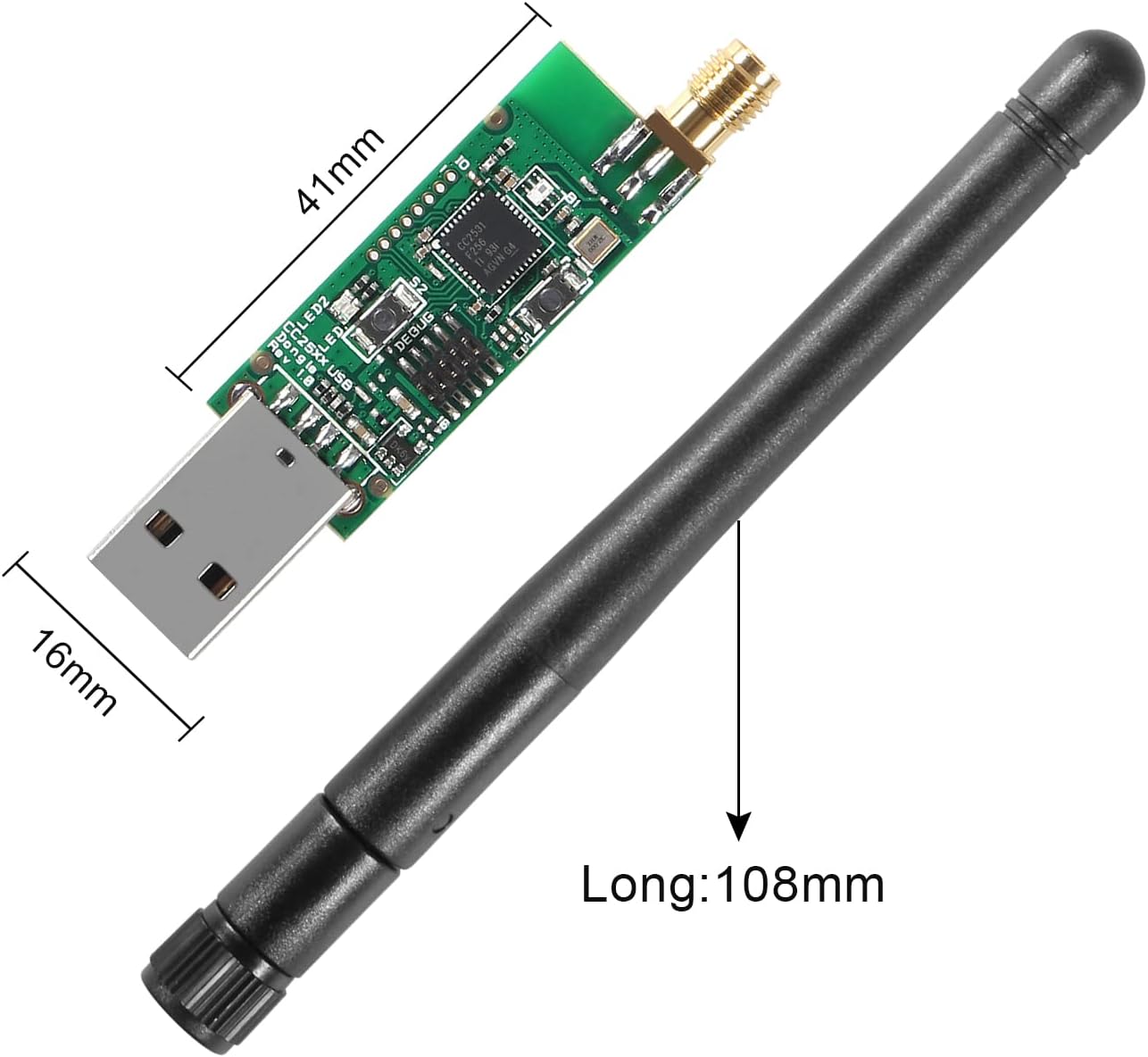
Nọmba 5: Dimensions of the CC2531 USB Dongle (41mm x 16mm) and the external antenna (108mm long).
| Ẹya ara ẹrọ | Ẹ̀kúnrẹ́rẹ́ |
|---|---|
| Brand | AITIAO |
| Awoṣe | CC2531 Sniffer USB Dongle |
| Ni wiwo Hardware | USB, Bluetooth |
| Igbohunsafẹfẹ Ṣiṣẹ | 2.405-2.485GHz |
| Oṣuwọn Gbigbe Alailowaya | 250 Kbaud (250,000 Bits Per Second) |
| Power Consumption (Receiving) | <20mA |
| Power Consumption (Transmission) | <25mA |
| Awọn iwọn Ọja (L x W x H) | 41mm x 16mm x 1.6mm (1.61" x 0.63" x 0.06") |
| Awọn ẹrọ ibaramu | Awọn kọmputa tabili |
| Àwọ̀ | Black, Silver (referring to components) |
| UPC/GTIN | 701715496361 |
9. Atilẹyin ọja ati Support
For warranty information and technical support, please refer to the documentation provided with your purchase or contact AITIAO customer service directly. Keep your purchase receipt for warranty claims.