
1. Ifihan
This manual provides detailed instructions for the proper use and maintenance of your Casio G-Shock G-5600UE-1 digital watch. Designed for durability and functionality, this timepiece features shock resistance, 200-meter water resistance, and Tough Solar power. Please read this manual thoroughly to ensure optimal performance and longevity of your watch.
2. Ọja Ipariview
2.1 Key Awọn ẹya ara ẹrọ
- Shock Resistant (G-SHOCK construction)
- 200-Mita Resistance Omi
- Tough Solar Power (solar charging system)
- LED Backlight with Afterglow
- World Time (supports multiple time zones)
- 1/100-keji Aago
- Aago kika
- Multi-function Alarms and Hourly Ifihan agbara Aago
- Full Auto Calendar (pre-programmed until 2099)
- 12/24-Aago kika
- Flash Alert (flashes with buzzer for alarms, hourly time signal, countdown timer time-up alarm)
2.2 Watch irinše
The Casio G-Shock G-5600UE-1 features a standard four-button configuration for navigation and function control.
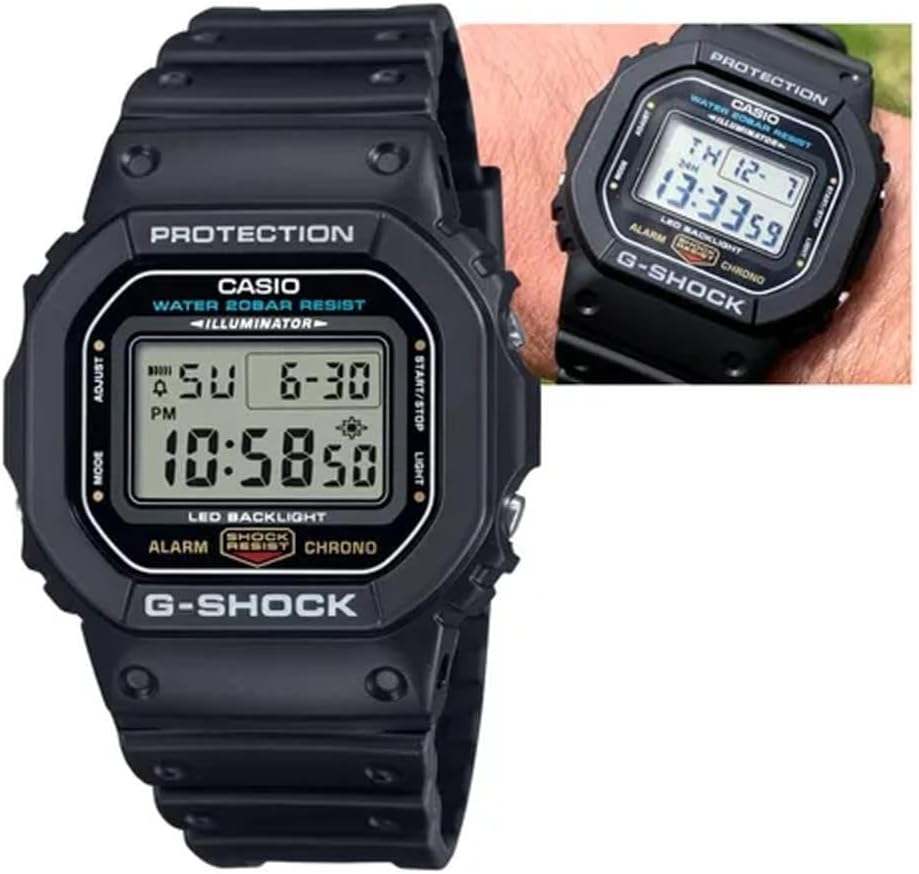
Nọmba 1: Iwaju view of the Casio G-Shock G-5600UE-1 digital watch. The display shows time, date, and day. Buttons are located on the left (MODE, ADJUST) and right (START/STOP, LIGHT) sides of the case.
- ADJUST Button (Top Left): Ti a lo lati tẹ ati jade awọn ipo eto, ati lati jẹrisi eto.
- Bọtini MODE (Isalẹ Osi): Used to cycle through the watch's various modes (Timekeeping, World Time, Alarm, Stopwatch, Countdown Timer).
- Bọ́tìnì Ìmọ́lẹ̀ (Òkè Ọ̀tún): Activates the LED backlight. Also used to increase values during setting.
- Bọ́tìnì BÍBẸ̀RẸ̀/DÚRÓ (Ìsàlẹ̀ Ọ̀tún): Used to start/stop stopwatch and countdown timer operations. Also used to decrease values during setting.
3. Eto
3.1 Gbigba agbara akọkọ (Oorun Alakikanju)
Your watch is equipped with Tough Solar technology, which converts light into power. Before initial use, or if the watch display is blank, expose the watch face to bright light (e.g., sunlight or a bright window) for several hours to ensure it is sufficiently charged. Avoid prolonged exposure to extreme heat.
3.2 Setting the Home City and Time
- Ni Ipo Ṣiṣe Aago, di mọlẹ ṢAtunṣe bọ́tìnì títí tí kódì ìlú yóò fi bẹ̀rẹ̀ sí í tàn. Èyí fi hàn pé ipò ìṣètò náà ni a ó lò.
- Lo awọn Imọlẹ ati Bẹrẹ/Duro awọn bọtini lati yan koodu Ilu Ile ti o fẹ.
- Tẹ awọn MODE bọ́tìnì láti yípo kọjá àwọn ètò míràn: DST (Àkókò Ìfipamọ́ Ọjọ́), ìrísí wákàtí 12/24, Àáyá, Wákàtí, Ìṣẹ́jú, Ọdún, Oṣù, Ọjọ́.
- Fun eto kọọkan, lo Imọlẹ ati Bẹrẹ/Duro awọn bọtini lati ṣatunṣe iye.
- Ni kete ti gbogbo awọn eto ti tunto, tẹ bọtini naa ṢAtunṣe bọtini lati jade ni ipo eto.
4. Awọn ilana Iṣiṣẹ
4.1 Ipo Lilọ kiri
Tẹ awọn MODE button to cycle through the watch's modes in the following order:Timekeeping Mode → World Time Mode → Alarm Mode → Stopwatch Mode → Countdown Timer Mode → Timekeeping Mode.
4.2 World Time Ipo
In World Time Mode, you can view akoko lọwọlọwọ ni awọn ilu 48 (awọn agbegbe akoko 29) ni ayika agbaye.
- Tẹ awọn Bẹrẹ/Duro button to scroll through city codes.
- To toggle Daylight Saving Time (DST) for the currently displayed city, hold down the ṢAtunṣe bọtini fun bii iṣẹju-aaya meji.
4.3 Ipo Itaniji
The watch has multiple alarms and an hourly akoko ifihan agbara.
- In Alarm Mode, use the Bẹrẹ/Duro button to select the desired alarm (AL1, AL2, AL3, AL4, AL5, SNZ for Snooze Alarm, or SIG for Hourly Time Signal).
- Mu mọlẹ ṢAtunṣe button until the alarm time starts to flash.
- Lo awọn Imọlẹ ati Bẹrẹ/Duro buttons to set the hour and minute.
- Tẹ awọn ṢAtunṣe bọtini lati jade ni ipo eto.
- Tẹ awọn Bẹrẹ/Duro button to toggle the alarm or hourly akoko ifihan agbara ON/PA.
4.4 Ipo aago iṣẹju-aaya
Iwọn aago iṣẹju -aaya ṣe akoko ti o ti kọja, awọn akoko pipin, ati awọn ipari meji.
- Nínú Ipò Àago Ìdádúró, tẹ Bẹrẹ/Duro button to start and stop the measurement.
- Tẹ awọn ṢAtunṣe bọtini lati tun aago iṣẹju-aaya pada si odo.
4.5 Kika Aago Ipo
The countdown timer can be set for a period of 1 minute to 24 hours.
- In Countdown Timer Mode, hold down the ṢAtunṣe button until the current countdown start time flashes.
- Lo awọn Imọlẹ ati Bẹrẹ/Duro buttons to set the desired countdown start time.
- Tẹ awọn ṢAtunṣe bọtini lati jade ni ipo eto.
- Tẹ awọn Bẹrẹ/Duro button to start and stop the countdown.
- Nigbati kika ba de odo, itaniji yoo dun. Tẹ bọtini eyikeyi lati da itaniji duro.
4.6 LED Backlight
Tẹ awọn Imọlẹ button to illuminate the display for easy viewing in low-light conditions. The backlight duration can typically be adjusted in the Timekeeping Mode settings.
5. Itọju
5.1 Power Management (Tough Solar)
To ensure stable operation, expose the watch to light regularly. The watch has a power saving function that turns off the display when left in the dark for a certain period. The power indicator on the display shows the current charge level.
- Exposure to Light: Place the watch where it can receive direct sunlight or strong artificial light.
- Yago fun Idilọwọ: Ensure the watch face is not covered by clothing or other objects.
- Ipele gbigba agbara: Monitor the charge indicator. If it drops to a low level, expose the watch to light immediately.
5.2 Omi Resistance
Your G-Shock G-5600UE-1 is water resistant to 200 meters (20 BAR). This means it is suitable for showering, swimming, and diving (excluding saturation diving).
- Má ṣe lo àwọn bọ́tìnì nígbà tí aago náà bá wà nínú omi tàbí tí ó wà ní omi.
- Lẹhin ifihan si omi iyọ, fi omi ṣan aago pẹlu omi titun ki o mu ese rẹ gbẹ pẹlu asọ asọ.
- Yago fun ṣiṣafihan aago si omi gbona tabi nya si, nitori eyi le ba awọn edidi naa jẹ.
5.3 Ninu
Wipe the watch and band with a soft, dry cloth to remove dirt and moisture. For stubborn dirt, use a soft brush with mild soap and water, then rinse thoroughly and dry. Avoid using chemical cleaners or solvents.
6. Laasigbotitusita
- Ifihan ti ṣofo tabi baibai: The watch may be low on charge. Expose it to bright light for several hours. Ensure the power saving function is not active (if in a dark environment).
- Akoko ko pe: Re-check your Home City setting and DST setting. Perform a manual time adjustment as described in Section 3.2.
- Awọn bọtini ko dahun: Ensure the watch is not in a mode that locks button operations. If submerged or wet, dry the watch thoroughly before attempting to operate buttons.
- Omi inu aago: If you notice condensation or water droplets inside the watch, stop using it immediately and contact Casio service for inspection.
7. Awọn pato
| Nọmba awoṣe | G-5600UE-1 |
| Case Dimensions (L×W×H) | 48.9 × 42.8 × 13.4 mm |
| Iwọn | 52g |
| Case and Band Material | Resini |
| Crystal | Erupe Gilasi |
| Omi Resistance | 200 Mita (20 BAR) |
| Orisun agbara | Oorun Alakikanju (Agbara Oorun) |
| Batiri Iru | 1 Batiri Litiumu Irin (pẹlu) |
| Approx. Battery Life (without solar charge) | 2 years on CR2016 (Note: Tough Solar power system significantly extends operational life with regular light exposure.) |
| Yiye | ± 15 aaya fun osu kan |
| Imọlẹ ẹhin | Electro-luminescent backlight with Afterglow |
| Pataki Awọn ẹya ara ẹrọ | Shock Resistant, World Time, 1/100-second Stopwatch, Countdown Timer, Multi-function Alarms, Hourly Time Signal, Full Auto Calendar, 12/24-hour format, Flash Alert |
8. Atilẹyin ọja ati Support
Your Casio G-Shock G-5600UE-1 watch is covered by a manufacturer's warranty. For specific warranty terms, service, or technical support, please refer to the warranty card included with your purchase or visit the official Casio webojula.
Atilẹyin Casio osise: https://www.casio.com/us/support/


