
1. Ifihan
O ṣeun fun riraasing the TURBOX Giantpeak Mechanical Feel RGB Gaming Keyboard. This manual provides essential information for setting up, operating, and maintaining your new keyboard. Please read this manual carefully before use to ensure optimal performance and longevity of your device.
2. Alaye Aabo
- Keep the keyboard away from excessive heat, direct sunlight, and moisture.
- Although the keyboard is spill-resistant, avoid intentionally exposing it to large amounts of liquid. In case of spills, disconnect the keyboard immediately and allow it to dry completely before reconnecting.
- Do not attempt to disassemble or modify the keyboard. This will void the warranty and may cause damage.
- Use only with compatible devices and power sources as specified.
- Jeki kuro ni arọwọto awọn ọmọde.
3. Package Awọn akoonu
Jọwọ ṣayẹwo package fun awọn nkan wọnyi:
- TURBOX Giantpeak Mechanical Feel RGB Gaming Keyboard
- Afowoyi Olumulo (iwe-ipamọ yii)
4. Ọja Ipariview
The TURBOX Giantpeak keyboard is designed for gaming, featuring a mechanical feel, customizable RGB lighting, and macro capabilities. It also includes a convenient mobile device holder.
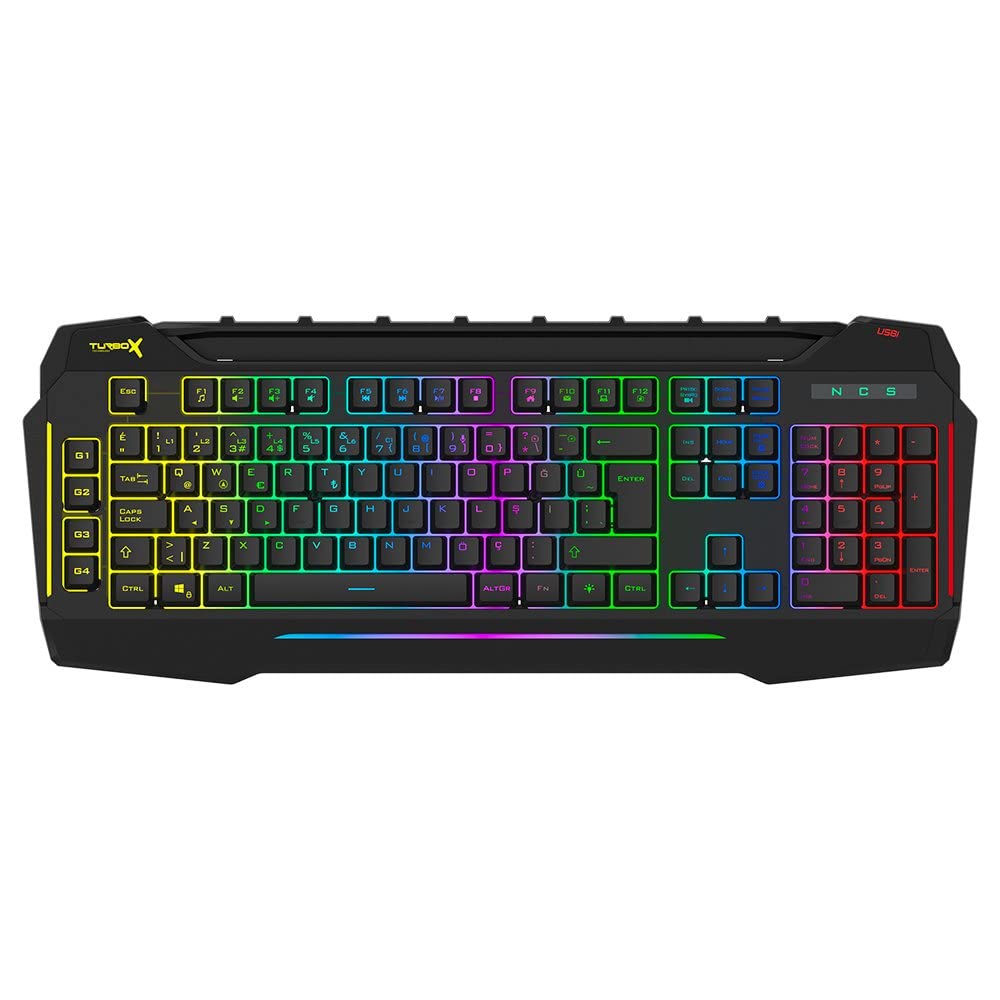
Figure 4.1: TURBOX Giantpeak keyboard with integrated mobile device stand.
This full-size keyboard offers a standard Q layout, providing a comfortable and responsive typing experience for both gaming and general use.

olusin 4.2: Top view of the TURBOX Giantpeak keyboard.
The keyboard features vibrant RGB backlighting that can be customized to various effects, including sound-sensitive modes. Its spill-resistant design provides added durability.

olusin 4.3: Angled view showing RGB lighting.
Dedicated macro keys (G1-G4) are located on the left side, allowing for quick execution of complex commands or sequences.

Figure 4.4: Close-up of programmable G-keys.
The keyboard also includes a full numeric keypad for data entry and additional functions.

Figure 4.5: Numeric keypad detail.
Connectivity is provided via a durable USB cable, ensuring a stable and responsive connection to your computer.

olusin 4.6: Apa view pelu okun USB.
5. Eto
Follow these steps to set up your TURBOX Giantpeak keyboard:
- Yọ Keyboard kuro: Carefully remove the keyboard and any packaging materials from the box.
- Sopọ si Kọmputa: Plug the USB connector of the keyboard into an available USB port on your desktop or laptop computer.
- Fifi sori Awakọ: Your operating system (Windows, macOS, etc.) should automatically detect and install the necessary drivers. This process may take a few moments.
- Jẹrisi Iṣiṣẹ: Once drivers are installed, test the keyboard by typing in a text editor or browser to ensure all keys are functioning correctly. The RGB lighting should also illuminate.
6. Awọn ilana Iṣiṣẹ
6.1 Ipilẹ Keyboard Awọn iṣẹ
The TURBOX Giantpeak keyboard operates like a standard Q-layout keyboard. All standard keys (alphanumeric, function keys, numeric keypad, navigation keys) function as expected.
6.2 RGB ina Iṣakoso
The keyboard features customizable RGB backlighting with 7 different color options and sound-sensitive modes. Specific key combinations are used to cycle through lighting effects and adjust brightness:
- Yi Ipò Imọlẹ pada: Lo awọn Fn + Yi lọ Titiipa keys to cycle through various lighting effects.
- Ṣatunṣe Imọlẹ: Lo awọn Fn + Oju-iwe Soke (ìlọ́po) tàbí Fn + Oju-iwe isalẹ (decrease) keys to adjust the brightness level of the backlighting.
- Sound-Sensitive Mode: The keyboard supports sound-sensitive lighting. Refer to specific software or key combinations (if available) for activation. (Note: Specific key combinations for sound-sensitive mode may vary or require software.)
6.3 Macro Programming (G1-G4 Keys)
The TURBOX Giantpeak keyboard includes 4 programmable macro keys (G1, G2, G3, G4) for executing custom commands or sequences. Follow these general steps for macro recording:
- Enter Macro Recording Mode: Tẹ awọn MR key (Macro Record, usually near the G-keys). The keyboard's indicator light may flash to indicate recording mode.
- Select Macro Key: Press one of the G-keys (G1, G2, G3, or G4) where you want to save the macro.
- Record Sequence: Type the sequence of keys you wish to record. This can include multiple keystrokes, delays, and modifier keys.
- Exit Macro Recording Mode: Tẹ awọn MR key again to save the macro and exit recording mode. The indicator light should stop flashing.
- Execute Macro: To use the recorded macro, simply press the assigned G-key.
Note: For advanced macro settings or specific software-based macro management, please check the manufacturer's website for any available utility software.
6.4 Mobile Device Holder
The integrated slot at the top of the keyboard is designed to hold smartphones or small tablets, providing a convenient viewing angle while gaming or working.
7. Itọju
To ensure the longevity and performance of your keyboard, follow these maintenance guidelines:
- Ninu: Lo asọ ti o rọ, ti o gbẹ lati nu dada ti keyboard. Fun idoti alagidi, die-die dampen awọn asọ pẹlu omi tabi kan ìwọnba ninu ojutu. Yago fun awọn kemikali lile tabi awọn ohun elo abrasive.
- Yiyọ eruku kuro: Lo afẹfẹ fisinuirindigbindigbin lati yọ eruku ati idoti kuro laarin awọn bọtini bọtini.
- Iṣakoso Idasonu: In case of liquid spills, immediately disconnect the keyboard from your computer. Turn it upside down to drain any liquid and allow it to air dry completely for at least 24-48 hours before reconnecting.
- Ibi ipamọ: Nigbati o ko ba wa ni lilo fun awọn akoko ti o gbooro sii, tọju bọtini itẹwe ni agbegbe ti o mọ, ti o gbẹ.
8. Laasigbotitusita
If you encounter issues with your TURBOX Giantpeak keyboard, refer to the following common problems and solutions:
| Isoro | Owun to le Solusan |
|---|---|
| Keyboard ko dahun. |
|
| Ina RGB ko ṣiṣẹ tabi ti di. |
|
| Macro keys (G1-G4) are not working. |
|
| Àwọn kọ́kọ́rọ́ náà máa ń lẹ̀ mọ́ tàbí wọn kì í dáhùn. |
|
9. Awọn pato
| Ẹya ara ẹrọ | Ẹ̀kúnrẹ́rẹ́ |
|---|---|
| Orukọ awoṣe | Giantpeak |
| Nọmba apakan | ID9923266 |
| Brand | TURBOX |
| Asopọmọra Technology | Okun USB |
| Awọn ẹrọ ibaramu | Kọǹpútà alágbèéká, PC |
| Iru bọtini | Mechanical Feel (Membrane) |
| Pataki Awọn ẹya ara ẹrọ | RGB Lighting, Macro Keys (4), Sound-Sensitive Lighting, Spill-Resistant, Mobile Device Holder |
| Nọmba ti Awọn bọtini | Ọdun 87 (Note: Visuals suggest a full-size layout, this number may refer to a specific key group or variant.) |
| Ni wiwo Hardware | USB |
| Package Mefa | 51.2 x 22.2 x 5.2 cm |
| Iwọn Nkan | 1 kilogram |
10. Atilẹyin ọja ati Support
For warranty information and technical support, please refer to the warranty card included with your product or visit the official TURBOX webojula. Jeki ẹri rira rẹ fun eyikeyi awọn ibeere atilẹyin ọja.
If you require further assistance, please contact TURBOX customer support through their official channels.