
WORKPRO WPLG36V
WORKPRO Cordless 3.6V Grass Shears and Hedge Trimmer
Model: WPLG36V
Manufacturer: WORKPRO
Ọrọ Iṣaaju
O ṣeun fun riraasing the WORKPRO Cordless 3.6V Grass Shears and Hedge Trimmer. This versatile 2-in-1 tool is designed to simplify your garden maintenance tasks, offering both grass shearing and hedge trimming capabilities in a compact, lightweight, and cordless design. Please read this manual carefully before operation to ensure safe and efficient use of the product.
For optimal performance and longevity, adhere to all instructions regarding setup, operation, maintenance, and safety.
Alaye Aabo
IKILO: Always wear appropriate personal protective equipment (PPE) including safety glasses, gloves, and sturdy footwear when operating this tool. Keep hands and feet away from blades. Do not operate in wet conditions or near flammable liquids or gases.
- Jeki awọn ọmọde ati awọn alafojusi kuro lakoko ti o nṣiṣẹ ọpa.
- Ensure the safety lock key is properly inserted before operation.
- Do not force the tool. Use the correct blade for the task.
- Disconnect the tool from the power source before cleaning, maintenance, or changing accessories.
- Tọju ọpa naa ni ibi gbigbẹ, ti o ni aabo ti ko ni arọwọto awọn ọmọde.
Ọja Pariview ati irinše
Familiarize yourself with the components of your WORKPRO Grass Shears and Hedge Trimmer:
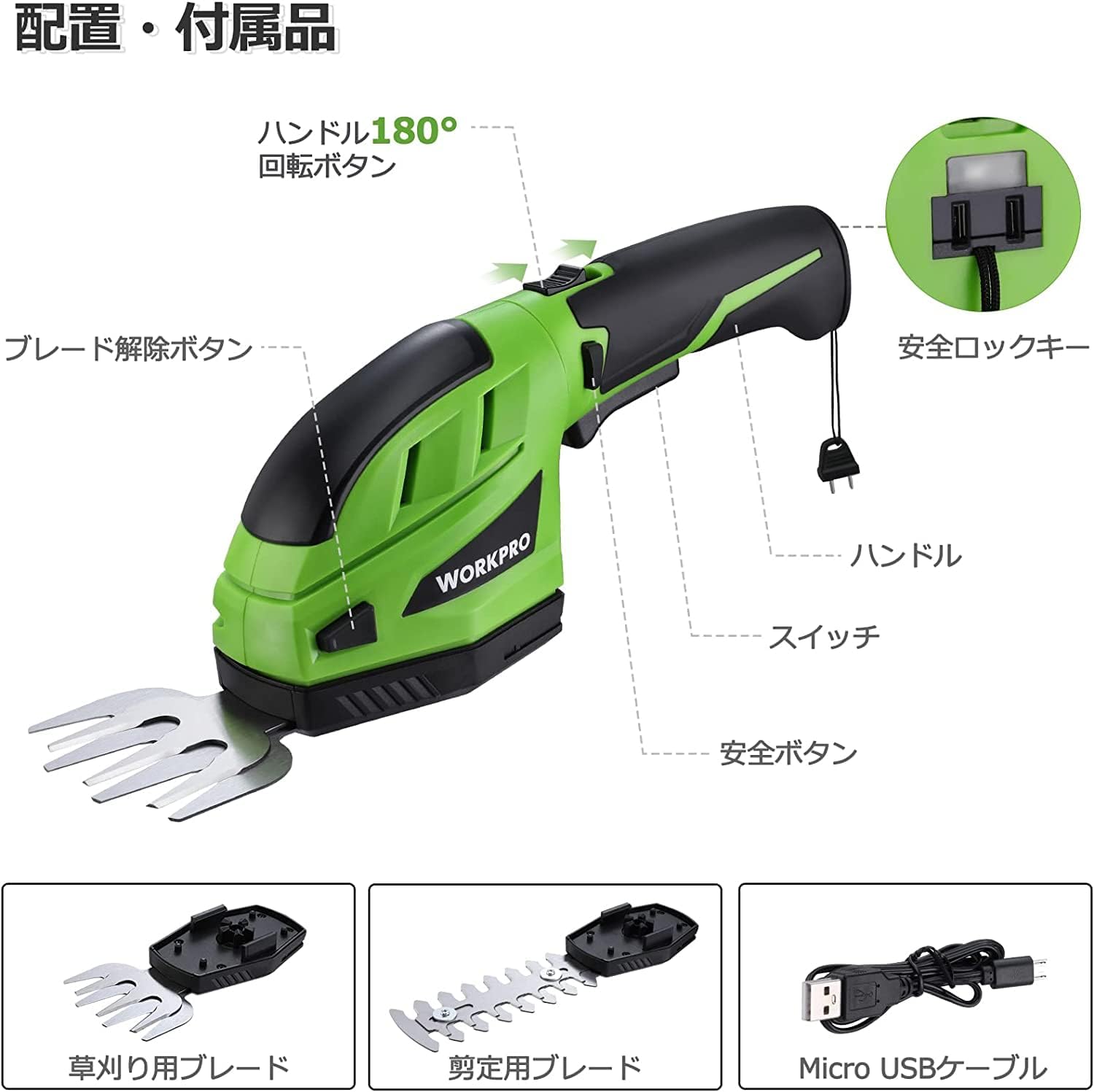
Àwòrán 1: Àwọn Ẹ̀yà Ọjà
- Mu: Ergonomically apẹrẹ fun itunu dimu.
- Bọtini Aabo: Must be pressed simultaneously with the switch to operate.
- Yipada: Activates the blades.
- Bọtini itusilẹ abẹfẹlẹ: Used to detach blades for changing.
- 180° Rotation Button: Allows the handle to rotate for different cutting angles.
- Safety Lock Key: Must be inserted into the handle end for operation.
- Abẹfẹ Irẹ koriko: 80mm cutting width, ideal for lawn edges and small grass areas.
- Abẹ́ ẹ̀rọ ìtẹ̀gùn ẹ̀rọ: 120mm cutting width, suitable for hedges and shrubs.
- Okun USB Micro: For charging the tool's battery.
Setup and Blade Installation
Before first use, ensure the battery is fully charged (refer to the Charging section). Follow these steps to install the desired blade:
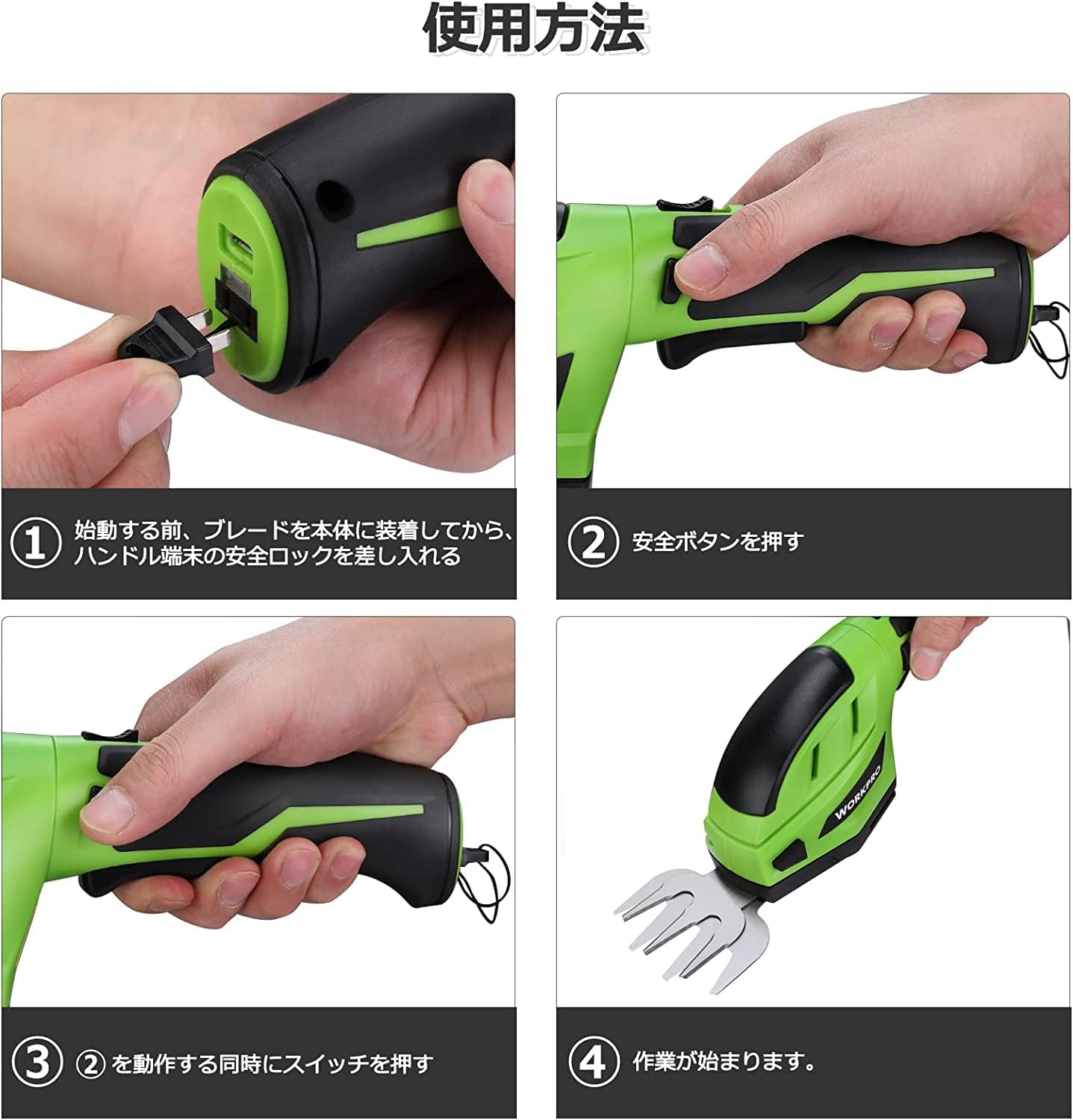
Figure 2: Setup Steps
- So Blade naa: Align the chosen blade (grass shear or hedge trimmer) with the main unit and press firmly until it clicks into place. Ensure it is securely fastened.
- Insert Safety Lock Key: Insert the safety lock key into the designated slot at the end of the handle. The tool will not operate without this key.
Awọn ilana Iṣiṣẹ
To operate your WORKPRO tool, follow these steps:
- Activate Safety Button: With the safety lock key inserted, press and hold the safety button located on the side of the handle.
- Olukoni Yipada: While holding the safety button, press the main power switch (trigger) to start the blades.
- Ise Tesiwaju: Once the blades are running, you can release the safety button, and the tool will continue to operate as long as the main switch is pressed.
- Adjust Handle Angle (Hedge Trimmer): For hedge trimming, you can rotate the handle 180 degrees by pressing the 180° rotation button and adjusting the handle to your desired angle. This allows for comfortable cutting in various positions.

Figure 3: Grass Shearing in Use

Figure 4: Hedge Trimming and Handle Rotation
Video: WORKPRO Grass Shears and Hedge Trimmer in Action
This video demonstrates the operation of the WORKPRO Grass Shears and Hedge Trimmer, including blade changes, safety features, and practical use for both grass and hedge trimming.
Ngba agbara si Batiri naa
The WORKPRO tool is powered by a 3.6V rechargeable Lithium-ion battery. It features a battery level indicator lamp to show the remaining charge.

Figure 5: Charging and Power Indicator
- Atọka gbigba agbara: Ina pupa tọkasi pe batiri n gba agbara. Ina alawọ ewe tọkasi batiri ti gba agbara ni kikun.
- Connecting for Charge: Use the provided Micro USB cable. Connect it to the tool's charging port and plug the other end into a commercially available USB adapter (DC5V 0.5~1.0A output is recommended).
- Akoko gbigba agbara: Approximately 1.5 to 3.5 hours for a full charge.
- Akiyesi pataki: Ensure your USB adapter provides at least 5V/1A output. Insufficient output may prevent proper charging or trigger overvoltage protection, stopping the charging process.
Itoju
Itọju deede ṣe idaniloju gigun ati iṣẹ ṣiṣe to dara julọ ti ọpa rẹ.
- Isọfọ abẹfẹlẹ: After each use, remove the blades and clean off any grass, leaves, or debris. Use a brush or cloth.
- Lubrication Blade: Periodically apply a light machine oil to the blades to prevent rust and ensure smooth operation.
- Ibi ipamọ: Store the tool and blades in a dry, clean place. Ensure blades are clean and dry before storage.
- Itọju Batiri: Do not store the tool with a completely depleted battery. Charge it periodically if not used for extended periods to maintain battery health.
Laasigbotitusita
| Isoro | Owun to le Fa | Ojutu |
|---|---|---|
| Irinṣẹ ko bẹrẹ. | Batiri naa kere tabi ti dinku. Safety lock key not inserted. Safety button and switch not pressed simultaneously. | Gba agbara si batiri. Insert the safety lock key fully. Ensure both the safety button and switch are pressed at the same time. |
| Awọn abẹfẹlẹ ko ni gige daradara. | Awọn abẹfẹlẹ jẹ ṣigọgọ tabi idọti. Incorrect blade for the material. | Clean blades. If dull, consider replacement blades. Ensure you are using the appropriate blade (grass shear for grass, hedge trimmer for hedges). |
| Ọpa ma duro lakoko iṣẹ. | Batiri ti dinku. Idaabobo apọju ti mu ṣiṣẹ. | Saji si batiri. Reduce the load on the blades. Avoid cutting overly thick branches or dense grass. |
| Batiri ko ngba agbara. | USB adapter output is insufficient. Cable jẹ aṣiṣe. | Use a 5V/1A USB adapter. Gbiyanju okun USB ti o yatọ. |
Awọn pato
| Ẹya ara ẹrọ | Sipesifikesonu |
|---|---|
| Brand | WORKPRO |
| Awoṣe | WPLG36V |
| Orisun agbara | Agbara Batiri |
| Batiri Iru | Lithium-ion / DC 3.6V / 2.0A |
| Ngba agbara Voltage | 5V |
| Akoko gbigba agbara | 1.5-3.5 wakati |
| No-load Operating Time | Isunmọ. 40 iṣẹju |
| Grass Shear Cutting Width | 80mm |
| Fífẹ̀ Gígé Trimmer | 120mm |
| Max Trimmer Cutting Diameter | 7.5mm |
| Iwọn Ọja | 394g (ẹyọ akọkọ) |
| Awọn iwọn | 28 x 12.5 x 8.9 cm (Iwọn idii) |

Ṣe nọmba 6: Awọn Iwọn Ọja ati Awọn pato
Atilẹyin ọja ati Support
WORKPRO products are manufactured to high-quality standards. For warranty information, technical support, or to purchase replacement parts, please refer to the contact information provided with your product packaging or visit the official WORKPRO webojula.
Jọwọ ṣe idaduro ẹri rira rẹ fun awọn iṣeduro atilẹyin ọja.
Ask a question about this manual
Ask about setup, troubleshooting, compatibility, parts, safety, or missing instructions. Manuals+ will review the question and use this page’s manual context to help answer it.