
FOREVER SB-315
FOREVER SB-315 Fitband Smartwatch User Manual
Awoṣe: SB-315
1. Ifihan
The FOREVER SB-315 Fitband Smartwatch is a versatile activity tracker designed to help you monitor your fitness and stay connected. Featuring a heart rate sensor, step counter, distance tracker, and sleep monitor, it provides comprehensive insights into your daily activity. Its discreet and lightweight design, coupled with a long-lasting battery, ensures maximum comfort and convenience.
This manual provides detailed instructions on how to set up, operate, and maintain your SB-315 smartwatch to ensure optimal performance and longevity.

olusin 1.1: Iwaju view of the FOREVER SB-315 Fitband Smartwatch.
2. Eto
2.1 Unboxing ati Ni ibẹrẹ idiyele
Carefully remove all components from the packaging. The box should contain the SB-315 smartwatch and its charging cable. Before first use, fully charge the device.
- So okùn gbigba agbara pọ mọ awọn olubasọrọ gbigba agbara lori ẹhin smartwatch naa.
- Pulọọgi opin USB ti okun naa sinu ohun ti nmu badọgba agbara USB boṣewa (kii ṣe pẹlu) tabi ibudo USB ti kọnputa kan.
- The watch display will indicate charging status. A full charge typically takes 2-3 hours.
- The 155 mAh battery provides up to 10 days of standby time on a single charge.

Figure 2.1: The SB-315 Smartwatch and its retail packaging.
2.2 App fifi sori ati so pọ
To unlock the full potential of your SB-315 smartwatch, you need to install the companion application on your smartphone and pair the devices via Bluetooth.
- Ṣe igbasilẹ ohun elo naa: Wa fun the "Forever Smart" or "Forever Fit" app (refer to the packaging or quick start guide for the exact app name) on the Apple App Store (for iOS 10.0 and above) or Google Play Store (for Android 5.0 and above).
- Mu Bluetooth ṣiṣẹ: Rii daju pe Bluetooth ti ṣiṣẹ lori foonuiyara rẹ.
- Ṣii App naa: Launch the installed application on your smartphone.
- So Ẹrọ naa pọ: Follow the in-app instructions to add a new device. Select "SB-315" from the list of available devices. The app will guide you through the pairing process.
- Awọn igbanilaaye fifunni: Gba awọn igbanilaaye pataki (fun apẹẹrẹ, awọn iwifunni, ipo, data ilera) fun ohun elo lati ṣiṣẹ ni deede.
Once successfully paired, the watch will synchronize time and data with your smartphone.
3. Ṣiṣẹ Smartwatch rẹ
3.1 Ipilẹ Lilọ kiri
The SB-315 features a bright 0.96-inch (or 1.3-inch, depending on specific model variant) display. Navigate through menus by swiping across the screen and tapping to select options.
- Ra soke/isalẹ: Scroll through different functions and menus.
- Ra osi/Ọtun: Wọlé kíákíá views like daily activity, heart rate, or notifications.
- Fọwọ ba: Yan àṣàyàn kan tàbí tẹ àkójọ-à ...
- Press Side Button (if applicable): Pada si iboju ile tabi tan/pa ina.
3.2 mojuto Awọn iṣẹ
The SB-315 is equipped with several features to help you monitor your health and fitness.
- Abojuto Oṣuwọn Ọkàn: The integrated heart rate sensor continuously monitors your heart rate. View data akoko gidi lori aago tabi awọn aṣa alaye ninu app naa.
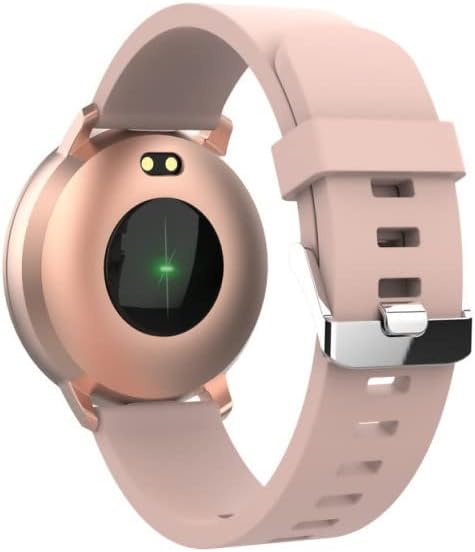
olusin 3.1: Ẹyìn view of the SB-315, highlighting the heart rate sensor.
- Àtòjọ iṣẹ́: Tracks steps taken, distance covered, and calories burned throughout the day.
- Abojuto oorun: Automatically monitors your sleep patterns, including deep sleep, light sleep, and awake times. Access detailed sleep analysis in the companion app.
- Awọn ọna idaraya: Select from various sports modes such as running, cycling, climbing, and walking to track specific workout data.
- Olurannileti Hydration: Set reminders to ensure you drink enough water throughout the day.
3.3 Smart Awọn ẹya ara ẹrọ
- Awọn iwifunni: Receive instant notifications for incoming calls, SMS messages, and alerts from social media applications directly on your wrist.
- Iṣakoso kamẹra jijin: Lo agogo smart rẹ gẹ́gẹ́ bí ohun èlò ìdábùú láti ọ̀dọ̀ àwọn kámẹ́rà fóònù rẹ.
- Iṣakoso Orin: Ṣakoso ṣiṣiṣẹ orin lori foonu alagbeka rẹ (mu ṣiṣẹ, da duro, fo awọn orin) taara lati aago naa.
- Isọdi Oju Wo: Personalize your watch by choosing from various watch faces available through the companion app.
- Aago itaniji: Set silent vibrating alarms to wake you up or remind you of important events.
4. Itọju
4.1 Itọju ati Itọju
To ensure the longevity and proper functioning of your SB-315 smartwatch, follow these cleaning and care guidelines:
- Ninu: Máa nu ibojú aago náà déédéé pẹ̀lú aṣọ rírọ̀, d.amp, lint-free cloth. Avoid using harsh chemicals, abrasive cleaners, or solvents.
- Gbigbe: Ensure the watch is completely dry before charging or wearing, especially after exposure to water.
- Itọju okun: If the strap is removable, clean it separately. Allow it to air dry completely before reattaching.
4.2 Omi Resistance (IP67)
The SB-315 smartwatch is rated IP67, meaning it is protected from dust and can withstand immersion in water up to 1 meter for up to 30 minutes. While it is water-resistant, it is not waterproof for prolonged submersion or high-pressure water activities.
- Do not wear the watch while showering with hot water, in saunas, or steam rooms.
- Yẹra fun titẹ awọn bọtini labẹ omi.
- If the watch gets wet, wipe it dry thoroughly before charging.
4.3 batiri Itọju
Lati mu igbesi aye batiri ati iṣẹ ṣiṣe pọ si:
- Gba agbara aago naa patapata ṣaaju lilo akọkọ.
- Yago fun mimu batiri kuro patapata nigbagbogbo.
- Tọju aago ni itura, aye gbigbẹ nigbati o ko ba wa ni lilo fun awọn akoko gigun.
- Lo okun gbigba agbara ti a pese nikan.
5. Laasigbotitusita
If you encounter issues with your SB-315 smartwatch, refer to the following common problems and solutions:
| Isoro | Owun to le Fa | Ojutu |
|---|---|---|
| Wiwo ko tan | Batiri kekere; ẹrọ ti di didi | Charge the watch for at least 30 minutes. If still unresponsive, try a soft reset (refer to app or manufacturer's webaaye fun awọn ilana kan pato). |
| Ko le ṣe alawẹ-meji pẹlu foonuiyara | Bluetooth off; app not running; watch not discoverable; interference | Ensure Bluetooth is on for both devices. Restart both the watch and phone. Make sure the app is open and searching. Forget previous pairings on phone. |
| Awọn iwifunni ko gba | App permissions not granted; notification settings off; app not running in background | Check app permissions in phone settings. Verify notification settings within the companion app. Ensure the app is running in the background. |
| Inaccurate heart rate/step count | Improper fit; sensor obstruction; software glitch | Ensure the watch is worn snugly on the wrist, about one finger's width above the wrist bone. Clean the sensor on the back of the watch. Restart the watch. |
| Aye batiri kukuru | Frequent use of features; high brightness; constant notifications | Reduce screen brightness. Limit continuous heart rate monitoring. Turn off unnecessary notifications. Ensure background app refresh is optimized. |
If the problem persists, please contact FOREVER customer support for further assistance.
6. Awọn pato
Key technical specifications for the FOREVER SB-315 Fitband Smartwatch:
| Ẹya ara ẹrọ | Ẹ̀kúnrẹ́rẹ́ |
|---|---|
| Orukọ awoṣe | SB-315 |
| Brand | LAIYE |
| Àwọ̀ | Pink |
| Asopọmọra Technology | Bluetooth 5.0 |
| Iwọn Ifihan | 0.96" (or 1.3", depending on specific model variant) - 240 x 240 pixels |
| Agbara Batiri | 155 mAh Litiumu-polima |
| Max Imurasilẹ Time | Titi di ọjọ mẹwa 10 |
| Omi Resistance Rating | IP67 |
| Awọn ẹrọ ibaramu | Smartphones (iOS ≥ 10.0, Android ≥ 5.0) |
| Pataki Awọn ẹya ara ẹrọ | Heart Rate Monitor, Sleep Monitor, Notification, Alarm Clock, Activity Tracker, Remote Camera/Music Control |
| Apapọ iwuwo | 57g |
7. Atilẹyin ọja ati Support
For warranty information, please refer to the warranty card included in your product packaging or contact your point of purchase. Warranty terms and conditions may vary by region and retailer.
For technical support, troubleshooting assistance beyond this manual, or inquiries about spare parts, please visit the official FOREVER webojú-òpó wẹ́ẹ̀bù tàbí kí o kàn sí ẹ̀ka iṣẹ́ ìtọ́jú oníbàárà wọn. Àwọn àlàyé ìbánisọ̀rọ̀ sábà máa ń wà lórí ilé iṣẹ́ olùpèsè webaaye tabi apoti ọja.
Manufacturer: TelForceOne
Ask a question about this manual
Ask about setup, troubleshooting, compatibility, parts, safety, or missing instructions. Manuals+ will review the question and use this page’s manual context to help answer it.