
Ọrọ Iṣaaju
Thank you for choosing the Krisons Sound Blaster Tower Speaker. This manual provides essential information for the safe and efficient operation of your speaker system. Please read it thoroughly before use and retain it for future reference.
Ọja Pariview
The Krisons Sound Blaster Tower Speaker is designed to deliver clear and balanced audio with an 8-inch woofer. It features multiple connectivity options including Bluetooth, USB, AUX, and FM radio, along with an LCD display for mode information. The speaker includes controls for volume, bass, and mode selection.

Nọmba 1: Iwaju ati ẹgbẹ view of the Krisons Sound Blaster Tower Speaker, highlighting the display, USB port, mode button, play/pause, previous/next controls, bass, treble, volume knobs, 4-inch speakers, and 8-inch woofer.
Ṣeto
1. Unpacking
Ni ifarabalẹ yọ gbogbo awọn paati kuro ninu apoti. Rii daju pe awọn nkan wọnyi wa:
- 1 x Krisons Sound Blaster Tower Speaker
- 1 x Isakoṣo latọna jijin
- 1 x Itọsọna olumulo (iwe yii)
- 1 x Kaadi atilẹyin ọja
2. Ifiweranṣẹ
Position the tower speaker on a flat, stable surface. For optimal sound performance, place the speaker in a location that allows for clear sound dispersion. The compact design allows for flexible placement in various room sizes.
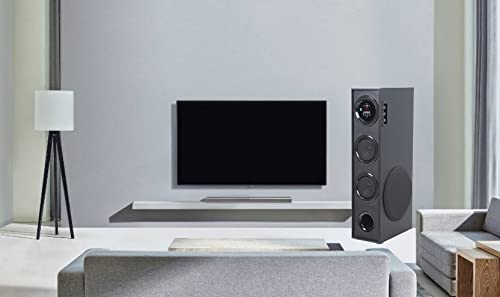
Olusin 2: Exampti ipo agbọrọsọ ni ayika ile.

Figure 3: Speaker dimensions for placement planning.
3. Asopọ agbara
Connect the speaker's power cable to a standard AC power outlet. Ensure the power switch on the speaker is in the OFF position before connecting to power.
4. Awọn isopọ Audio
Agbọrọsọ naa ṣe atilẹyin fun ọpọlọpọ awọn ọna titẹ sii ohun:
- Bluetooth: Fún ìsopọ̀ aláìlókùn sí àwọn fóònù alágbékalẹ̀, àwọn tábìlẹ́ẹ̀tì, àti àwọn ẹ̀rọ míràn tí Bluetooth ń ṣiṣẹ́.
- USB: Fun ohun afetigbọ files taara lati a USB drive.
- AX-in: Fún ìsopọ̀ onírin sí àwọn ẹ̀rọ nípa lílo okùn ohùn 3.5mm.
- Redio FM: Built-in FM tuner for radio broadcasts.

Àwòrán 4: Àwọn àṣàyàn ìsopọ̀ tó wà.

Figure 5: Connecting to an external device via AUX cable.
Awọn ilana Iṣiṣẹ
1. Agbara Tan / Paa
Locate the power switch on the rear panel of the speaker. Flip the switch to the "ON" position to power on the speaker. The LCD display will illuminate. Flip to "OFF" to power down.
2. Awọn ọna Iṣakoso
The speaker can be controlled using the physical buttons and knobs on the side panel or via the included remote control.
- Awọn iṣakoso igbimọ ẹgbẹ: Includes buttons for mode change, play/pause, previous/next track, and knobs for volume and bass adjustment.
- Isakoṣo latọna jijin: Provides full functionality for convenient operation from a distance.
3. Aṣayan Ipo
Press the "MODE" button on the speaker's control panel or the remote control to cycle through available input modes: Bluetooth, USB, AUX, and FM Radio. The selected mode will be indicated on the LCD display.
4. Bluetooth Isẹ
- Switch the speaker to Bluetooth mode. The LCD display will show "BT" or a similar indicator, and the speaker will enter pairing mode.
- Lori ẹrọ rẹ (foonuiyara, tabulẹti), mu Bluetooth ṣiṣẹ ki o wa awọn ẹrọ to wa.
- Select "Krisons Sound Blaster" (or similar name) from the list of devices.
- Once paired, the speaker will confirm the connection, and you can play audio from your device.
5. USB Sisisẹsẹhin
- Fi kọnputa USB ti o ni ohun MP3 sii files sinu USB ibudo lori agbọrọsọ.
- Switch the speaker to USB mode. The speaker will automatically detect and begin playing audio files lati USB drive.
- Use the previous/next buttons to navigate tracks and the play/pause button to control playback.
6. AUX-in Connection
- Connect one end of a 3.5mm audio cable to the AUX-in port on the speaker.
- Connect the other end of the 3.5mm audio cable to the audio output jack of your external device (e.g., TV, computer, MP3 player).
- Switch the speaker to AUX mode. Audio from your connected device will now play through the speaker.
7. Redio FM
- Switch the speaker to FM Radio mode.
- The speaker will automatically scan and store available FM stations.
- Use the previous/next buttons to cycle through the stored stations.
8. Iwọn didun ati Iṣatunṣe Ohun orin
Use the "Volume" knob to adjust the overall sound level. Use the "Bass" knob to increase or decrease the low-frequency output. The speaker is designed to provide a balanced sound across treble, midrange, and bass frequencies.
Itoju
To ensure the longevity and optimal performance of your Krisons Sound Blaster Tower Speaker, follow these maintenance guidelines:
- Ninu: Use a soft, dry cloth to wipe the exterior surfaces of the speaker. Do not use abrasive cleaners, waxes, or solvents, as these can damage the finish.
- Eruku: Regularly dust the speaker grilles and vents to prevent accumulation, which can affect sound quality and internal components.
- Ifihan Olomi: Keep the speaker away from water and other liquids. Do not place liquid-filled containers on or near the speaker.
- Ibi ipamọ: If storing the speaker for an extended period, disconnect it from power and store it in a cool, dry place, away from direct sunlight and extreme temperatures.
Laasigbotitusita
Ti o ba pade awọn ọran pẹlu agbọrọsọ rẹ, tọka si awọn iṣoro ti o wọpọ ati awọn ojutu wọnyi:
| Isoro | Owun to le Solusan |
|---|---|
| Ko si agbara |
|
| Ko si ohun |
|
| Bluetooth ko sopọ |
|
| Isakoṣo latọna jijin ko ṣiṣẹ |
|
| Sound during power on/off | A brief sound or pop during power on/off is normal for this type of audio equipment and does not indicate a malfunction. |
Awọn pato
| Ẹya ara ẹrọ | Ẹ̀kúnrẹ́rẹ́ |
|---|---|
| Brand | Krisons |
| Orukọ awoṣe | Ohun Blaster |
| Agbọrọsọ Agbara Ijade ti o pọju | 80 Wattis |
| Asopọmọra Technology | Auxiliary, Bluetooth, USB, Wireless |
| Ipo Ijade Ohun | Ayika |
| Iṣagbesori Iru | Iduro Floor |
| Ohun elo apade | Crystal |
| Agbọrọsọ Iru | Subwoofer/Bookshelf/Woofer/Tower |
| Àwọ̀ | Dudu |
| Ọna Iṣakoso | Fọwọkan, Isakoṣo latọna jijin |
| Woofer Driver Diameter | 8 inches |
| Tweeter Driver Diameter | 1 inches |
| Total USB 2.0 Ports | 1 |
| Nọmba ti Audio awọn ikanni | 2.1 |
| Awọn iwọn Nkan (D x W x H) | 39D x 24W x 57H |
| Iwọn Nkan | 8900 giramu |
| Awọn ẹrọ ibaramu | Foonuiyara, Tabulẹti |
| Orisun agbara | AC |
Alaye atilẹyin ọja
This Krisons Sound Blaster Tower Speaker comes with a 6-osu atilẹyin ọja on manufacturing defects. Please refer to the included Warranty Card for detailed terms and conditions. Retain your purchase receipt as proof of purchase for warranty claims.
Onibara Support
For any questions, assistance, or support regarding your Krisons Sound Blaster Tower Speaker, please contact Krisons Customer Care:

Figure 6: Krisons Customer Support contact details.
- Imeeli: service@krisons.com
- Foonu: + 91-8287124581 / + 91-9910016757
- Awọn wakati iṣẹ: 10 AM to 6 PM
- Olupese: Krisons Electronic Systems Limited, ZYTEL ENTERPRISES PVT