
1. Ifihan
O ṣeun fun riraasing the JCPOWER JC1800.5 5-Channel Amplifier. Iwe afọwọkọ yii n pese alaye pataki fun fifi sori ẹrọ to dara, iṣẹ ṣiṣe, ati itọju rẹ amplifier. Jọ̀wọ́ ka ìwé ìtọ́ni yìí dáadáa kí o tó gbìyànjú láti fi ẹ̀rọ náà sí i tàbí láti ṣiṣẹ́ láti rí i dájú pé ó ṣiṣẹ́ dáadáa àti ààbò.
The JC1800.5 is designed to deliver high-quality audio performance for your vehicle's sound system, featuring a 5-channel configuration for versatile speaker and subwoofer setups.
2. Awọn ilana aabo
Ṣe akiyesi awọn iṣọra ailewu atẹle lakoko fifi sori ẹrọ ati iṣẹ:
- A ṣe iṣeduro fifi sori Ọjọgbọn: Installation of this product requires experience with electrical wiring and car audio systems. Professional installation is highly recommended.
- Ge batiri kuro: Máa yọ ẹ̀rọ batiri tó ń yọ́ mọ́ ọkọ̀ kúrò kí o tó bẹ̀rẹ̀ iṣẹ́ fífi sori ẹ̀rọ láti dènà kí iná mànàmáná má baà tàn.
- Asopọmọra to tọ: Ensure all wiring is correctly connected and insulated to prevent short circuits and damage to the amplifier or vehicle's electrical system. Use appropriate gauge wires as specified.
- Iṣagbesori: Gbe awọn amplifier securely in a dry, well-ventilated area, away from direct sunlight, heat sources, and moisture. Ensure adequate airflow around the unit to prevent overheating.
- Fiusi: Always use fuses of the specified rating. Never replace a fuse with one of a higher amperage or bypass the fuse.
- Awọn ipele Iwọn: Prolonged exposure to high volume levels can cause hearing damage. Adjust the volume to a comfortable level.
- Pipade Ooru: Awọn amplifier generates heat during operation. Do not cover the amplifier or obstruct its heat sinks.
3. Package Awọn akoonu
Jẹrisi pe gbogbo awọn ohun kan wa ninu package:
- JCPOWER JC1800.5 5-Channel Ampitanna
- Afowoyi Olumulo (iwe-ipamọ yii)
- Ohun elo iṣagbesori (skru)
- Spare Fuses (if included)

Figure 3.1: JCPOWER JC1800.5 Amplifier in its retail packaging.
4. Eto ati fifi sori
Dara fifi sori jẹ pataki fun awọn iṣẹ ati longevity ti rẹ amplifier. Refer to the diagram below for connection points.
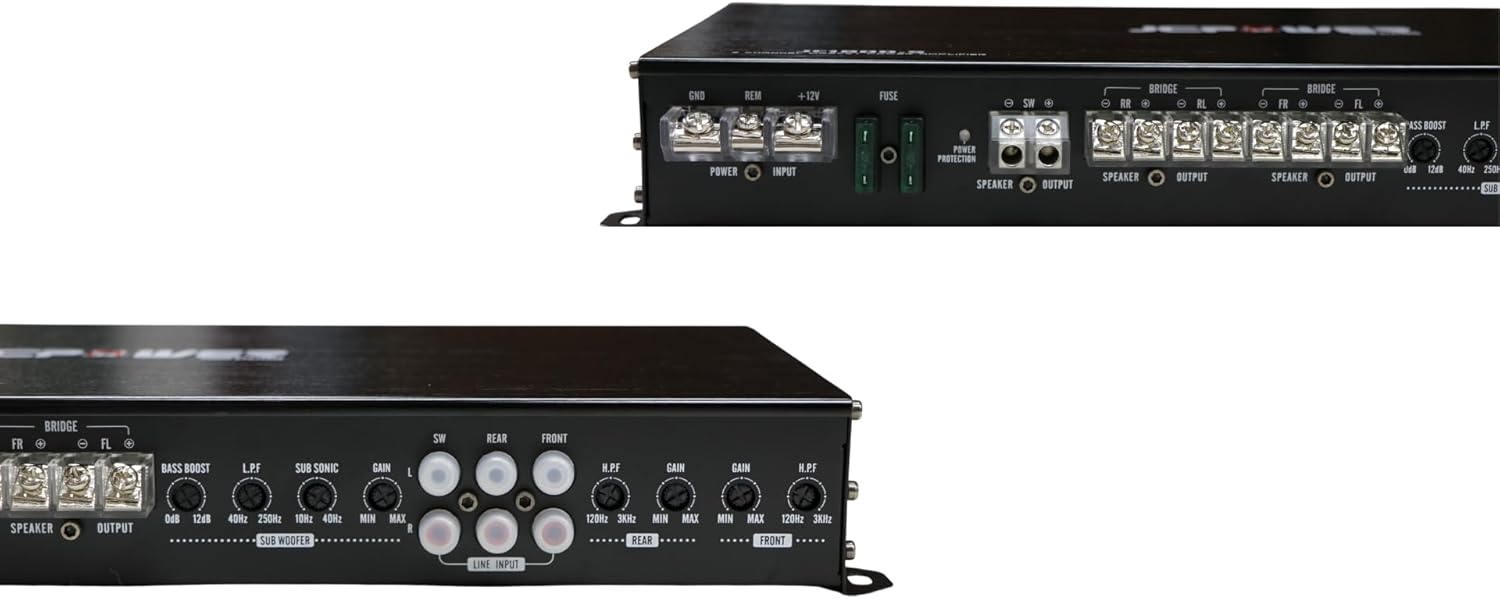
Figure 4.1: Rear panel connections and controls of the JCPOWER JC1800.5 amplifier.
4.1. Awọn isopọ Agbara
- Ilẹ (GND): Connect a heavy-gauge wire (minimum 8 AWG, preferably 4 AWG) from the amplifier's GND terminal to a clean, unpainted metal point on the vehicle's chassis. Ensure a solid, low-resistance connection.
- Latọna jijin (REM): Connect a 18 AWG wire from the ampLifier's REM ebute si isakoṣo titan-titan ti ipin ori rẹ. Eleyi waya yipada awọn amplifier tan ati pa pẹlu sitẹrio ọkọ ayọkẹlẹ rẹ.
- + 12V (Agbara): Connect a heavy-gauge wire (minimum 8 AWG, preferably 4 AWG) from the amplifier's +12V terminal directly to the positive terminal of the vehicle's battery. Install an in-line fuse holder within 18 inches (45 cm) of the battery, using a fuse of appropriate amperage (refer to specifications).
4.2. Agbọrọsọ Awọn isopọ
The JC1800.5 is a 5-channel amplifier. Channels 1-4 are typically used for full-range speakers, and Channel 5 (Subwoofer channel) is for a subwoofer.
- Connect your front speakers to the FR+ and FR- terminals and FL+ and FL- terminals.
- Connect your rear speakers to the RR+ and RR- terminals and RL+ and RL- terminals.
- Connect your subwoofer to the SW+ and SW- terminals.
- Ensure correct polarity (+ to + and - to -) for all speaker connections. Incorrect polarity can lead to poor sound quality.
- Bridging (Channels 1-4): Channels 1-4 can be bridged to power two speakers at higher power. Refer to the amplifier's specifications for minimum impedance when bridging. Connect the speaker to the FL+ and FR- terminals for one bridged channel, and RL+ and RR- for the other.
4.3. Àwọn ìsopọ̀ ìtẹ̀síwájú (RCA)
So awọn kebulu RCA pọ lati inu ẹyọ ori rẹ ṣaaju-amp outputs to the corresponding RCA input jacks on the amplifier (FRONT, REAR, SUBWOOFER). Ensure a secure connection.
5. Ṣiṣẹ ati Awọn atunṣe
Lẹ́yìn tí o bá ti fi sori ẹrọ, ṣe àtúnṣe rẹ̀ dáadáa amplifier eto fun aipe ohun išẹ.
5.1. Atunse ere
Iṣakoso GAIN ibaamu awọn amplifier's input sensitivity to the output of your head unit. It is kii ṣe a volume control.
- Yipada awọn amplifier's GAIN controls to their minimum (counter-clockwise) position.
- Ṣeto iwọn didun ti ẹrọ ori rẹ si nipa 75-80% ti o pọju rẹ.
- Laiyara mu awọn amplifier's GAIN control until you hear slight distortion, then back it off slightly until the sound is clear.
- Repeat for FRONT, REAR, and SUBWOOFER channels independently.
5.2. Eto adakoja (LPF/HPF)
Awọn agbekọja ti a ṣe sinu gba ọ laaye lati taara awọn sakani igbohunsafẹfẹ pato si awọn agbohunsoke rẹ.
- LPF (Àlẹmọ Pass Kekere): Used for subwoofers. This allows frequencies ni isalẹ the set point to pass through. Adjust the LPF for the subwoofer channel (typically 80Hz-120Hz) to blend with your main speakers.
- HPF (Àlẹmọ Pass giga): Used for full-range speakers. This allows frequencies loke the set point to pass through. Adjust the HPF for the FRONT and REAR channels (typically 80Hz-100Hz) to prevent low frequencies from distorting smaller speakers.
5.3. Bass didn
The BASS BOOST control (on the subwoofer channel) provides an increase in output at a specific low frequency. Use sparingly, as excessive bass boost can lead to distortion and potential speaker damage.
6. Itọju
Itọju deedee n ṣe idaniloju igba pipẹ ati iṣẹ ti awọn olu rẹ amplifier.
- Ninu: Lorekore nu awọn amplifier's exterior with a soft, dry cloth. Do not use harsh chemicals or abrasive cleaners. Ensure ventilation fins are free of dust and debris.
- Awọn isopọ: Lẹẹkọọkan ṣayẹwo gbogbo agbara, ilẹ, latọna jijin, ati awọn asopọ agbọrọsọ lati rii daju pe wọn wa ni aabo ati ominira lati ipata.
- Ayika: Rii daju pe amplifier remains in a dry, well-ventilated environment. Avoid exposing it to extreme temperatures or moisture.
7. Laasigbotitusita
Ti o ba ni iriri awọn iṣoro pẹlu rẹ amplifier, wo awọn ọran ati awọn solusan ti o wọpọ wọnyi:
| Isoro | Owun to le Fa | Ojutu |
|---|---|---|
| Ko si Power / Power LED Pa | Fiusi ti fẹ Asopọ agbara/ilẹ ti ko dara Ko si isakoṣo latọna jijin ifihan agbara | Ṣayẹwo ki o si ropo fiusi Daju gbogbo agbara ati ilẹ awọn isopọ wa ni aabo Ṣayẹwo asopọ okun waya latọna jijin ati iṣẹjade ipin ori |
| No Sound / Protection LED On | Agbohunsoke kukuru Circuit Gbigbona pupọ Vol kekeretage | Check speaker wiring for shorts Rí i dájú pé afẹ́fẹ́ tó péye wà níbẹ̀; amplifier lati dara Check battery and charging system |
| Ohun Daru | Ere ṣeto ga ju Awọn eto adakoja ti ko tọ Agbọrọsọ impedance mismatch | Din ere eto Adjust LPF/HPF settings Daju ikọjujasi agbọrọsọ wa laarin amplifier's limits |
| Engine Noise (Whine) | Isopọ ilẹ ti ko dara RCA cables routed near power wires Faulty RCA cables | Improve ground connection Reroute RCA cables away from power wires Replace RCA cables |
8. Awọn pato
Key technical specifications for the JCPOWER JC1800.5 ampolutọpa:
- Awọn ikanni: 5
- RMS Power Output (4 ohm): 35 W x 4 CH + 250 W x 1 CH
- RMS Power Output (2 ohm): 50 W x 4 CH + 500 W x 1 CH
- Bridged Power Output (4 ohm): 100 W x 2 CH (for channels 1-4)
- Lapapọ Agbara Ijade: 250 Watts (as per product data, likely peak or combined)
- Iru fifi sori: Independent Mount
- Iwọn Ọja: 3 kilo
- Awọn iwọn idii: 47.6 x 22.2 x 7 cm
- Nọmba awoṣe: JC1800.5
9. Atilẹyin ọja ati Support
JCPOWER products are designed and manufactured to the highest quality standards. This product is covered by a limited warranty against defects in materials and workmanship. The specific terms and duration of the warranty may vary by region and retailer.
For warranty service, technical support, or further inquiries, please contact your authorized JCPOWER dealer or visit the official JCPOWER webojula fun alaye olubasọrọ.
Jọwọ ṣe idaduro ẹri rira rẹ fun awọn iṣeduro atilẹyin ọja.