
1. Ifihan
This manual provides detailed instructions for the installation, operation, and maintenance of your Antec NX700 Mid-Tower ATX Gaming Case. Please read this manual thoroughly before beginning assembly to ensure proper setup and safe usage.

Figure 1: Antec NX700 Mid-Tower ATX Gaming Case overview.
Key Awọn ẹya ara ẹrọ
- 3D Geometric Mesh Front Panel: Designed for optimal airflow and aesthetic appeal.
- Awọn ololufẹ ARGB to wa: Comes with two 185mm ARGB fans in the front and one 120mm ARGB fan in the rear for effective cooling and customizable lighting.
- Panel Ẹgbẹ Gilasi ti o ni ibinu: A 4mm thick tempered glass side panel provides a clear view ti awọn ẹya inu rẹ.
- Extensive Radiator Support: Supports up to a 360mm radiator for advanced liquid cooling solutions.
- Versatile I/O Panel: Features Power, LED control button, Reset, 2 x USB 3.0 ports, and MIC/HD-AUDIO jacks.
- Ibamu modaboudu: Supports ATX, Micro-ATX, and Mini-ITX motherboards.

Figure 2: Close-up of the 3D geometric mesh front panel, designed for enhanced airflow.
2. Eto ati fifi sori
Follow these steps to install your components into the Antec NX700 case.
2.1 Included Fans Installation
The case comes pre-installed with two 185mm ARGB fans at the front and one 120mm ARGB fan at the rear. Ensure these fans are properly connected to your motherboard or a fan controller for power and ARGB functionality.
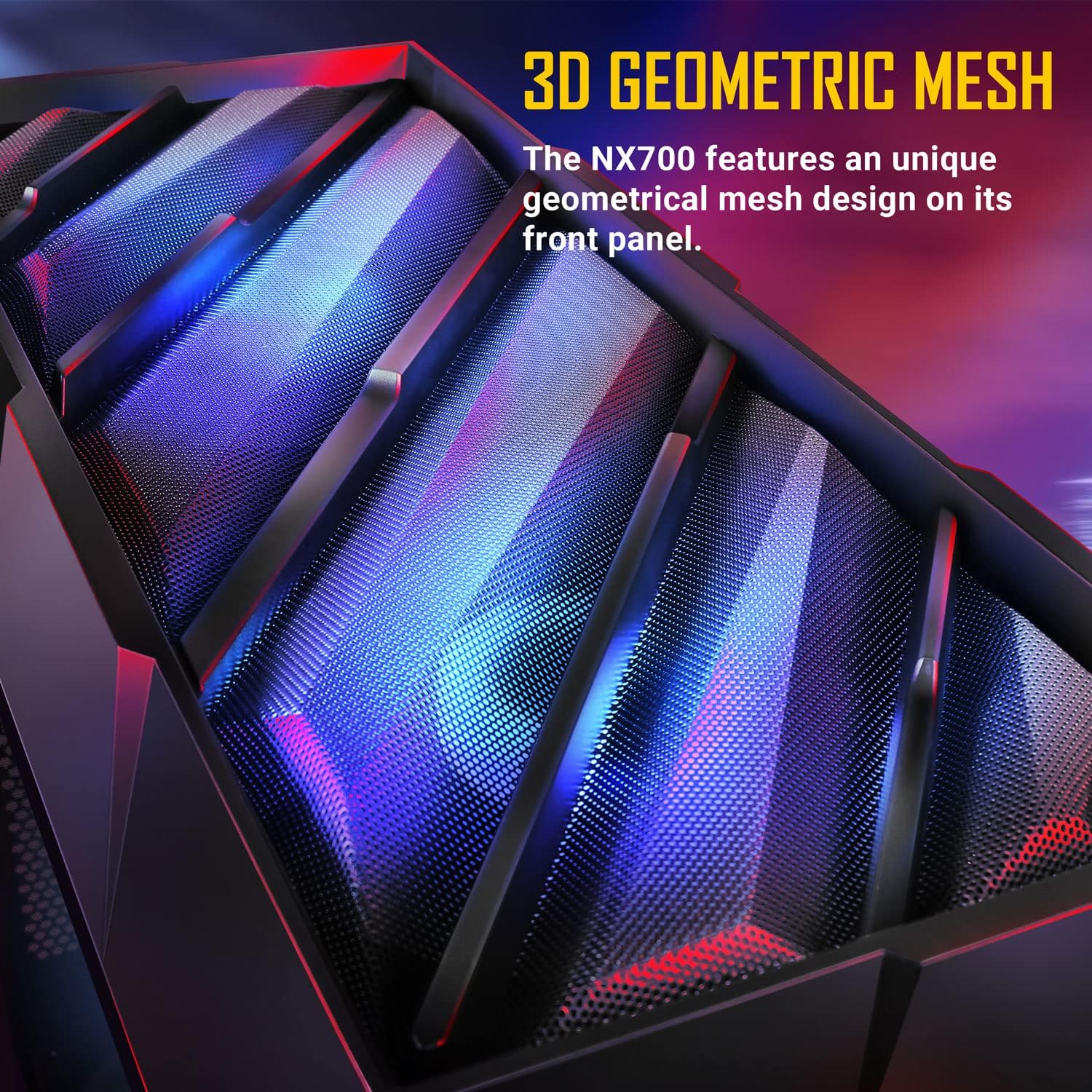
Figure 3: Illustration of the included 2 x 185mm ARGB front fans and 1 x 120mm ARGB rear fan.
2.2 Itutu eto iṣeto ni
The NX700 supports various fan and radiator configurations to optimize cooling performance.
- Iwaju: Supports 3 x 120mm, 3 x 140mm, or 2 x 185mm fans. Radiator support up to 360mm.
- Oke: Supports 2 x 120mm or 2 x 140mm fans. Radiator support up to 280mm.
- Ẹyìn: Supports 1 x 120mm or 1 x 140mm fan. Radiator support up to 140mm.
- Ipese Agbara: Ṣe atilẹyin fun awọn onijakidijagan 2 x 120mm.

Figure 4: Diagram illustrating fan and radiator mounting options within the case.

Figure 5: Illustration showing space for a 360mm radiator installation at the front, even with 185mm fans.
2.3 Fi sori ẹrọ paati
The NX700 offers ample space for various components. Ensure all cables are routed neatly for optimal airflow and aesthetics.
- Modaboudu: Supports ATX motherboards (up to 305mm x 275mm).
- Olutọju Sipiyu: Giga ti o pọ julọ ti 170mm.
- Kaadi eya aworan (GPU): Gígùn tó pọ̀ jùlọ jẹ́ 340mm.
- Ipese Agbara (PSU): Supports PSUs up to 200mm (with HDD) or 365mm (without HDD).
- Ibi ipamọ: 2 x 3.5" HDD / 2.5" SSD (convertible) and 4 x 2.5" SSDs.
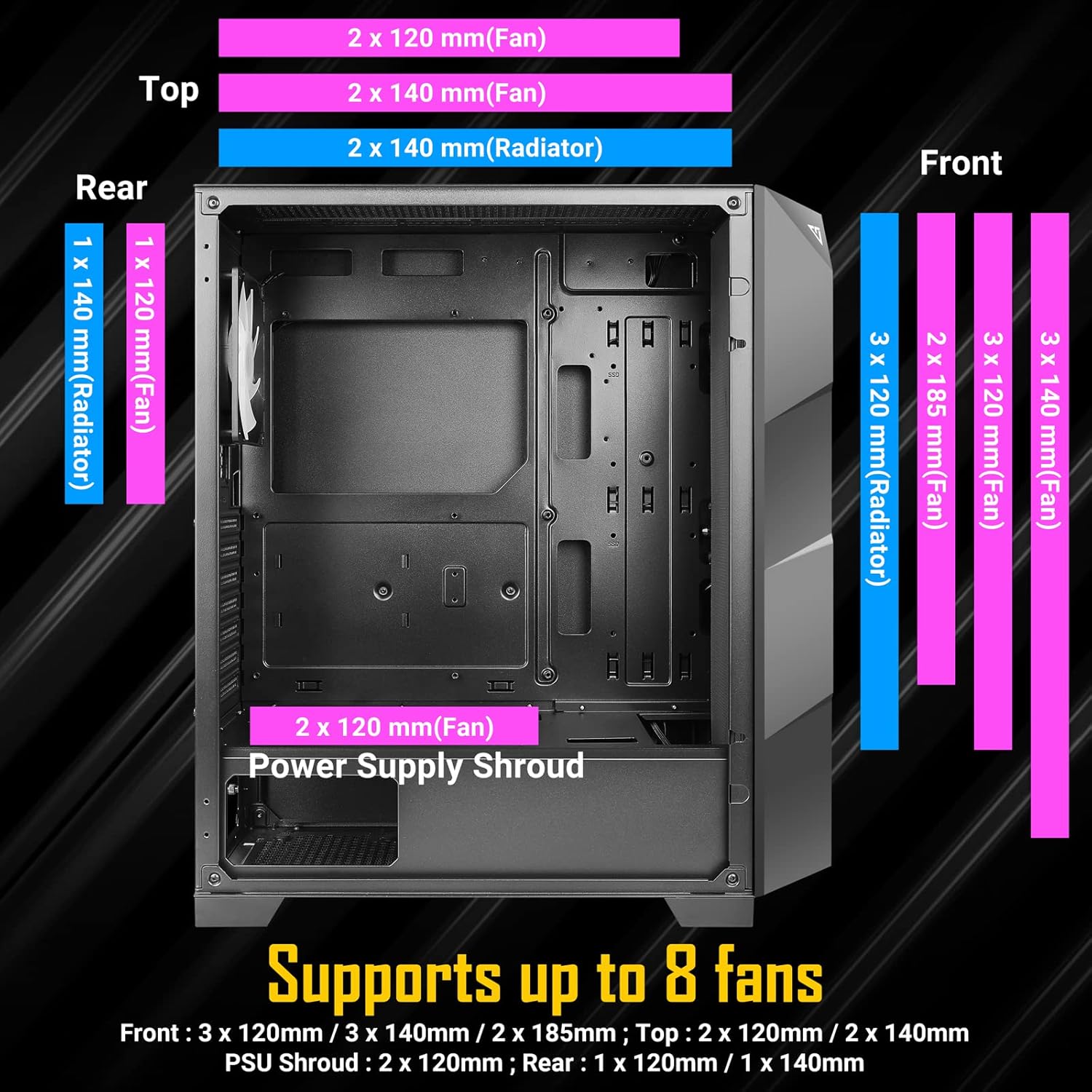
Figure 6: Internal layout showing maximum dimensions for CPU cooler, GPU, and motherboard support.

olusin 7: Ohun ti abẹnu view of the NX700 case with various components installed, demonstrating space and layout.
2.4 Video Guide for Assembly
Watch this official video for a visual guide on the Antec NX700 Mid-Tower ATX Gaming Case features and assembly process.
Video 1: Osise loriview and assembly guide for the Antec NX700 Mid-Tower ATX Gaming Case.
3. Awọn ilana Iṣiṣẹ
3.1 Mo / Eyin Panel Awọn iṣẹ
The top I/O panel provides convenient access to essential controls and ports.
- Bọtini agbara: Tan-an tabi pa eto naa.
- Bọtini Iṣakoso LED: Cycles through various ARGB lighting modes for the included fans.
- Bọtini atunto: Tun eto naa bẹrẹ.
- Awọn ibudo USB 3.0 (x2): Fun ga-iyara data gbigbe.
- MIC/HD-AUDIO Jacks: Fún sísopọ̀ àwọn agbekọri àti makirofóònù.

Nọmba 8: Alaye view of the top I/O panel with power, LED control, USB 3.0, and audio ports.
3.2 Iṣakoso Fẹ́ẹ́fù ARGB
The included ARGB fans can be controlled either via the dedicated LED button on the I/O panel or synchronized with your motherboard's ARGB software.
- Using the LED Control Button: Press the LED button on the I/O panel to cycle through pre-programmed lighting effects.
- Modaboudu Amuṣiṣẹpọ: To sync with your motherboard, connect the ARGB cables from the fans to a compatible 3-pin 5V ARGB header on your motherboard. Use your motherboard's software (e.g., ASUS Aura Sync, MSI Mystic Light, Gigabyte RGB Fusion) to control the lighting.

Figure 9: The Antec NX700 case showcasing its vibrant ARGB lighting capabilities.
4. Itọju
Regular maintenance helps ensure the longevity and optimal performance of your Antec NX700 case.
- Awọn Ajọ Eruku: Periodically clean the dust filters located at the top and bottom of the case. Gently remove them and use compressed air or a soft brush to clear accumulated dust.
- Àpò Ìta: Mu ese ita gbangba pẹlu asọ, damp asọ. Yago fun abrasive ose tabi epo.
- Tempered Glass Panel: Clean the tempered glass panel with a microfiber cloth and a glass cleaner designed for electronics. Avoid excessive force or harsh chemicals.
- Isọmọ inu: Every few months, open the case and use compressed air to remove dust from internal components and fan blades. Ensure the system is powered off and unplugged before cleaning.
5. Laasigbotitusita
This section addresses common issues you might encounter with your Antec NX700 case.
5.1 Fans Not Spinning or Lighting Up
- Asopọ agbara: Verify that all fan power cables are securely connected to the motherboard fan headers or a fan controller.
- Asopọmọra ARGB: Ensure ARGB cables are correctly connected to a 3-pin 5V ARGB header on the motherboard or the case's LED controller. Incorrect connection (e.g., to a 4-pin 12V RGB header) can damage the LEDs.
- LED Button Functionality: If using the case's LED button, ensure it is functioning. Try cycling through modes.
- Sọfitiwia modaboudu: If using motherboard sync, check your motherboard's ARGB software for fan control and lighting settings.
- Molex Connector: Some fan controllers or hubs may require a Molex connector for power. Ensure this is properly connected to your power supply.
5.2 No Power to System
- PSU Connection: Ensure the power supply is properly installed and connected to the motherboard and all components. Check that the PSU switch is in the 'ON' position.
- Awọn asopọ Panel Iwaju: Verify that the front panel power switch cable is correctly connected to the motherboard's front panel header. Refer to your motherboard manual for the correct pinout.
5.3 Missing Motherboard Mounting Stand-offs
While the case includes standard stand-offs, some motherboard layouts (e.g., certain ATX boards) may require additional stand-offs for full support. Ensure all necessary stand-offs are installed to prevent motherboard flex and potential damage.
6. Awọn pato
Detailed technical specifications for the Antec NX700 Mid-Tower ATX Gaming Case.
| Ẹya ara ẹrọ | Sipesifikesonu |
|---|---|
| Brand | Antec |
| jara | NX700 |
| Orukọ awoṣe | NX700 |
| Nọmba Awoṣe Nkan | 0-761345-81072-2 |
| Iru Irú | Ile-iṣọ Mid |
| Modaboudu Ibamu | ATX, Micro ATX, Mini ITX |
| Ohun elo | SPCC + Plastic, Tempered Glass |
| Awọn iwọn Ọja (LxWxH) | 17.32 x 8.66 x 19.37 inches (440 x 220 x 492 mm) |
| Iwọn Nkan | 15.84 iwon (7.2 kilo) |
| Awọn onijakidijagan to wa | 2 x 185mm ARGB (Front), 1 x 120mm ARGB (Rear) |
| Atilẹyin Fan iwaju | 3 x 120mm / 3 x 140mm / 2 x 185mm |
| Àtìlẹ́yìn Àwọn Afẹ́fẹ́ Tó Gbéga Jùlọ | 2 x 120mm / 2 x 140mm |
| Atilẹyin Fẹ́ẹ́rẹ́ Ẹ̀yìn | 1 x 120mm / 1 x 140mm |
| PSU Shroud Fan Support | 2 x 120mm |
| Iwaju Radiator Support | Ti o de 360mm |
| Top Radiator Support | Ti o de 280mm |
| Ru Radiator Support | Ti o de 140mm |
| Max Sipiyu kula Iga | 170mm |
| Max GPU Ipari | 340mm |
| Iye ti o ga julọ ti PSU | 200mm (with HDD) / 365mm (without HDD) |
| Wakọ Bays | 2 x 3.5" HDD / 2.5" SSD (convertible), 4 x 2.5" SSD |
| I/O igbimo | Power, LED Control, Reset, 2 x USB 3.0, MIC/HD-AUDIO |

Figure 10: Dimensions of the Antec NX700 Mid-Tower ATX Gaming Case.

olusin 11: Ẹyìn view of the Antec NX700, showing expansion slots and fan mount.
7. Atilẹyin ọja ati Support
For warranty information, technical support, or to inquire about replacement parts, please visit the official Antec website or contact Antec customer service. Keep your proof of purchase for warranty claims.
Antec Osise Webojula: www.antec.com