
Ọrọ Iṣaaju
This manual provides comprehensive instructions for the use and care of your new Remote brand compatible remote control. This remote is specifically designed to function seamlessly with Nordmende ND40S3000J SMART televisions, offering full functionality without the need for complex programming.
Please read this manual carefully to ensure proper setup and operation of your remote control.
Ṣeto
1. Fifi sori batiri
The remote control requires alkaline batteries (not included). Follow these steps to install them:
- Wa ideri iyẹwu batiri ni ẹhin isakoṣo latọna jijin.
- Gbe ideri si isalẹ tabi tẹ latch lati ṣii.
- Insert two new alkaline batteries, ensuring the positive (+) and negative (-) terminals match the diagrams inside the compartment.
- Rọpo ideri iyẹwu batiri, yiya pada si aaye titi yoo fi tẹ ni aabo.
Pataki: Always use new alkaline batteries for optimal performance. Do not mix old and new batteries, or different types of batteries.
2. Initial Use (No Programming Required)
This compatible remote control is pre-programmed for the Nordmende ND40S3000J SMART TV model. No additional programming or setup steps are required. Once batteries are installed, the remote is ready for immediate use with your television.
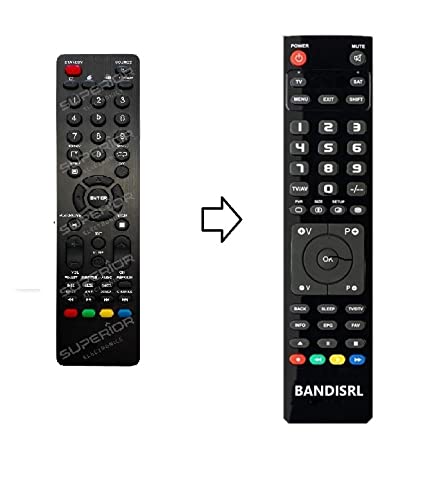
Nọmba 1: The Remote compatible remote control. This image displays the layout of the buttons and the overall design of the remote, ready for use with your Nordmende TV.
Awọn ilana Iṣiṣẹ
To operate your Nordmende ND40S3000J SMART TV with this remote control, point the remote directly at the television's infrared receiver. Ensure there are no obstructions between the remote and the TV.
- Bọtini agbara: Tẹ lati tan TV tabi pa.
- Iwọn didun Soke/Isalẹ: Ṣe atunṣe iwọn didun ohun.
- Ikanni Soke/Isalẹ: Changes TV channels sequentially.
- Awọn bọtini nọmba (0-9): Taara yan awọn ikanni TV.
- Awọn bọtini lilọ kiri (Awọn bọtini itọka, O DARA): Lilọ kiri nipasẹ awọn akojọ aṣayan ko si yan awọn aṣayan.
- Awọn bọtini TV Smart: Access specific Smart TV functions or applications (e.g., Home, Apps, Netflix, YouTube, etc., depending on the remote's layout and TV's features).
- Bọtini Mute: Ó pa ohùn tẹlifíṣọ̀n náà lẹ́nu mọ́.
- Orisun/Bọtini titẹ sii: Àwọn ibi tí a ti lè rí àwọn ohun èlò ìtẹ̀síwájú (HDMI, AV, àti bẹ́ẹ̀ bẹ́ẹ̀ lọ) ń yípo.
Refer to your Nordmende TV's original user manual for specific details on its menu structure and Smart TV functionalities.
Itoju
Ninu Iṣakoso Latọna jijin
To clean your remote control, use a soft, dry cloth. For stubborn dirt, slightly dampen the cloth with water. Do not use abrasive cleaners, alcohol, or solvents, as these can damage the remote's surface and internal components.
Batiri Rirọpo
Replace batteries when the remote control's response becomes sluggish or stops working. Always replace both batteries simultaneously with new alkaline batteries. Dispose of used batteries according to local regulations.
Ibi ipamọ
Tọju isakoṣo latọna jijin ni itura, aye gbigbẹ kuro lati orun taara ati awọn iwọn otutu to gaju. Ti a ko ba lo latọna jijin naa fun akoko ti o gbooro sii, o ni imọran lati yọ awọn batiri kuro lati yago fun jijo.
Laasigbotitusita
- Iṣakoso latọna jijin ko ṣiṣẹ:
- Ṣayẹwo boya awọn batiri ti wa ni fi sii bi o ti tọ pẹlu awọn ti o tọ polarity (+/-).
- Rọpo awọn batiri pẹlu awọn batiri alkaline tuntun.
- Rii daju pe ko si awọn idena laarin isakoṣo latọna jijin ati olugba infurarẹẹdi ti TV.
- Make sure you are pointing the remote directly at the TV.
- Rí i dájú pé TV náà ti ṣiṣẹ́.
- Some buttons are not responding:
- This remote is designed for the Nordmende ND40S3000J SMART TV. If you are using it with a different model, some advanced functions may not be compatible.
- Ensure the buttons are clean and free from debris.
- TV responds intermittently:
- Awọn batiri le jẹ kekere; ropo wọn.
- Ensure a clear line of sight to the TV's infrared sensor.
- Avoid strong light sources (like direct sunlight) that might interfere with the infrared signal.
If troubleshooting steps do not resolve the issue, please refer to the Support section.
Awọn pato
| Brand: | Remote (Manufacturer: Bandisrl) |
| Awọn ẹrọ ibaramu: | Nordmende ND40S3000J SMART Television |
| Imọ-ẹrọ Asopọmọra: | Infurarẹẹdi (IR) |
| Ẹya Pataki: | Ko si siseto ti a beere |
| Iru Batiri: | Alkaline |
| Awọn batiri To wa: | Rara |
| Àwọ̀: | Dudu |
| Nọmba Awọn bọtini: | 25 |
| Iru Adari: | Iṣakoso bọtini |
Atilẹyin ọja ati Support
Alaye atilẹyin ọja
Specific warranty details for this compatible remote control are not provided in this manual. Please refer to the purchase documentation or contact the seller/manufacturer (Bandisrl) for information regarding warranty coverage and terms.
Onibara Support
For further assistance, technical support, or inquiries regarding compatibility with other TV models, please contact the manufacturer, Bandisrl. Contact information can typically be found on the product packaging or the seller's webojula.
If you own a different TV model than the Nordmende ND40S3000J SMART, it is recommended to contact Bandisrl to confirm compatibility before purchase or use.