
Technics EAH-A800
Ìwé Ìtọ́sọ́nà Olùlò fún Ìró Ariwo Aláìlókùn EAH-A800
Ọrọ Iṣaaju
This manual provides essential instructions for the safe and effective use of your Technics EAH-A800 Wireless Noise Cancelling Over-Ear Headphones. Please read this manual thoroughly before using the product and retain it for future reference.

Image: Technics EAH-A800 Wireless Noise Cancelling Over-Ear Headphones in black, showcasing wọn aso oniru.
The Technics EAH-A800 headphones are designed to deliver high-fidelity audio with advanced noise-cancelling technology and superior call clarity. They feature multi-point connectivity for seamless switching between devices and comfortable over-ear earpads for extended wear.
Ohun ti o wa ninu Apoti
Jẹrisi pe gbogbo awọn ohun kan wa ninu package:
- Technics EAH-A800 Over-Ear Headphones
- Okun Ngba agbara USB
- Audio Cable (3.5 mm jack)
- Ọran Gbigbe Idaabobo

Image: The complete package contents, including the headphones, charging cable, audio cable, and protective case.
Ṣeto
1. Ngba agbara si awọn Agbekọri
Before first use, fully charge the headphones. Connect the USB charging cable to the headphone's charging port and a USB power source. The charging indicator will show the charging status.
2. Sisopọ Bluetooth
- Rii daju pe awọn agbekọri ti wa ni pipa.
- Tẹ bọtini agbara naa ki o si di mu titi ti ifihan LED yoo fi tan imọlẹ bulu ati pupa, ti o fihan ipo isopọmọ.
- Lori ẹrọ rẹ (foonuiyara, tabulẹti, kọmputa), mu Bluetooth ṣiṣẹ ki o wa awọn ẹrọ to wa.
- Select "Technics EAH-A800" from the list of found devices.
- Ni kete ti o sopọ, Atọka LED yoo tan buluu laiyara.
3. Technics Audio Connect App
For enhanced control and customization, download the Technics Audio Connect app from your device's app store. The app allows you to adjust sound settings, noise cancellation levels, and other features.

Image: Screenshots of the Technics Audio Connect app, illustrating its interface for sound and ambient control settings.
Awọn ilana Iṣiṣẹ
1. Agbara Tan / Paa
- To power on: Press and hold the power button until the LED indicator lights up.
- Láti pa iná: Tẹ bọtini agbara ki o si di mu titi ti ifihan LED yoo fi pa.
2. Noise Cancelling and Ambient Sound Modes
The EAH-A800 features active noise cancellation to reduce external distractions and an ambient sound mode to allow you to hear your surroundings.
- Ifagile Ariwo: Reduces environmental noise for an immersive listening experience.
- Ipo Ibaramu: Allows external sounds to be heard, useful for awareness in public spaces.
Switch between modes using the dedicated button on the headphones or through the Technics Audio Connect app.

Image: A visual representation of the noise cancelling technology in action, showing how external sounds are minimized.
3. Asopọmọra ọpọ-ojuami
The headphones can connect to more than two Bluetooth devices simultaneously, allowing for seamless audio switching. For example, you can listen to music from your laptop and instantly answer a call from your smartphone without re-pairing.

Image: A user seamlessly switching audio between a smartphone and a laptop, highlighting the multi-point connectivity feature.
4. Awọn iṣẹ ipe
The EAH-A800 headphones are equipped with 8 microphones and advanced wind noise reduction for clear voice transmission during calls. Use the integrated controls to answer, end, or reject calls.
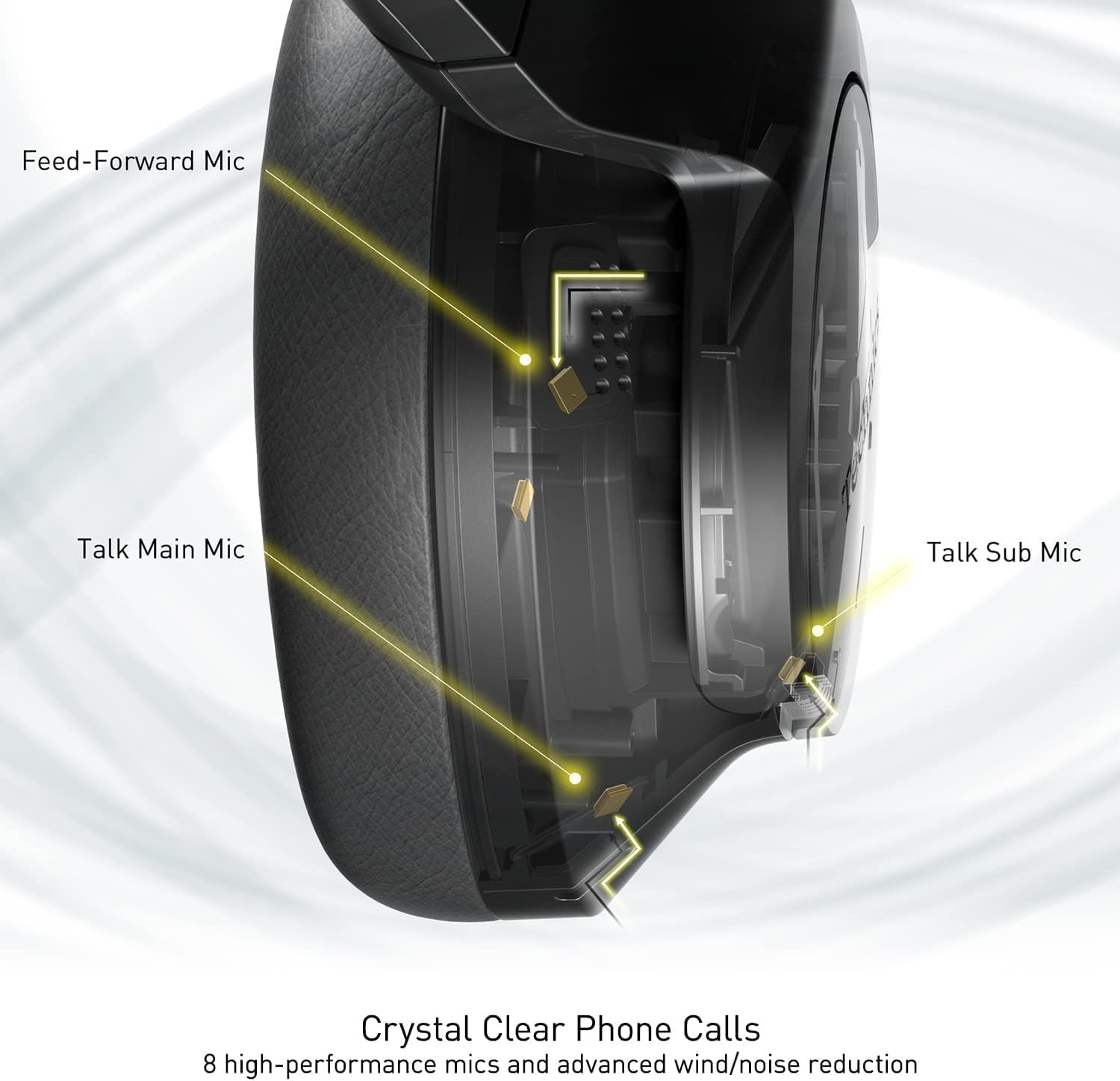
Image: An internal diagram illustrating the strategic placement of 8 microphones within the headphone for optimal call clarity.
5. Awọn iṣakoso
The headphones feature physical buttons for power, volume, and mode switching, as well as a touch-sensitive panel on one earcup for additional functions. Refer to the quick start guide for a detailed layout of controls.
6. Aye batiri ati gbigba agbara
The EAH-A800 offers up to 50 hours of playback with Active Noise Cancellation (ANC) enabled on a single charge. A quick 15-minute charge provides approximately 10 hours of playback.

Image: A graphic detailing the impressive battery life and quick charge capabilities of the headphones.
Itoju
1. Ninu
- Mu awọn agbekọri nu pẹlu asọ ti o gbẹ.
- Fún àwọn ètí, fi ọwọ́ rọra nu ún pẹ̀lú dídí díẹ̀amp asọ ati gba laaye lati gbẹ patapata ṣaaju lilo.
- Ma ṣe lo awọn kẹmika lile, awọn nkanmimu, tabi awọn afọmọ abrasive.
2. Ibi ipamọ
When not in use, store the headphones in their protective carrying case to prevent damage from dust, scratches, and impacts. Avoid exposing the headphones to extreme temperatures or humidity.
Laasigbotitusita
| Isoro | Owun to le Fa | Ojutu |
|---|---|---|
| Awọn agbekọri ko ṣiṣẹ | Batiri kekere | Gba agbara si awọn agbekọri ni kikun. |
| Ko le so pọ nipasẹ Bluetooth | Headphones not in pairing mode; Device Bluetooth off; Out of range | Ensure headphones are in pairing mode (flashing blue/red). Turn on Bluetooth on your device. Move device closer to headphones. |
| Ko si ohun tabi iwọn didun kekere | Volume too low; Incorrect audio output selected; Device not connected | Increase headphone and device volume. Check device's audio output settings. Re-establish Bluetooth connection. |
| Didara ipe ti ko dara | Microphone obstructed; Weak signal; Environmental noise | Ensure microphones are clear. Move to an area with better signal. Adjust noise cancelling settings via the app. |
| Multi-point connectivity issues | Connection conflict; Device not properly paired | Disconnect from one device and reconnect. Ensure both devices are paired correctly. |
If problems persist, consult the Technics Audio Connect app for further diagnostics or visit the official Technics support webojula.
Awọn pato
| Orukọ awoṣe | Technics EAH-A800 |
| Asopọmọra Technology | Bluetooth 5.2 |
| Idahun Igbohunsafẹfẹ | 4 Hz - 40 kHz |
| Ariwo Iṣakoso | Ti nṣiṣe lọwọ Noise Ifagile |
| Igbesi aye batiri | Up to 50 Hours (with ANC ON) |
| Akoko gbigba agbara | Approximately 3 Hours (15 min quick charge for 10 hrs playback) |
| Iwọn Nkan | 10.5 iwon (298 giramu) |
| Ohun elo | Polyurethane (PU) |
| Awọn agbekọri Jack | 3.5 mm Jack |
| Awọn ẹrọ ibaramu | Awọn foonu alagbeka, Kọǹpútà alágbèéká, Kọǹpútà alágbèéká, Awọn tabulẹti, Awọn foonu |
| Pataki Awọn ẹya ara ẹrọ | Fast Charging, Foldable, Microphone Included |
| UPC | 885170381162 |
Atilẹyin ọja ati Support
Your Technics EAH-A800 headphones are covered by a manufacturer's warranty. For specific warranty terms, registration, and support inquiries, please refer to the official Technics webojula tabi kan si wọn onibara iṣẹ.
For additional information, FAQs, and software updates, please visit the official Technics brand store or support pages: