
Ọrọ Iṣaaju
This manual provides comprehensive instructions for the safe and effective operation of your Simba Planet Fighter Robot, Model 108042509. Please read this manual thoroughly before use and retain it for future reference. This robot features infrared remote control, gesture control, light and sound effects, and a shooting function.
Alaye Aabo pataki
ÌKÌLỌ̀: Kò yẹ fún àwọn ọmọdé tí kò tó ọmọ ọdún mẹ́ta nítorí àwọn ẹ̀yà ara kékeré. Ewu gbígbóná.
- Ṣe abojuto awọn ọmọde nigbagbogbo lakoko ere.
- Do not aim the shooting mechanism at eyes or face.
- Jeki kuro lati omi ati ọrinrin.
- Do not attempt to disassemble or modify the robot or remote control.
- Rii daju pe awọn batiri ti wa ni fi sii pẹlu polarity to pe.
- Yọ awọn batiri kuro ti a ko ba lo ọja naa fun igba pipẹ.
Package Awọn akoonu
Daju pe gbogbo awọn nkan ti a ṣe akojọ rẹ si isalẹ wa ninu package rẹ:
- Simba Planet Fighter Robot (Model 108042509)
- Isakoṣo latọna jijin Iṣakoso
- USB Cable (for potential charging or data, specific function not detailed in specifications)
- Soft Darts/Arrows (for shooting function)
- Afowoyi Olumulo (iwe-ipamọ yii)

Ṣeto
1. Battery Installation (Robot)
The robot requires 3 AAA batteries (not included).
- Wa ibi ipamọ batiri naa ni ẹhin tabi isalẹ robot naa.
- Ṣí ideri yàrá batiri náà nípa lílo ẹ̀rọ screwdriver tí ó bá pọndandan.
- Insert 3 AAA batteries according to the polarity markings (+/-).
- Pa ideri batiri naa ni aabo.

2. Fifi sori batiri (Iṣakoso latọna jijin)
The remote control typically requires 2 AA batteries (not included). Please check the remote control's battery compartment for specific requirements.
- Wa yara batiri ni ẹhin isakoṣo latọna jijin.
- Ṣii ideri iyẹwu batiri naa.
- Insert the required batteries according to the polarity markings (+/-).
- Pa ideri batiri naa ni aabo.
3. Agbara Lori
After installing batteries, turn on the robot using the power switch, usually located on its back or chest. Turn on the remote control using its power switch.
Awọn ilana Iṣiṣẹ
Awọn iṣẹ iṣakoso latọna jijin
The infrared remote control allows you to command the robot's movements and actions. Ensure the remote is pointed towards the robot for optimal signal transmission.
- Awọn iṣakoso gbigbe: Use the directional buttons (Forward, Backward, Turn Left, Turn Right) to navigate the robot.
- Slide Movement: Specific buttons may allow the robot to slide forward or backward.
- Run/Dance: Activate pre-programmed running or dancing sequences.
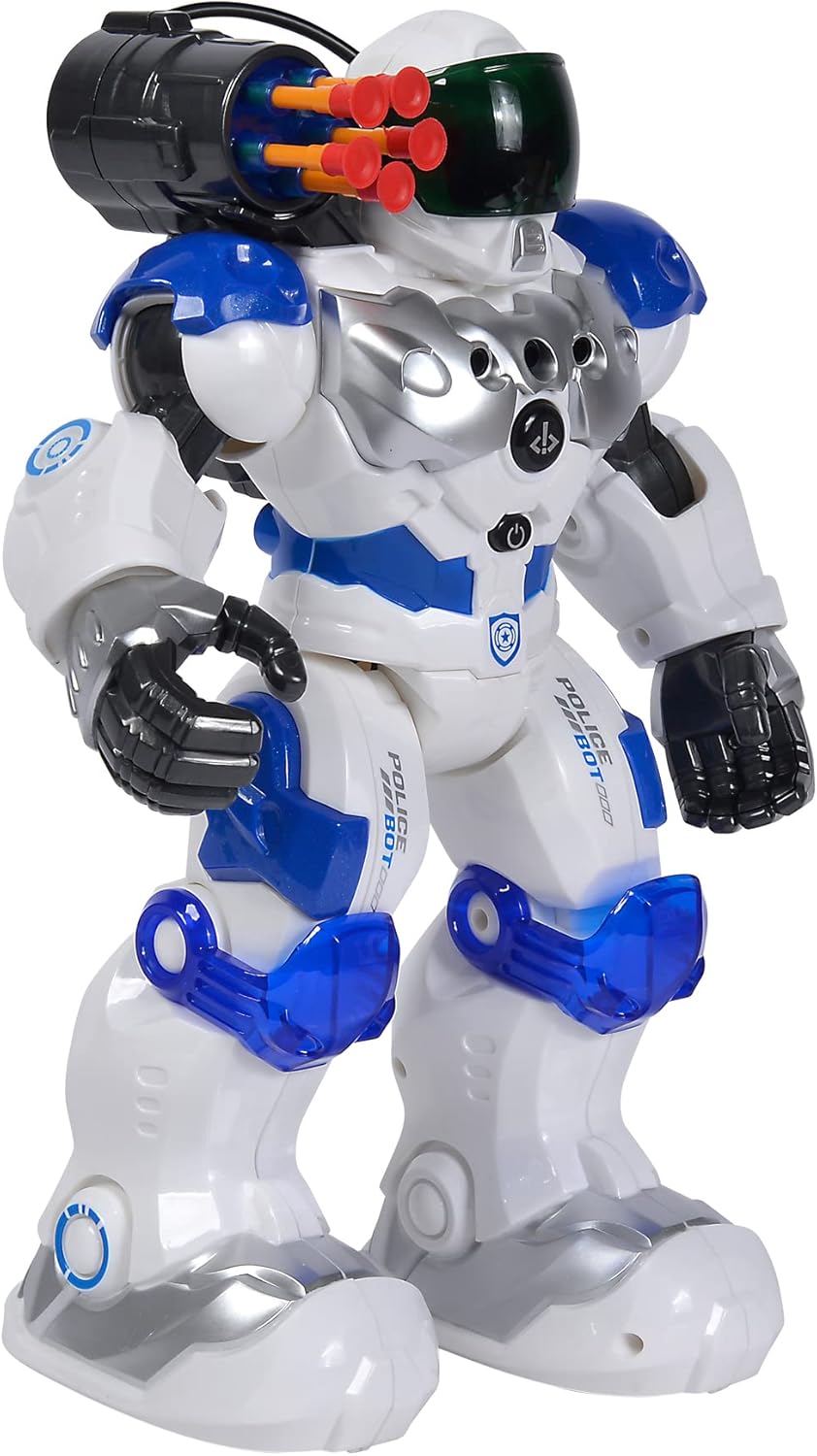
- Iṣẹ Ibon: Press the "SHOOT" button to fire the soft darts from the robot's shoulder-mounted launcher. Ensure darts are loaded correctly.
- Imọlẹ & Ohun: Buttons for activating or deactivating the robot's visor light and various sound effects.
- Iṣe Eto: Some models allow programming a sequence of movements. Refer to the remote's specific button layout for programming instructions.
- Iṣakoso iwọn didun: Ṣatunṣe iwọn didun ohun roboti.
Iṣakoso afarajuwe
The robot can respond to hand gestures. Specific sensors on the robot detect hand movements to initiate actions such as moving forward or turning. Experiment with different hand motions in front of the robot's sensors to discover its gesture-controlled responses.
Key Awọn ẹya ara ẹrọ
- Iṣakoso latọna jijin infurarẹẹdi: Full control over movement and actions.
- Iṣakoso afarajuwe: Responds to hand movements for interactive play.
- Iṣẹ Ibon: Fires soft darts from a shoulder-mounted launcher.
- Imọlẹ ati Awọn ipa Ohun: Features a light-up visor and various robotic sounds.
- Multiple Movement Modes: Capable of driving, running, and dancing.
- Ikole ti o tọ: Made from plastic, designed for active play.

Itoju
- Ninu: Wipe the robot and remote control with a soft, dry cloth. Do not use harsh chemicals or abrasive cleaners.
- Itọju Batiri: Remove batteries from both the robot and remote control if they will not be used for an extended period to prevent leakage.
- Ibi ipamọ: Store the robot and its accessories in a cool, dry place, away from direct sunlight and extreme temperatures.
Laasigbotitusita
| Isoro | Owun to le Fa | Ojutu |
|---|---|---|
| Robot ko ni tan-an. | Awọn batiri ti ku tabi ti fi sori ẹrọ ti ko tọ. | Ṣayẹwo polarity batiri ki o rọpo pẹlu awọn batiri titun. |
| Isakoṣo latọna jijin ko dahun. | Remote batteries are dead or robot is out of range/line of sight. | Replace remote batteries. Ensure remote is pointed at the robot within effective range. |
| Shooting function not working. | Darts not loaded correctly or mechanism jammed. | Ensure darts are fully inserted. Check for any obstructions in the launcher. |
| Robot moves erratically or not as expected. | Low batteries or interference. | Replace batteries. Move away from other infrared or radio-controlled devices. |
Awọn pato
| Ẹya ara ẹrọ | Ẹ̀kúnrẹ́rẹ́ |
|---|---|
| Nọmba awoṣe | 108042509 |
| Brand | Simba |
| Awọn iwọn (L x W x H) | 11 x 21 x 31.5 cm |
| Iwọn | 1.34 kg |
| Niyanju Ọjọ ori | 5 ọdun ati si oke |
| Robot Battery Type | Awọn batiri 3 x AAA (kii ṣe pẹlu) |
| Latọna jijin Iṣakoso Batiri Iru | 2 x AA batteries (not included, typical for similar remotes) |
| Ohun elo akọkọ | Ṣiṣu |
| Ọna Iṣakoso | Infrared Remote Control, Gesture Control |
| Awọn ẹya ara ẹrọ | Light, Sound, Shooting Function, Various Movement Functions |
Atilẹyin ọja ati Support
For warranty information and customer support, please refer to the documentation provided at the time of purchase or contact your retailer. Simba products are designed for quality and durability, and support is available for manufacturing defects.
For further assistance, please visit the official Simba webojula tabi kan si wọn onibara iṣẹ Eka.