
Ọrọ Iṣaaju
This manual provides essential information for setting up, operating, maintaining, and troubleshooting your Xiaomi Redmi Note 11S smartphone. Please read this guide thoroughly to ensure optimal performance and longevity of your device.
Ipariview of the Redmi Note 11S, highlighting its 108MP pro-grade main camera, 90Hz FHD+ AMOLED DotDisplay, and 33W Pro fast charging capabilities.
Ṣeto
1. Unboxing ati Ibẹrẹ Ayẹwo
Carefully unpack your Redmi Note 11S. Ensure all items are present:
- Xiaomi Redmi Akọsilẹ 11S Foonuiyara
- Ṣaja Ọkọ ayọkẹlẹ Yara
- SIM Atẹ ejector
- Ṣaja Odi
2. Fifi sori kaadi SIM
The Redmi Note 11S supports dual nano SIM cards. To install:
- Wa atẹ kaadi SIM ni ẹgbẹ ti ẹrọ naa.
- Fi SIM atẹ ejector ọpa sinu kekere iho tókàn si awọn atẹ ki o si tẹ rọra titi ti atẹ yoo jade.
- Fi kaadi SIM nano rẹ sinu awọn iho ti a yan lori atẹ naa. Rii daju pe awọn ifọwọkan goolu naa kọju si isalẹ.
- Fi iṣọra tun fi atẹ sii sinu foonu naa.
3. Gbigba agbara akọkọ ati Agbara Tan
Before first use, it is recommended to fully charge your device. Connect the wall charger to the phone and a power outlet. The Redmi Note 11S supports 33W Pro fast charging for quick recharging of its 5000mAh battery.

Illustration of the 33W Pro fast charging feature for the 5000mAh battery, showing charging efficiency and estimated usage times for video, calling, and music.
To power on, press and hold the power button located on the side of the device until the Xiaomi logo appears.
Awọn ilana Iṣiṣẹ
1. Ipilẹ Lilọ kiri
The Redmi Note 11S features a responsive touchscreen. Use gestures such as tap, swipe, pinch, and spread to navigate the MIUI 12 operating system. The power button controls screen on/off and device power, while the volume buttons adjust audio levels.
2. Ifihan Awọn ẹya ara ẹrọ
Your device is equipped with a 6.43-inch FHD+ AMOLED DotDisplay with a 90Hz high refresh rate for smooth visuals. It also includes Sunlight Display for readability in bright conditions and Reading Mode 3.0 to reduce eye strain.

The 6.43-inch FHD+ AMOLED DotDisplay of the Redmi Note 11S, emphasizing its 90Hz high refresh rate for a responsive touchscreen experience.
3. Eto kamẹra
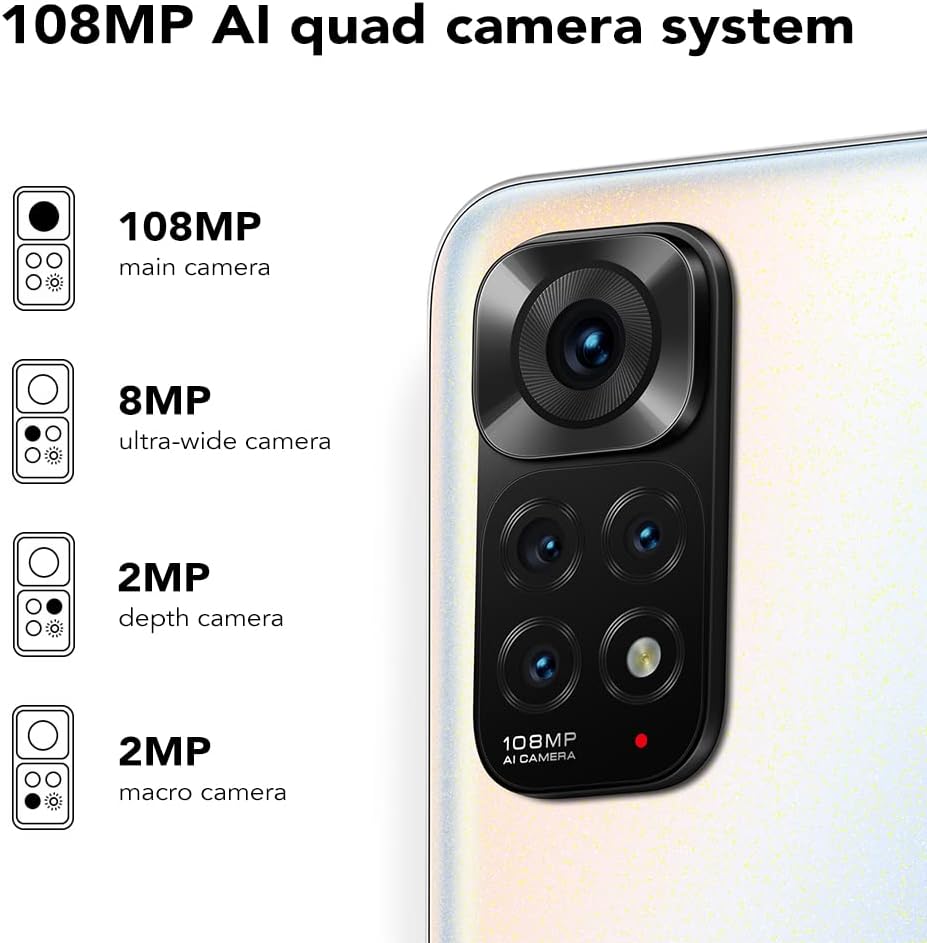
The Redmi Note 11S features a 108MP AI quad camera system on the rear and a 16MP selfie camera. The rear camera setup includes:
- 108MP Kamẹra akọkọ
- 8MP Kámẹ́rà tó gbòòrò gan-an
- 2MP Kamẹra Makiro
- 2MP Kamẹra Ijinle
Open the Camera application to access various modes such as Photo, Video, Portrait, Night Mode, and more.

Alaye view of the 108MP AI quad camera system on the Redmi Note 11S, featuring a 108MP main camera, 8MP ultra-wide camera, 2MP depth camera, and 2MP macro camera.
4. Ibi ipamọ ati Performance
The device comes with 128GB of internal storage, expandable up to 1TB via a microSD card (sold separately). It is powered by the MediaTek Helio G96 processor, ensuring smooth performance for daily tasks and gaming.
5. Asopọmọra
The Redmi Note 11S supports 4G cellular networks, Wi-Fi, and GPS for navigation and location services.
Itoju
1. Ninu Rẹ Device
Lo asọ rirọ, ti ko ni lint lati nu iboju ati ara foonu rẹ mọ. Yago fun lilo awọn kẹmika lile tabi awọn ohun elo abrasive. Ma ṣe fi ẹrọ naa han si ọrinrin pupọ.
2. Software imudojuiwọn
Ṣayẹwo nigbagbogbo fun ati fi awọn imudojuiwọn sọfitiwia sori ẹrọ lati rii daju pe ẹrọ rẹ ni awọn ẹya tuntun, awọn abulẹ aabo, ati awọn ilọsiwaju iṣẹ. Lilö kiri si Ètò > Nípa fóònù > Ẹ̀yà MIUI lati ṣayẹwo fun awọn imudojuiwọn.
3. Itọju batiri
Lati pẹ igbesi aye batiri:
- Yago fun awọn iwọn otutu to gaju.
- Ma ṣe jẹ ki batiri naa ṣan patapata nigbagbogbo.
- Use the original charger provided with the device.
4. Gbigbọn ooru
The Redmi Note 11S incorporates LiquidCool technology with multiple layers of graphite and copper foil for efficient heat dissipation. Ensure proper airflow around the device during heavy usage to prevent overheating.

Ohun ti abẹnu view illustrating the multi-dimensional heat dissipation system using LiquidCool technology, which incorporates multiple layers of graphite and copper foil for efficient cooling.
Laasigbotitusita
This section addresses common issues you might encounter with your Redmi Note 11S.
Ẹrọ Ko Titan
- Ensure the battery is charged. Connect the device to the charger for at least 30 minutes.
- Tẹ bọtini agbara ki o si dimu fun awọn aaya 10-15 lati ṣe atunbere ti a fi agbara mu.
Apps Freezing or Crashing
- Ti ohun elo iṣoro naa pa ki o tun ṣii rẹ.
- Pa cache ati data ti app naa mọ nipasẹ Settings > Apps > Manage apps > [App Name] > Clear data.
- Rí i dájú pé àwọn àpù àti ẹ̀rọ ìṣiṣẹ́ rẹ wà ní àkókò tuntun.
Igbesi aye batiri ti ko dara
- Adjust screen brightness and reduce screen timeout.
- Disable unused features like Wi-Fi, Bluetooth, or GPS when not needed.
- Identify and close power-consuming apps running in the background.
Awọn ọrọ Asopọmọra Nẹtiwọọki
- Tun ẹrọ rẹ bẹrẹ.
- Ṣayẹwo boya o ti fi kaadi SIM rẹ sii daradara.
- Reset network settings via Settings > Connection & sharing > Reset Wi-Fi, mobile networks and Bluetooth.
Awọn pato
The following table outlines the key specifications for the Xiaomi Redmi Note 11S (Model: 2201117SY).
| Ẹya ara ẹrọ | Sipesifikesonu |
|---|---|
| Orukọ awoṣe | NOTE 11s |
| Nọmba Awoṣe Nkan | Ọdun 2201117SY |
| Brand | XIAOMI |
| Eto isesise | MIUI 12 |
| Iwon iboju | 6.43 inches |
| Ifihan Iru | FHD+ AMOLED DotDisplay, 90Hz Refresh Rate |
| Kamẹra ẹhin | 108MP Main, 8MP Ultra-wide, 2MP Macro, 2MP Depth |
| Kamẹra iwaju | 16MP |
| Àgbo | 6 GB |
| Agbara Ibi ipamọ Iranti | 128 GB (A le fẹ̀ sí i títí dé 1TB) |
| Agbara Batiri | 5000 Milionuampwakati ere (mAh) |
| Gbigba agbara | 33W Pro Fast Charging (58 minutes for full charge) |
| Cellular Technology | 4G |
| Alailowaya ti ngbe | Ṣiṣi silẹ fun Gbogbo Awọn Olukọni |
| Awọn ọna ẹrọ Asopọmọra | Wi-Fi, Alagbeka |
| Pataki Awọn ẹya ara ẹrọ | Dual SIM, GPS, Smartphone |
| Ọja Mefa | 2.9 x 0.32 x 6.29 inches |
| Iwọn Nkan | 6.3 iwon (179 Giramu) |
| Àwọ̀ | Pearl White |

The aesthetic flat-frame design of the Redmi Note 11S, highlighting its slim profile (8.09mm thickness) and light weight (179g) for a comfortable grip.
Alaye atilẹyin ọja
Specific warranty terms and conditions for the Xiaomi Redmi Note 11S may vary by region and retailer. Please refer to the warranty card included with your product packaging or visit the official Xiaomi website for detailed warranty information applicable to your purchase. Retain your proof of purchase for warranty claims.
Atilẹyin
For further assistance, technical support, or service inquiries regarding your Xiaomi Redmi Note 11S, please visit the official Xiaomi support website or contact their customer service. You can typically find contact information and FAQs on the manufacturer's official webojula.