
Ọja Pariview
The DIZO Watch 2 Sports Smart Watch (Model DW2121) is a versatile fitness tracker designed for Android and iOS phones. It features a 1.69-inch HD full touchscreen, comprehensive health monitoring capabilities including heart rate and blood oxygen, sleep tracking, and support for over 110 sports modes. The watch is 5ATM waterproof and offers extended battery life.
Eto ati Lilo akọkọ
Unboxing and First Charge
Upon unboxing your DIZO Watch 2 Sports, it is recommended to fully charge the device before its first use. Connect the magnetic charging cable to the charging points on the back of the watch and plug the USB end into a compatible power adapter (not included).

Image: The DIZO Watch 2 Sports Smart Watch connected to its magnetic charging cable, displaying a 100% charge indicator. The watch is pink with a rose gold frame.
The watch typically takes approximately 2 hours to fully charge. A full charge provides up to 10 days of working time with automatic heart rate monitoring and up to 30 days of standby time.
Fifi sori App ati Sisopọ
To unlock the full potential of your DIZO Watch 2 Sports, download and install the official "DIZO" application on your smartphone. The app is available on both the App Store (for iOS devices) and Google Play (for Android devices).
- Ṣe igbasilẹ ohun elo naa: Wa fun "DIZO" in your phone's app store and install it. Alternatively, you can scan the QR code provided in the physical user manual to directly access the app download page.
- Mu Bluetooth ṣiṣẹ: Rii daju pe Bluetooth ti ṣiṣẹ lori foonuiyara rẹ.
- So Ẹrọ naa pọ: Open the DIZO app and follow the on-screen instructions to pair your DIZO Watch 2 Sports with your phone. The app will guide you through the pairing process.
Video: Guide to downloading the DIZO app and pairing the smartwatch with a smartphone.
Awọn ilana Iṣiṣẹ
Lilọ kiri iboju
The DIZO Watch 2 Sports features a 1.69-inch HD full touchscreen for intuitive navigation.
- Ra si isalẹ: From the home screen, swipe down to access the notification list interface.
- Ra soke: From the home screen, swipe up to enter the main menu, which includes various features like activity data, heart rate, SpO2, sleep, workout, alarm, and weather.
- Ra si osi: Lati iboju ile, ra sosi si view quick access data such as steps, sleep, and heart rate.
- Ra Ọtun: From the home screen, swipe right to enter the shortcut interface, providing quick access to common settings and functions.
- Tẹ Bọtini ẹgbẹ: Press the physical button on the side to return to the home screen or wake the display.
Video: Demonstrating screen navigation and power off function on the DIZO Watch 2 Sports.
Abojuto Ilera
The DIZO Watch 2 Sports is equipped with advanced sensors for continuous health tracking.
- Atẹle Oṣuwọn ọkan: The watch features a real-time heart rate monitor. You can enable 24-hour heart rate detection through the DIZO app for continuous tracking.
- Atẹgun ẹjẹ (SpO2) Atẹle: Monitor your blood oxygen levels directly from your wrist.
- Atẹle oorun: Automatic sleep tracking analyzes your sleep data, including deep sleep, light sleep, and awake times, to help you understand your sleep patterns.
- Àtòjọ iṣẹ́: Ṣe àtòjọ àwọn ìgbésẹ̀, ìjìnnà, àti àwọn kalori tí a jó ní gbogbo ọjọ́.

Image: The DIZO Watch 2 Sports displaying heart rate data (75 bpm average) and a graph, alongside a visual representation of sleep tracking showing deep, light, and awake sleep durations.
Sports Modes and GPS Tracking
The watch supports over 110 sports modes to accurately track your workouts. Connect to your phone's GPS via the DIZO app to record activity routes and get detailed workout statistics.

Image: The DIZO Watch 2 Sports showing various sports mode icons, including running, cycling, and yoga, with a smartphone screen displaying GPS tracking for an outdoor run.
Àwọn Ìfitónilétí àti Àwọn Ẹ̀yà Ọlọ́gbọ́n
Duro si asopọ pẹlu ipe ati awọn iwifunni ifiranṣẹ taara lori ọwọ rẹ.
- Call & Message Notifications: After connecting to Bluetooth, the watch will vibrate to alert you of incoming calls and messages from various apps like Facebook, LinkedIn, Instagram, Twitter, WhatsApp, and Line. Note: You cannot reply to messages directly from the watch.
- Iṣakoso Orin: Control your smartphone's music player directly from the watch.
- Iṣakoso kamẹra: Lo aago naa bi olutọpa latọna jijin fun kamẹra foonu rẹ.
- Àfojúsùn ojú ọjọ: View local weather information.
- Awọn olurannileti: Set up alarm clocks, drinking water reminders, sedentary reminders, and menstrual cycle reminders.
- Wa Foonu: Locate your paired smartphone using the watch.
- Atunse Imọlẹ: Five levels of brightness options ensure readability in various lighting conditions.

Image: A DIZO Watch 2 Sports on a wrist, displaying a notification icon, with various social media and messaging app logos floating around it, indicating smart notification capabilities.
Isọdi
Personalize your watch with a wide range of watch faces and interchangeable bands.
- Awọn oju iṣọ: Choose from over 150 stylish watch faces available through the DIZO app. You can also customize the dial with your favorite pictures.
- Detachable Bands: The watch features detachable bands, allowing you to easily switch them to match your style.
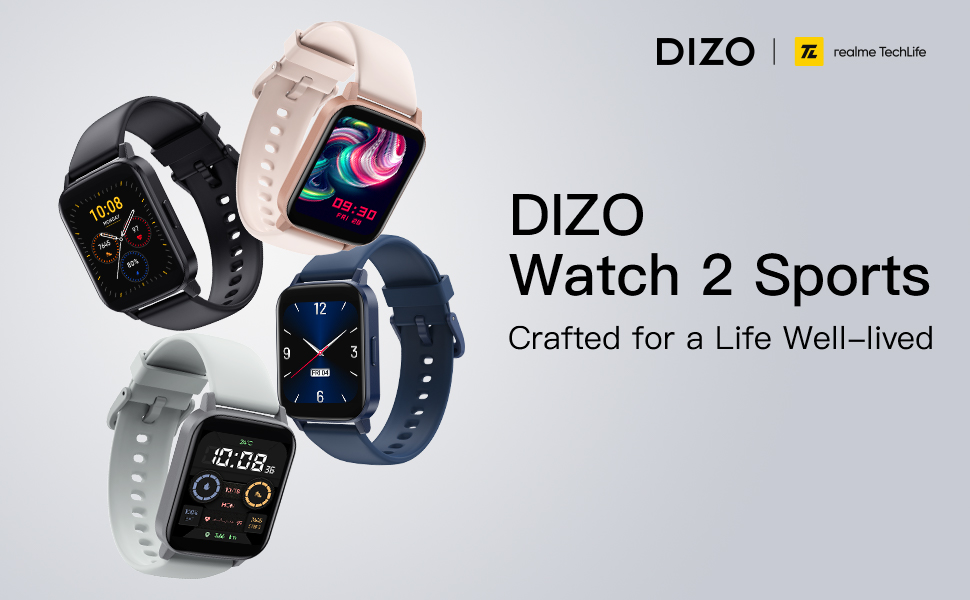
Image: A DIZO Watch 2 Sports displaying a custom watch face with a yellow cat-like character, alongside a smartphone screen showing options for customizing the watch dial, including text color, background picture, and time location.
Itọju ati Itọju
Omi Resistance
The DIZO Watch 2 Sports has a 5ATM waterproof rating, meaning it can withstand pressures equivalent to a depth of 50 meters. This makes it suitable for swimming and showering. However, it is not recommended for diving or high-pressure water activities.
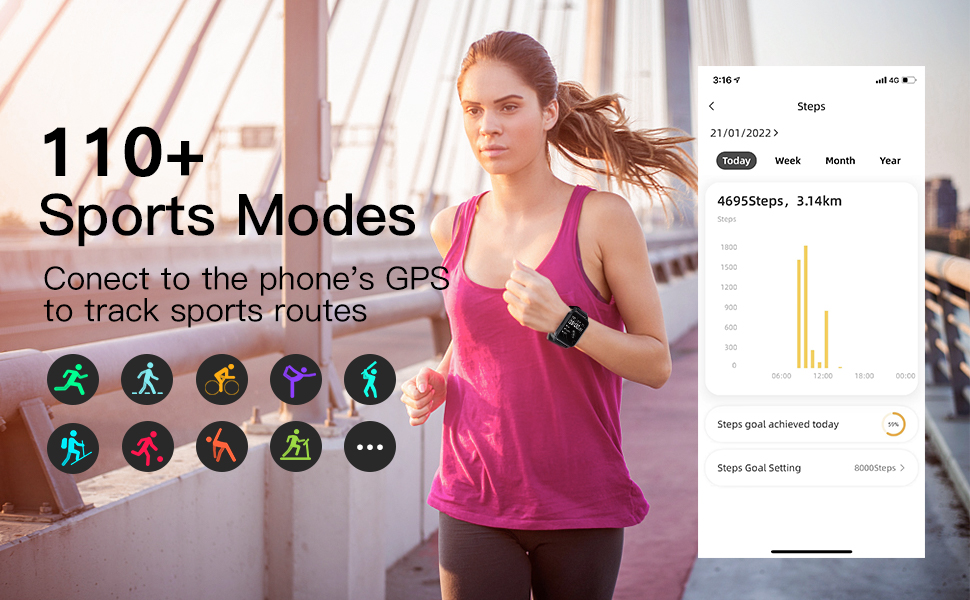
Image: A DIZO Watch 2 Sports being worn on a wrist underwater, with text indicating "5ATM (164 ft./50 meters) Waterproof".
Ninu
To maintain the watch's performance and appearance, regularly clean the device and its strap. Use a soft, damp aṣọ láti nu ibojú àti okùn rẹ̀. Yẹra fún lílo àwọn kẹ́míkà líle tàbí àwọn ohun èlò ìpalára.
Awọn pato
| Ẹya ara ẹrọ | Ẹ̀kúnrẹ́rẹ́ |
|---|---|
| Nọmba awoṣe | DW2121 |
| Iwon iboju | 1.69 inches |
| Ifihan Iru | TFT HD Full Touch Screen |
| Ipinnu | 240*280 |
| Mabomire Rating | 5ATM (50 mita) |
| Agbara Batiri | 280mAh |
| Akoko gbigba agbara | O fẹrẹ to awọn wakati 2 |
| Igbesi aye batiri (Lilo Aṣoju) | Titi di ọjọ mẹwa 10 |
| Akoko Iduro | Titi di ọjọ mẹwa 30 |
| Asopọmọra | Bluetooth 5.0, GPS (via phone) |
| Ibamu | Android 5.0 ati loke, iOS 9.0 ati loke |
| Abojuto Ilera | Ìwọ̀n Ọkàn, Atẹ́gùn Ẹ̀jẹ̀, Ìtọ́pinpin Oòrùn |
| Awọn ipo ere idaraya | 110+ |
| Iwọn Nkan | 4.2 iwon |
| Package Mefa | 6.26 x 3.86 x 1.26 inches |
Laasigbotitusita
- Wo ti ko tan: Rí i dájú pé aago náà ti gba agbára tán pátápátá. So ó mọ́ ẹ̀rọ amúṣẹ́yá fún o kere tán ìṣẹ́jú mẹ́wàá kí o tó gbìyànjú láti tan an.
- Ko le so pọ pẹlu foonu:
- Rii daju pe Bluetooth ti ṣiṣẹ lori foonu rẹ.
- Make sure the DIZO app is installed and open.
- Bring the watch close to your phone during the pairing process.
- Tun foonu rẹ ati aago bẹrẹ mejeeji.
- Check if the watch is already paired with another device. If so, unpair it first.
- Awọn iwifunni ko han:
- Verify that the watch is successfully paired with your phone via Bluetooth.
- Check notification settings within the DIZO app to ensure app notifications are enabled.
- Ensure your phone's notification settings allow the DIZO app to send notifications.
- Má ṣe yọ ipò "Má ṣe yọ ara rẹ lẹ́nu" lórí aago àti fóònù rẹ.
- Awọn alaye ilera ti ko pe:
- Rii daju pe aago naa ti wọ snugly lori ọwọ ọwọ rẹ, kii ṣe ju tabi alaimuṣinṣin pupọ.
- Mọ sensọ lori ẹhin aago nigbagbogbo.
- Avoid excessive movement during measurements for more accurate readings.
- Igbesi aye batiri kukuru:
- Din imọlẹ iboju din.
- Dín iye àwọn ohun èlò tí wọ́n ń fi ìfitónilétí ránṣẹ́ sí aago kù.
- Dá ìṣàyẹ̀wò ìlù ọkàn dúró nígbà gbogbo tí kò bá pọndandan ní gbogbo ìgbà.
- Rii daju pe aago naa ti gba agbara ni kikun ni igba kọọkan.
Atilẹyin ọja ati Support
For warranty information and customer support, please refer to the official DIZO webojula tabi kan si wọn onibara iṣẹ taara. Tọju iwe-ẹri rira rẹ bi ẹri rira fun awọn iṣeduro atilẹyin ọja.