
GOOLOO GP2000 & S4
GOOLOO GP2000 Jump Starter & S4 Battery Charger User Manual
Comprehensive Guide for Safe and Effective Operation
1. Ifihan
This manual provides detailed instructions for the safe and effective use of your GOOLOO GP2000 Jump Starter and GOOLOO S4 4Amp Car Battery Charger. Please read this manual thoroughly before operation to ensure proper usage and to prevent damage to the devices or injury.
The GOOLOO GP2000 is a powerful portable jump starter designed to start vehicles with up to 9.0L gas or 7.0L diesel engines. The GOOLOO S4 is an all-weather battery charger, maintainer, and desulfator compatible with various 6V and 12V lead-acid batteries, as well as 12V LiFePO4 batteries.
2. Alaye Aabo pataki
Always observe the following safety precautions to avoid electric shock, explosion, fire, or injury.
- Ka gbogbo awọn ilana ṣaaju lilo ọja naa.
- Do not expose the devices to rain or wet conditions.
- Do not operate the devices if they have been dropped or damaged.
- Jeki kuro ni arọwọto awọn ọmọde.
- Rii daju pe fentilesonu to dara lakoko iṣẹ.
- Wear eye protection when working with batteries.
- The GP2000 is for jump-starting vehicles only; do not use it as a battery charger.
- The S4 is a battery charger/maintainer; it is not a jump starter.
3. Package Awọn akoonu
Daju pe gbogbo awọn nkan wa ninu apo rẹ:
- GOOLOO GP2000 Jump Starter
- GOOLOO S4 4Amp Ṣaja Batiri ọkọ ayọkẹlẹ
- Heavy-duty Jumper Clamps (for GP2000)
- AC Power Cord (for S4)
- Afowoyi Olumulo (iwe-ipamọ yii)
- USB Charging Cable (for GP2000)

Image: The GOOLOO GP2000 Jump Starter and GOOLOO S4 Battery Charger, showing both units side-by-side. The GP2000 is on the right, a black and red rectangular device with power indicator lights. The S4 is on the left, a black and red unit with a digital display and attached power cord.
4. Eto ati Gbigba agbara akọkọ
4.1. GOOLOO GP2000 Jump Starter
Before first use, fully charge the GP2000. Connect the provided USB charging cable to the Type-C input port on the jump starter and plug the other end into a USB power adapter (not included). The LED indicator lights will show the charging progress.

Aworan: A alaye view of the GOOLOO GP2000 Jump Starter, highlighting its various ports and features. Labels indicate the 12V Car Jump Start port, LED indicator, power button, In/Out Type-C port, USB outputs (5V/2.1A, 5V/9V/12V), LED light, and 15V/10A output.
4.2. GOOLOO S4 Battery Charger
The S4 charger does not require initial charging. Simply connect it to a power outlet using the AC power cord. Ensure the battery to be charged is clean and free of corrosion.

Image: The GOOLOO S4 Battery Charger displayed with its included accessories: the AC power plug, battery clamps (red and black), and a ring terminal connector. The S4 unit itself features a digital display and a robust red and black casing.
5. Awọn ilana Iṣiṣẹ
5.1. Using the GOOLOO GP2000 Jump Starter
- Ensure the GP2000 is sufficiently charged (at least 3 LED indicators).
- Connect the blue end of the jumper cable to the 12V jump start port on the GP2000.
- So pupa clamp si ebute rere (+) ti batiri ọkọ ati dudu clamp si ebute odi (-).
- Bẹrẹ ọkọ ayọkẹlẹ naa.
- Ni kete ti ọkọ ayọkẹlẹ ba bẹrẹ, yọ cl naa kuro lẹsẹkẹsẹamps from the battery, then disconnect the jumper cable from the GP2000.

Image: The GOOLOO GP2000 Jump Starter with its heavy-duty jumper clamps attached. The black and red unit is shown with the red and black clamps connected to its side port, ready for use.

Image: A visual representation of the GOOLOO GP2000 Jump Starter being used to start a vehicle. The device is shown connected to a car battery under the hood, emphasizing its role as an emergency jump starter for various vehicle types.

Image: A person holding the GOOLOO GP2000 Jump Starter, demonstrating its built-in LED flashlight feature. The flashlight illuminates an engine bay, showing its utility in low-light conditions with stable, strobe, and SOS modes.
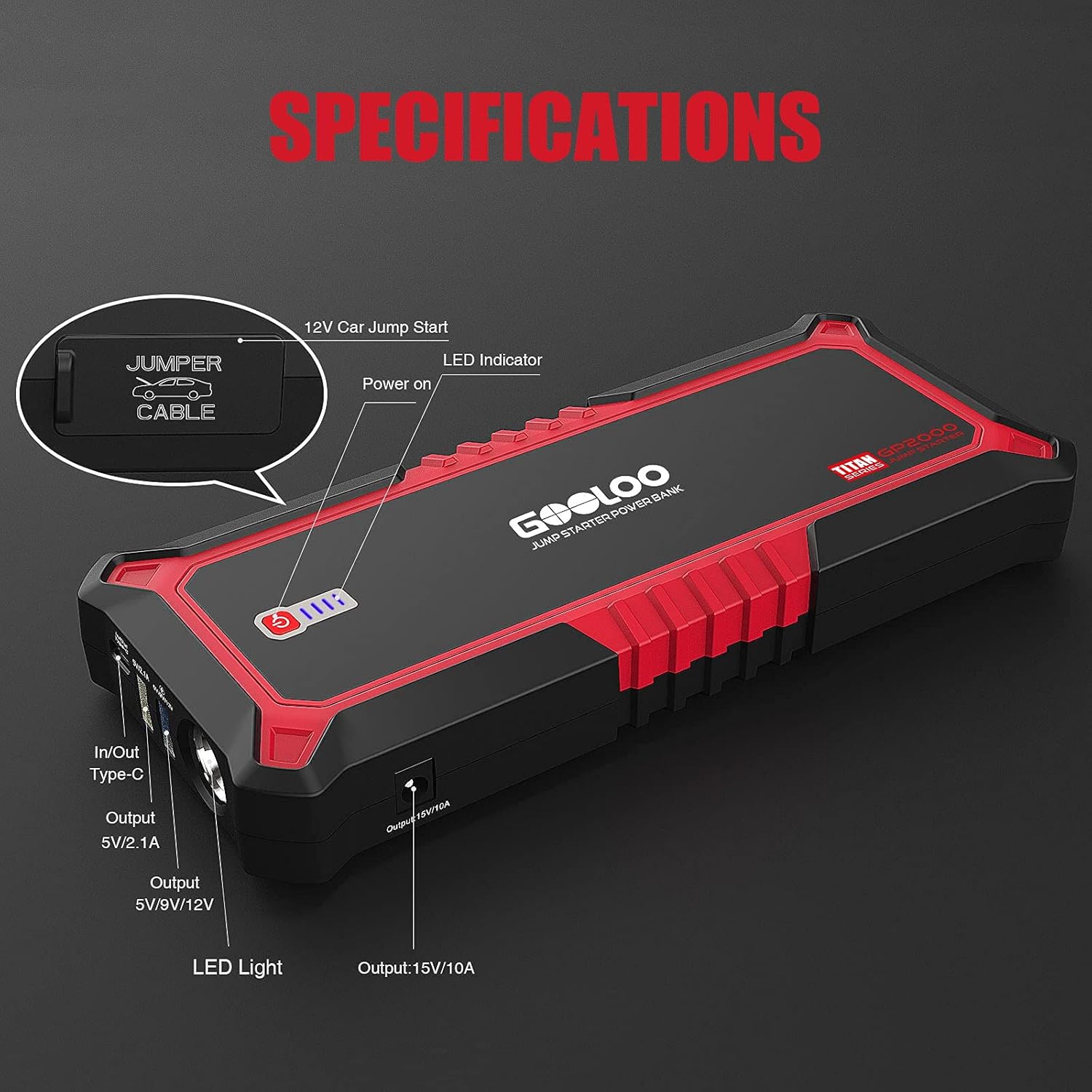
Image: The GOOLOO GP2000 Jump Starter functioning as a portable power supply, charging a smartphone and a tablet simultaneously. This image highlights its versatility beyond jump-starting, providing power for various portable devices.
5.2. Using the GOOLOO S4 Battery Charger
- Connect the S4's battery clamps to the battery terminals: red to positive (+), black to negative (-).
- Plug the S4 into a standard 100-120VAC 50-60Hz power outlet.
- The S4 will automatically detect the battery type and voltage (6V tabi 12V) ki o si bẹrẹ ilana gbigba agbara.
- Use the "MODE" button to select specific charging modes if needed (e.g., 12V STD, 12V AGM/C, 12V GEL, 12V LFP, 6V STD).
- The display will show charging status and battery voltage.
- Once charging is complete, the S4 will switch to maintenance mode. Disconnect the power, then the clamps lati batiri.

Image: The GOOLOO S4 Battery Charger actively charging a car battery. The charger's display shows charging information, and its clamps are securely connected to the battery terminals, illustrating the charging process.

Image: An illustration highlighting the GOOLOO S4 Battery Charger's intelligent features: automatic detection of sulfation and acid stratification, automatic repair of battery damage, and simple plug-and-play auto-charge functionality. The S4 is shown connected to a battery.
6. Itọju
- Ninu: Fi aṣọ gbígbẹ tí ó rọ, nu àwọn ẹ̀rọ náà. Má ṣe lo àwọn ohun ìfọṣọ tàbí àwọn ohun èlò ìfọṣọ.
- Ibi ipamọ: Store the GP2000 and S4 in a cool, dry place when not in use.
- GP2000 Battery Maintenance: Recharge the GP2000 every 3-6 months, even if not used, to maintain battery health.
- S4 Cable Inspection: Regularly inspect the S4's cables and clamps for any signs of damage or wear.
7. Laasigbotitusita
| Isoro | Owun to le Fa | Ojutu |
|---|---|---|
| GP2000 not turning on/charging. | Batiri kekere; okùn gbigba agbara/adapta ti ko ni abawọn. | Charge the unit; try a different USB cable or adapter. |
| GP2000 not jump-starting vehicle. | Insufficient charge; incorrect clamp connection; battery too dead. | Ensure full charge; check polarity (+ to +, - to -); vehicle battery may be beyond jump-start capability. |
| S4 not charging battery. | Incorrect connection; battery severely discharged/damaged; power outlet issue. | Daju pe clamp polarity; battery may be unrecoverable; check power outlet. |
| S4 display shows error code. | Refer to specific error codes in the full manual (if available). | Consult GOOLOO support or the detailed product manual for specific error code meanings and solutions. |
8. Awọn pato
GOOLOO GP2000 Jump Starter
- Tente oke Lọwọlọwọ: 2000A
- Ibamu Enjini: Déésì tó 9.0L, Díséẹ̀lì 7.0L
- USB Output 1 (Type-C): 5V/2.1A (In/Out)
- USB Output 2 (Quick Charge): 5V/9V/12V
- Okun USB 3: 5V/2.4A
- DC Iṣelọpọ: 15V/10A
- Awọn ẹya ara ẹrọ ti a ṣe sinu: LED Flashlight (Stable, Strobe, SOS)
GOOLOO S4 4Amp Ṣaja Batiri ọkọ ayọkẹlẹ
- Iṣawọle: 100-120VAC 50-60Hz
- Abajade: 12V/4A, 6V/2A
- Awọn oriṣi Batiri: 6V & 12V Lead-Acid (WET, SLA, GEL, AGM, FLOODED, VRLA), 12V LiFePO4
- Charging Program: 10-stage laifọwọyi gbigba agbara
- Awọn iṣẹ: Charger, Maintainer, Desulfator
9. Atilẹyin ọja ati Support
GOOLOO products come with a standard manufacturer's warranty. For specific warranty terms and conditions, please refer to the warranty card included with your product or visit the official GOOLOO webojula.
For technical support, troubleshooting assistance, or warranty claims, please contact GOOLOO customer service:
- Webojula: www.gooloo.com
- Imeeli: Tọkasi apoti ọja rẹ tabi webojú-òpó wẹ́ẹ̀bù fún ìfiranṣẹ́ ìrànlọ́wọ́.
- Itaja Amazon: GOOLOO Official Amazon Store
Ask a question about this manual
Ask about setup, troubleshooting, compatibility, parts, safety, or missing instructions. Manuals+ will review the question and use this page’s manual context to help answer it.