
1. Ifihan
Thank you for choosing the Devoko Ergonomic Gaming Chair, model OCRC8900. This manual provides detailed instructions for the assembly, operation, and maintenance of your new chair. Please read this manual carefully before assembly and use to ensure proper function and longevity of the product.
The Devoko OCRC8900 is designed to provide comfort and support during extended periods of sitting, whether for gaming, work, or relaxation. Its ergonomic design includes multi-point support, an adjustable headrest, and lumbar cushion to conform to your spine.

Aworan 1.1: Iwaju view of the Devoko Ergonomic Gaming Chair OCRC8900 in black.
2. Alaye Aabo
- Nigbagbogbo tẹle awọn ilana apejọ ni pẹkipẹki.
- Ensure all screws and bolts are securely tightened before using the chair. Periodically check and re-tighten if necessary.
- Maṣe duro lori alaga tabi lo bi otita igbesẹ kan.
- Maṣe kọja agbara iwuwo ti o pọju ti 130 kg (286 lbs).
- Keep children away from moving parts during assembly and adjustment.
- Lo alaga lori alapin, dada iduroṣinṣin.
3. Package Awọn akoonu
Please check the package contents against the list below. If any parts are missing or damaged, please contact customer support.
- 1 x Devoko Ergonomic Gaming Chair (disassembled)
- 1 x Assembly Tool Kit (includes Allen wrench and screws)
- 1 x Itọsọna olumulo (iwe yii)
4. Apejọ Awọn ilana
Follow these steps to assemble your Devoko Ergonomic Gaming Chair. It is recommended to assemble the chair on a soft, clean surface to prevent damage.
- So Casters si Ipilẹ: Insert the five casters into the holes at the end of each leg of the chair base. Push firmly until they click into place.
- Fi Gas Gbe soke: Place the gas lift cylinder into the center hole of the assembled chair base. Ensure it is seated securely.
- Eto Ijoko Kojọpọ: So ẹ̀rọ ìjókòó mọ́ ìsàlẹ̀ ìrọ̀rí ìjókòó náà nípa lílo àwọn skru tí a pèsè. Rí i dájú pé iwájú ẹ̀rọ náà dojúkọ iwájú ìjókòó náà.
- So Armrests: Secure the armrests to the sides of the seat cushion using the designated screws. Do not fully tighten yet.
- So Backrest si Ijoko: Align the backrest with the seat cushion's metal brackets. Secure them together using the remaining screws. Once aligned, tighten all screws for the armrests and backrest firmly. Ensure all screws are aligned with their holes before tightening.
- Ibi Apejọ Ijoko sori Gas Gbe: Carefully place the assembled seat and backrest onto the gas lift cylinder, ensuring the center hole of the seat mechanism aligns with the top of the gas lift.
- Attach Headrest and Lumbar Cushions: Position the headrest cushion and lumbar support cushion as desired. These are typically secured with straps.

Image 4.1: Diagram illustrating key dimensions and components for assembly.

Image 4.2: Detail of the gas lift cylinder, a key component for height adjustment.
5. Awọn ilana Iṣiṣẹ
Your Devoko Ergonomic Gaming Chair offers several adjustable features to customize your seating experience.
5.1. Ijoko Giga tolesese
To adjust the seat height, locate the lever on the right side beneath the seat. While seated, pull the lever up to lower the seat. To raise the seat, stand up slightly and pull the lever up. Release the lever to lock the height in place. The gas lift allows for a height adjustment range of 33-43 cm.
5.2. Backrest Recline Adjustment
The backrest can be reclined between 90° and 150°. To recline, pull the recline lever (typically located on the right side, near the height adjustment lever) and lean back to your desired angle. Release the lever to lock the backrest in position. To return to an upright position, pull the lever and lean forward.

Image 5.1: Illustration of the chair's recline angles (90°, 120°, 150°) and height adjustment mechanism.
5.3. Armrest Atunṣe
The armrests are adjustable. Locate the buttons or levers on the side of the armrests to adjust their height. Adjust them to a comfortable position that supports your arms and shoulders.

Image 5.2: Detail showing the adjustable armrests and the tilt lock mechanism.
5.4. Lumbar ati Headrest Cushions
The chair includes a removable headrest pillow and lumbar support cushion. Adjust their position along the backrest to find the most comfortable and supportive placement for your neck and lower back.

Image 5.3: Ergonomic design highlighting multi-point support for the spine.
5.5. Swivel Išė
The chair features a 360-degree swivel function, allowing for easy rotation and access to your workspace without needing to move the entire chair.
6. Itọju
- Ninu: Mu ese alaga nu pẹlu asọ, damp cloth. For tougher stains, use a mild soap solution and then wipe with a clean, damp asọ. Yẹra fun awọn kẹmika lile tabi awọn olutọpa abrasive.
- Awọn Casters: Lẹẹkọọkan ṣayẹwo awọn casters fun irun tabi idoti ti o le ṣe idiwọ gbigbe dan. Mọ bi o ti nilo.
- Awọn ohun mimu: Regularly check all screws and bolts to ensure they are tight. Re-tighten any loose fasteners to maintain stability and safety.
7. Laasigbotitusita
| Isoro | Owun to le Fa | Ojutu |
|---|---|---|
| Alaga jẹ riru tabi riru. | Awọn skru alaimuṣinṣin tabi apejọ ti ko tọ. | Check all assembly screws and tighten them securely. Ensure the chair is on a flat surface. |
| Atunṣe iga ijoko ko ṣiṣẹ. | Gas lift not properly engaged or damaged. | Ensure the gas lift is correctly inserted into the base and seat mechanism. If still not working, contact support. |
| Casters ko yiyi laisiyonu. | Awọn idoti ti a mu ni awọn kasiti tabi awọn kasiti ti o bajẹ. | Inspect casters for hair, dust, or other obstructions and remove them. If damaged, consider replacement. |
| Backrest recline not locking. | Ìlànà ìfàsẹ́yìn kò ṣiṣẹ́ tàbí bàjẹ́. | Ensure the recline lever is fully released to lock the position. If the issue persists, contact support. |
| Lumbar/Headrest cushions slide out of place. | Cushions not properly secured or straps are loose. | Adjust the straps to secure the cushions more firmly to the backrest. |
8. Awọn pato
| Ẹya ara ẹrọ | Ẹ̀kúnrẹ́rẹ́ |
|---|---|
| Nọmba awoṣe | OCRC8900 |
| Brand | Devoko |
| Àwọ̀ | Dudu |
| Ohun elo | Alloy Steel frame, High-density foam, PU leather upholstery |
| Awọn iwọn ijoko (W x D) | 37 cm x 52 cm (14.6 ni x 20.5 ninu) |
| Awọn iwọn Afẹyinti (W x H) | 56 cm x 93 cm (22 ni x 36.6 ninu) |
| Adijositabulu Ijoko Iga | 33 cm - 43 cm (13 ni - 17 in) |
| O pọju iwuwo Agbara | 130 kg (286 lbs) |
| Iwọn Ọja | 20 kg (44 lbs) |
| Igun rọgbọkú | 90° si 150° |
| Pataki Awọn ẹya ara ẹrọ | Ergonomic design, Adjustable height, Reclining backrest, Adjustable armrests, Lumbar support, Headrest pillow, 360° swivel, Silent casters |

Image 8.1: Indication of the chair's maximum weight capacity.
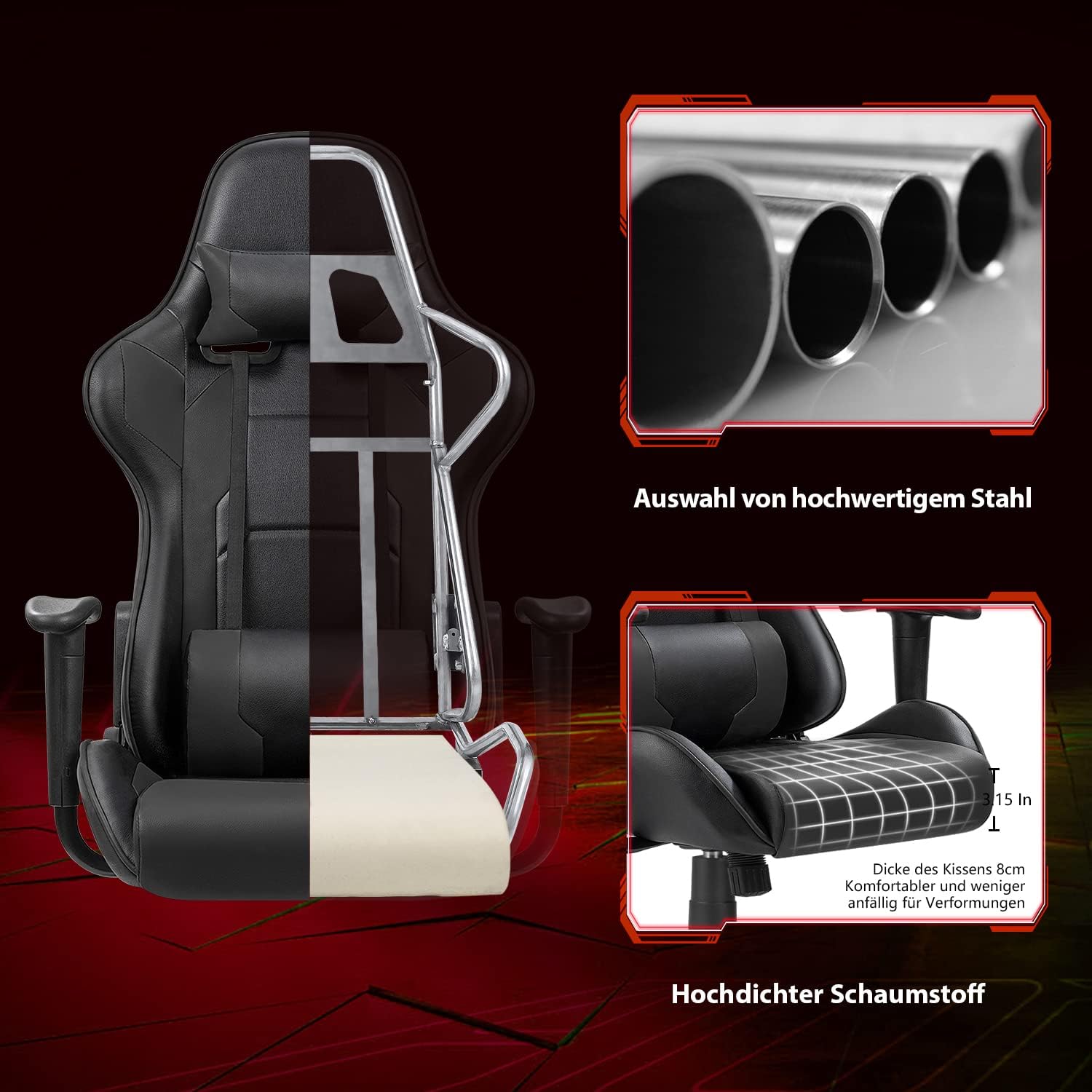
Image 8.2: Cutaway view illustrating the robust alloy steel frame and high-density foam construction.
9. Atilẹyin ọja ati Support
Devoko is committed to providing high-quality products and customer satisfaction. While specific warranty details are not provided in this manual, please retain your proof of purchase for any warranty claims.
If you have any questions, require assistance with assembly, or encounter any issues with your Devoko Ergonomic Gaming Chair, please do not hesitate to contact our customer support team. We are here to help.
For support, please refer to the contact information provided with your purchase or visit the official Devoko webojula.