
Ọrọ Iṣaaju
This manual provides comprehensive instructions for the safe and efficient use of your JayTech Y27 43mm Smartwatch. Please read this manual thoroughly before using the device and retain it for future reference. The JayTech Y27 is designed with features such as an SOS emergency button, SIM card slot, and GPS tracking, making it suitable for various users, including seniors.
Alaye Aabo
IKILO: Ikuna lati tẹle awọn ilana aabo wọnyi le ja si ina, ina mọnamọna, ipalara, tabi ibajẹ si ẹrọ tabi ohun-ini miiran.
- Ma ṣe gbiyanju lati ṣajọ, tunṣe, tabi tunse ẹrọ naa.
- Jeki ẹrọ naa kuro ni iwọn otutu to gaju, oorun taara ati ọrinrin.
- Lo ṣaja ati awọn ẹya ẹrọ ti a fọwọsi nikan.
- Consult a medical professional before using health monitoring features if you have pre-existing conditions.
- Ensure the SIM card is correctly inserted to avoid damage.
Package Awọn akoonu
Jẹrisi pe gbogbo awọn ohun kan wa ninu package:
- JayTech Y27 Smartwatch
- Ngba agbara USB
- Afowoyi Olumulo (iwe-ipamọ yii)
- Ọpa SIM Ejector (ti o ba wulo)
Ọja Pariview
Familiarize yourself with the main components of your JayTech Y27 Smartwatch.
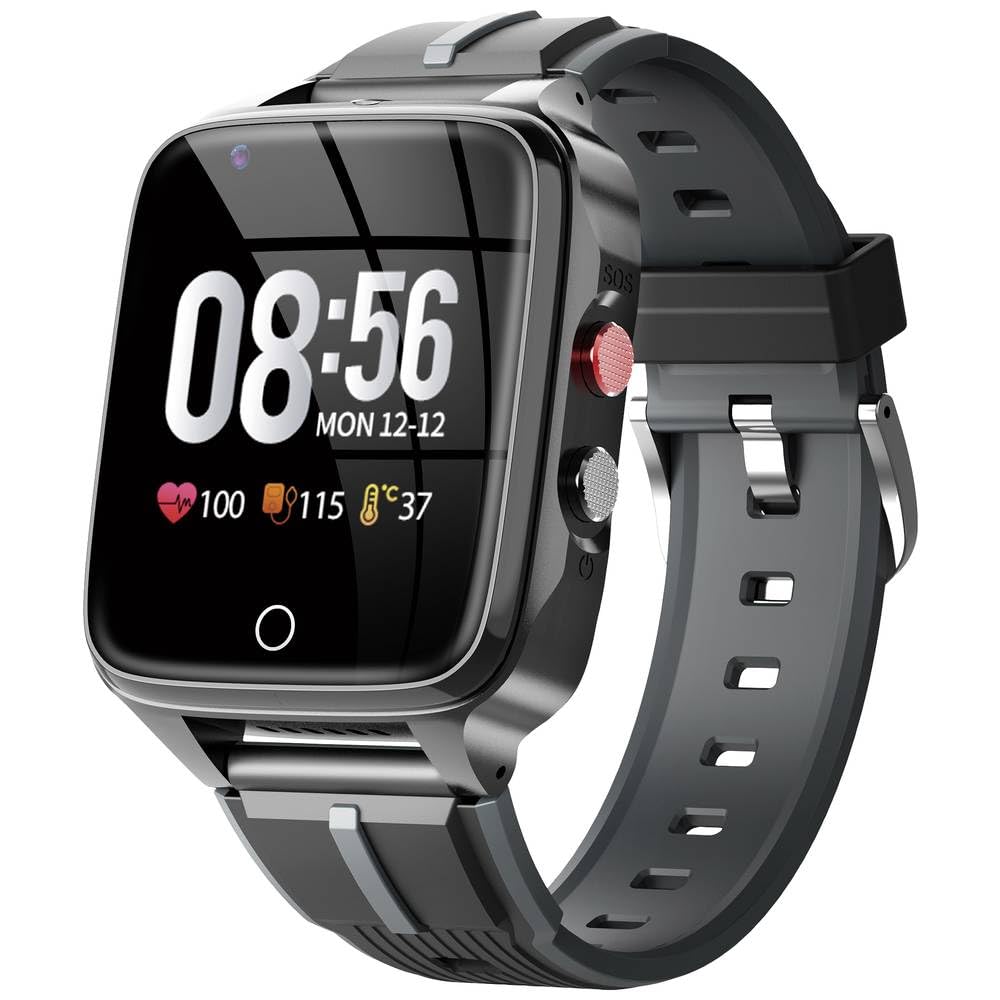
Nọmba 1: Iwaju view of the JayTech Y27 Smartwatch, showing the circular display and buttons on the side. This image illustrates the general design and button placement for user orientation.
- Ifihan: 43mm LCD touchscreen for interaction.
- Bọtini Agbara/Iṣẹ: Typically located on the side, used for turning on/off, waking the screen, and returning to the home screen.
- Bọtini SOS: Dedicated emergency button, often red, for quick access to emergency contacts.
- Iho kaadi SIM: For inserting a Nano-SIM card to enable cellular connectivity.
- Awọn sensọ: Located on the back for health monitoring (pulse, blood pressure).
- Gbohungbohun & Agbọrọsọ: For calls and audio feedback.
Ṣeto
1. Gbigba agbara Smartwatch
- So okun gbigba agbara pọ si ibudo gbigba agbara lori ẹhin smartwatch.
- So opin keji okun naa sinu adapter agbara USB (ko si ninu rẹ) tabi ibudo USB kọmputa kan.
- Allow the smartwatch to charge fully before first use. A charging indicator will appear on the screen.
2. Fi kaadi SIM sii
The JayTech Y27 supports 4G/LTE connectivity via a Nano-SIM card.
- Pa smartwatch naa patapata.
- Locate the SIM card slot, usually on the side or back of the device.
- Use the provided SIM ejector tool (if applicable) or a small pin to open the SIM tray.
- Place the Nano-SIM card into the tray with the gold contacts facing down, ensuring correct orientation.
- Gently push the SIM tray back into the slot until it clicks into place.
3. Agbara Lori ati Iṣeto ni ibẹrẹ
- Press and hold the Power/Function button until the screen lights up.
- Tẹle awọn itọsọna loju iboju lati yan ede rẹ, agbegbe aago, ati awọn eto ibẹrẹ miiran.
- Connect to a Wi-Fi network if prompted, or ensure cellular data is active via your SIM card.
4. Pairing with a Smartphone (Optional)
For full functionality, it is recommended to pair your smartwatch with a compatible smartphone or tablet.
- Download the official JayTech companion app from your smartphone's app store.
- Enable Bluetooth on your smartphone and smartwatch.
- Open the companion app and follow the instructions to search for and pair with your JayTech Y27.
- Jẹrisi koodu sisopọ lori awọn ẹrọ mejeeji ti o ba ṣetan.
Ṣiṣẹ Smartwatch
Ipilẹ Lilọ kiri
- Afi ika te: Rọ apa osi/ọtun, soke/isalẹ lati lọ kiri nipasẹ awọn akojọ aṣayan ati awọn iwifunni. Tẹ lati yan awọn ohun kan.
- Bọtini Agbara/Iṣẹ: Press briefly to wake the screen or return to the watch face. Press and hold to access power options.
Ṣiṣe ati Gbigba Awọn ipe
With a Nano-SIM inserted, you can make and receive calls directly from your smartwatch.
- Lati Ṣe Ipe: Navigate to the "Phone" or "Contacts" app, select a contact, or dial a number.
- Lati Gba Ipe kan: When a call comes in, tap the green answer icon on the screen.
SOS Emergency Function
The dedicated SOS button is designed for emergencies.
- Ṣeto: Configure emergency contacts in the companion app or smartwatch settings.
- Muu ṣiṣẹ: In an emergency, press and hold the SOS button for several seconds. The smartwatch will automatically call the pre-set emergency contacts and send your location.
GPS and Location Tracking
The smartwatch features real-time GPS, Wi-Fi, and LBS (GSM localization system) for accurate positioning.
- Location data can be viewed via the companion app on a paired smartphone.
- Ensure GPS and location services are enabled in the smartwatch settings for optimal performance.
Abojuto Ilera
The JayTech Y27 includes a pulse counter and blood pressure measurement.
- Access these features through the dedicated health apps on the smartwatch.
- For accurate readings, ensure the watch is worn snugly on your wrist.
- Note: These features are for general wellness and fitness purposes only and are not intended for medical diagnosis or treatment.
Camera and Video Calls
The smartwatch is equipped with a camera and supports video calls.
- Navigate to the "Camera" app to take photos.
- Initiate video calls through the appropriate communication app, ensuring a stable internet connection (4G/LTE or Wi-Fi).
Itoju
Cleaning the Smartwatch
- Pa iboju ati ara rẹ pẹlu asọ ti ko ni lint.
- Yago fun lilo abrasive ose tabi epo.
- Ensure the charging port and sensor area are clean and dry.
Itọju Batiri
- Charge the device regularly, avoiding complete discharge.
- Ma ṣe fi batiri han si ooru to gaju tabi otutu.
- If storing the device for an extended period, charge it to about 50% and store in a cool, dry place.
Awọn imudojuiwọn Software
Periodically check for software updates through the companion app or the smartwatch's settings menu to ensure optimal performance and access to new features.
Laasigbotitusita
| Isoro | Owun to le Fa | Ojutu |
|---|---|---|
| Smartwatch ko ni tan. | Batiri kekere; ẹrọ aotoju. | Gba agbara sori ẹrọ naa fun o kere ju iṣẹju 30. Tẹ bọtini agbara naa ki o si di mu fun awọn aaya 10-15 lati fi agbara mu lati tun bẹrẹ. |
| Ko le ṣe/gba awọn ipe wọle. | No SIM card; SIM not active; poor network signal. | Ensure SIM card is correctly inserted and active. Check network signal strength. Contact your mobile carrier. |
| Ipo GPS ko pe. | Poor satellite signal; GPS disabled. | Gbe lọ si agbegbe ṣiṣi pẹlu ọrun ti o mọ view. Ensure GPS is enabled in settings. |
| Health monitoring readings are inconsistent. | Improper fit; movement during measurement. | Ensure the watch is snug on your wrist. Remain still during measurement. Clean the sensor area. |
| Ko le ṣe alawẹ-meji pẹlu foonuiyara. | Bluetooth off; app issues; device already paired. | Ensure Bluetooth is on for both devices. Restart both devices. Clear app cache or reinstall the companion app. |
Awọn pato
| Ẹya ara ẹrọ | Ẹ̀kúnrẹ́rẹ́ |
|---|---|
| Brand | JAY-TECH |
| Nọmba awoṣe | 7700 1505 |
| Iwon iboju | 43 millimeters |
| Ifihan Iru | LCD |
| Asopọmọra Technology | GPS, Wi-Fi, Cellular (4G/LTE) |
| Alailowaya Ibaraẹnisọrọ Alailowaya | Bluetooth |
| Pataki Awọn ẹya ara ẹrọ | SOS Emergency Button, Real-time GPS Tracking, SIM Card Slot, Phone Function, Video Call, Camera, Pulse Counter, Blood Pressure Measurement, Notification |
| Awọn ẹrọ ibaramu | Foonuiyara, Tabulẹti |
| Ibiti ọjọ ori (Apejuwe) | Agba |
| Fọọmù ifosiwewe | Yika |
Atilẹyin ọja ati Support
For warranty information, technical support, or service inquiries, please refer to the warranty card included with your product or visit the official JAY-TECH webojula. Tọju iwe-ẹri rira rẹ bi ẹri rira.
Note: Information regarding spare parts availability and guaranteed software updates was not available at the time of this manual's creation.