
Ọrọ Iṣaaju
Thank you for choosing the Hoco J41 Pro 10000mAh Fast Charging Power Bank. This manual provides essential information for the safe and efficient use of your device. Please read it thoroughly before operation and retain it for future reference.
Package Awọn akoonu
- Hoco J41 Pro 10000mAh Power Bank
- Okun Ngba agbara USB (Iru-C)
- Itọsọna olumulo
Note: The specific type of USB cable included may vary.
Ọja Pariview
The Hoco J41 Pro is a portable power bank designed for fast charging of various electronic devices. It features multiple output ports and an LED digital display for battery status.

Aworan 1: Iwaju view of the Hoco J41 Pro Power Bank, showcasing its sleek black design and the LED digital display indicating a 100% charge level. A wrist strap is visible on the left side.

Aworan 2: Igun view of the Hoco J41 Pro Power Bank, highlighting the USB-A output port (22.5W) and the USB-C input/output port (PD 20W). The LED display shows the current battery percentage.
Awọn ẹya pataki:
- Agbara giga: 10000mAh (37Wh) for extended use.
- Fast Charging Protocols: Supports PD20W, QC, FCP/SCP, AFC, VOOC, DASH for wide compatibility.
- Ọpọ Ibudo: USB-A output (22.5W) and Type-C input/output (PD 20W).
- Ifihan Digital: LED screen shows real-time battery percentage and fast charge indicator.
- Apẹrẹ Iwapọ: Gbigbe ati rọrun lati gbe.
Ṣeto
Gbigba agbara akọkọ ti Bank Power:
- Connect the provided USB charging cable (Type-C) to the Type-C input port on the Hoco J41 Pro power bank.
- Connect the other end of the cable to a compatible USB wall adapter (not included) or a computer's USB port. For fastest charging, use a PD-compatible wall adapter.
- The LED digital display will show the charging progress. When the display shows "100%", the power bank is fully charged.
- Ge asopọ okun ni kete ti gbigba agbara ti pari.
A gba ọ niyanju lati gba agbara si banki agbara ni kikun ṣaaju lilo akọkọ rẹ.
Awọn ilana Iṣiṣẹ
Gbigba agbara si awọn ẹrọ rẹ:
- Ensure your Hoco J41 Pro power bank has sufficient charge. Check the LED display for the current battery percentage.
- Connect your device's charging cable to the appropriate output port on the power bank (USB-A or Type-C).
- So opin keji okun waya naa mọ ẹrọ itanna rẹ (fun apẹẹrẹ, foonuiyara, tabulẹti).
- The power bank will automatically begin charging your device. The LED display may show a fast charge indicator if a compatible device and cable are used.
- Ni kete ti ẹrọ rẹ ba ti gba agbara ni kikun, ge asopọ lati banki agbara.
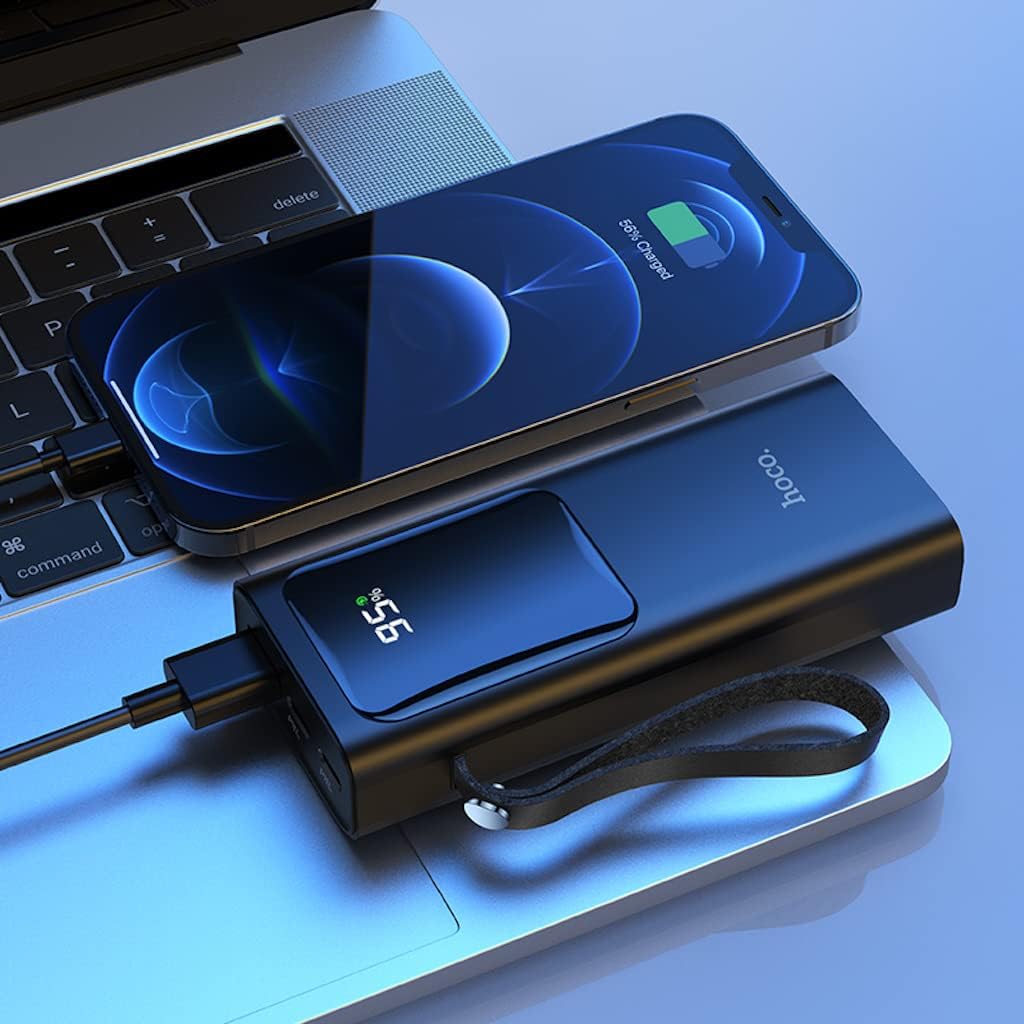
Aworan 3: The Hoco J41 Pro Power Bank actively charging an iPhone, positioned next to a laptop. The power bank's LED display shows a 95% charge, indicating its readiness for use.

Aworan 4: The Hoco J41 Pro Power Bank simultaneously charging two smartphones, demonstrating its multi-device charging capability. The power bank's display shows 100% charge.
Understanding the LED Digital Display:
- Ifihan naa fihan ogorun batiri to kutage ti banki agbara.
- Lakoko gbigba agbara, ogoruntage yoo pọ si.
- When a device is being fast-charged, a specific indicator (e.g., a lightning bolt icon or "PD" / "QC" text) may appear on the display.
Itoju
- Ninu: Lo aṣọ rírọrùn tí ó gbẹ láti nu ibi ìpamọ́ agbára. Má ṣe lo àwọn ohun ìfọmọ́ omi tàbí aerosols.
- Ibi ipamọ: Tọju banki agbara ni itura, aye gbigbẹ kuro lati orun taara, awọn iwọn otutu to gaju, ati ọriniinitutu.
- Itọju Batiri: Láti mú kí batiri pẹ́ sí i, gba agbára bank agbára náà ní kíkún lẹ́ẹ̀kan ní oṣù mẹ́ta tí kò bá sí ní lílò déédéé.
- Yago fun awọn isọ silẹ: Maṣe ju silẹ tabi tẹ banki agbara si awọn ipa to lagbara.
Laasigbotitusita
| Isoro | Owun to le Fa | Ojutu |
|---|---|---|
| Bank agbara ko gba agbara. |
|
|
| Ẹrọ naa ko gba agbara lati banki agbara. |
|
|
| Gbigba agbara lọra. |
|
|
Awọn pato
| Ẹya ara ẹrọ | Ẹ̀kúnrẹ́rẹ́ |
|---|---|
| Orukọ awoṣe | J41 Pro |
| Brand | HOCO |
| Agbara Batiri | 10000mAh (37Wh) |
| Ti won won Agbara | 5900mAh |
| Batiri Cell Tiwqn | Litiumu polima |
| Input (Lightning/Type-C) | 18W (PD) |
| Ijade (Iru-C) | PD 20W |
| Ijade (USB-A) | 22.5W (full compatible) |
| Lapapọ Ijade | 5V/3A |
| Awọn Ilana atilẹyin | PD 20W, QC, FCP/SCP, AFC, VOOC, DASH |
| Ifihan | LED Digital Display (Power, Fast Charge Indicator) |
| Asopọmọra Iru | Mọ̀nàmọ́ná, USB Type C |
| Voltage | 5 Volts |
| Awọn iwọn | 21.8 x 14.5 x 4.4 cm |
| Iwọn | 206 g |
| Àwọ̀ | Dudu |
Alaye Aabo
Jọwọ ka ki o si tẹle awọn itọsona aabo lati yago fun ibaje si ẹrọ rẹ tabi ipalara ti ara ẹni:
- Má ṣe fi ibi ìpamọ́ agbára sí omi, ọrinrin, tàbí ooru tó le koko.
- Má ṣe tú ká, ṣe àtúnṣe, tàbí gbìyànjú láti tún páńkì agbára ṣe.
- Jeki kuro lati awọn ọmọde.
- Má ṣe lò ó tí páńkì agbára bá bàjẹ́, tí ó wú, tàbí tí ó ń jò.
- Avoid dropping or subjecting the power bank to heavy impacts.
- Lo awọn kebulu gbigba agbara ifọwọsi nikan ati awọn oluyipada.
- Má ṣe gbé àwọn nǹkan tó wúwo sí orí páńkì agbára.
- Sọ banki agbara kuro ni ifojusọna ni ibamu si awọn ilana agbegbe.
Atilẹyin ọja ati Support
Hoco products are manufactured to high-quality standards. For warranty information or technical support, please refer to the warranty card included in your package or contact your local retailer or Hoco customer service. Please have your product model number (J41 Pro) and purchase details ready when seeking support.