
SHARP YC-PS204AE-S
SHARP YC-PS204AE-S Microwave Oven User Manual
Model: YC-PS204AE-S
1. Awọn Ilana Aabo pataki
Ka gbogbo awọn itọnisọna ni pẹkipẹki ṣaaju lilo ohun elo naa. Jeki iwe afọwọkọ yii fun itọkasi ọjọ iwaju.
Gbogbogbo Abo
- Maṣe gbiyanju lati ṣiṣẹ adiro yii pẹlu ṣiṣi ilẹkun nitori eyi le ja si ifihan ipalara si agbara makirowefu.
- Ma ṣe gbe ohun kan si laarin oju iwaju adiro ati ẹnu-ọna tabi jẹ ki ile tabi aloku mimọ lati ṣajọpọ lori awọn ibi ifamọ.
- Ma ṣe ṣiṣẹ lọla ti o ba bajẹ. O ṣe pataki ni pataki pe ilẹkun adiro tilekun daradara ati pe ko si ibajẹ si: (1) Ilẹkun (ti tẹ), (2) Awọn isunmọ ati awọn latches (ti fọ tabi titu), (3) Awọn edidi ilẹkun ati awọn oju-ile.
- adiro ko yẹ ki o tunše tabi tunše nipasẹ ẹnikẹni ayafi awọn oṣiṣẹ iṣẹ ti o peye daradara.
- Ohun elo yii jẹ ipinnu fun lilo ile nikan.
- Maṣe lo awọn kemikali ibajẹ tabi awọn eefin ninu ohun elo yii.
- Ma ṣe fi ohun elo yii pamọ si ita. Maṣe lo ọja yii nitosi omi.
- Ma ṣe bọ okun tabi pulọọgi sinu omi.
- Jeki okun kuro lati awọn aaye ti o gbona.
- Ma ṣe jẹ ki okun duro lori eti tabili tabi counter.
- Lati dinku eewu ina ninu iho adiro:
- Maṣe jẹ ounjẹ pupọju.
- Yọ awọn asopọ lilọ waya kuro ninu iwe tabi awọn baagi ṣiṣu ṣaaju gbigbe apo sinu adiro.
- Ti awọn ohun elo inu adiro yẹ ki o tanna, jẹ ki ilẹkun adiro tiipa, pa adiro kuro, ki o ge asopọ okun agbara, tabi pa agbara kuro ni fiusi tabi nronu fifọ Circuit.
Itanna Aabo
- Rii daju pe ipese agbara ibaamu voltage pato lori aami igbelewọn ohun elo.
- Nigbagbogbo pulọọgi ẹrọ naa sinu iṣan-ilẹ ti o wa lori ilẹ.
- Do not use extension cords unless absolutely necessary and ensure they are rated for the appliance's power consumption.
- Yọọ ohun elo kuro ni iṣan nigbati ko ba lilo ati ṣaaju ṣiṣe afọmọ.
2. Ọja Ipariview
Familiarize yourself with the components and control panel of your SHARP YC-PS204AE-S microwave oven.
Awọn eroja
- Iho adiro: Ààyè inú ilé tí wọ́n ti ń sè oúnjẹ.
- Yipada: Atẹ gilasi kan ti o yiyi lati rii daju paapaa sise.
- Òrùka Títúnṣe: Supports the turntable.
- Ilekun: Equipped with a safety interlock system.
- Ibi iwaju alabujuto: Contains the display, buttons, and dial for operation.
- Imọlẹ inu inu LED: Illuminates awọn adiro iho nigba isẹ ti.
Ibi iwaju alabujuto ati Ifihan
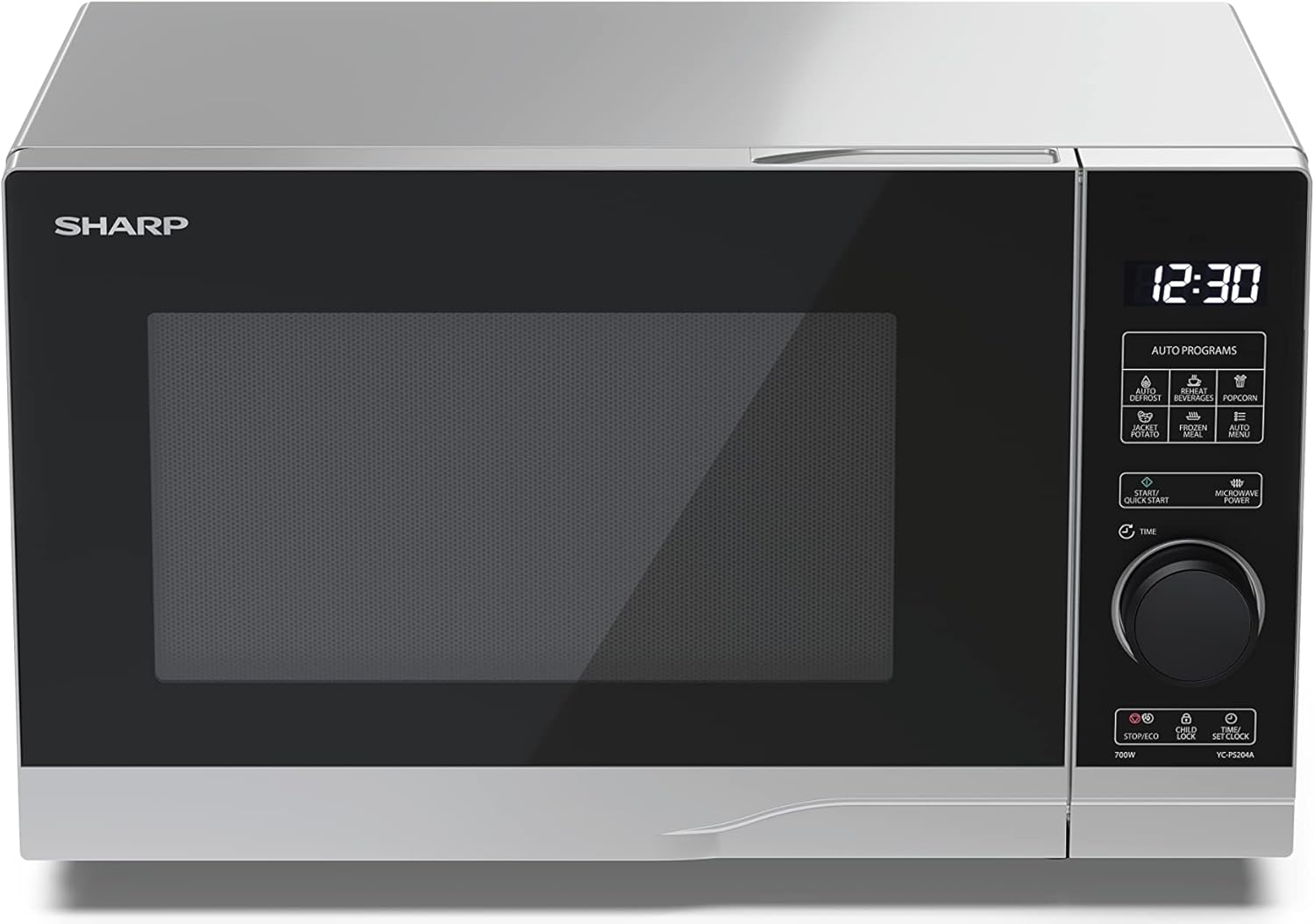
Aworan: Iwaju view of the Sharp YC-PS204AE-S microwave oven, highlighting the semi-digital control panel on the right side. The display shows "88:88" and various auto program icons are visible above the main dial.
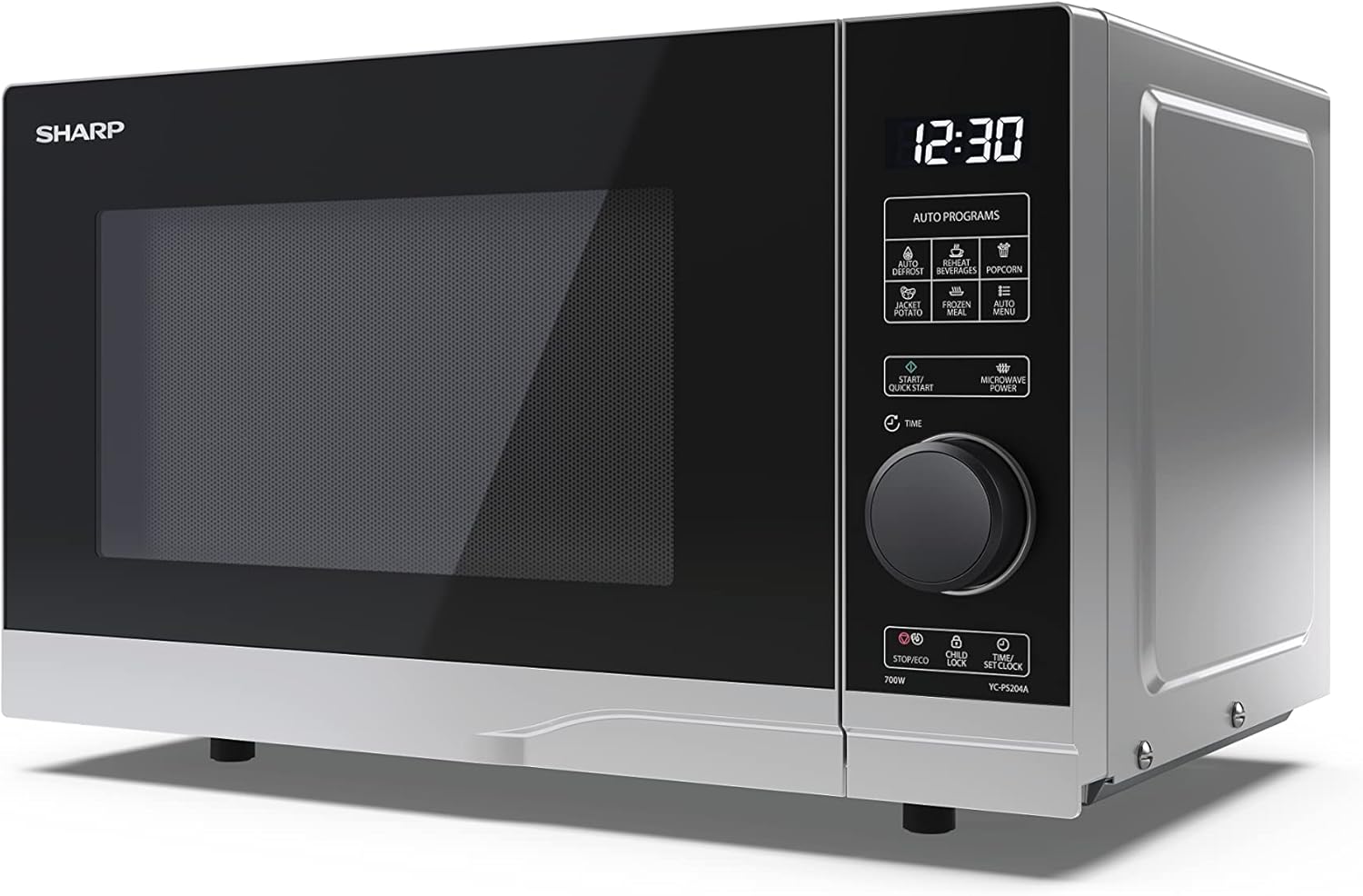
Aworan: Angled iwaju view of the Sharp YC-PS204AE-S microwave, showing the sleek silver and black design. The control panel is clearly visible with its digital display and rotary knob.
The control panel features a digital display, a rotary dial for setting time and power, and several touch buttons for various functions and automatic programs.
- Ifihan: Shows time, cooking settings, and program indicators.
- Ipe ipe Rotari: Used to set cooking time, weight, and adjust clock.
- Awọn eto Aifọwọyi: Icons for Defrost, Reheat, Popcorn, Jacket Potato, Frozen Meal, Beverages, and Auto Menu.
- Start/Quick Start Button: Initiates cooking or starts quick cooking.
- Microwave Power Button: Selects power levels.
- Stop/Eco Button: Stops cooking or activates ECO mode.
- Bọtini Titiipa Ọmọ: Activates/deactivates child lock.
- Time/Set Clock Button: Sets the clock or adjusts time.
3. Eto
Ṣiṣi silẹ
- Farabalẹ yọ adiro makirowefu ati gbogbo awọn ohun elo iṣakojọpọ lati paali.
- Ṣayẹwo adiro fun eyikeyi ibajẹ, gẹgẹbi awọn apọn tabi ẹnu-ọna ti ko tọ. Ma ṣe ṣiṣẹ lọla ti o ba bajẹ.
- Yọ eyikeyi fiimu aabo lati inu ile minisita.
- Ensure all accessories are present: glass turntable, turntable ring, and instruction manual.

Aworan: The interior of the Sharp YC-PS204AE-S microwave oven with the door open, showing the glass turntable and the stainless steel interior. This view is useful for understanding how to place food and clean the cavity.
Ipo
- Gbé ààrò náà sí orí ilẹ̀ títẹ́jú tí ó sì dúró ṣinṣin tí ó lè gbé ìwọ̀n rẹ̀ àti oúnjẹ tí ó wúwo jùlọ tí ó ṣeé ṣe kí ó sè nínú rẹ̀.
- Ensure adequate ventilation: leave a minimum of 20 cm (8 inches) of space above the oven, 10 cm (4 inches) at the rear, and 5 cm (2 inches) on each side.
- Ma ṣe dina eyikeyi awọn ṣiṣi atẹgun.
- Ma ṣe gbe adiro si nitosi awọn orisun ooru gẹgẹbi awọn imooru tabi awọn adiro.
- Keep the oven away from radio and TV sets to avoid interference.

Aworan: A diagram showing the dimensions of the Sharp YC-PS204AE-S microwave oven, with measurements for height (273 mm), width (455 mm), and depth (334 mm). This helps users ensure proper placement and ventilation space.
Eto Ibẹrẹ
- So okùn agbára náà mọ́ ihò iná mànàmáná tí a fi ilẹ̀ ṣe (230V, 50Hz).
- The display will show "0:00" or "12:00".
- Ṣiṣeto aago:
- Press the "Time/Set Clock" button once. The hour digits will flash.
- Turn the rotary dial to set the hour (0-23 for 24-hour format).
- Press "Time/Set Clock" again. The minute digits will flash.
- Turn the rotary dial to set the minutes (0-59).
- Press "Time/Set Clock" a third time to confirm. The clock is now set.
4. Awọn ilana Iṣiṣẹ
Ipilẹ Makirowefu Sise
- Fi ounjẹ sinu apo eiyan-ailewu kan makirowefu lori tabili titan.
- Pa ẹnu-ọna adiro ni aabo.
- Press the "Microwave Power" button repeatedly to select the desired power level (e.g., P100 for 100% power, P80 for 80%, etc. There are 10 levels).
- Turn the rotary dial to set the cooking time (up to 95 minutes).
- Press the "Start/Quick Start" button to begin cooking.
Awọn ọna Bẹrẹ Išction
- Press the "Start/Quick Start" button repeatedly to cook at 100% power for 30-second intervals. Each press adds 30 seconds.
- The maximum quick start time is 10 minutes.
Iṣẹ Iyọkuro
This function allows you to defrost food by weight.
- Gbe awọn tutunini ounje lori turntable.
- Press the "Defrost" button (usually indicated by a snowflake icon). The display will show "dEF1" or "dEF2" depending on the defrost mode.
- Turn the rotary dial to select the weight of the food (e.g., 100g to 2000g).
- Press "Start/Quick Start" to begin defrosting.
Automatic Programs (Auto Menu)
The microwave has 8 pre-set automatic programs for common food items.
- Press the "Auto Menu" button (often labeled with "Auto Programs" or specific icons).
- Turn the rotary dial to select the desired program (e.g., Popcorn, Potato, Pizza, Beverage, etc.). The display will show the program number (e.g., A-1, A-2).
- Press "Auto Menu" again to confirm the program.
- Turn the rotary dial to select the weight or quantity (if applicable for the program).
- Press "Start/Quick Start" to begin.
Ọmọ Titiipa Išė
To prevent unintended operation, especially by children.
- Lati muu ṣiṣẹ: Press and hold the "Child Lock" button (often combined with "Stop/Eco") for 3 seconds. A lock icon will appear on the display.
- Lati mu maṣiṣẹ: Press and hold the "Child Lock" button for 3 seconds again. The lock icon will disappear.
Ipo ECO
To save energy, the display can be turned off when the oven is not in use.
- Lati muu ṣiṣẹ: In standby mode, press the "Stop/Eco" button once. The display will turn off.
- Lati mu maṣiṣẹ: Press any button or open the door to reactivate the display.
5. Itọju ati Cleaning
Ninu deede ati itọju yoo rii daju igbesi aye gigun ati iṣẹ aipe ti adiro makirowefu rẹ.
Ninu inu ilohunsoke adiro
- Yọọ adiro nigbagbogbo ṣaaju ṣiṣe mimọ.
- Nu ihò inu lẹhin lilo kọọkan pẹlu ipolowoamp asọ ati ìwọnba detergent.
- For stubborn stains, place a bowl of water with lemon juice inside and heat for 2-3 minutes. The steam will loosen the residue.
- Do not use abrasive cleaners or metal brushes, as they can damage the interior surface.
Cleaning the Turntable and Ring
- A le yọ òrùka dígí àti òrùka dígí kúrò fún mímú.
- Fọ wọn ninu omi gbona, ti o ni ọṣẹ tabi ninu ẹrọ fifọ.
- Rí i dájú pé wọ́n gbẹ pátápátá kí o tó gbé wọn padà sínú ààrò.
Ninu Ode
- Mu ese ita gbangba pẹlu asọ, damp asọ.
- Yẹra fun gbigba omi sinu awọn ṣiṣi atẹgun.
- Clean the door and door seals regularly to ensure proper closure and prevent microwave leakage.
6. Laasigbotitusita
Ti o ba pade awọn ọran pẹlu adiro makirowefu rẹ, tọka si awọn iṣoro ti o wọpọ ati awọn solusan atẹle.
| Isoro | Owun to le Fa | Ojutu |
|---|---|---|
| Lọla ko bẹrẹ. | Kò sí okùn agbára tí a so mọ́; Fúúsì tí a fẹ́ tàbí ẹ̀rọ ìfọ́wọ́sí tí a gbé síta ti bàjẹ́; Ilẹ̀kùn náà kò ti dé dáadáa. | So mọ́ ihò ìtajà; Rọpo fiusi tàbí tún ẹ̀rọ ìfọ́wọ́sí oníṣẹ́ náà ṣe; Ti ilẹ̀kùn náà dáadáa. |
| Ounje ko sise boṣeyẹ. | Oúnjẹ kò rú tàbí yípo; A kò lè yípo. | Stir or turn food halfway through cooking; Ensure turntable and ring are correctly placed and clean. |
| Ó ń tàn yanran nínú ààrò. | Metal or foil in the oven; Dish not microwave-safe; Food residue. | Remove any metal; Use microwave-safe dishes; Clean oven cavity thoroughly. |
| Ifihan fihan koodu aṣiṣe. | Ti abẹnu aiṣedeede. | Yọ ààrò náà kúrò fún ìṣẹ́jú díẹ̀, lẹ́yìn náà fi í sínú rẹ̀. Tí àṣìṣe náà bá ń bá a lọ, pe olùtọ́jú ìlera. |
| Imọlẹ adiro ko ṣiṣẹ. | Boolubu nilo rirọpo. | Kan si oṣiṣẹ iṣẹ ti o peye fun rirọpo boolubu. |
If the problem persists after trying these solutions, please contact SHARP customer support.
7. Awọn pato
Technical specifications for the SHARP YC-PS204AE-S Microwave Oven.
| Ẹya ara ẹrọ | Ẹ̀kúnrẹ́rẹ́ |
|---|---|
| Nọmba awoṣe | YC-PS204AE-S |
| Agbara | 20 liters |
| Makirowefu Power wu | 700 Wattis |
| Awọn ipele agbara | 10 |
| Iṣakoso Iru | Semi-digital |
| Awọn Iwọn Ọja (W x H x D) | 45.5 cm x 27.4 cm x 33.4 cm |
| Iwọn | 10.5 kilo |
| Àwọ̀ | Fadaka |
| Ohun elo inu inu | Irin ti ko njepata |
| Turntable Opin | 245 mm |
| Pataki Awọn ẹya ara ẹrọ | Child Lock, ECO Function, Defrost System, LED Interior Lighting, 8 Auto Programs |
| Ibi ti ina elekitiriki ti nwa | 230 Volts |
| Awọn irinše to wa | 1x Microwave SHARP YC-PS204AE-S, Glass Turntable, Multilingual Operating Instructions, Warranty Card |
8. Atilẹyin ọja ati Support
SHARP provides a warranty for this product. Please refer to the warranty card included in the packaging for specific terms and conditions.
Onibara Support
For technical assistance, troubleshooting beyond this manual, or warranty claims, please contact SHARP customer service.
- Visit the official SHARP webAaye fun alaye olubasọrọ atilẹyin ni agbegbe rẹ.
- Have your model number (YC-PS204AE-S) and purchase date ready when contacting support.
Ask a question about this manual
Ask about setup, troubleshooting, compatibility, parts, safety, or missing instructions. Manuals+ will review the question and use this page’s manual context to help answer it.