
1. Ifihan
O ṣeun fun riraasing the ENUOSUMA Bluetooth Desktop Soundbar. This manual provides essential information for setting up, operating, and maintaining your new speaker. Please read it thoroughly before use to ensure optimal performance and longevity of the product.
2. Alaye Aabo
- Ma ṣe fi ẹrọ naa han si omi tabi ọrinrin pupọ.
- Yago fun gbigbe agbọrọsọ nitosi awọn orisun ooru tabi ni imọlẹ orun taara.
- Má ṣe gbìyànjú láti tú agbọ̀rọ̀sọ náà tàbí láti tún un ṣe fúnra rẹ. Tọ́ka gbogbo iṣẹ́ ìtọ́jú náà sí àwọn òṣìṣẹ́ tó péye.
- Use only the provided USB cable for power.
- Jeki kuro ni arọwọto awọn ọmọde.
3. Package Awọn akoonu
Jọwọ ṣayẹwo package fun awọn nkan wọnyi:
- ENUOSUMA Bluetooth Desktop Soundbar
- Okun Agbara USB
- 3.5mm AUX Audio Cable

4. Ọja Ipariview
4.1 Awọn iṣakoso

- Large Central Knob: Turn on/off, adjust volume.
- Bọ́tìnnì Ṣíṣe/Sánu duro: Play/pause audio, answer/reject calls.
- Bọtini Orin ti tẹlẹ: Rekọja si orin iṣaaju.
- Bọtini Orin atẹle: Rekọja si orin atẹle.
- Bọtini Ipo: Switch between input modes (Bluetooth, AUX, FM Radio, USB Disk/TF Card). Double-press to turn RGB lights on/off.
4.2 Awọn ibudo

- Iṣawọle agbara USB: Fún síso okùn agbára USB pọ̀.
- Iṣawọle AUX: 3.5mm jack fun asopọ ohun onirin.
- USB Disk Slot: Fun ohun orin lati inu kọnputa filasi USB kan.
- Iho Kaadi TF: Fún gbígbọ́ ohùn láti inú káàdì TF (Micro SD).
5. Eto
- Asopọ agbara: Connect the USB power cable to the speaker's USB power input and then to a USB power source (e.g., computer USB port, USB wall adapter).
- Agbara Tan: Rotate the large central knob clockwise to turn on the speaker. The RGB lights will illuminate.
6. Awọn ilana Iṣiṣẹ
6.1 Agbara Titan / Pa ati Atunse Iwọn didun
- To turn on, rotate the large central knob clockwise.
- To turn off, rotate the large central knob counter-clockwise until it clicks.
- To adjust volume, rotate the large central knob clockwise to increase and counter-clockwise to decrease.
6.2 Ipo Bluetooth
- Tan agbohunsoke. Yoo tẹ ipo sisopọ Bluetooth wọle laifọwọyi.
- Lórí ẹ̀rọ rẹ (fóònù, tábìlì, kọ̀ǹpútà), mu Bluetooth ṣiṣẹ́ kí o sì wá àwọn ẹ̀rọ tó wà.
- Select "ENUOSUMA Speaker" (or similar) from the list to pair.
- Once paired, you will hear a confirmation sound, and you can play audio wirelessly.
6.3 AUX Wired Mode
- Connect one end of the 3.5mm AUX audio cable to the speaker's AUX input.
- Connect the other end of the 3.5mm AUX audio cable to your audio source's headphone jack (e.g., computer, laptop, MP3 player).
- Press the "Mode" button on the speaker until it switches to AUX mode.
6.4 FM Redio Ipo
- Ensure the USB power cable is connected, as it acts as the FM antenna.
- Press the "Mode" button repeatedly until the speaker enters FM Radio mode.
- Press and hold the "Play/Pause" button to automatically search for and save available FM stations.
- Use the "Previous Song" and "Next Song" buttons to navigate between saved stations.
6.5 Sisisẹsẹhin Kaadi USB / TF
- Insert a USB flash drive or TF (Micro SD) card containing audio files sinu awọn ti o baamu Iho.
- Press the "Mode" button until the speaker switches to USB Disk or TF Card mode.
- Agbọrọsọ yoo bẹrẹ sisẹ ohun laifọwọyi files. Use the "Play/Pause", "Previous Song", and "Next Song" buttons for control.
6.6 RGB ina Iṣakoso

- The speaker features dynamic RGB lighting.
- To turn the RGB lights on or off, quickly double-press the "Mode" button.
7. Itọju
- Ninu: Lo aṣọ rírọrùn tí ó gbẹ láti nu ojú agbọ́rọ̀ náà. Má ṣe lo àwọn ohun èlò ìfọmọ́ omi tàbí àwọn ohun èlò ìpara.
- Ibi ipamọ: Nigbati o ko ba wa ni lilo fun awọn akoko ti o gbooro sii, tọju agbohunsoke si ibi ti o tutu, ti o gbẹ kuro ni imọlẹ orun taara.
8. Laasigbotitusita
| Isoro | Owun to le Fa | Ojutu |
|---|---|---|
| Ko si agbara | Okùn USB kò sopọ̀ mọ́ tàbí orísun agbára náà kò ní èrè. | Ensure USB cable is securely connected to a working USB port. |
| Ko si ohun | Volume too low; incorrect mode selected; device not connected. | Increase volume; press 'Mode' button to select correct input; ensure Bluetooth is paired or AUX cable is connected. |
| Sisopọ Bluetooth kuna | Agbọrọsọ kii ṣe ni ipo sisopọ; Bluetooth ẹrọ pa; ju jina lati agbọrọsọ. | Ensure speaker is in Bluetooth mode; enable Bluetooth on your device; move device closer to speaker. |
| Gbigba FM ti ko dara | USB cable not connected (acting as antenna); weak signal. | Ensure USB cable is connected; try repositioning the speaker or the USB cable for better reception. |
9. Awọn pato

| Ẹya ara ẹrọ | Ẹ̀kúnrẹ́rẹ́ |
|---|---|
| Brand | ENUOSUMA |
| Awoṣe | Ohun elo Ojú-iṣẹ Bluetooth |
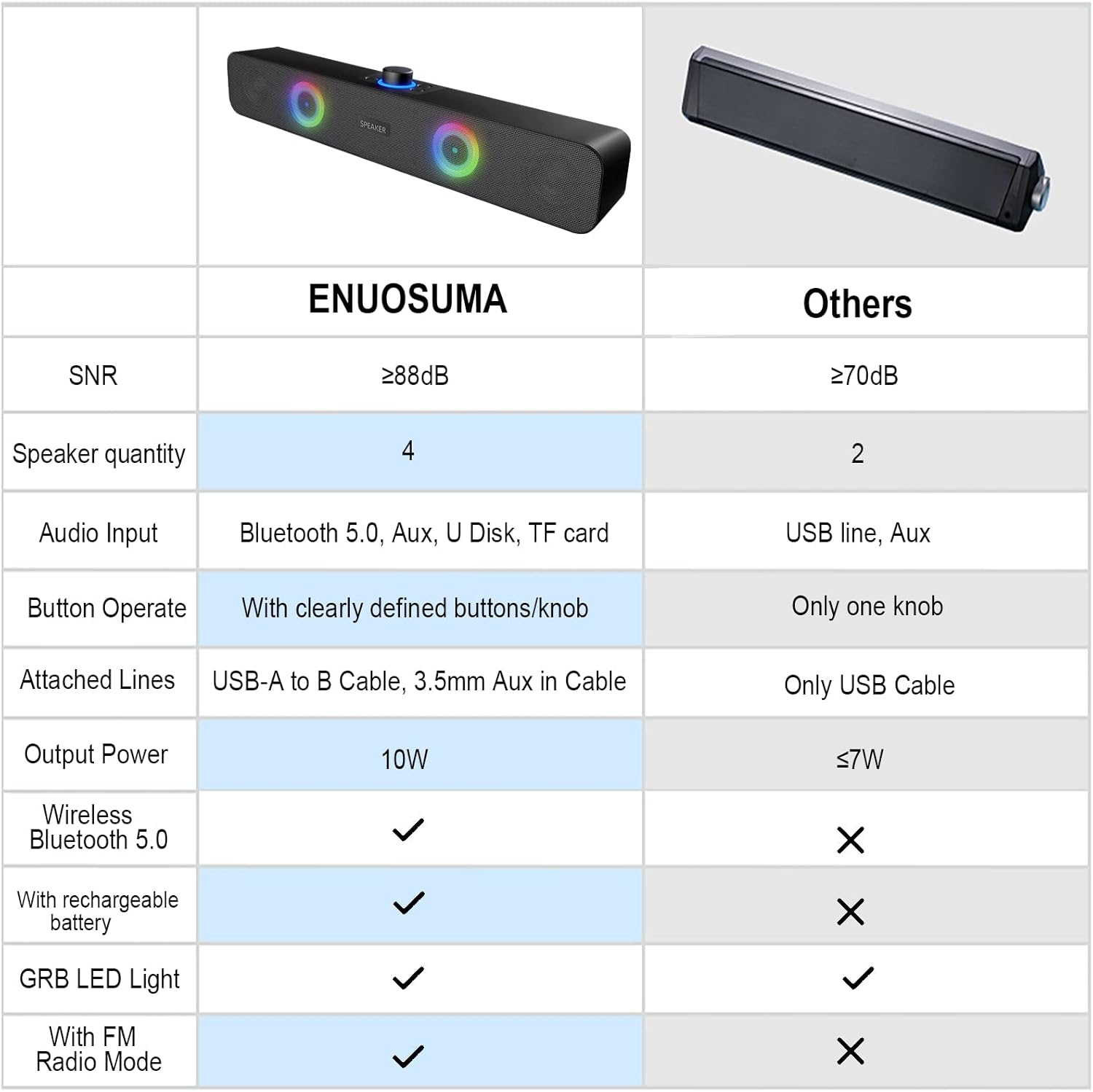
| Asopọmọra Technology | Bluetooth, Auxiliary (3.5mm), USB Disk, TF Card |
| Ipo Ijade Ohun | Sitẹrio (ikanni 2.0) |
| Agbọrọsọ Agbara Ijade ti o pọju | 10 Watts (2 x 5W) |
| Pataki Awọn ẹya ara ẹrọ | RGB Lights, FM Radio |
| Orisun agbara | Okun Itanna (Agbara USB) |
| Ọja Mefa | 38 cm (W) x 8 cm (D) x 5 cm (H) |
| Iwọn Nkan | 598.74 giramu |
| Ohun elo | Irin |
| Àwọ̀ | Dudu |
| Niyanju Lilo | Gaming, Movies, Music |
| Awọn ẹrọ ibaramu | Laptop, Personal Computer, Projector, Tablet, Phone |
10. Atilẹyin ọja ati Support
This product comes with a standard manufacturer's warranty. For specific warranty details, technical support, or service inquiries, please refer to the documentation provided with your purchase or contact the retailer/manufacturer directly.