
LFF DAB Plus Digital FM Radio
Ìwé Ìtọ́sọ́nà Olùlò Rédíò FM Dẹ́mítà LFF DAB Plus
Model: DAB Plus Digital FM Radio
Orúkọ ìtajà: LFF
1. Ifihan
This manual provides detailed instructions for the LFF DAB Plus Digital FM Radio. It covers setup, operation, maintenance, and troubleshooting to ensure optimal performance and user experience. Please read this manual thoroughly before using the device.

Iwaju view of the LFF DAB Plus Digital FM Radio, showing the speaker grille, color display, and extended antenna.
2. Package Awọn akoonu
Jọwọ ṣayẹwo package fun awọn nkan wọnyi:
- 1 x LFF DAB Plus Digital FM Radio
- 1 x Adaparọ Agbara AC
- 1 x Itọsọna Ibẹrẹ kiakia
3. Ọja Ipariview
Mọ ara rẹ pẹ̀lú àwọn èròjà àti àwọn ìṣàkóso rédíò náà.
3.1 Key Awọn ẹya ara ẹrọ

This diagram illustrates the radio's key functions: DAB+ radio, 60 station presets, FM radio, sleep timer, headphone jack, Bluetooth connectivity, full-color screen, and dual alarm capability.
3.2 Awọn iṣakoso ati awọn ibudo

Oke ati ẹgbẹ view of the radio, showing control buttons and knobs on the top panel, and the 3.5mm headphone jack located on the side.
Refer to the diagram above for the location of the following:
- Bọtini agbara: Yi redio si tan/pa.
- Bọtini Ipo: Switches between DAB+, FM, and Bluetooth modes.
- Tune/Select Knob: Rotates to tune stations or navigate menus, press to select.
- Bọtini Iwọn didun: Ṣe atunṣe iwọn didun ohun.
- Awọn bọtini tito tẹlẹ: For saving and recalling favorite stations.
- Alarm/Sleep Timer Button: Accesses alarm and sleep timer settings.
- Ifihan awọ: Shows station information, time, and menu options.
- Jack agbekọri (3.5mm): Fun ikọkọ gbigbọ.
- DC NI Port: Fun sisopọ ohun ti nmu badọgba agbara AC.
- Eriali telescopic: Fun imudara gbigba redio.
4. Eto
4.1 Agbara Lori
The radio can be powered by the included AC adapter or by batteries.
- Agbara AC: Connect the AC power adapter to the DC IN port on the back of the radio and plug it into a wall outlet.
- Agbara Batiri: Open the battery compartment on the back of the radio and insert 4 x 1.5V AA (LR6) batteries, ensuring correct polarity.
Pada view of the radio, detailing the battery compartment for 4x AA batteries, the AC adapter input (5V/1000mA), and the 360° rotatable antenna. Product dimensions are also indicated.
4.2 Atunṣe Antenna
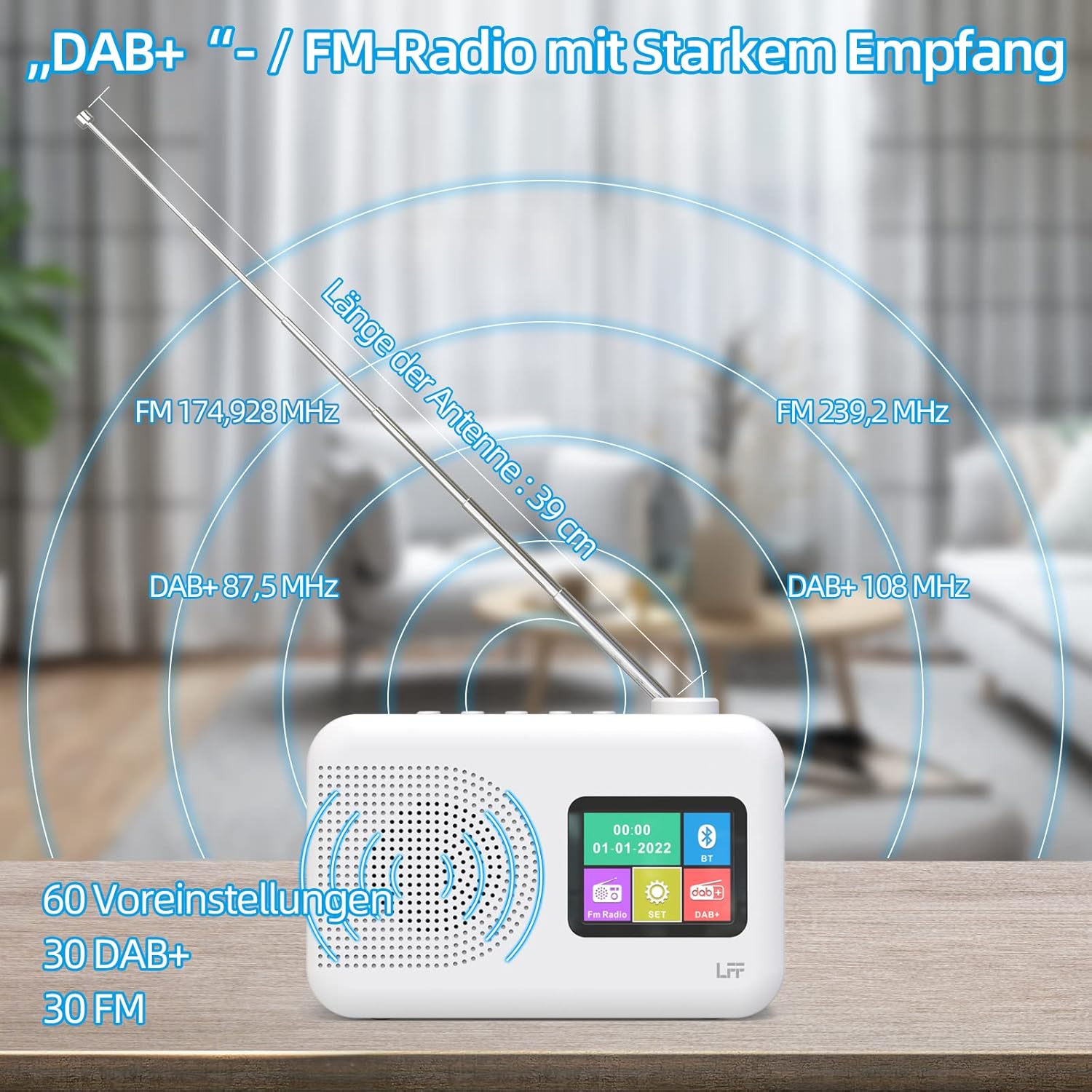
Extend the telescopic antenna fully (approximately 39 cm) and adjust its angle for optimal reception, especially for DAB+ and FM stations.

This diagram illustrates the radio's strong DAB+ and FM reception capabilities with the fully extended 39cm antenna, showing frequency ranges and the capacity for 60 total presets (30 DAB+, 30 FM).
4.3 Ṣiṣayẹwo akọkọ (DAB+)
- Tan redio.
- Ensure the mode is set to DAB+. If not, press the Ipo bọtini lati yipada.
- The radio will automatically perform a full scan for available DAB+ stations. This may take a few minutes.
- Once the scan is complete, the radio will display a list of found stations.
5. Awọn ilana Iṣiṣẹ
5.1 DAB+ Radio Mode
- Tẹ awọn Ipo bọtini lati yan ipo DAB+.
- Yiyi awọn Tun / Yan knob to browse through the available stations.
- Tẹ awọn Tun / Yan bọtini lati yan ibudo kan.
- Fifipamọ awọn tito tẹlẹ: To save a station, press and hold a Tito tẹlẹ button until the display confirms. To recall, briefly press the corresponding Tito tẹlẹ button. Up to 30 DAB+ stations can be saved.
5.2 FM Redio Ipo
- Tẹ awọn Ipo bọtini lati yan ipo FM.
- Yiyi awọn Tun / Yan bọtini lati ṣe atunṣe si igbohunsafẹfẹ pẹlu ọwọ.
- Tẹ mọlẹ Tun / Yan knob for a few seconds to auto-scan for the next available station.
- Fifipamọ awọn tito tẹlẹ: Similar to DAB+ mode, press and hold a Tito tẹlẹ button to save, and briefly press to recall. Up to 30 FM stations can be saved.
5.3 Ipo Bluetooth

This diagram illustrates the three primary playback options for the radio: through its internal speaker, via Bluetooth connection to an external device, or using headphones connected to the headphone jack.
- Tẹ awọn Ipo button to select Bluetooth mode. The display will show "Bluetooth Pairing" or similar.
- On your external device (e.g., smartphone), enable Bluetooth and search for available devices.
- Select "LFF Radio" (or similar name) from the list to pair.
- Once paired, you can play audio from your device through the radio's speaker.
- Akiyesi: This radio acts as a Bluetooth receiver. It does not support connecting to Bluetooth headphones or other Bluetooth speakers.
5.4 Aago orun
Aago oorun naa gba redio laaye lati pa laifọwọyi lẹhin akoko ti a ti ṣeto.

This image depicts the sleep timer function, offering selectable durations of 15, 30, 45, 60, 90, and 120 minutes before the radio automatically powers off.
- Tẹ awọn Alarm/Sleep Timer button repeatedly to cycle through sleep timer options (15 min, 30 min, 45 min, 60 min, 90 min, 120 min, OFF).
- Select your desired duration. The radio will turn off automatically after this time.
Aago Itaniji 5.5
The radio features a dual alarm function.
- Tẹ mọlẹ Alarm/Sleep Timer button to enter alarm settings.
- Lo awọn Tun / Yan knob to set the alarm time, alarm source (DAB+, FM, or buzzer), and volume.
- Tẹ awọn Tun / Yan bọtini lati jẹrisi eto kọọkan.
- Repeat the process for the second alarm if needed.
5.6 Agbekọri Lilo
Plug 3.5mm headphones into the headphone jack on the side of the radio for private listening. The internal speaker will automatically mute.
6. Itọju
6.1 Ninu
- Wipe the radio's surface with a soft, dry cloth.
- Ma ṣe lo abrasive Cleaners, waxes, tabi epo bi wọn ṣe le ba ipari jẹ.
6.2 Batiri Rirọpo
When using battery power, replace all four AA batteries when the low battery indicator appears on the display or when performance degrades.
- Ensure the radio is turned off and disconnected from AC power.
- Ṣii ideri iyẹwu batiri ni ẹhin.
- Yọ awọn batiri atijọ kuro ki o si sọ wọn nù daradara.
- Insert new 4 x 1.5V AA (LR6) batteries, observing correct polarity (+/-).
- Pa ideri batiri naa ni aabo.
6.3 Fiimu Idaabobo iboju
The radio's display comes with a transparent protective film. For optimal clarity, gently peel off this film before first use.
7. Laasigbotitusita
Ti o ba pade awọn ọran, tọka si awọn iṣoro ti o wọpọ ati awọn ojutu wọnyi:
| Isoro | Owun to le Fa | Ojutu |
|---|---|---|
| Ko si agbara | Adapter AC kò sopọ̀ mọ́, batiri ti bàjẹ́ tàbí tí a fi sínú rẹ̀ lọ́nà tí kò tọ́. | Check AC adapter connection. Replace batteries or ensure correct polarity. |
| Gbigba redio ti ko dara | Antenna kò gùn, agbègbè àmì tí kò lágbára, ìdènà. | Fully extend and adjust the telescopic antenna. Move the radio to a different location. Avoid sources of interference. |
| Bluetooth ko sopọ | Radio not in Bluetooth mode, device too far, already paired with another device. | Ensure radio is in Bluetooth mode. Keep devices within range. Disconnect from other devices. |
| Ko si ohun | Volume too low, headphones connected, mute activated. | Increase volume. Disconnect headphones. Check if mute is active. |
8. Awọn pato
- Brand: LFF
- Awoṣe: DAB Plus Digital FM Radio
- Àwọ̀: Funfun
- Imọ-ẹrọ Asopọmọra: Bluetooth
- Awọn iwọn (L x W x H): 16.1 cm x 5.9 cm x 10.9 cm
- Imọ-ẹrọ Atunṣe: DAB
- Orisun Agbara: AC Adapter (5V/1000mA) or 4 x 1.5V AA (LR6) Batteries
- Awọn ẹgbẹ Redio ti o ni atilẹyin: DAB+, FM
- DAB+ Iwọn Igbohunsafẹfẹ: 174.928 - 239.2 MHz
- Iwọn ipo igbohunsafẹfẹ FM: 87.5 - 108 MHz
- Awọn tito tẹlẹ: 30 DAB +, 30 FM
- Ipari Antenna: 39 cm (extendable)
- Awọn ẹya pataki: DAB Plus Radio, Sleep Timer, Dual Alarm, Headphone Jack, Color Display
- Awọn eroja to wa: DAB Digital Radio, AC Power Adapter, Quick Start Guide
9. Atilẹyin ọja ati Support
For any quality-related issues or technical support, please contact the seller directly. We are committed to resolving any problems you may encounter with your LFF DAB Plus Digital FM Radio.