
1. Awọn Ilana Aabo pataki
Jọwọ ka gbogbo awọn itọnisọna ni pẹkipẹki ṣaaju lilo ohun elo yii ki o da wọn duro fun itọkasi ọjọ iwaju. Ikuna lati tẹle awọn ilana wọnyi le ja si mọnamọna, ina, tabi ipalara nla.
- Nigbagbogbo rii daju pe ipese agbara ibaamu voltage pato lori awọn Rating aami.
- Maṣe fi ohun elo, okun, tabi pulọọgi sinu omi tabi awọn olomi miiran.
- Unplug the appliance from the power outlet when not in use, before filling or emptying the water tank, and before cleaning.
- Jeki ohun elo naa kuro ni arọwọto awọn ọmọde ati awọn ohun ọsin.
- Ma ṣe ṣiṣẹ ohun elo pẹlu okun tabi plug ti o bajẹ, tabi lẹhin aiṣe ohun elo tabi ti bajẹ ni eyikeyi ọna.
- Place the appliance on a stable, level surface to prevent tipping.
- Do not block the air inlet or outlet. Maintain at least 20 cm clearance from walls and other objects.
- Only use clean tap water in the water tank. Do not add any chemicals or additives other than recommended by the manufacturer.
- Do not use the appliance outdoors or in wet environments like bathrooms.
- Ensure the water tank is properly seated before operating.
2. Ọja Ipariview
The RELAX4LIFE Portable 3-in-1 Air Cooler is designed to cool, humidify, and circulate air, providing a comfortable environment for your home or office. It features a 7-liter water tank, three wind modes, three fan speeds, a timer function, and remote control operation.

olusin 2.1: Iwaju view of the RELAX4LIFE Portable 3-in-1 Air Cooler, showing the air outlet and control panel.
3. Eto
3.1 Ṣiṣii silẹ
- Fara yọ afẹfẹ kuro ninu apoti rẹ.
- Yọ gbogbo awọn ohun elo iṣakojọpọ kuro, pẹlu eyikeyi awọn fiimu aabo tabi awọn teepu.
- Check for any damage during transit. If the appliance is damaged, do not use it and contact customer support.
3.2 Attaching Universal Wheels
The air cooler comes with universal wheels for easy mobility. If not pre-attached, follow these steps:
- Fi iṣọra yi ẹyọ naa pada si isalẹ.
- Insert the stem of each wheel into the designated holes at the bottom of the unit until securely in place.
- Pada ẹyọ naa pada si ipo titọ.

Figure 3.1: Illustration of the removable water tank, universal wheels, and visible water level indicator.
3.3 Kikun Omi Omi
For cooling and humidification functions, the water tank must be filled with water. You can also add ice boxes for enhanced cooling.
- Rii daju pe ohun elo naa ti yọ kuro lati inu iṣan agbara.
- Fa jade ni omi ojò lati isalẹ ru ti awọn kuro.
- Fill the tank with clean tap water, ensuring the water level is between the 'MIN' and 'MAX' indicators. Do not overfill.
- For stronger cooling, place the provided ice boxes (after freezing) into the water tank.
- Carefully slide the water tank back into the unit until it clicks into place.

Figure 3.2: Demonstrating how to fill the 7L water tank.
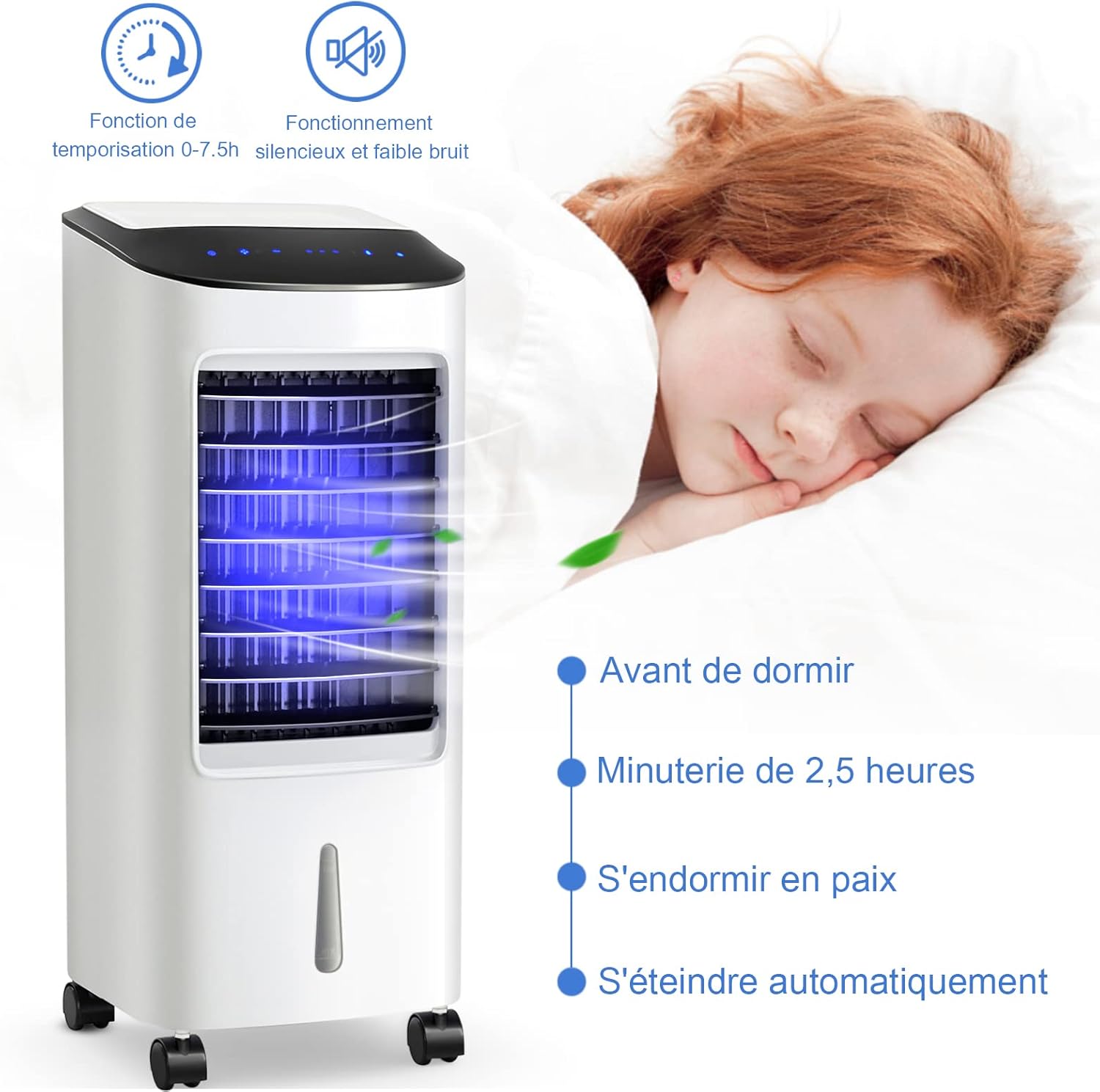
Figure 3.3: Ice boxes can be added to the water tank for improved cooling performance.
4. Awọn ilana Iṣiṣẹ
Olutọju afẹfẹ le ṣee ṣiṣẹ nipa lilo igbimọ iṣakoso ifọwọkan lori oke ti ẹyọkan tabi isakoṣo latọna jijin ti o wa pẹlu.

Figure 4.1: The intelligent touch control panel and effective remote control.
4.1 Agbara Tan / Pa
- Pulọọgi okun agbara sinu iṣan itanna to dara.
- Tẹ awọn TAN/PA bọtini lori awọn iṣakoso nronu tabi isakoṣo latọna jijin lati tan kuro tabi pa.
4.2 Selecting Wind Mode
Tẹ awọn MODE button to cycle through the available wind modes:
- Ipo deede: Provides a constant, steady airflow.
- Ipo Adayeba: Ṣe afarawe afẹfẹ adayeba pẹlu awọn iyara àìpẹ oriṣiriṣi.
- Ipo orun: Ó ń ṣiṣẹ́ ní iyàrá tó kéré sí i, tó sì dákẹ́ jẹ́ẹ́, ó sì ń dínkù díẹ̀díẹ̀asing fan speed over time for undisturbed sleep.

Figure 4.2: Visual representation of the three wind modes and three fan speeds.
4.3 Siṣàtúnṣe Fan Speed
Tẹ awọn Iyara button to select from three fan speeds:
- Iyara kekere
- Iyara Alabọde
- Ere giga
4.4 Oscillation Išė
The air cooler features automatic horizontal oscillation and manual vertical adjustment.
- Tẹ awọn WIPE button to activate or deactivate the automatic left-to-right oscillation of the internal louvers.
- Manually adjust the external louvers up or down to direct the airflow vertically.
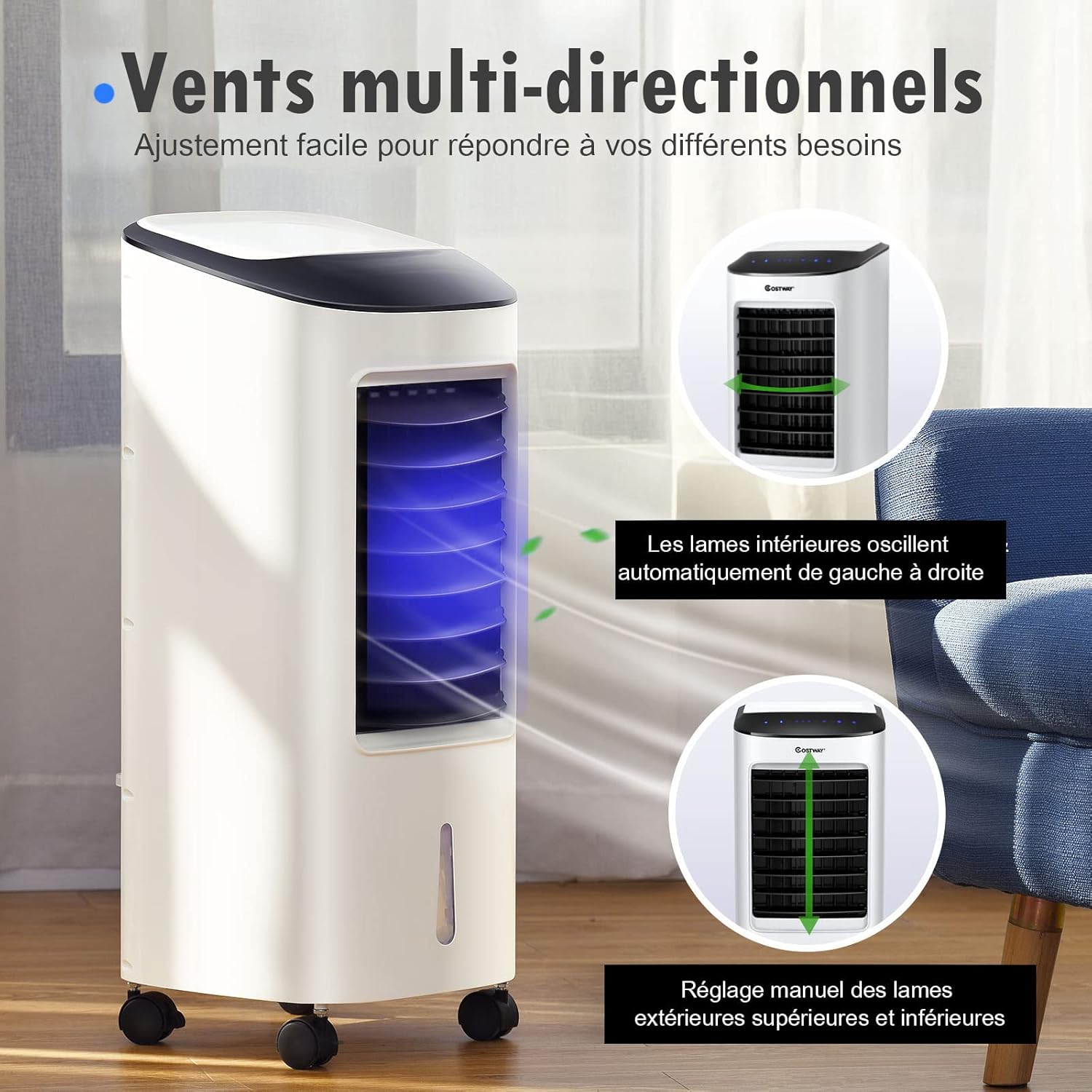
Figure 4.3: Multi-directional airflow with automatic horizontal swing and manual vertical adjustment.
4.5 Aago Išė
The timer allows you to set the appliance to turn off automatically after a specified period (0 to 7.5 hours).
- Tẹ awọn Aago button repeatedly to select the desired operating time in 0.5-hour increments.
- The indicator lights on the control panel will show the set time.
- Ẹrọ naa yoo wa ni pipa laifọwọyi nigbati akoko ti a ṣeto ba ti pari.
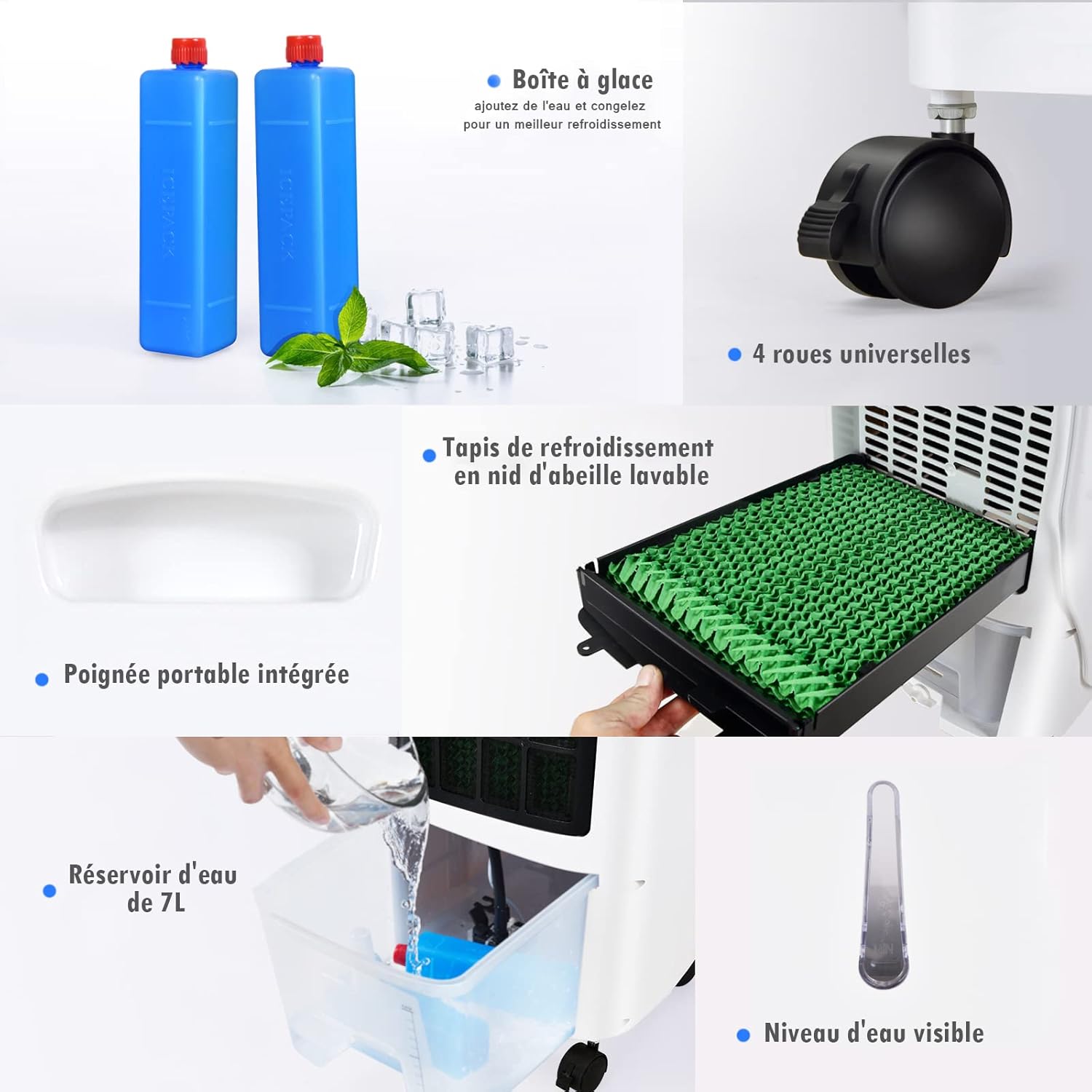
Figure 4.4: The timer function allows for automatic shut-off, ideal for sleep.
4.6 Cooling/Humidification Function
To activate the cooling and humidification function, ensure the water tank is filled.
- Tẹ awọn TURA bọtini lori nronu iṣakoso tabi isakoṣo latọna jijin.
- The unit will begin to draw water from the tank to humidify and cool the air.
- Tẹ awọn TURA button again to deactivate this function.
5. Itọju
Ninu deede ati itọju yoo rii daju iṣẹ ṣiṣe ti o dara julọ ati fa gigun igbesi aye ti kula afẹfẹ rẹ.
5.1 Ninu Omi Omi
It is recommended to clean the water tank weekly, especially if used frequently.
- Yọọ ohun elo kuro ni iṣan agbara.
- Fa jade ni omi ojò lati kuro.
- Sofo eyikeyi omi ti o ku.
- Nu ojò naa mọ pẹlu asọ rirọ ati ohun ọṣẹ tutu. Fi omi ṣan daradara pẹlu omi mimọ.
- Gbẹ ojò naa patapata ṣaaju ki o to tun fi sii sinu ẹyọ.
5.2 Cleaning the Cooling Pad/Filter
The cooling pad should be cleaned regularly to prevent mold and maintain airflow.
- Yọọ ohun elo naa kuro.
- Remove the rear filter cover (refer to diagram if available).
- Fara rọra yọ kuro ni paadi itutu agbaiye.
- Rinse the cooling pad under running water to remove dust and mineral deposits. For stubborn dirt, use a soft brush.
- Allow the cooling pad to air dry completely before reinserting.
- Reattach the rear filter cover.

Figure 5.1: The washable honeycomb cooling pad for easy maintenance.
5.3 Ode Ninu
- Mu ese ita kuro pẹlu asọ, damp asọ.
- Ma ṣe lo abrasive ose tabi epo.
- Rí i dájú pé omi kò wọ inú pánẹ́ẹ̀lì ìṣàkóso tàbí àwọn ohun èlò iná mànàmáná mìíràn.
5.4 Ibi ipamọ
Ti ohun elo naa kii yoo lo fun igba pipẹ:
- Empty and clean the water tank and cooling pad thoroughly.
- Rii daju pe gbogbo awọn ẹya ti gbẹ patapata.
- Store the appliance in a cool, dry place, preferably in its original packaging.
6. Laasigbotitusita
Ṣaaju ki o to kan si atilẹyin alabara, jọwọ wo itọsọna laasigbotitusita atẹle yii fun awọn ọran ti o wọpọ:
| Isoro | Owun to le Fa | Ojutu |
|---|---|---|
| Ẹka ko ni tan-an. | Ko si ipese agbara. | Check if the power cord is securely plugged in. Check the power outlet. |
| Alailagbara tabi ko si ṣiṣan afẹfẹ. | Ti dina mọ ẹnu-ọna afẹfẹ. Iyára afẹ́fẹ́ kéré jù. | Rii daju pe ko si ohun ti o ṣe idiwọ awọn atẹgun afẹfẹ. Ṣe alekun iyara afẹfẹ. |
| No cooling/humidification. | Omi ojò ṣofo. Iṣẹ itutu agbaiye ko mu ṣiṣẹ. | Kun omi ojò. Press the 'COOL' button. |
| Òrùn dídùn. | Stagnant water or dirty cooling pad. | Empty and clean the water tank. Clean the cooling pad. |
| Isakoṣo latọna jijin ko ṣiṣẹ. | Awọn batiri ti dinku. Idilọwọ laarin latọna jijin ati ẹyọkan. | Rọpo awọn batiri. Ensure a clear line of sight to the unit's receiver. |
7. Awọn pato
Technical details for the RELAX4LIFE Portable 3-in-1 Air Cooler (7L Model):
| Ẹya ara ẹrọ | Sipesifikesonu |
|---|---|
| Orukọ awoṣe | Portable 3-in-1 Air Cooler |
| Awọn iwọn (L x W x H) | 30 x 27 x 152.4 cm (11.8 x 10.6 x 60 inches) |
| Iwọn Nkan | 7.69 kilogram (16.95 lbs) |
| Agbara agbara | 65 Wattis |
| Omi ojò Agbara | 7 liters |
| Ohun elo | Copper (motor), ABS (body) |
| Àwọ̀ | Funfun |
| Iṣakoso Iru | Isakoṣo latọna jijin, Igbimọ Fọwọkan |
| Nọmba ti Awọn iyara | 3 |
| Pataki Awọn ẹya ara ẹrọ | Cooling Fan, Humidifier, Timer (0-7.5h), Universal Wheels |
| Iṣagbesori Iru | Sisun |
| Ilu isenbale | China |

Figure 7.1: Key features and dimensions of the air cooler.
8. Atilẹyin ọja ati Support
RELAX4LIFE products are manufactured to high-quality standards. In the unlikely event of a problem, please refer to your purchase documentation for warranty details. For technical assistance, troubleshooting beyond this manual, or to inquire about replacement parts, please contact RELAX4LIFE customer support through your retailer or the official brand webojula.
Please have your model number (7L Portable 3-in-1 Air Cooler) and purchase date available when contacting support.