
1. Ifihan
O ṣeun fun riraasing the Muse M-308 BT Bluetooth Speaker. This manual provides essential information for the safe and correct use of your device. Please read it thoroughly before use and keep it for future reference.
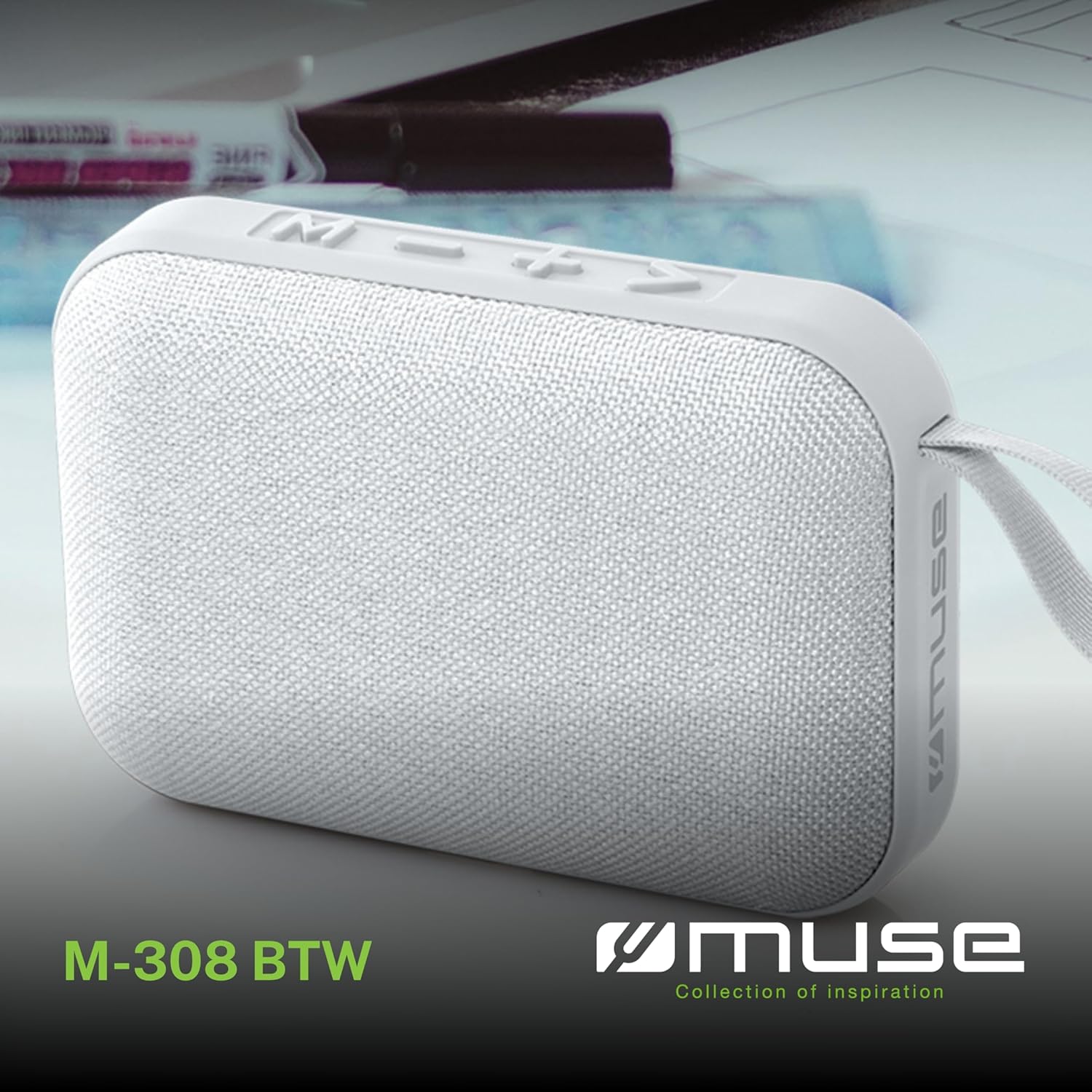
Aworan 1.1: Iwaju view of the Muse M-308 BT Bluetooth Speaker.
2. Awọn ẹya Ọja
- Asopọmọra Bluetooth: Gba ohùn láilọ́wọ́ láti ọ̀dọ̀ àwọn ẹ̀rọ tó bá ara wọn mu.
- Iṣẹ ti ko ni ọwọ: Integrated microphone for taking calls.
- Sisisẹsẹhin Media: Supports music playback from USB and MicroSD (TF) cards.
- Sitẹrio Sitẹrio: Connect two M-308 BT speakers for enhanced stereo sound.
- Atọka LED: Provides visual feedback for Bluetooth pairing and charging status.
- Iwapọ ati iwuwo fẹẹrẹ: Designed for portability, weighing approximately 200g.
- Batiri Gbigba agbara ti a ṣe sinu: 1200mAh capacity for up to 10 hours of playback.
- Agbara Ijade: 5 Watts for clear audio.

Image 2.1: Key features of the Muse M-308 BT speaker.

Image 2.2: Additional functionalities of the Muse M-308 BT speaker.
3. Package Awọn akoonu
Rii daju pe gbogbo awọn nkan wa lori ṣiṣi silẹ:
- Muse M-308 BT Bluetooth Speaker
- Okun Ngba agbara USB
- Afowoyi Olumulo (iwe-ipamọ yii)
4. Awọn iṣakoso ati Awọn isopọ
Mọ ararẹ pẹlu awọn iṣakoso agbọrọsọ ati awọn ibudo asopọ:

Image 4.1: Top panel with various connections.
- Ibudo USB: Fun orin lati inu awakọ filasi USB kan.
- Ibudo USB Micro-USB: Fun gbigba agbara si agbọrọsọ.
- Micro SD (TF) Card Slot: Fun orin lati inu kaadi Micro SD kan.
- ON/PA Yipada: To power the speaker on or off.

Image 4.2: Side panel with control buttons.
- M Button (Mode): Press to switch between Bluetooth, USB, and Micro SD modes.
- - Button (Volume Down / Previous Track):
- Tẹ kukuru: Din iwọn didun ku.
- Long press: Go to the previous track.
- + Button (Volume Up / Next Track):
- Tẹ kukuru: Mu iwọn didun pọ si.
- Long press: Go to the next track.
- > Button (Play / Pause / Call):
- Short press: Play or pause music.
- Short press (during incoming call): Answer call.
- Long press (during incoming call): Reject call.
- Short press (during call): End call.
5. Eto
5.1 Gbigba agbara si Agbọrọsọ
- Connect the supplied USB charging cable to the Micro-USB port on the speaker.
- So opin okun USB pọ si ohun ti nmu badọgba agbara USB (kii ṣe pẹlu) tabi ibudo USB ti kọnputa kan.
- The LED indicator will illuminate to show charging status. It will turn off or change color when fully charged.
5.2 Titan / Pa a
- To power on, slide the ON/OFF switch to the 'ON' position. You will hear an audible prompt.
- To power off, slide the ON/OFF switch to the 'OFF' position.
5.3 Sisopọ Bluetooth
- Ensure the speaker is powered on and in Bluetooth mode (indicated by a flashing LED). If not, press the 'M' button to switch to Bluetooth mode.
- Mu Bluetooth ṣiṣẹ lori foonu alagbeka rẹ, tabulẹti, tabi ẹrọ ibaramu miiran.
- Wa fun available Bluetooth devices and select "M-308 BT" from the list.
- Ni kete ti a ba so pọ, Atọka LED yoo da didan duro ati duro ṣinṣin, ati pe iwọ yoo gbọ ohun orin ijẹrisi kan.
- The speaker will automatically connect to the last paired device when powered on, if it is within range.
5.4 Sísopọ̀mọ́ra Sitẹrio (Iṣẹ́ TWS)
To pair two M-308 BT speakers for true wireless stereo sound:
- Ensure both speakers are powered on and in Bluetooth pairing mode (LED flashing).
- On one of the speakers (this will be the primary speaker), double-press the 'M' button. The speaker will search for another M-308 BT speaker.
- Once connected, both speakers will emit a confirmation tone, and the LED on the primary speaker will flash slowly, while the LED on the secondary speaker will remain solid.
- Bayi, so ẹrọ rẹ pọ si agbọrọsọ akọkọ nipasẹ Bluetooth gẹgẹbi a ti ṣalaye ni apakan 5.3.
6. Awọn ilana Iṣiṣẹ
6.1 Ti ndun Orin
- Ipo Bluetooth: After successful pairing, start playing music on your connected device. The audio will stream through the speaker.
- Ipo USB/Mikro SD: Insert a USB flash drive or Micro SD card into the respective port. The speaker will automatically switch to the corresponding mode and begin playing music. If it doesn't, press the 'M' button to cycle through modes.
6.2 Iṣakoso iwọn didun
- Press the '+' button to increase the volume.
- Press the '-' button to decrease the volume.
6.3 Lilọ kiri Orin
- Tẹ bọtini '+' fun gigun lati fo si orin ti o tẹle.
- Long press the '-' button to go back to the previous track.
6.4 Ipe laisi ọwọ
- When a call comes in, the music will pause. Press the '>' button to answer the call.
- To end a call, press the '>' button again.
- To reject an incoming call, long press the '>' button.
7. Itọju
- Jẹ́ kí agbọ́rọ̀sọ náà jìnnà sí ooru tó le koko, oòrùn tààrà, àti ọrinrin.
- Do not expose the speaker to water or other liquids. This model is not water-resistant.
- Sọ agbọrọsọ mọ pẹlu asọ asọ ti o gbẹ. Ma ṣe lo abrasive ose tabi epo.
- Ma ṣe gbiyanju lati ṣajọ tabi tun agbọrọsọ naa ṣe funrararẹ. Eyi yoo sọ atilẹyin ọja di ofo.
- Tí o kò bá lò ó fún ìgbà pípẹ́, gba agbára bátìrì náà lẹ́ẹ̀kan ní oṣù mẹ́ta kí ó lè máa ṣiṣẹ́ dáadáa.
8. Laasigbotitusita
| Isoro | Owun to le Fa | Ojutu |
|---|---|---|
| Agbọrọsọ ko ni agbara lori. | Batiri ti dinku. | Gba agbara si agbọrọsọ nipa lilo okun USB ti a pese. |
| Ko le so pọ nipasẹ Bluetooth. | Bluetooth is not enabled on your device or speaker is not in pairing mode. Speaker is too far from the device. | Ensure Bluetooth is active on both devices. Make sure the speaker is in Bluetooth pairing mode (flashing LED). Move the speaker closer to your device (within 10 meters). |
| Ko si ohun. | Volume is too low. Speaker is not connected. Incorrect mode selected. | Increase the volume on both the speaker and your connected device. Re-pair the Bluetooth connection. Press the 'M' button to cycle through modes (Bluetooth, USB, Micro SD). |
| Music playback from Micro SD card is erratic or "screaming". | Ti bajẹ files on Micro SD card. Incompatible file ọna kika. | Ṣe idaniloju ohun afetigbọ files are in a compatible format (e.g., MP3). Try using a different Micro SD card or reformatting the current one and reloading files. |
| Speaker switches between modes (e.g., SD and BT) unexpectedly. | Interference or a temporary software glitch. | Power off the speaker, wait a few seconds, then power it back on. Ensure no other devices are causing interference. If the issue persists, try removing the Micro SD card if it's inserted. |
9. Awọn pato
| Orukọ awoṣe | M-308 BT |
| Brand | Muse |
| Asopọmọra Technology | Bluetooth, Ti firanṣẹ |
| Imọ-ẹrọ Ibaraẹnisọrọ Alailowaya | Bluetooth |
| Agbọrọsọ Agbara Ijade ti o pọju | 5 Wattis |
| Ipo Ijade Ohun | Sitẹrio |
| Agbọrọsọ Iru | Agbọrọsọ Bluetooth to ṣee gbe |
| Pataki Awọn ẹya ara ẹrọ | Bluetooth |
| Awọn ẹrọ ibaramu | Foonuiyara, Tabulẹti |
| Orisun agbara | Batiri |
| Igbesi aye batiri | Awọn wakati 10 |
| Agbara Batiri | 1200 Milionuampere-wakati |
| Awọn iwọn Ọja (D x W x H) | 118D x 30B x 76H millimeters (11.8 x 3 x 7.6 cm) |
| Iwọn Nkan | 200 giramu |
| Ohun elo | Plastic rubber material |
| Is Water Resistant | Rara |
| Awọn irinše to wa | Okun Ngba agbara USB |
Image 9.1: Dimensions of the Muse M-308 BT speaker.
10. Atilẹyin ọja ati Support
The Muse M-308 BT Bluetooth Speaker comes with a 2-odun atilẹyin ọja lati ọjọ ti o ra.
For technical support, warranty claims, or further assistance, please contact your retailer or visit the official MUSE webojula fun alaye olubasọrọ.