
1. Ọja Ipariview
A ṣe apẹrẹ ohun elo Warrior 18V Cordless 3/8 Inch Drill/Driver Kit fun oniruuru iṣẹ lilu ati awakọ ni ayika ile ati ibi iṣẹ. Ohun elo ti o wapọ yii ni okunfa iyara ti o yatọ, bireki ina, ati awọn eto clutch iyipo 20 fun iṣakoso deede. Chuck ti ko ni bọtini gba laaye fun awọn iyipada bit ni iyara ati irọrun, ati ina LED ti a ṣe sinu rẹ n tan imọlẹ si agbegbe iṣẹ fun ilọsiwaju irisi ni awọn igun dudu. Batiri Lithium-Ion 18V ti o wa ninu rẹ le yipada pẹlu awọn irinṣẹ Volt Warrior 18 miiran, ti o funni ni irọrun ati irọrun.
Awọn ẹya pataki:
- Iyara ti o yatọ, iṣẹ atunṣe
- Bérékì iná mànàmáná fún dídúró lẹ́sẹ̀kẹsẹ̀
- Awọn eto idimu iyipo 20 fun awọn ohun elo oriṣiriṣi
- Chuck aláìló bọtini fún àwọn àyípadà kíákíá lórí bit
- Imọlẹ LED ti a ṣepọ fun hihan ti o pọ si
- Batiri Lithium-Ion 18 Volt, tí a lè yípadà pẹ̀lú àwọn irinṣẹ́ Warrior 18V mìíràn
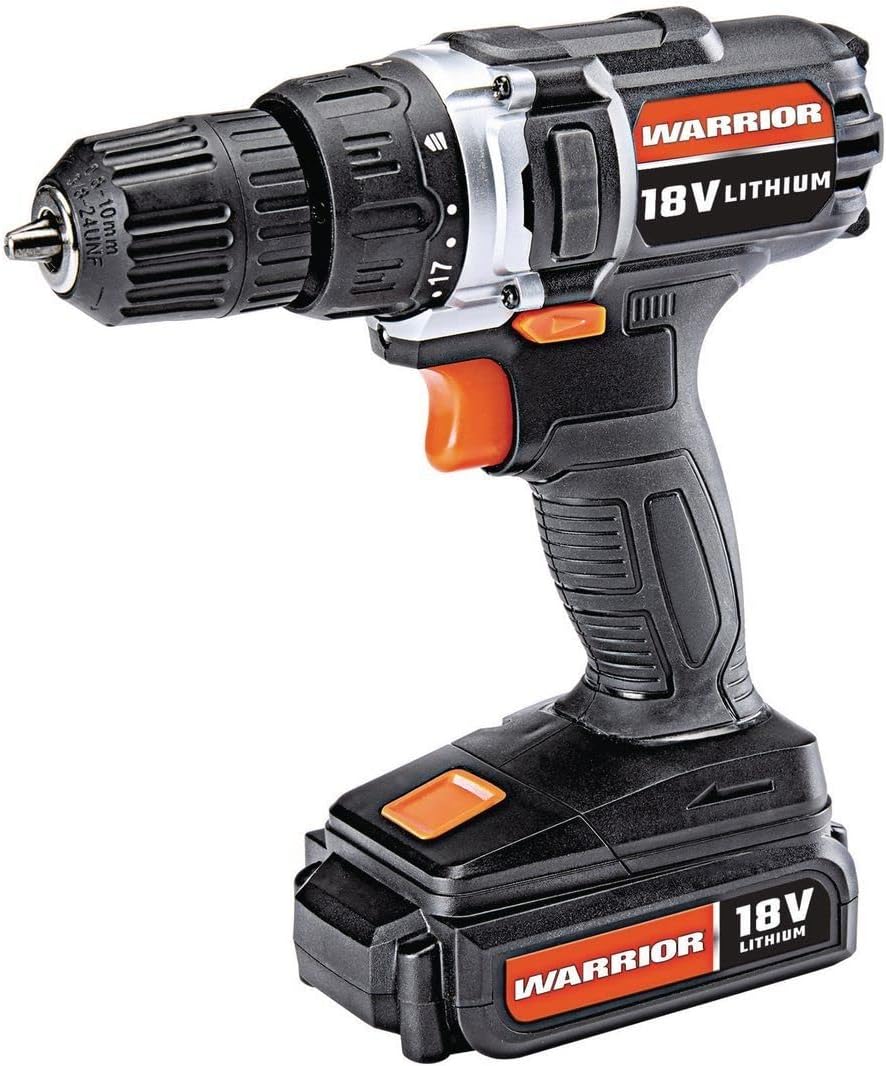
Àwòrán 1: Ohun èlò ìwakọ̀/aláìlókùn 18V Warrior 3/8 Inch, showcasing apẹrẹ kekere rẹ ati awọn ẹya pataki rẹ.
2. Eto
2.1 Batiri Ngba agbara ati fifi sori
- Ngba agbara si Batiri naa: So ẹ̀rọ gbigba agbara ti a pese mọ ibudo gbigba agbara ti o wa lori apo batiri naa. So ẹ̀rọ gbigba agbara naa sinu ibudo ina deede. Ina ifihan lori ẹ̀rọ gbigba agbara naa yoo fihan ipo gbigba agbara naa (fun apẹẹrẹ, pupa fun gbigba agbara, alawọ ewe fun gbigba agbara ni kikun). Rii daju pe batiri naa ti gba agbara ni kikun ṣaaju lilo akọkọ.
- Fifi sori ẹrọ Batiri naa: Ṣe àkójọ batiri náà pẹ̀lú ìsàlẹ̀ ọwọ́ ìdábùú náà. Fi batiri náà sí ipò rẹ̀ títí tí yóò fi tẹ dáadáa. Rí i dájú pé ó dúró dáadáa kí ó má baà ya kúrò nígbà tí a bá ń ṣiṣẹ́.
- Yọ Batiri naa kuro: Tẹ awọn bọtini idasilẹ batiri (nigbagbogbo ni awọn ẹgbẹ ti apo batiri) ki o si yọ batiri naa kuro ninu ọwọ idalẹmọ naa.
2.2 Fi sii ati yiyọ Awọn gige Liluho kuro
- Ṣii Chuck: Yi ọrùn iwájú ti chuck aláìlọ́wọ́ náà pada sí ọ̀nà òdìkejì títí tí àwọn ẹ̀rẹ̀kẹ́ náà yóò fi gbòòrò tó láti gba lílo ohun èlò ìwakọ̀ tàbí ohun èlò ìwakọ̀ tí a fẹ́.
- Fi Bit sii: Fi ọ̀pá ìdábùú tàbí ẹ̀rọ ìwakọ̀ sínú àgbọ̀n chuck. Rí i dájú pé ẹ̀rọ náà wà ní àárín gbùngbùn àti pé ó wà ní ibi tí ó bá ṣeé ṣe láìfi ọwọ́ kan ara ẹ̀rọ ìwakọ̀ náà.
- Mu Chuck naa pọ: Yí kọ́là iwájú chuck náà padà sí ọwọ́ ọ̀tún títí tí ẹ̀rẹ̀kẹ́ rẹ̀ yóò fi di ohun èlò náà mú dáadáa. Fún ìdìmú tó pọ̀ jùlọ, fi ọwọ́ yí i padà sí i.
- Yọ Bit naa kuro: Yí kọ́là iwájú chuck náà padà sí òdìkejì láti tú àwọn ẹ̀rẹ̀kẹ́ náà kí ó sì yọ ẹ́ kúrò.

Olusin 2: Pariview ti awọn ẹya ara ẹrọ ti adaṣe naa, pẹlu awọn eto clutch 20, ina LED, iyara ti o yatọ, ati apẹrẹ fẹẹrẹfẹ.
3. Awọn ilana Iṣiṣẹ
3.1 Agbára Títàn/Pá àti Ìṣàkóso Ìyára Oníyípadà
- Láti bẹ̀rẹ̀ ìlù, tẹ ìyípadà ìlù. Ìwọ̀n ìlù tí a fi sí ìlù ni a ń darí iyàrá ìlù náà; títẹ̀ ẹ́ síwájú sí i ń mú iyàrá náà pọ̀ sí i.
- Láti dá ìdábùú dúró, tú ìyípadà ìfàgùn náà sílẹ̀. Bírékì iná mànàmáná náà yóò ṣiṣẹ́, yóò sì dá ìyípo ìfàgùn náà dúró kíákíá.
3.2 Siwaju / Yiyi pada
- Ìyípadà yíyàn iwájú/àtúnṣe wà ní òkè ohun tí ń fa ìṣòro náà.
- Titẹ yipada si apa osi fun yiyi siwaju (fun lilu ati awakọ awọn skru).
- Titari yipada si apa ọtun fun yiyi pada (fun yiyọ awọn skru kuro tabi awọn bits gbigbe sẹhin).
- Tí switch bá wà ní àárín, a ti ti ohun tí ń fa á pa, èyí tí yóò dènà kí ìbẹ̀rẹ̀ tí kò ṣe é ṣe.
3.3 Ètò Ìdìpọ̀ Ìyípo
- Oruka idimu iyipo naa wa ni ẹhin idimu naa. O ni awọn eto nọmba 20 ati aami idakọ kan.
- Yí òrùka náà padà láti yan ètò ìyípo tí ó fẹ́. Àwọn nọ́mbà ìsàlẹ̀ kò ní agbára púpọ̀, ó dára fún àwọn skru kéékèèké àti àwọn ohun èlò tí ó rọ̀ jù láti dènà ìwakọ̀ tàbí yíyọ kúrò. Àwọn nọ́mbà gíga ń fúnni ní agbára púpọ̀ fún àwọn skru ńlá àti àwọn ohun èlò líle.
- Fun awọn ohun elo liluho, yan eto aami liluho fun iyipo ti o pọju.
3.4 Imọlẹ Ise LED
- Ìmọ́lẹ̀ iṣẹ́ LED tí a ṣepọ náà máa ń tàn yòò nígbà tí a bá tẹ ohun tí ń fa iná náà, èyí tí yóò sì fún ojú iṣẹ́ náà ní ìmọ́lẹ̀.

Àwòrán 3: Ẹ̀rọ ìwakọ̀ oní-agbára Warrior 18V tí a ń lò, èyí tí ó ń fi hàn bí a ṣe ń lò ó fún àwọn iṣẹ́ ilé bíi fífi ọ̀pá ìgbámú sí i.
4. Itọju
4.1 Gbogbogbo Cleaning
- Jẹ́ kí àwọn ọ̀nà afẹ́fẹ́ tí ó wà nínú ohun èlò náà mọ́ tónítóní kí ó má sì sí ìdọ̀tí kankan láti rí i dájú pé ẹ̀rọ náà tutù dáadáa.
- Pa ohun elo naa pẹlu mimọ, damp asọ. Maṣe lo awọn kẹmika ti o lewu tabi awọn afọmọ abrasive.
- Máa ṣe àyẹ̀wò àwọn chuck earns déédéé fún ìbàjẹ́ kí o sì nu eruku tàbí ìdọ̀tí tí ó kó jọ.
4.2 Itọju Batiri ati Ibi ipamọ
- Tọju batiri naa ni itura, aye gbigbẹ kuro lati orun taara ati awọn iwọn otutu to gaju.
- Fun ibi ipamọ igba pipẹ, a gba ọ niyanju lati gba agbara batiri naa si agbara ti o to 50%.
- Má ṣe jẹ́ kí batiri náà gbẹ pátápátá kí o tó tún gba agbára padà, nítorí pé èyí lè dín àkókò rẹ̀ kù.
5. Laasigbotitusita
5.1 Ìlù kò ṣiṣẹ́
- Rii daju pe batiri ti gba agbara ni kikun ati fi sori ẹrọ daradara.
- Ṣàyẹ̀wò pé ìyípadà yíyàn iwájú/àtúnṣe kò sí ní ipò àárín (tí a ti tì).
- Rí i dájú pé a ti ge ẹ̀rọ amúṣẹ́ náà kúrò nínú bátìrì nígbà tí a bá ń gbìyànjú láti lo ẹ̀rọ amúṣẹ́ náà.
5.2 Agbára tàbí Iṣẹ́ Tí Ó Dínkù
- Batiri naa le ma ni agbara ti o kere. Tun batiri naa gba agbara.
- Eto clutch iyipo le kere ju fun iṣẹ naa. Ṣe atunṣe si eto ti o ga julọ tabi ipo lilu.
- Rí i dájú pé ohun èlò ìdábùú náà mú kí ó sì yẹ fún ohun èlò tí a ń ṣiṣẹ́ lé lórí.
6. Awọn pato
| Ẹya ara ẹrọ | Sipesifikesonu |
|---|---|
| Brand | Jagunjagun |
| Nọmba awoṣe | Jagunjagun-XXX |
| Orisun agbara | Agbara Batiri |
| Voltage | 18 Volts |
| Batiri Cell Type | Litiumu Iwon |
| Iyara Yiyipo ti o pọju | 900 RPM |
| Torque Eto | 20 Idimu Eto |
| Iru Chuck | Keyless Chuck |
| Liluho Agbara Wood | 1 Inṣi |
| Iwọn Nkan | 2.47 iwon |
| Ohun elo | Ṣiṣu |
| Pataki Awọn ẹya ara ẹrọ | Iyara Oniyipada, Imọlẹ LED |
| UPC | 798993496886 |
7. Atilẹyin ọja ati Support
A ko pese alaye atilẹyin ọja pato ati awọn alaye olubasọrọ atilẹyin alabara ninu data ọja naa. Jọwọ tọka si apoti ọja naa tabi osise olupese naa. webAaye fun awọn ofin atilẹyin ọja tuntun ati awọn aṣayan atilẹyin.