
1. Ifihan
Thank you for choosing the HoldPeak HP-816B Digital Anemometer. This device is designed for precise measurement of wind speed, air flow velocity, and temperature, including wind chill indication. This manual provides detailed instructions for proper setup, operation, and maintenance to ensure optimal performance and longevity of your anemometer.
Please read this manual thoroughly before using the device and keep it for future reference.
2. Ọja Ipariview
The HoldPeak HP-816B is a compact and versatile digital anemometer suitable for various applications, from outdoor activities to electrical equipment testing.
Awọn ẹya pataki:
- Precise Measurement: Measures wind speed from 0.3 to 30 m/s (±5% rdg) and temperature from -10 to 45°C (±2°C), with real-time wind chill indication.
- Multi-Unit Display: Supports wind speed units (m/s, Ft/min, knots, Km/h, Mph) and temperature units (°C/°F).
- Awọn ọna data: Displays maximum, average, and current wind speed.
- LCD Afẹyinti: Features a crystal display with an automatic backlight function for visibility in low-light conditions.
- Agbara Aifọwọyi Paa: Ó ń pa bátírì mọ́ nípa pípa ara rẹ̀ láìfọwọ́sí lẹ́yìn ìṣẹ́jú mẹ́ẹ̀ẹ́dógún tí kò bá ṣiṣẹ́.
- Apẹrẹ to gbe: Lightweight and compact, designed for single-hand operation and easy portability.

Figure 2.1: HoldPeak HP-816B Anemometer with basic functions highlighted.
3. Awọn irinše To wa
The HoldPeak HP-816B Digital Anemometer package typically includes:
- HoldPeak HP-816B Digital Anemometer
- CR2032 3.0V Battery (pre-installed or included separately)
- Lanyard
- Itọsọna olumulo
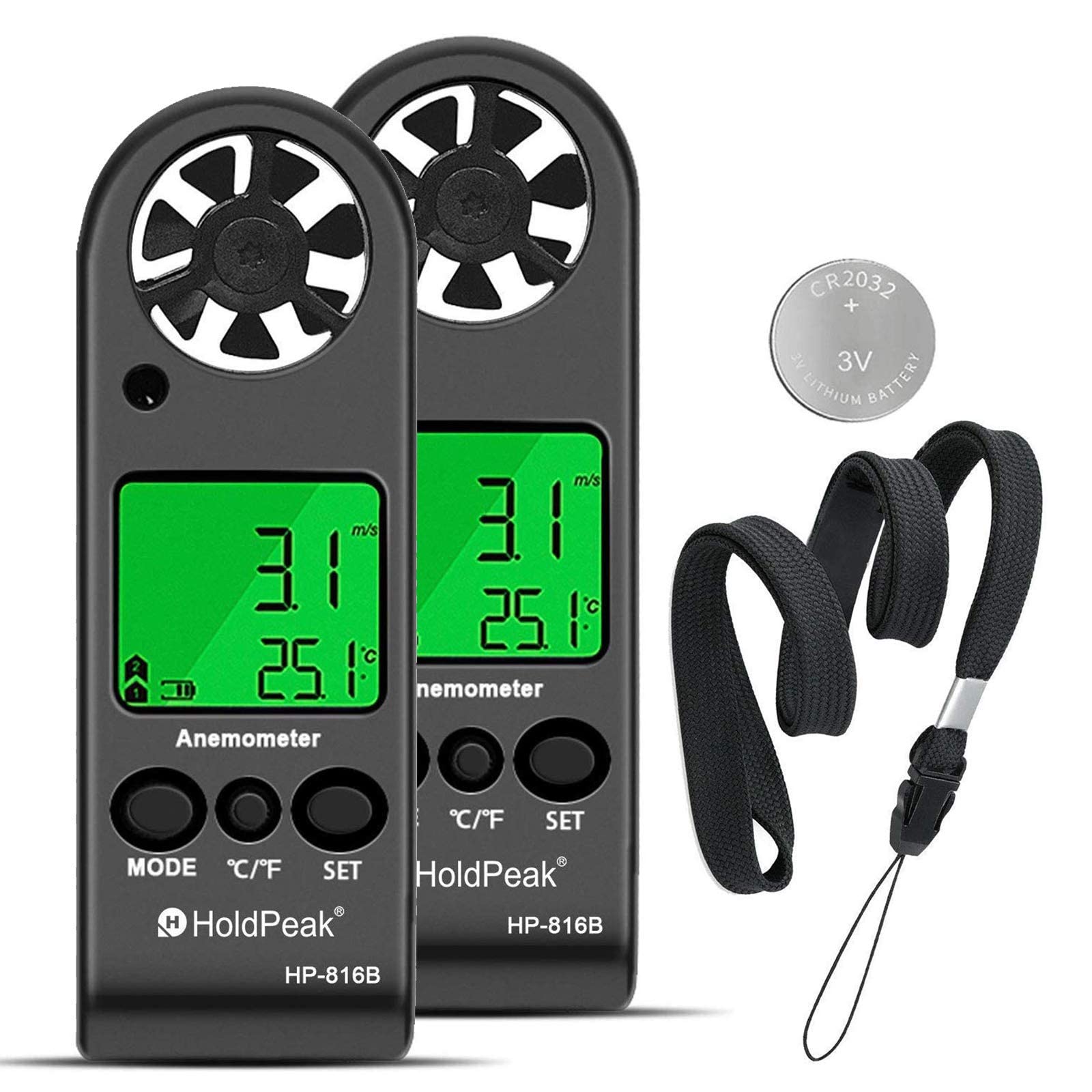
Figure 3.1: The HoldPeak HP-816B Digital Anemometer and its included accessories.
4. Eto
4.1 Fifi sori batiri
The device uses one CR2032 3.0V battery. Follow these steps to install or replace the battery:
- Locate the battery cover on the back of the anemometer.
- Use a coin to rotate the battery cover counter-clockwise to the "OPEN" position.
- Remove the cover and insert the CR2032 battery with the positive (+) side facing up.
- Replace the battery cover and rotate it clockwise to the "CLOSE" position to secure it.

Figure 4.1: Illustrated guide for battery replacement.
4.2 Lanyard Attachment
To prevent accidental drops and for convenient carrying, attach the included lanyard:
- Locate the lanyard hole at the bottom of the anemometer.
- Thread the thin loop of the lanyard through the hole.
- Pass the main strap of the lanyard through the loop and pull it tight to secure.
Video 4.1: Demonstration of battery installation and lanyard attachment.
5. Awọn ilana Iṣiṣẹ
5.1 Agbara Tan / Pa
- Agbara Tan: Long press the "MODE" button until the device turns on and "m/s" starts to flash.
- Agbara Pa: Long press the "SET" button to turn off the device. The device also features an automatic power-off function after 10 minutes of inactivity.
5.2 Unit Selection (Wind Speed)
To change the wind speed unit:
- With the device powered on, short press the "MODE" button repeatedly.
- Cycle through the available units: m/s, km/h, ft/min, knots, mph.
- A o fi ohun elo ti a yan han loju iboju naa.
5.3 Temperature Unit Switch (°C/°F)
Lati yipada laarin Celsius ati Fahrenheit:
- Short press the "°C/°F" button to toggle between Celsius (°C) and Fahrenheit (°F).
5.4 Backlight Išė
The device is equipped with a backlight for use in dark environments:
- Press any key to activate the LCD backlight for 5 seconds.

Figure 5.1: Anemometer display with backlight activated in a dark setting.
5.5 Measurement Modes (MAX/AVG/CURRENT)
The anemometer can display maximum, average, and current wind speed. Use the "MODE" button to cycle through these display options after the device is powered on and the unit is selected.

Nọmba 5.2: Alaye view of the anemometer's display and control buttons (MODE, °C/°F, SET).
6. Awọn pato
Below are the technical specifications for the HoldPeak HP-816B Digital Anemometer:
| Ẹya ara ẹrọ | Sipesifikesonu |
|---|---|
| Brand | HoldPeak |
| Nọmba awoṣe | HP-816B |
| Ohun elo | Acrylonitrile Butadiene Styrene (ABS) |
| Awọn Iwọn Nkan (L x W x H) | 11.3 x 4 x 1.5 cm |
| Iwọn Nkan | 80 giramu |
| Batiri Iru | CR2032 3.0V |
| Iwọn otutu | NTC thermometer |
| Iwọn otutu | -10°C si 45°C (14°F si 113°F) |
| Awọn iwọn otutu ti nṣiṣẹ | ≤ 90% RH |
| Ibi ipamọ otutu | -40°C si 60°C (-40°F si 140°F) |
| Lilo lọwọlọwọ | Nipa 3mA |
| Wind Speed Range (m/s) | 0.3 - 30 m/s (Resolution: 0.1, Threshold: 0.1, Accuracy: ±5%) |
| Wind Speed Range (Ft/min) | 0 - 5860 Ft/min (Resolution: 19, Threshold: 39, Accuracy: ±5%) |
| Wind Speed Range (Knots) | 0 - 55 Knots (Resolution: 0.2, Threshold: 0.3, Accuracy: ±5%) |
| Wind Speed Range (Km/h) | 0 - 90 Km/h (Resolution: 0.3, Threshold: 0.3, Accuracy: ±5%) |
| Wind Speed Range (Mph) | 0 - 65 Mph (Resolution: 0.2, Threshold: 0.2, Accuracy: ±5%) |

Figure 6.1: Detailed specifications and dimensions of the anemometer.
7. Itọju
7.1 Ninu
To maintain accuracy and extend the life of your anemometer:
- Mu ese ẹrọ rẹ jẹ pẹlu asọ, asọ gbigbẹ.
- Ma ṣe lo abrasive ose tabi epo.
- Ensure the fan blades are free from dust and debris for accurate wind speed readings.
7.2 Batiri Rirọpo
Refer to Section 4.1 for detailed instructions on how to replace the battery. Replace the battery when the low battery indicator appears on the display to ensure continuous and accurate operation.
7.3 Ibi ipamọ
When not in use for extended periods, store the anemometer in a cool, dry place, away from direct sunlight and extreme temperatures. If storing for a long time, it is recommended to remove the battery to prevent leakage.
8. Laasigbotitusita
If you encounter issues with your HoldPeak HP-816B Anemometer, refer to the following common problems and solutions:
- Ẹrọ ti ko tan: Check if the battery is correctly installed and has sufficient charge. Replace the battery if necessary (refer to Section 4.1).
- Inaccurate wind speed readings: Ensure the fan blades are clean and unobstructed. Make sure the device is held in an open area, facing the wind direction.
- Ifihan ti wa ni baibai tabi yiyi: The battery might be low. Replace the battery.
- Imọlẹ ẹhin ko ṣiṣẹ: Press any button to activate the backlight. If it still doesn't work, check the battery.
If the problem persists after attempting these solutions, please contact HoldPeak customer support for further assistance.
9. Awọn oju iṣẹlẹ elo
The HoldPeak HP-816B Digital Anemometer is a versatile tool suitable for a wide range of applications:
- Awọn iṣẹ ita gbangba: Ideal for shooting, sailing, mountaineering, kite flying, drone operation, and other sports where wind conditions are crucial.
- Awọn ọna ṣiṣe HVAC: Useful for testing and balancing heating, ventilation, and air conditioning equipment.
- Abojuto Ayika: Can be used for air flow research and aerial surveys.
- Lilo Ile-iṣẹ: Suitable for various industrial applications requiring wind speed and temperature monitoring.

Olusin 9.1: Examples of the anemometer's diverse application scenarios.
10. Atilẹyin ọja ati Support
HoldPeak provides a 365-day warranty for the HP-816B Digital Anemometer, ensuring quality and reliability. Additionally, lifetime technical support is available to assist you with any questions or issues you may encounter.
For technical assistance or warranty claims, please contact HoldPeak customer service through their official channels or the retailer where the product was purchased.