
DXPICR SMWACTH42
DXPICR Smart Watch User Manual
Model: SMWACTH42
Ọrọ Iṣaaju
This manual provides comprehensive instructions for the operation, maintenance, and troubleshooting of your DXPICR Smart Watch. Please read this manual carefully before using the device to ensure proper functionality and to maximize your user experience.

Image: The DXPICR Smart Watch, featuring a light pink band and a vibrant display showing various app icons.
Setup and Initial Pairing
Before using your DXPICR Smart Watch, ensure it is adequately charged. The watch comes with a Lithium Polymer battery (included). Follow these steps to set up and pair your watch with your smartphone:
- Ṣe igbasilẹ ohun elo naa: Download the official DXPICR companion application from your mobile app store (compatible with Android and iOS).
- Mu Bluetooth ṣiṣẹ: Tan Bluetooth lori foonuiyara rẹ.
- So Wiwo naa pọ: Open the DXPICR app on your phone. Navigate to the "Add a device" section and search for "Y20 GT" to connect.
- Enable Call Function (for calling features): On your watch, swipe down the screen to access quick settings and turn on the 'call' function switch.
- So Bluetooth pọ fun Awọn ipe: Open your phone's Bluetooth settings page. Find and connect to "Y20 GT_Phone" to enable call answering and dialing directly from your watch.
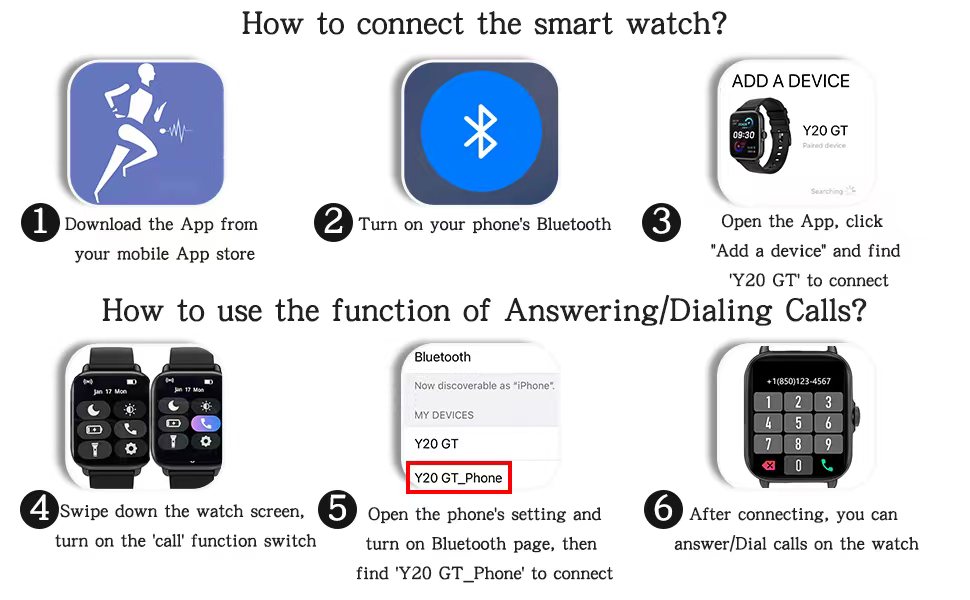
Image: A visual guide illustrating the six steps for connecting the smart watch and enabling its call answering/dialing functions via the mobile app and Bluetooth settings.

Image: A woman using her DXPICR Smart Watch to answer or dial calls directly from her wrist, demonstrating the Bluetooth call function.
Ṣiṣẹ Smart Watch rẹ
Your DXPICR Smart Watch features a 1.7-inch TFT color full touch screen (240x280 pixels) for intuitive navigation. Use the touchscreen and the physical dial/button for interaction.
Awọn ẹya pataki ati Awọn iṣẹ:
- Call Receive/Dial: Once paired, you can make and receive calls directly from your watch using the dial pad, call records, or contacts.
- Awọn iwifunni Smart: Receive notifications for calls, messages, and social media apps directly on your wrist.

Image: A user interacting with their laptop while their DXPICR Smart Watch displays various notifications, including calls, messages, and social media alerts.
- Abojuto Ilera:
- Atẹle Oṣuwọn ọkan: Built-in optical heart rate sensor provides real-time heart rate data.

Image: A woman meditating, with her DXPICR Smart Watch displaying her heart rate, illustrating the heart rate monitoring feature.
- Atẹle oorun: Tracks awake time, light sleep, and deep sleep patterns to help you understand your sleep quality.

Image: A person sleeping, with the DXPICR Smart Watch displaying detailed sleep monitoring data, including awake time, light sleep, and deep sleep.
- Atẹgun ẹjẹ (SpO2) Atẹle: Ṣe iwọn awọn ipele itẹlọrun atẹgun ẹjẹ rẹ.
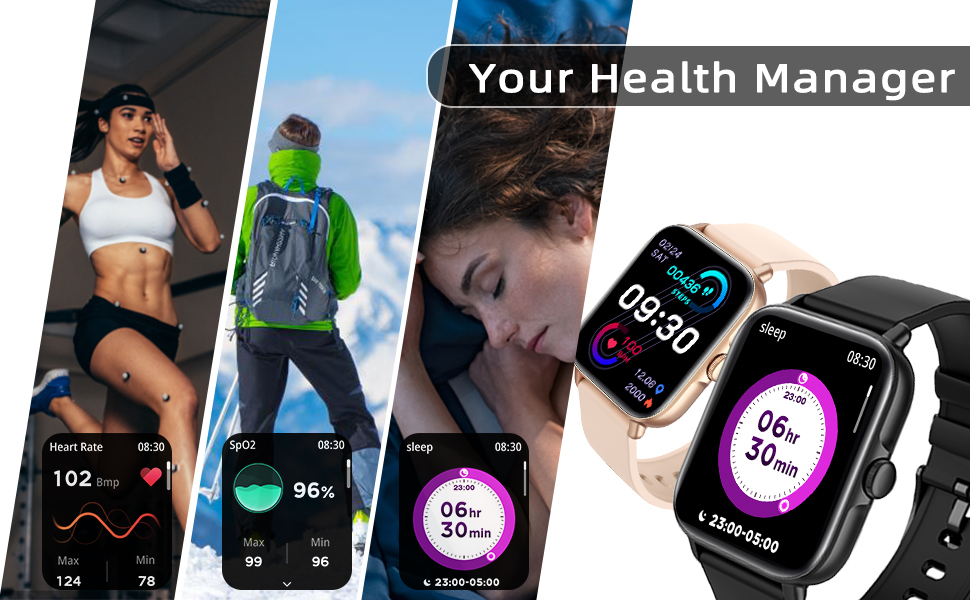
Aworan: Afihan akojọpọasing the health management features of the DXPICR Smart Watch, including heart rate, SpO2, and sleep tracking.
- Atẹle Oṣuwọn ọkan: Built-in optical heart rate sensor provides real-time heart rate data.
- Activity Tracking & Sports Modes: Built-in activity tracker records steps, calories burned, distance, and active hours. It supports 28 sports modes with GPS connectivity (via phone).

Image: A woman celebrating after a workout, with her DXPICR Smart Watch displaying activity data such as steps, calories, distance, and active minutes, highlighting the 28 sports modes.

Image: A dynamic image illustrating various sports modes available on the DXPICR Smart Watch, including walking, cycling, and swimming, with corresponding activity data.
- Practical Tools: Your watch includes various useful tools:
- Oluranlọwọ ohun: Access AI voice commands.
- Ikẹkọ Mimi: Awọn adaṣe mimi itọsọna fun isinmi.
- Iṣakoso Orin: Ṣakoso ṣiṣiṣẹsẹhin orin lori foonu ti o so pọ.
- Iṣakoso kamẹra: Lo aago rẹ bi isakoṣo latọna jijin fun kamẹra foonu rẹ.
- Awọn olurannileti Iduroṣinṣin: Alerts to encourage movement after periods of inactivity.
- Aago itaniji: Ṣeto awọn itaniji taara lati aago rẹ.
- Ifihan oju ojo: Gba awọn imudojuiwọn oju ojo ni akoko gidi.
- Imọlẹ ina: A basic flashlight function.

Image: A compilation of icons representing the DXPICR Smart Watch's practical functions, including weather display, blood oxygen monitoring, music control, call features, and alarm clock.
- Personalized Watch Face: Customize your watch face with your favorite pictures or photos through the app.
Itọju ati Itọju
Proper care will extend the life and performance of your DXPICR Smart Watch.
- Ninu: Máa nu ibojú aago àti band déédéé pẹ̀lú aṣọ rírọ̀, damp asọ. Yago fun lilo awọn kẹmika lile tabi awọn ohun elo abrasive.
- Omi Resistance: The watch is designed to be waterproof. However, avoid prolonged submersion in water, hot water, or steam. It is suitable for daily use and light water exposure like hand washing or rain.
- Gbigba agbara: Use the provided charging cable. Ensure the charging contacts on the watch and cable are clean and dry before charging.
- Ibi ipamọ: Nigbati o ko ba wa ni lilo fun awọn akoko ti o gbooro sii, tọju aago naa ni itura, aaye gbigbẹ.
Laasigbotitusita
If you encounter issues with your DXPICR Smart Watch, refer to the following common solutions:
| Isoro | Owun to le Solusan |
|---|---|
| Aago naa ko tan/gba agbara. | Ensure the charging cable is properly connected to both the watch and a power source. Check if the charging contacts are clean. Allow the watch to charge for at least 30 minutes before attempting to turn it on. |
| Ge asopọ Bluetooth. | Ensure the watch and phone are within Bluetooth range. Restart both the watch and your phone. Unpair and re-pair the devices through the app and phone's Bluetooth settings. Check if the app is running in the background and has necessary permissions. |
| Awọn iwifunni ko han. | Verify that notification permissions are enabled for the DXPICR app in your phone's settings. Ensure notifications are enabled within the DXPICR app itself. Check if "Do Not Disturb" mode is active on either the watch or phone. |
| Heart rate/SpO2 readings are inaccurate. | Ensure the watch is worn snugly on your wrist, not too tight or too loose. Keep the sensor clean and free from debris. Remain still during measurements. |
| App ipadanu tabi di. | Update the DXPICR app to the latest version. Clear the app's cache and data (this may require re-pairing). Reinstall the app if the issue persists. Ensure your phone's operating system is up to date. |
Awọn pato ọja
| Ẹya ara ẹrọ | Ẹ̀kúnrẹ́rẹ́ |
|---|---|
| Brand | DXPICR |
| Orukọ awoṣe | DXPICR Smart Watch |
| Nọmba Awoṣe Nkan | SMWACTH42 |
| Ọja Mefa | 3.7 x 3.4 x 1.7 inches |
| Iwọn Nkan | 3.84 iwon |
| Àwọ̀ | Pink Pink |
| Ifihan ọna ẹrọ | TFT |
| Iwon iboju | 1.7 inches |
| Ipinnu | 240 x 280 awọn piksẹli |
| Eto isesise | Android, iOS ibaramu |
| Asopọmọra Technology | Bluetooth |
| Batiri Iru | 1 Batiri litiumu polima (pẹlu) |
| Pataki Awọn ẹya ara ẹrọ | Phone Call, Heart Rate Monitor, Sleep Monitor, Blood Oxymeter (SpO2), Music Player, Camera, Sedentary Reminder, Alarm Clock, Calorie Tracker, Time Display, Voice Call, Waterproof, Multisport Tracker, Notifications, Activity Tracker, Breath Monitor |
| Human Interface Input | Dial, Touchscreen |
Atilẹyin ọja ati Support
For warranty information or technical support, please refer to the contact details provided with your product packaging or visit the official DXPICR website. Our customer service team is available to assist you with any questions or concerns regarding your smart watch.