
TOPTECH Spike-4
Ìwé Ìtọ́sọ́nà Olùlò Agbọrọsọ Bluetooth Spike-4 Tó Ga Jùlọ
Model: Spike-4
1. Ifihan
O ṣeun fun riraasing the Top Tech Audio Spike-4 Bluetooth Speaker. This manual provides important information regarding the setup, operation, maintenance, and troubleshooting of your new speaker. Please read this manual thoroughly before using the product to ensure proper and safe operation.
2. Alaye Aabo
Awọn Itọsọna Aabo pataki:
- Ma ṣe fi agbọrọsọ si awọn iwọn otutu to gaju, ọriniinitutu, tabi imọlẹ orun taara.
- Do not immerse the speaker in water or other liquids. This product is not waterproof.
- Má ṣe gbìyànjú láti tú agbọ̀rọ̀sọ náà ká, tún un ṣe, tàbí ṣe àtúnṣe rẹ̀. Tọ́ka gbogbo iṣẹ́ ìtọ́jú náà sí àwọn òṣìṣẹ́ tó mọ̀ nípa rẹ̀.
- Use only the power cord supplied with the speaker.
- Jeki agbọrọsọ kuro ni awọn orisun ooru gẹgẹbi awọn imooru, awọn iforukọsilẹ ooru, awọn adiro, tabi awọn ohun elo miiran (pẹlu ampliifiers) ti o gbe ooru jade.
- Mọ pẹlu asọ gbigbẹ nikan.
- Rii daju pe fentilesonu to dara ati ki o ma ṣe dina eyikeyi awọn ṣiṣi atẹgun.
- Yago fun gbigbọ ni awọn ipele iwọn didun giga fun awọn akoko gigun lati dena ibajẹ igbọran.
3. Package Awọn akoonu
Jọwọ ṣayẹwo awọn akoonu package lati rii daju pe gbogbo awọn ohun kan wa:
- 1 x AL-802 Party Speaker (Top Tech Audio Spike-4 Bluetooth Speaker)
- 1 x Gbohungbohun
- 1 x Okun Agbara
4. Ọja Ipariview ati Awọn ẹya ara ẹrọ
The Top Tech Audio Spike-4 is a portable Bluetooth speaker designed to deliver powerful sound with dynamic light displays, suitable for both indoor and outdoor use.
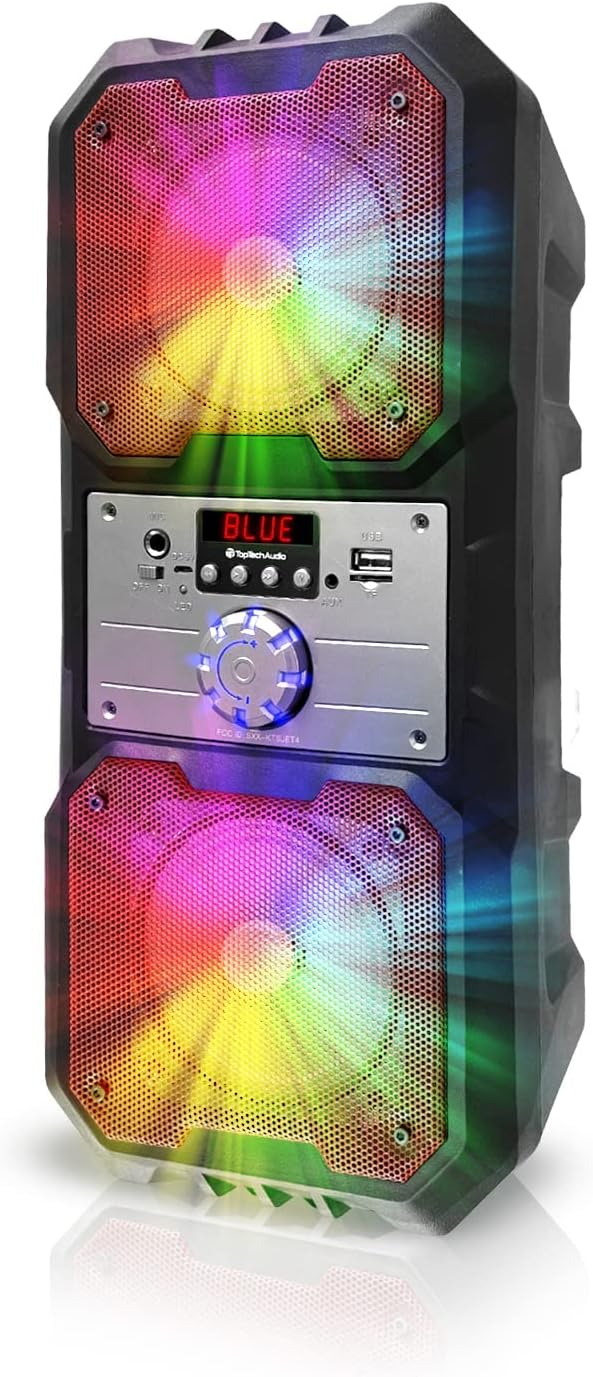
Nọmba 4.1: Iwaju view of the Top Tech Audio Spike-4 speaker, showcasing its dual 4-inch woofers with vibrant, multi-color LED lighting effects. The central control panel is visible between the two speaker grilles.

Nọmba 4.2: Pariview of the speaker's connectivity options and features, including Easy Portable design, USB Port, TF Card Port, Mic Port, AUX Port, and Bluetooth Wireless capability. These features are indicated by clear icons around the speaker.

Nọmba 4.3: Illustration of the speaker's dynamic lighting features, including Multicolor Gradation where lights move with the rhythm, and Reactive Color Show where colors change and rotate slowly, enhancing the audio experience.
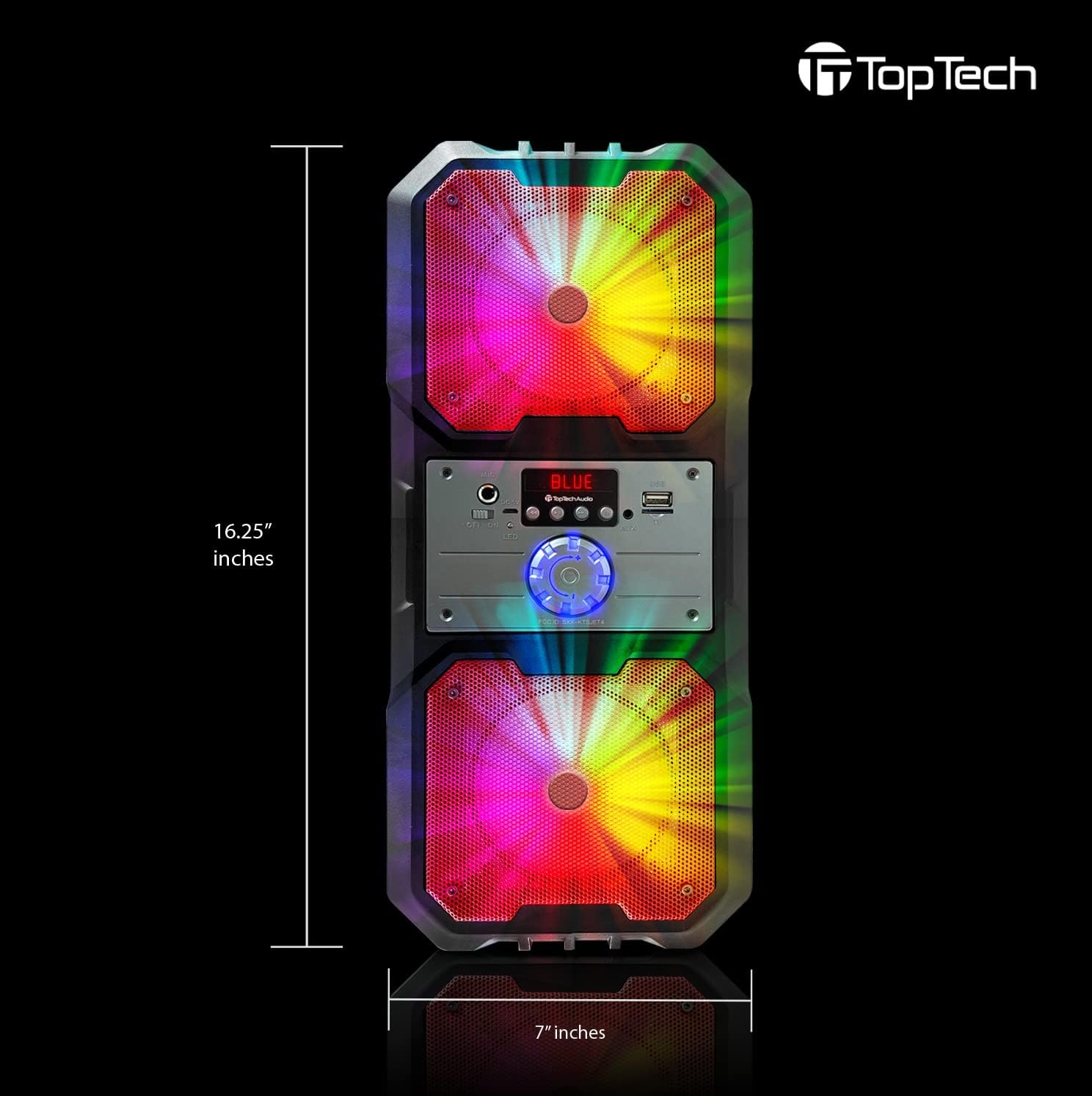
Nọmba 4.4: Dimensions of the Top Tech Audio Spike-4 speaker, showing a height of 16.25 inches and a width of 7 inches, emphasizing its compact yet powerful design.
Awọn ẹya pataki:
- Ohun Alagbara: Dual 4-inch woofers deliver full-range audio with deep bass and vibrant highs.
- Rhythmic Disco Lights: Built-in LED lighting effects synchronize with your music for a dynamic visual experience.
- Ṣiṣanwọle Bluetooth Alailowaya: Easily connect your smartphone or tablet with up to 33ft (10 meters) wireless range.
- Awọn ọna Sisisẹsẹhin lọpọlọpọ: Supports USB, TF card, AUX input, and FM radio for versatile listening options.
- Built-in Karaoke Function: Includes a microphone input and a microphone for sing-alongs and parties.
- Apẹrẹ to gbe: Equipped with a handle for easy transport.
5. Eto
5.1 Gbigba agbara akọkọ
Before first use, fully charge the speaker. Connect the supplied power cord to the speaker's charging port and plug the other end into a standard wall outlet. The charging indicator light will illuminate. Once fully charged, the light may change color or turn off, depending on the model.
5.2 Titan / Pa a
To power on the speaker, locate the power button, usually on the control panel, and press and hold it for a few seconds until you hear an audible prompt or see the display light up. To power off, repeat the process.
5.3 Sisopọ Bluetooth
- Ensure the speaker is powered on and in Bluetooth mode. If not, press the "Mode" button to switch to Bluetooth. The display will show "BLUE" or a similar indicator, and you may hear a pairing prompt.
- Lori ẹrọ alagbeka rẹ (foonuiyara, tabulẹti, ati bẹbẹ lọ), mu Bluetooth ṣiṣẹ ki o wa awọn ẹrọ to wa.
- Select "Spike-4" or "TOPTECH" from the list of found devices.
- Once paired, the speaker will indicate a successful connection, usually with an audible tone.
- O le mu ohun ṣiṣẹ bayi lati ẹrọ rẹ nipasẹ agbọrọsọ.
5.4 Connecting Other Audio Sources
- Iṣawọle AUX: Connect an external audio device (e.g., MP3 player, computer) to the speaker's AUX port using a 3.5mm audio cable (not included). Press the "Mode" button to switch to AUX mode.
- Sisisẹsẹhin USB: Fi kọnputa USB ti o ni ohun MP3 sii files into the USB port. The speaker will automatically switch to USB mode and begin playing.
- Sisisẹsẹhin Kaadi TF: Insert a TF (microSD) card containing MP3 audio files into the TF card slot. The speaker will automatically switch to TF card mode and begin playing.
5.5 Gbohungbohun Asopọ
Plug the supplied microphone into the speaker's microphone input port. The microphone is ready for use in any mode, allowing for karaoke or public address functions.
6. Awọn ilana Iṣiṣẹ
6.1 Iṣakoso iwọn didun
Adjust the master volume using the large rotary knob on the control panel. Turn clockwise to increase volume, counter-clockwise to decrease.
6.2 Aṣayan ipo
Press the "Mode" button repeatedly to cycle through available input modes: Bluetooth, FM Radio, AUX, USB, and TF Card. The current mode will be indicated on the display.
6.3 Awọn Ipo Imọlẹ
The speaker features dynamic LED lights. There may be a dedicated button (e.g., "Light" or "LED") to cycle through different light patterns or to turn the lights on/off. Refer to the control panel for specific button functions.
6.4 FM Radio isẹ
- Yipada agbọrọsọ si ipo Redio FM nipa lilo bọtini "Ipo".
- Press the "Play/Pause" button (often labeled with a play symbol) to initiate an automatic scan for available FM stations. The speaker will save detected stations.
- Use the "Previous/Next Track" buttons (often labeled with arrow symbols) to navigate between saved stations.
6.5 Karaoke Išė
With the microphone connected, simply speak or sing into the microphone. The speaker will amplify your voice. Adjust the microphone volume (if available) and echo effects (if available) using dedicated knobs or buttons on the control panel.
7. Itọju
7.1 Ninu
Fi aṣọ rírọrùn, gbígbẹ, nu ìta agbọ̀rọ̀sọ náà. Má ṣe lo àwọn ohun ìfọṣọ, ìpara, tàbí àwọn ohun olómi. Rí i dájú pé omi kò wọ inú ihò agbọ̀rọ̀sọ náà.
7.2 Ibi ipamọ
When not in use for extended periods, store the speaker in a cool, dry place, away from direct sunlight and extreme temperatures. It is recommended to partially charge the battery before storing to prolong its lifespan.
7.3 batiri Itọju
The speaker contains a rechargeable battery. To maximize battery life:
- Yago fun gbigba agbara si batiri ni kikun nigbagbogbo.
- Charge the speaker regularly, even if not in frequent use.
- Má ṣe fi agbọ́hùnsọ̀ sí iwọ̀n otútù tó ju 45°C (113°F) tàbí tó wà ní ìsàlẹ̀ 0°C (32°F).
8. Laasigbotitusita
| Isoro | Owun to le Fa | Ojutu |
|---|---|---|
| Agbọrọsọ ko ni agbara lori. | Batiri ti dinku. | So agbọrọsọ naa pọ mọ orisun agbara ki o si gba agbara rẹ. |
| Ko si ohun lati agbọrọsọ. | Iwọn didun kere ju; Ipo ti ko tọ ti yan; Ẹrọ ko sopọ mọ daradara. | Increase volume; Ensure correct input mode (Bluetooth, AUX, USB, TF); Reconnect device. |
| Asopọ Bluetooth kuna. | Agbọrọsọ kii ṣe ni ipo sisopọ; Ẹrọ Bluetooth kuro; Ju jina lati agbọrọsọ. | Ensure speaker is in Bluetooth pairing mode; Turn on Bluetooth on your device; Move device closer to speaker (within 10 meters). |
| Gbohungbohun ko ṣiṣẹ. | Gbohungbohun ko edidi ni deede; Iwọn gbohungbohun ti lọ silẹ pupọ. | Ensure microphone is fully inserted into the mic port; Adjust microphone volume knob if available. |
| Àìdúró redio FM. | Ifihan agbara; kikọlu. | Relocate the speaker to an area with better reception; Perform an auto-scan again. |
9. Awọn pato
| Ẹya ara ẹrọ | Ẹ̀kúnrẹ́rẹ́ |
|---|---|
| Orukọ awoṣe | Spike-4 |
| Brand | TOPTECH |
| Agbọrọsọ Iru | Outdoor / Portable |
| Iwọn Agbọrọsọ | Meji Inṣi 4 (Woofers) |
| Asopọmọra Technology | Bluetooth, USB, AUX |
| Imọ-ẹrọ Ibaraẹnisọrọ Alailowaya | Bluetooth |
| Bluetooth Ibiti | 10 Mita (ẹsẹ 33) |
| Orisun agbara | Agbara Batiri |
| Igbesi aye batiri | Titi di awọn wakati 5 |
| Awọn irinše to wa | AL-802 Party Speaker, Microphone, Power Cord |
| Àwọ̀ | Dudu |
| UPC | 752574407043 |
| Awọn iwọn (Itosi.) | 16.25 inches (Height) x 7 inches (Width) |
10. Atilẹyin ọja ati Support
The Top Tech Audio Spike-4 Bluetooth Speaker comes with a Limited Warranty. Please retain your proof of purchase for warranty claims.
For technical support, warranty inquiries, or replacement parts, please contact Top Tech Audio customer service. Refer to the contact information provided with your product packaging or visit the official Top Tech Audio webojula.
Olupese: Top Tech Audio
Ask a question about this manual
Ask about setup, troubleshooting, compatibility, parts, safety, or missing instructions. Manuals+ will review the question and use this page’s manual context to help answer it.