Ọrọ Iṣaaju
O ṣeun fun riraasing the Kenmore 4-Slice Toaster. This manual provides essential information for the safe operation, maintenance, and troubleshooting of your new appliance. Please read these instructions thoroughly before first use and retain them for future reference.

Figure 1: Kenmore 4-Slice Toaster with toast.
Awọn Aabo pataki
Nigbati o ba nlo awọn ohun elo itanna, awọn iṣọra aabo ipilẹ yẹ ki o tẹle nigbagbogbo, pẹlu atẹle naa:
- Ka gbogbo ilana.
- Maṣe fi ọwọ kan awọn aaye ti o gbona. Lo awọn ọwọ tabi awọn koko.
- Lati daabobo lodi si mọnamọna itanna, maṣe fi okun, plugs, tabi toaster bọ inu omi tabi omi miiran.
- Abojuto sunmọ jẹ pataki nigbati eyikeyi ohun elo ba lo nipasẹ tabi sunmọ awọn ọmọde.
- Yọọ kuro lati inu iṣan nigbati ko si ni lilo ati ṣaaju ṣiṣe mimọ. Gba laaye lati tutu ṣaaju fifi si tabi mu awọn ẹya kuro.
- Ma ṣe ṣiṣẹ ohun elo eyikeyi pẹlu okun tabi pulọọgi ti o bajẹ, tabi lẹhin aiṣe ohun elo tabi ti bajẹ ni eyikeyi ọna.
- Lilo awọn asomọ ẹya ẹrọ ti a ko ṣeduro nipasẹ olupese ohun elo le fa awọn ipalara.
- Maṣe lo ni ita.
- Ma ṣe jẹ ki okun duro lori eti tabili tabi counter, tabi fi ọwọ kan awọn aaye ti o gbona.
- Ma ṣe gbe sori tabi sunmọ gaasi ti o gbona tabi ina ina, tabi ni adiro ti o gbona.
- Lati ge asopọ, tan eyikeyi iṣakoso si “pa,” lẹhinna yọ plug kuro ni iṣan ogiri.
- Ma ṣe lo ohun elo fun miiran ju lilo ti a pinnu lọ.
- A kò gbọdọ̀ fi oúnjẹ tó pọ̀ jù, àwọn ohun èlò irin, tàbí àwọn ohun èlò tí a fi ń ṣe ohun èlò ìtọ́jú oúnjẹ sínú ẹ̀rọ ìtọ́jú oúnjẹ nítorí wọ́n lè fa iná tàbí ewu ìkọlù iná mànàmáná.
- A ina le waye ti o ba ti toasters ti wa ni bo tabi kàn flammable ohun elo, pẹlu awọn aṣọ-ikele, draperies, Odi, ati bi, nigba ti ni isẹ.
- Ma ṣe gbiyanju lati tu ounjẹ kuro nigbati toaster ti wa ni edidi.
- Maṣe ṣiṣẹ lairi.
Ọja Pariview
Familiarize yourself with the components of your Kenmore 4-Slice Toaster.
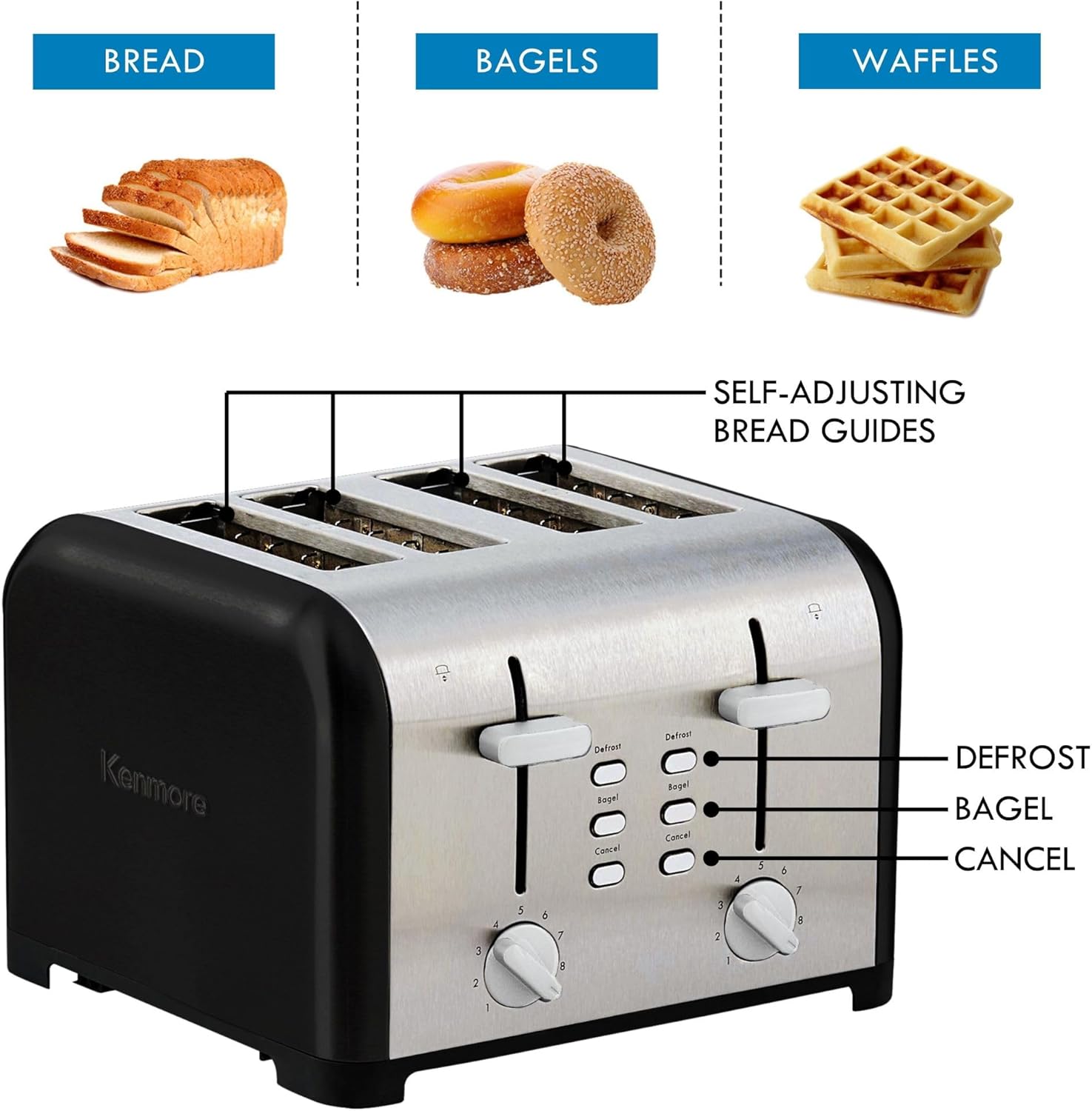
Figure 2: Toaster controls and features, including self-adjusting bread guides.
- Àwọn ibi ìjẹun sísè: Four extra-wide slots accommodate various bread types.
- Self-Adjusting Bread Guides: Automatically center bread for even toasting.
- Awọn Oṣiṣẹ Iṣakoso: Initiate the toasting cycle and raise toast.
- Shade Control Dials: Adjust toast darkness from 1 (lightest) to 9 (darkest). Two independent dials for each pair of slots.
- Bọtini Defrost: Fún sísè búrẹ́dì dídì.
- Bọtini Bagel: Ó ń gé apá àwọn bagel náà nígbà tí ó ń gbóná apá kejì.
- Bọtini Fagilee: Ó máa ń dá ìṣẹ́jú sísun oúnjẹ dúró nígbàkigbà.
- Àwọn Àwo Ẹ̀rún Tí A Lè Yọ kúrò: Collect crumbs for easy cleaning.
- Lefa Gíga: Allows for easy removal of smaller items.
- Itura-Fọwọkan ode: Designed to remain cool during operation.
- Ẹsẹ ti ko ni isokuso: Provides stability on countertops.
Ṣeto
- Yọ awọn toaster kuro ki o yọ gbogbo awọn ohun elo apoti kuro.
- Gbe toaster sori iduro, sooro ooru, ati dada gbigbẹ, kuro lati awọn ohun elo ti o jo.
- Ensure the crumb trays are properly inserted.
- Pulọọgi okun agbara sinu iṣan itanna 120V AC boṣewa.
- For the first use, operate the toaster without bread on the highest shade setting (9) to burn off any manufacturing residues. A slight odor or smoke may be present; this is normal. Allow the toaster to cool completely.
Awọn ilana Iṣiṣẹ
Toasting Akara
- Insert up to four slices of bread into the toasting slots. The self-adjusting guides will center the bread.
- Select your desired browning level using the shade control dial (1-9). Start with a medium setting (e.g., 4 or 5) and adjust as needed for future use.
- Tẹ ohun èlò ìdarí náà títí tí yóò fi di ibi tí ó yẹ. Ìgbésẹ̀ sísun oúnjẹ yóò bẹ̀rẹ̀.
- When the selected shade is reached, the toast will automatically pop up.
- If the toast is not high enough to retrieve easily, use the high-lift lever to raise it further.
Iṣẹ Iyọkuro
This function is designed to toast frozen bread products.
- Fi burẹdi dídì sínú àwọn ibi tí wọ́n ti ń fi iná sun.
- Select your desired shade setting.
- Press the control lever down, then press the Dín button. The indicator light on the Defrost button will illuminate.
- The toaster will automatically adjust the toasting time to account for defrosting.
Iṣẹ Bagel
The Bagel function toasts the cut side of a bagel while gently warming the outer side.
- Insert bagel halves into the toasting slots with the cut side facing inwards.
- Select your desired shade setting.
- Press the control lever down, then press the Bagel button. The indicator light on the Bagel button will illuminate.
- The toaster will complete the cycle, and the bagel will pop up.
Fagilee Išė
Lati da yiyi toasting duro nigbakugba, tẹ awọn Fagilee button. The control lever will immediately pop up.

Figure 3: Visual representation of the 9 shade settings.
Ninu ati Itọju
Wíwẹ̀ déédéé máa ń mú kí iṣẹ́ rẹ̀ dára jù, ó sì máa ń mú kí iṣẹ́ tó wà nínú ẹ̀rọ ìwẹ̀nùmọ́ rẹ pẹ́ sí i.
- Máa yọ ẹ̀rọ toaster kúrò nínú ẹ̀rọ iná mànàmáná nígbà gbogbo, kí o sì jẹ́ kí ó tutu pátápátá kí o tó sọ ọ́ di mímọ́.
- Àwọn Àwo Ẹ̀rún: Pull out the removable crumb trays from the bottom of the toaster. Discard accumulated crumbs. Wipe the trays clean with a damp fi aṣọ bò ó kí o sì gbẹ ẹ́ dáadáa kí o tó tún fi sí i.
- Òde: Mu ese ita ti toaster pẹlu asọ, damp cloth. Do not use abrasive cleaners or metal scouring pads, as they may scratch the stainless steel finish.
- Inu inu: Do not attempt to clean the interior of the toaster. If food particles remain lodged inside, unplug the toaster, turn it upside down, and gently shake to dislodge them.
- Maṣe fi toaster bọ inu omi tabi omi miiran.

Àwòrán 4: Àwọn àwo ìfọ́ tí a lè yọ kúrò fún ìfọ̀mọ́ tí ó rọrùn.
Laasigbotitusita
Tí o bá ní ìṣòro pẹ̀lú ẹ̀rọ ìtọ́jú oúnjẹ rẹ, wo àwọn ìṣòro àti ìdáhùn tó wọ́pọ̀ wọ̀nyí:
| Isoro | Owun to le Fa | Ojutu |
|---|---|---|
| Toaster ko ni tan. | Kò sí ohun tí a fi sínú rẹ̀; ìṣòro ìjáde agbára; ẹ̀rọ ìfọ́mọ́ra ìṣiṣẹ́ ti bàjẹ́. | Ensure toaster is securely plugged in. Test outlet with another appliance. Check household circuit breaker. |
| Tositi jẹ imọlẹ pupọ tabi dudu ju. | Shade setting is incorrect for bread type. | Adjust the shade control dial to a higher setting for darker toast or a lower setting for lighter toast. Different bread types may require different settings. |
| Toasting cycle stops prematurely. | Cancel button pressed accidentally; internal safety mechanism activated. | Ensure the Cancel button is not being pressed. If the toaster overheats, it may shut off automatically. Unplug and allow to cool before reuse. |
| Ẹfin nbo lati toaster. | Food lodged inside; crumbs in crumb tray; first use residue. | Unplug immediately. Remove any lodged food carefully. Empty and clean crumb trays. For first use, this is normal; allow to dissipate. |
Awọn pato
- Awoṣe: KKTSDC4SB
- Agbara: 1400 Wattis
- Voltage: 120V
- Nọmba Awọn Ege: 4
- Eto iboji: 9
- Ohun elo: Irin ti ko njepata
- Awọn iwọn (DxWxH): 10.8" x 11" x 7.5"
- Ìwọ̀n Nkan: 4.3 iwon
Atilẹyin ọja ati Support
This Kenmore toaster is backed by a 2-odun lopin atilẹyin ọja. For detailed warranty information, product support, or to inquire about replacement parts, please refer to the warranty card included with your purchase or visit the official Kenmore support webojula.
Jọwọ ṣe idaduro ẹri rira rẹ fun awọn iṣeduro atilẹyin ọja.


