
1. Ifihan
Thank you for choosing the Pantum BP5100DN Monochrome Laser Printer. This manual provides essential information for the safe and efficient use of your printer. Please read it thoroughly before operating the device and keep it for future reference.
The Pantum BP5100DN is designed for high-speed, high-quality monochrome printing, featuring automatic two-sided printing and versatile connectivity options including USB and Ethernet.
2. Alaye Aabo
- Always place the printer on a stable, level surface.
- Rii daju pe fentilesonu to dara ni ayika itẹwe lati ṣe idiwọ igbona.
- Má ṣe fi ẹ̀rọ ìtẹ̀wé náà sí omi tàbí ọ̀rinrin tó pọ̀ jù.
- Use only the specified power supply and connect to a grounded outlet.
- Jeki awọn ọwọ ati awọn aṣọ alaimuṣinṣin kuro lati awọn ẹya gbigbe lakoko iṣẹ.
- Yẹra fún fífọwọ́ kan ẹ̀rọ fuser náà, nítorí pé ó lè gbóná gan-an.
- Má ṣe gbìyànjú láti ṣe àtúnṣe ẹ̀rọ ìtẹ̀wé fúnra rẹ. Tọ́ka sí àwọn òṣìṣẹ́ iṣẹ́ tó péye.
3. Ohun ti o wa ninu Apoti
Daju pe gbogbo awọn nkan ti a ṣe akojọ rẹ si isalẹ wa ninu package rẹ:
- Pantum BP5100DN Monochrome Laser Printer
- Okun agbara
- USB ni wiwo USB
- Itọsọna iṣeto ni kiakia
- Starter cartridge (3000 pages)
- Starter drum (30000 pages)

Figure 3.1: Package Contents. This image displays the Pantum BP5100DN printer along with its accessories: power cord, USB interface cable, quick setup guide, starter toner cartridge, and starter drum unit.
4. Ọja Ipariview
4.1. Àwọn Ẹ̀yà Ìtẹ̀wé
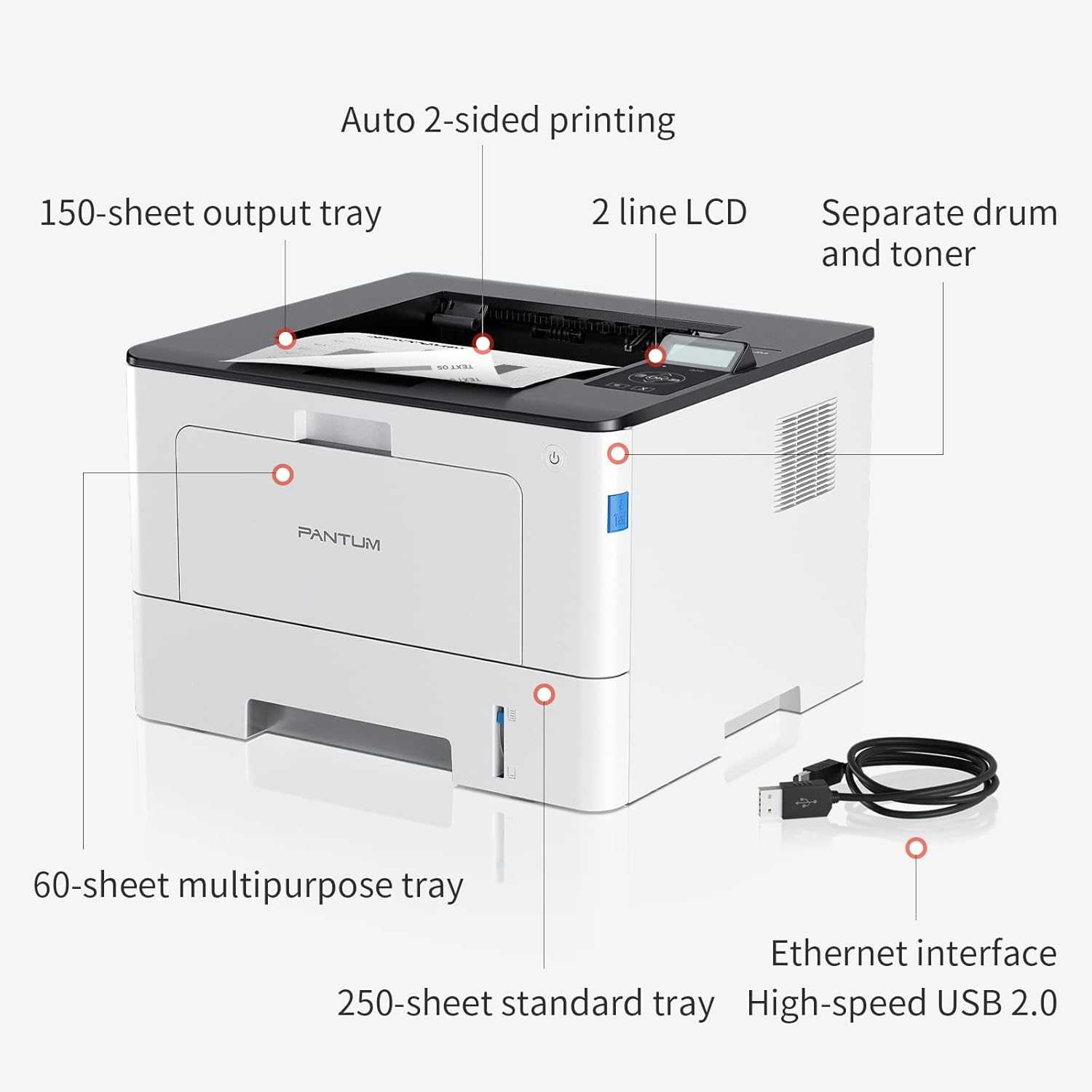
Figure 4.1: Printer Components. Key features include a 150-sheet output tray, a 2-line LCD display, separate drum and toner units, a 60-sheet multipurpose tray, a 250-sheet standard tray, an Ethernet interface, and a High-speed USB 2.0 port.
4.2. Awọn iwọn

Figure 4.2: Printer Dimensions. The printer measures approximately 14.33 inches (W) x 10.12 inches (H) x 13.54 inches (D).
4.3. Iṣakoso igbimo

Figure 4.3: Control Panel. The control panel includes a 2-line LCD display for status messages and menu navigation, along with buttons for OK, arrow controls, and cancel functions.
5. Eto
5.1. Unpacking ati Placement
- Fara yọọ itẹwe kuro ninu apoti rẹ.
- Yọ gbogbo awọn teepu aabo ati awọn ohun elo iṣakojọpọ kuro ninu ẹrọ itẹwe naa.
- Place the printer on a firm, level surface with adequate space for ventilation.
5.2. Toner and Drum Installation
- Ṣii ideri iwaju ti itẹwe naa.
- Unpack the drum unit and toner cartridge.
- Insert the toner cartridge into the drum unit until it clicks into place.
- Insert the combined drum and toner unit into the printer.
- Pa ideri iwaju.
5.3. Ikojọpọ iwe
- Pull out the standard paper tray or open the multipurpose tray.
- Ṣàtúnṣe àwọn ìwé ìtọ́sọ́nà sí ìwọ̀n ìwé rẹ.
- Load paper into the tray, ensuring it is flat and not exceeding the maximum capacity (250 sheets for standard tray, 60 sheets for multipurpose tray).
- Pa atẹ iwe naa.
5.4. Agbara ati Asopọmọra
- So okun agbara pọ mọ itẹwe ati lẹhinna si iṣan itanna ti ilẹ.
- For USB connection: Connect the provided USB 2.0 cable from the printer to your computer.
- For Ethernet connection: Connect an Ethernet cable from the printer to your network router or switch.
- Tẹ bọtini agbara lati tan itẹwe.
6. Awọn ilana Iṣiṣẹ
6.1. Fifi sori awakọ
For optimal performance, install the printer drivers from the official Pantum website or the provided installation media. The printer supports easy one-step installation for quick setup.
6.2. Printing a Document
- Ṣí ìwé tí o fẹ́ tẹ̀ jáde lórí kọ̀ǹpútà tàbí fóònù rẹ.
- Yan aṣayan titẹ lati inu ohun elo rẹ.
- Choose the Pantum BP5100DN from the list of available printers.
- Ṣàtúnṣe àwọn ètò ìtẹ̀wé bí ó ṣe pọndandan (fún àpẹẹrẹ, iye àwọn àdàkọ, ìwọ̀n ìwé, ìtẹ̀wé duplex).
- Tẹ 'Tẹjade'.
The printer offers fast printing speeds of up to 40 pages per minute (A4) / 42 pages per minute (Letter) in black and white. It also supports automatic two-sided printing to save paper.
6.3. Mobile Printing
The Pantum BP5100DN supports direct printing of office documents from mobile devices. Ensure your mobile device and printer are connected to the same network or via USB OTG (if supported by your device and printer).
7. Itọju
7.1. Replacing Toner Cartridge and Drum Unit
When the toner is low or the drum unit reaches its end of life, the printer's display will show a message. Refer to the instructions provided with the replacement consumables for proper installation. The starter toner cartridge yields approximately 3000 pages, and the starter drum unit yields approximately 30000 pages.
7.2. Ninu itẹwe
- Pa ẹ̀rọ ìtẹ̀wé náà kí o sì yọ okùn agbára náà kúrò kí o tó sọ ọ́ di mímọ́.
- Fi aṣọ rirọ, tí kò ní àwọ̀ nu òde ẹ̀rọ ìtẹ̀wé náà.
- Use a dry cloth to clean the paper path and rollers if paper jams occur frequently.
- Ma ṣe lo abrasive ose tabi epo.
8. Laasigbotitusita
If you encounter issues with your printer, refer to the following common solutions:
- Itẹwe Ko Dahun: Check power connections, USB/Ethernet cable connections, and ensure the printer is turned on. Restart both the printer and your computer.
- Awọn Jams Iwe: Open all covers and carefully remove any jammed paper. Ensure paper is loaded correctly and not creased or damaged.
- Didara Titẹjade Ko dara: Check toner levels. If print quality is faded, especially with cut and paste text, ensure you are using the correct print settings and consider replacing the toner cartridge or drum unit if they are near end-of-life.
- Awọn oran Asopọmọra: For Ethernet, verify network cable connection and IP address settings. For USB, try a different USB port or cable.
- Awọn ifiranṣẹ aṣiṣe: Consult the printer's display for specific error codes and refer to the quick setup guide or online support for detailed solutions.
For persistent issues, please contact customer service for support.
9. Awọn pato
| Ẹya ara ẹrọ | Sipesifikesonu |
|---|---|
| Orukọ awoṣe | BP5100DN |
| Imọ-ẹrọ titẹ sita | Lesa |
| Ijade itẹwe | Monochrome |
| Iyara Titẹjade ti o pọju (Monochrome) | 40 ppm (A4) / 42 ppm (Letter) |
| O pọju Print Resolution | 1200 x 1200 dpi |
| Titẹ-apa-meji | Bẹẹni (Alaifọwọyi) |
| Asopọmọra Technology | Àjọlò, USB 2.0 |
| O pọju Input dì Agbara | 250 sheets (Standard Tray), 60 sheets (Multipurpose Tray) |
| Media Print | Iwe (pẹtẹlẹ) |
| Iwon dì | A4, Letter, etc. |
| Awọn ẹrọ ibaramu | Awọn fonutologbolori, awọn PC |
| Wattage | 650 Wattis |
| Iwọn Nkan | 9.07 kg (nǹkan bíi 9 kg 70 g) |
| Olupese | Pantum |
10. Atilẹyin ọja ati Support
The Pantum BP5100DN Monochrome Laser Printer comes with a 1-year warranty from the date of purchase. For warranty claims, technical support, or any inquiries, please refer to the contact information provided in your quick setup guide or visit the official Pantum webojula.
For a better experience, please kindly refer to the user manual or contact customer service for support.


