
1. Ifihan
The DALS Lighting LTR-300-BK is a 300W outdoor low-voltage transformer designed for landscape lighting applications. This unit features a built-in timer and photocell sensor for automated operation, converting 120V AC input to selectable 12V, 13V, 14V, or 15V AC output. It is weatherproof and UL certified, ensuring safety and reliability for your outdoor lighting system.
2. Alaye Aabo
Read all instructions carefully before installation and operation. Failure to follow these instructions may result in electric shock, fire, or other hazards.
- Always disconnect power at the circuit breaker before installing, servicing, or performing any maintenance on the transformer or connected lighting fixtures.
- Fifi sori gbọdọ jẹ ṣiṣe nipasẹ onisẹ ina mọnamọna ni ibamu pẹlu gbogbo awọn koodu itanna agbegbe ati ti orilẹ-ede.
- This transformer is designed for outdoor use. Do not immerse the transformer in water.
- Ensure proper grounding of the transformer.
- Do not overload the transformer. The maximum recommended load is 80% of the 300W capacity (240W).
- Ma ṣe so awọn oluyipada meji tabi diẹ sii ni afiwe.
- Keep children away from the transformer during operation.
3. Eto ati fifi sori
Careful installation ensures optimal performance and safety.
3.1 Ṣíṣe àtúnṣe ẹ̀rọ náà
Mount the transformer vertically on a sturdy surface, such as a wall or post, using appropriate mounting hardware (not included). Ensure the transformer is mounted at least 1 foot (30 cm) above ground level to prevent water damage and allow for proper ventilation. The unit should be installed in a location that allows the photocell sensor to receive adequate ambient light for proper operation.

Nọmba 1: Dimensions of the DALS Lighting LTR-300-BK transformer. The unit measures approximately 12-15/16 inches in height, 5 inches in width, and 4-1/2 inches in depth. This diagram aids in planning the mounting location and ensuring adequate space.
3.2 Wiring the Input Power (120V AC)
- Ensure the main power supply is OFF at the circuit breaker before proceeding.
- Connect the 120V AC input power to the designated terminals inside the transformer. Follow local electrical codes for wiring connections.
- Rii daju pe gbogbo awọn asopọ wa ni aabo ati idabobo daradara.
3.3 Connecting Low-Voltage Output (12V/13V/14V/15V AC)
- So rẹ kekere-voltage landscape lighting cables to the output terminals of the transformer.
- The transformer offers multiple output voltage taps (12V, 13V, 14V, 15V AC) to compensate for voltage drop over long cable runs. Select the appropriate tap based on your lighting system's requirements and cable length. Higher voltage taps are typically used for longer cable runs to ensure consistent brightness.
- Ensure all connections are tight and weatherproof.
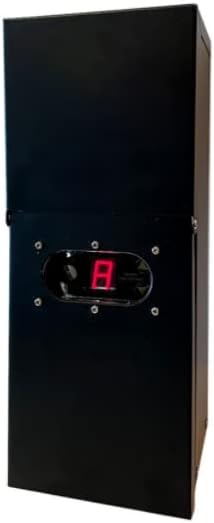
Nọmba 2: Iwaju view of the DALS Lighting LTR-300-BK 300W Landscape Transformer. This image shows the overall design and the digital display for settings.
4. Awọn ilana Iṣiṣẹ
The LTR-300-BK transformer offers flexible control options for your landscape lighting.
4.1 Setting Output Voltage
The transformer allows you to select an output voltage of 12V, 13V, 14V, or 15V AC. This selection is typically made via internal wiring terminals or a selector switch. Refer to the internal wiring diagram for specific instructions on how to adjust the output voltage to match your lighting system's needs and compensate for voltage ju.
4.2 Timer and Photocell Sensor Operation
The integrated timer and photocell sensor provide automatic control of your lighting system.
- Photocell Mode: The photocell sensor detects ambient light levels. In this mode, the lights will automatically turn on at dusk and turn off at dawn. Ensure the photocell is not obstructed and is exposed to natural light.
- Ipo aago: You can set the transformer to turn on at dusk and remain on for a specific duration (e.g., 4, 6, 8 hours). After the set duration, the lights will automatically turn off.
- TAN/PA Afọwọṣe: A manual override option allows you to turn the lights on or off independently of the timer or photocell settings.
Consult the control panel and user interface on the transformer for specific button functions and programming steps for the timer and photocell settings.
5. Itọju
Regular maintenance ensures the longevity and optimal performance of your transformer.
- Ninu: Periodically clean the exterior of the transformer with a soft, damp cloth. Do not use abrasive cleaners or solvents. Ensure the photocell sensor lens is clean and free of obstructions.
- Awọn isopọ: Annually inspect all wiring connections for tightness and corrosion. Loose connections can lead to poor performance or safety hazards.
- Afẹfẹ: Ensure that the transformer's ventilation openings are clear of debris to allow for proper air convection cooling.
- Awọn ipo Ayika: The transformer is designed to operate within a temperature range of -30°C to 45°C. Avoid exposing it to extreme conditions outside this range.
6. Laasigbotitusita
Ti o ba ni awọn iṣoro pẹlu transformer rẹ, tọka si awọn iṣoro ati awọn solusan ti o wọpọ wọnyi:
| Isoro | Owun to le Fa | Ojutu |
|---|---|---|
| Awọn imọlẹ ko tan. | No power to transformer, tripped circuit breaker, loose connections, faulty photocell/timer setting, overloaded circuit. | Check circuit breaker. Verify 120V AC input. Inspect all low-voltage connections. Adjust photocell/timer settings. Reduce load if overloaded. |
| Àwọn ìmọ́lẹ̀ ń tàn tàbí kí wọ́n tàn díẹ̀díẹ̀. | Voltage drop due to long cable runs, loose connections, insufficient wattage from transformer, faulty bulbs. | Select a higher output voltage tap (13V, 14V, or 15V). Tighten connections. Ensure total wattage of lights does not exceed 80% of transformer capacity. Replace faulty bulbs. |
| Photocell/Timer not working correctly. | Photocell obstructed, incorrect settings, internal fault. | Ensure photocell is clean and unobstructed. Verify timer and photocell settings. If issues persist, contact support. |
| Transformer makes unusual noise or smells. | Internal fault, overheating, short circuit. | Immediately disconnect power. Do not attempt to repair. Contact a qualified electrician or DALS Lighting support. |
The transformer includes protection features for short circuit and over voltage conditions. If a fault occurs, the unit may shut down. Disconnect power, identify and rectify the fault, then restore power.
7. Awọn pato
- Awoṣe: LTR-300-BK
- Brand: DALS Lighting
- Iṣagbewọle Voltage: 120VAC, 60Hz
- Agbara Ijade: 300W
- O wujade Voltage: 12VAC, 13VAC, 14VAC, 15VAC (selectable)
- Orisi Ijade: Ibakan voltage mode ipese agbara
- Idaabobo: Short circuit, Over voltage
- Itutu: Afẹfẹ convection
- Iṣeduro Iṣeduro ti o pọju: 80% (240W)
- Iwọn Iṣiṣẹ: -30°C si 45°C (-22°F si 113°F)
- Sensọ: Integrated Photocell sensor
- Ijẹrisi: UL Akojọ
- GTIN/UPC: 775902019794
8. Atilẹyin ọja
This DALS Lighting LTR-300-BK transformer is covered by a 5-odun lopin atilẹyin ọja olupese. This warranty covers defects in materials and workmanship under normal use. For warranty claims or detailed terms and conditions, please refer to the official DALS Lighting webaaye tabi kan si atilẹyin alabara wọn.
9. Atilẹyin
For technical assistance, troubleshooting beyond this manual, or warranty inquiries, please contact DALS Lighting customer support. Have your model number (LTR-300-BK) and purchase information ready when contacting support.
DALS Lighting Contact Information:
Please visit the official DALS Lighting website for the most current contact details, including phone numbers, email addresses, and support hours.