1. Ọja Ipariview
The LYCEBELL LC-1500 is a non-contact infrared thermometer designed for accurate temperature measurement across a wide range. It features dual lasers for precise targeting and an adjustable emissivity for various surfaces. This device is suitable for industrial and daily temperature measurement applications.

Image 1.1: LYCEBELL LC-1500 Infrared Thermometer and included accessories.
Awọn ẹya pataki:
- Iwọn otutu giga: Àwọn ìwọ̀n láti -58°F sí 2732°F (-50°C sí 1500°C).
- Ijade ti o le ṣatunṣe: Range of 0.1 to 1.0 for improved accuracy on different materials.
- Dual Lasers: Provides precise targeting for accurate measurements.
- Distance Spot Ratio (D:S): 30:1 for safe measurement from a distance.
- Bright Backlit LCD Display: Easy temperature reading in various lighting conditions.
- MAX / HOLD Data Function: Captures maximum readings and holds current data.
- Yipada Ẹka: Rọrùn yípadà láàrin Celsius (°C) àti Fahrenheit (°F).
- Agbara Aifọwọyi Paa: Ó máa mú kí batiri pẹ́ sí i.
- Atọka Agbara Kekere: Awọn itaniji nigbati batiri ba lọ silẹ.
2. Alaye Aabo
Please read and understand all safety warnings before using this product. Failure to do so may result in injury or damage to the device.
- NOT for Human Use: This thermometer is designed for industrial and general-purpose temperature measurement and is not intended for medical use or measuring human body temperature.
- Aabo lesa: This device uses a Class II laser with optical power <0.5mW and wavelength 630~670 nm.
- ṢE ṢE look directly into the laser beam or point it at others. Direct eye exposure can cause eye damage.
- ṢE ṢE aim the laser at reflective surfaces, as the beam could reflect into your eyes.
- Jeki ẹrọ naa kuro ni arọwọto awọn ọmọde.
- Exercise caution when measuring hot surfaces. The thermometer measures surface temperature, and the object may remain very hot even after the reading is taken.
3. Package Awọn akoonu
- LYCEBELL LC-1500 Infrared Thermometer
- Ilana itọnisọna
- Carabiner (for portability)
- 9V batiri
- Screwdriver kekere
- Apo ti n gbe
4. Awọn ẹya ara Idanimọ
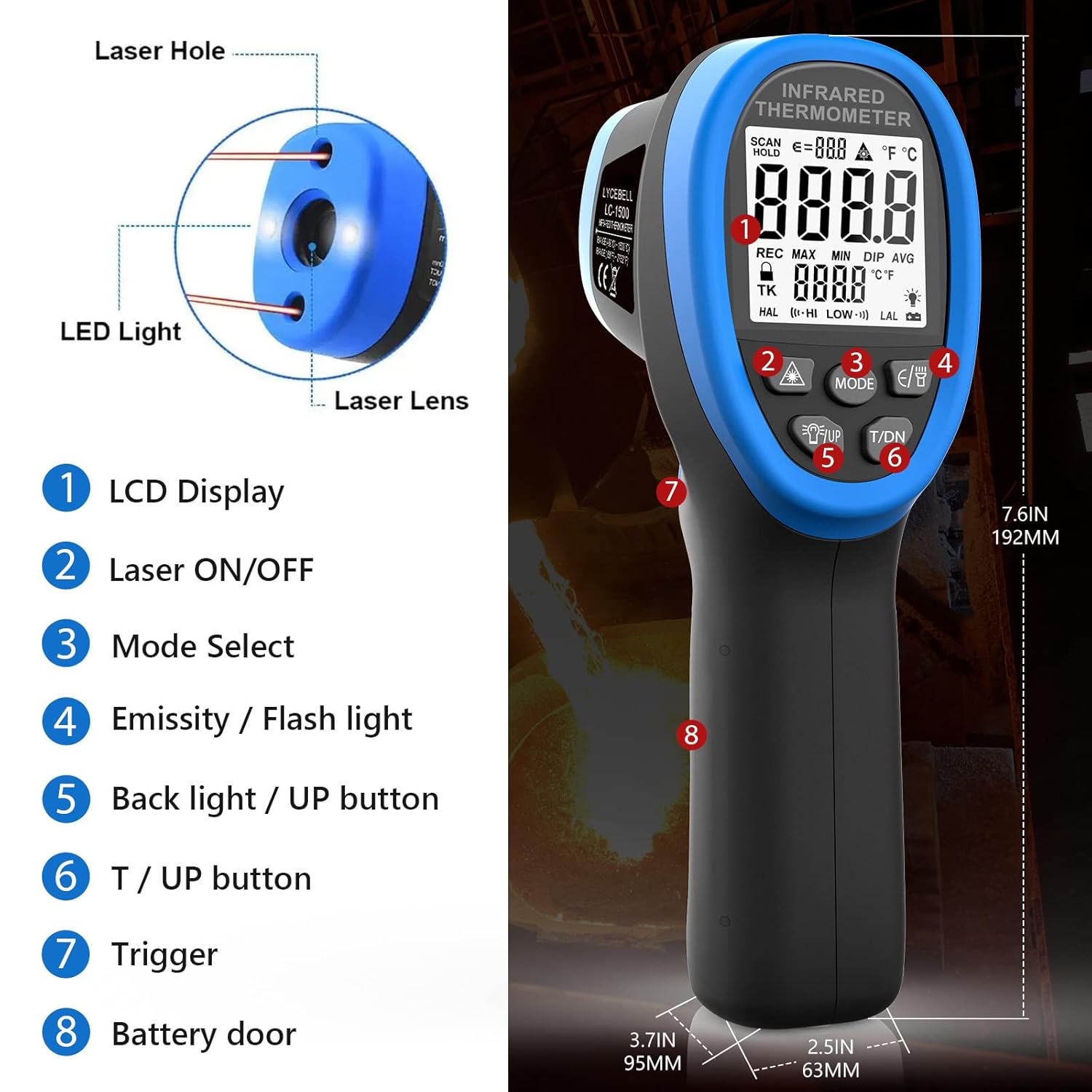
Image 4.1: Key components of the LYCEBELL LC-1500 Infrared Thermometer.
- Ifihan LCD
- Lesa ON / PA Bọtini
- Ipo Yan Bọtini
- Emissivity / Flashlight Button
- Backlight / UP Button
- T / DN Button (Temperature Unit / Down)
- Nfa
- Ilekun Batiri
5. Eto
5.1 Fifi sori batiri
- Locate the battery compartment on the handle (Part 8 in Image 4.1).
- Use the provided screwdriver to open the battery door.
- Fi batiri 9V sii, ki o rii daju pe o pe polarity to tọ.
- Pa ẹnu-ọna batiri naa ki o ni aabo pẹlu dabaru.
5.2 Attaching the Carabiner
A carabiner is included for convenient carrying. Attach it to the designated loop at the base of the handle.

Image 5.1: The thermometer with an attached carabiner for portability.
6. Awọn ilana Iṣiṣẹ
6.1 Ipilẹ wiwọn
- Point the thermometer at the target surface.
- Press and hold the Trigger (Part 7) to begin measurement. The temperature will be displayed on the LCD.
- Release the Trigger to hold the current reading on the display.
6.2 Ìyípadà Ẹ̀yà (°C/°F)
While the product is working (after pressing the trigger), directly press the 'T / DN' button (Part 6) to switch between Celsius (°C) and Fahrenheit (°F).

Image 6.1: Display showing temperature readings in both Celsius and Fahrenheit.
6.3 Iṣakoso Atọ́ka Lésà
Press the Laser ON/OFF button (Part 2) to display the laser symbol on the screen and activate the laser light. Release the trigger to turn off the laser. Press the key again to make the laser symbol and laser disappear from the display.
6.4 Àtúnṣe Ìtújáde Ìtújáde
Emissivity (ε) is the ability of a material to emit thermal energy. Different materials have different emissivities. For accurate measurements, adjust the emissivity setting to match the target material. While the product is working, press the 'E/B' button (Part 4) to enter Emissivity mode. Use the 'UP' (Part 5) and 'DN' (Part 6) buttons to adjust the value from 0.1 to 1.0.

Image 6.2: The adjustable emissivity feature allows for accurate readings on various materials.
Àwọn Ìwọ̀n Ìtújáde Tí Ó Wọ́pọ̀:
| Ohun elo | Emissivity | Ohun elo | Emissivity |
|---|---|---|---|
| Asphaltum | 0.90 si 0.98 | Aṣọ (dudu) | 0.98 |
| Beton | 0.94 | Awọ Eniyan | 0.98 |
| Simẹnti | 0.96 | Ọṣẹ nkuta | 0.75 si 0.80 |
| Iyanrin | 0.90 | Edu (lulú) | 0.96 |
| Ile | 0.92 si 0.96 | Lacquer | 0.80-0.95 |
| Omi | 0.92 si 0.96 | Lacquer (reluster) | 0.97 |
| Yinyin | 0.96 si 0.98 | Roba (dudu) | 0.94 |
| Òjò dídì | 0.83 | Ṣiṣu | 0.85-0.95 |
| Gilasi | 0.90 si 0.95 | Igi igi | 0.90 |
| Seramiki | 0.90 si 0.94 | Iwe | 0.70-0.94 |
| Marble | 0.94 | Chromic oxide | 0.81 |
| Gypsum | 0.80 si 0.90 | Ejò Oxide | 0.78 |
| Compo | 0.89 si 0.98 | Ohun elo afẹfẹ | 0.78 si 0.82 |
| Biriki | 0.93 si 0.96 | Irin ti ko njepata | 0.2-0.3 |
6.5 Mode Functions (MAX, MIN, DIF, AVG, HAL, LAL)
Press the 'MODE' button (Part 3) to cycle through various measurement options:
- O pọju: Measures the maximum temperature detected during a scan.
- MIN: Measures the minimum temperature detected during a scan.
- DIF: Calculates the difference between the maximum and minimum temperatures.
- AVG: Calculates the average temperature of all measurements taken.
- HAL (Ariwo Itaniji Giga): Sets a high-temperature alarm threshold.
- LAL (Ariwo kekere): Sets a low-temperature alarm threshold.
6.6 Itaniji iwọn otutu giga / kekere
To set a high or low temperature alarm:
- Press the 'MODE' button (Part 3) until 'HAL' (High Alarm) or 'LAL' (Low Alarm) is displayed.
- Use the 'UP' (Part 5) and 'DN' (Part 6) buttons to adjust the alarm threshold. Long press to accelerate value change.
- When the measured temperature exceeds the 'HAL' setting or falls below the 'LAL' setting, the LCD will display 'HI' or 'LO' respectively, and a buzzer will sound.
6.7 Video ifihan
Video 6.1: Official LYCEBELL demonstration of the LC-1500 Infrared Thermometer, including unboxing, button functions, and temperature testing.
7. Measurement Principles: Distance-to-Spot Ratio (D:S)
The D:S ratio indicates how large an area the thermometer measures from a given distance. For the LC-1500, the D:S ratio is 30:1. This means that at a distance of 30 units from the target, the measurement spot diameter will be 1 unit. A higher D:S ratio allows for more accurate measurements of smaller areas from a greater distance, which is crucial for safety when measuring high temperatures.

Image 7.1: Illustration of the 30:1 Distance-to-Spot ratio.
8. Awọn ohun elo
The LYCEBELL LC-1500 infrared thermometer is versatile and can be used in various settings, including:
- Testing high temperatures in industrial processes.
- Measuring water temperature.
- Àyẹ̀wò ètò HVAC.
- Car repair and engine temperature checks.
- Monitoring temperatures in cooking, such as pizza ovens.
- Metal casting, smelting, and alloy temperature measurement.
9. Awọn pato
| Ẹya ara ẹrọ | Iye |
|---|---|
| Iwọn otutu | -58°F si 2732°F (-50°C si 1500°C) |
| Adijositabulu Emissivity | 0.1 si 1.0 |
| Distance Spot Ratio (D:S) | 30:1 |
| Lesa Aabo Ipele | Class II, <0.5mW, 630~670 nm |
| Ifihan Iru | LCD |
| Asopọmọra Technology | Infurarẹẹdi |
| Orisun agbara | 9V batiri |
| Ọja Mefa | 9.25 x 6.5 x 3.23 inches |
| Iwọn Nkan | 14.82 iwon |
| Ohun elo ita | Irin |
10. Itọju ati Itọju
- Ninu: Wipe the device clean with a soft, dry cloth. Do not use abrasive cleaners or solvents.
- Ibi ipamọ: Store the thermometer in its carrying pouch in a cool, dry place when not in use.
- Batiri: Yọ batiri kuro ti ẹrọ naa ko ba ni lo fun igba pipẹ lati ṣe idiwọ jijo.
11. Laasigbotitusita
If you encounter issues with your LYCEBELL LC-1500 thermometer, consider the following general troubleshooting steps:
- Ko si Agbara: Ṣayẹwo boya batiri ti fi sori ẹrọ daradara ati pe o ni idiyele ti o to. Rọpo batiri naa ti o ba jẹ dandan.
- Awọn kika ti ko pe: Ensure the emissivity setting is appropriate for the material being measured. Verify the target is within the optimal distance-to-spot ratio.
- Awọn oran Ifihan: If the display is dim or flickering, replace the battery.
For further assistance, please contact LYCEBELL customer support.
12. Atilẹyin ọja ati Support
For information regarding warranty coverage, product support, or service, please refer to the documentation included with your purchase or visit the official LYCEBELL webojula. Tọju iwe-ẹri rira rẹ bi ẹri rira.