
Ọrọ Iṣaaju
Thank you for choosing the BOBLOV W3 WiFi Body Camera. This manual provides detailed instructions for the proper setup, operation, and maintenance of your device. Please read this manual thoroughly before using the camera to ensure optimal performance and to prevent damage.
Package Awọn akoonu
Daju pe gbogbo awọn nkan ti a ṣe akojọ rẹ si isalẹ wa ninu package rẹ:
- 1x BOBLOV W3 Body Camera
- 1x 64GB Micro SD Card (pre-installed in camera)
- 1x USB-C USB Ngba agbara
- 1x Screw Driver
- 1x Itọsọna olumulo (iwe yii)
- 1x Back Magnets Clip
- 1x Brooch
Ọja Pariview
Mọ ara rẹ pẹlu awọn ẹya ara ẹrọ ati awọn iṣakoso kamẹra:

Aworan: BOBLOV W3 Body Camera with labels indicating the Power/Video Button, Audio/WiFi Button, Microphone, Reset button, Brooch attachment point, Back Magnetic Clip, and USB-C Charging Interface. The image also shows the dimensions of the camera.
- Power/Video Button: Used to power on/off the device and start/stop video recording.
- Audio/WiFi Button: Used to start/stop audio recording and activate/deactivate WiFi function.
- Mi: Gbohungbohun fun gbigba ohun.
- Tun: Small button to reset the device (requires a pin).
- Brooch: Attachment point for the included brooch clip.
- Back Magnetic Clip: Removable clip for magnetic attachment.
- Oju-ọna gbigba agbara: USB-C ibudo fun gbigba agbara ati gbigbe data.
Ṣeto
1. Ngba agbara si Kamẹra
Before initial use, fully charge the camera. The built-in 1450mAh battery takes approximately 3 hours to fully charge.
- Connect the provided USB-C charging cable to the camera's charging interface.
- So opin okun miiran pọ si ohun ti nmu badọgba agbara USB (kii ṣe pẹlu) tabi ibudo USB ti kọnputa kan.
- Ina Atọka gbigba agbara yoo tan imọlẹ lakoko gbigba agbara ati pipa nigbati o ba gba agbara ni kikun.
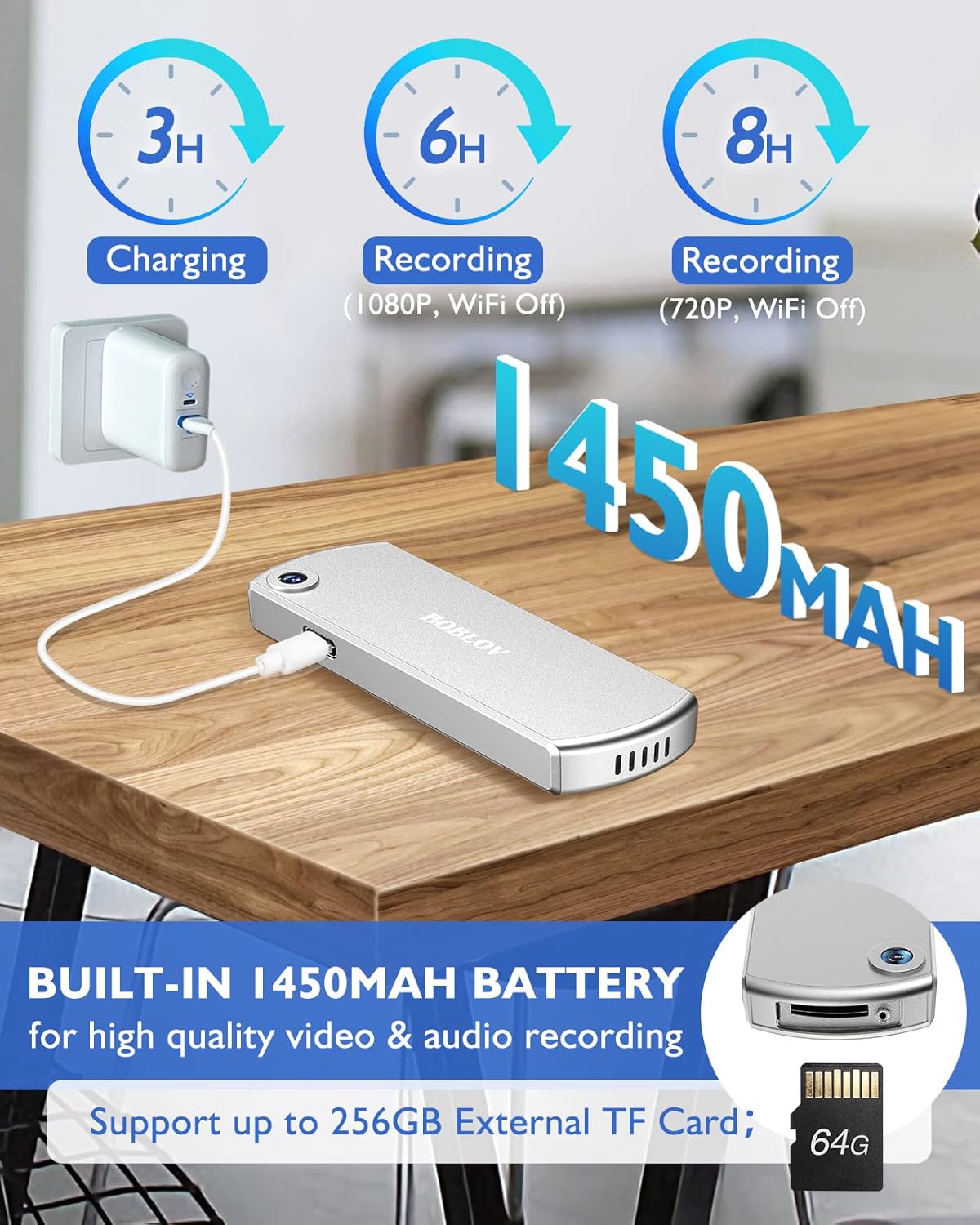
Aworan: The BOBLOV W3 Body Camera being charged via a USB-C cable, highlighting the 1450mAh battery and charging times: 3 hours for full charge, 6 hours recording (1080P, WiFi Off), and 8 hours recording (720P, WiFi Off).
2. Inserting/Expanding Memory Card
The W3 Body Camera uses an external Micro SD card. A 64GB card is included and pre-installed.
- Locate the memory card slot on the camera.
- Use the included screwdriver to carefully unscrew the cover of the card slot.
- Insert or replace the Micro SD card (up to 256GB) into the slot with the contacts facing down.
- Securely fasten the card slot cover with the screwdriver.
3. Síso Kámẹ́rà pọ̀ mọ́ra
The camera offers two attachment options: a back magnetic clip and a brooch.
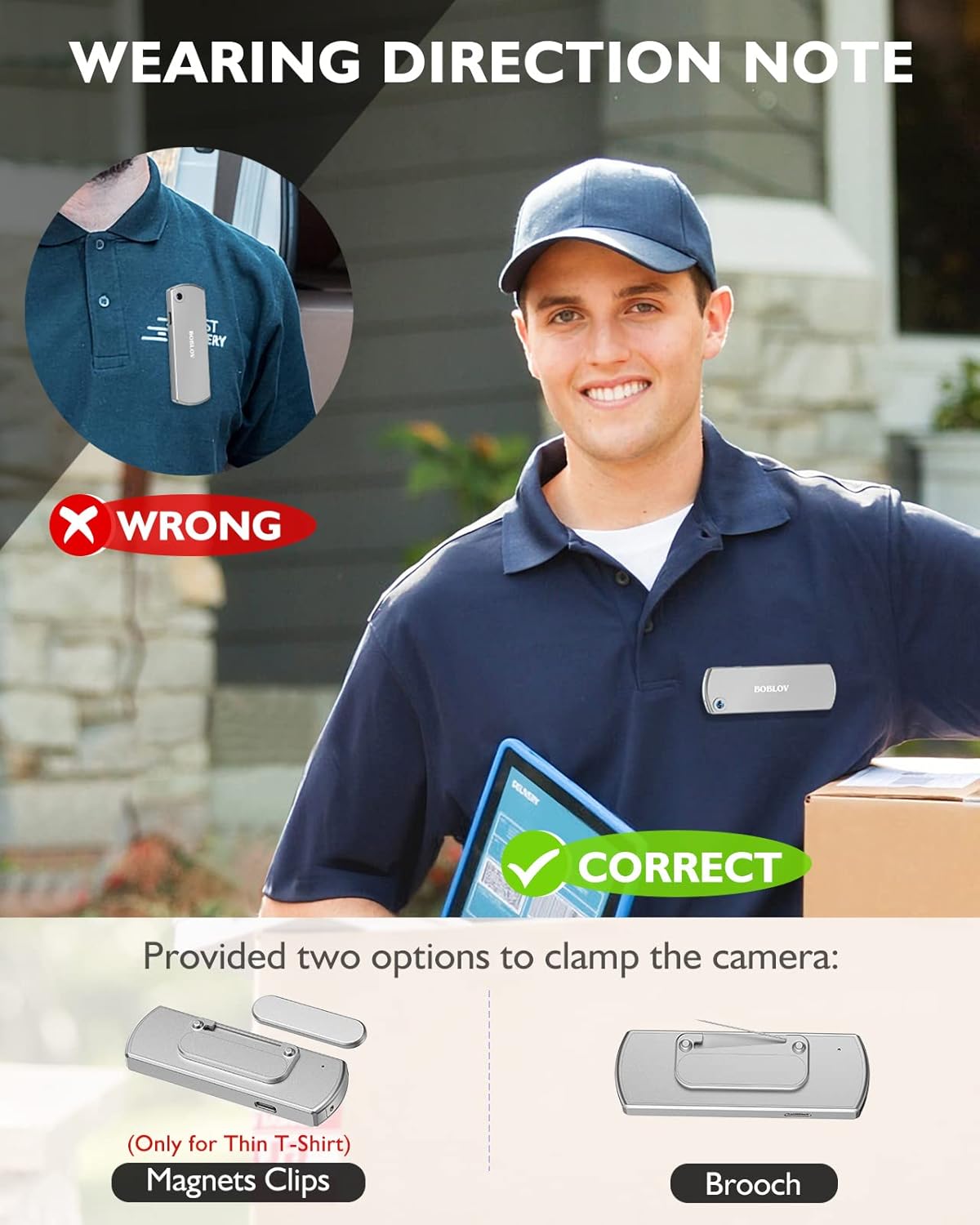
Aworan: Illustration demonstrating correct and incorrect ways to wear the BOBLOV W3 Body Camera. It shows that magnetic clips are suitable for thin T-shirts, while a brooch provides a more secure attachment for other clothing types.
- Agekuru oofa: Attach the magnetic clip to the back of the camera. This is suitable for thin fabrics like T-shirts. Ensure the camera is securely held.
- Brooch: For more secure attachment or thicker clothing, use the provided brooch. Attach it to the camera's designated brooch point and then pin it to your clothing.
Awọn ilana Iṣiṣẹ
1. Agbara Tan / Paa
- Agbara Tan: Tẹ mọlẹ Power/Video Button for a few seconds until the indicator light illuminates.
- Agbara Pa: Tẹ mọlẹ Power/Video Button again for a few seconds until the indicator light turns off.
2. Gbigbasilẹ fidio
- While the camera is powered on, press the Power/Video Button once to start video recording. The indicator light will flash to indicate recording is in progress.
- Tẹ awọn Power/Video Button again to stop video recording. The indicator light will return to a steady state.
- The camera supports 1080P and 720P video recording. With WiFi off, it can record for approximately 6 hours at 1080P or 8 hours at 720P on a full charge.
- Videos are saved in 5-minute fragments by default. The camera supports loop recording, overwriting older files nigbati kaadi iranti ba ti kun.
3. Gbigbasilẹ ohun
- While the camera is powered on, press the Audio/WiFi Button once to start audio recording.
- Tẹ awọn Audio/WiFi Button lẹẹkansi lati da gbigbasilẹ ohun duro.
4. WiFi Function and App Connectivity
The BOBLOV W3 features WiFi connectivity, allowing you to manage files and change settings via a smartphone app.
- Activate WiFi: Tẹ mọlẹ Audio/WiFi Button for a few seconds to turn on the WiFi function. The WiFi indicator light will flash.
- Ṣe igbasilẹ Ohun elo:
- For Android devices, download the DHiHZ app.
- For iOS devices, download the Mini-XRcam app.
- Sopọ̀ mọ́ Kámẹ́rà: On your smartphone, go to WiFi settings and connect to the camera's WiFi network (usually named "BOBLOV_W3_XXXX"). The default password is typically "12345678".
- Lo App: Open the downloaded app to view gbe footage, awọn gbigbasilẹ ṣiṣiṣẹsẹhin, gbigba lati ayelujara files, ati ṣatunṣe awọn eto kamẹra.
- Deactivate WiFi: Tẹ mọlẹ Audio/WiFi Button lẹẹkansi lati pa WiFi.

Aworan: The BOBLOV W3 Body Camera wirelessly connected to a smartphone, illustrating the WiFi function for managing files, changing settings, and accessing features like video, audio, preview, playback, and download through the dedicated Android (DHiHZ) and iOS (Mini-XRcam) applications.
5. Nsopọ si PC kan
You can connect the camera to a computer to manage recorded files ati ayipada eto.
- Rii daju pe kamẹra ti wa ni agbara ON before connecting to the PC.
- Connect the camera to your computer using the provided USB-C cable.
- Kámẹ́rà náà yóò farahàn gẹ́gẹ́ bí awakọ̀ díìsìkì tí a lè yọ kúrò lórí kọ̀ǹpútà rẹ.
- You can then access, copy, delete, or upload recorded files. Some settings may also be configurable via a configuration file on the camera's storage.

Aworan: The BOBLOV W3 Body Camera connected to a laptop via a USB-C cable, demonstrating how to manage recorded files and change settings. Icons for Playback, Delete, Upload, and Settings are shown, with a note to ensure the camera is powered ON for connection.
Itoju
- Ninu: Use a soft, dry cloth to clean the camera body. Do not use liquid cleaners or solvents.
- Ibi ipamọ: Tọju kamẹra naa ni itura, aye gbigbẹ kuro lati orun taara ati awọn iwọn otutu to gaju.
- Itọju Batiri: Láti mú kí batiri pẹ́ sí i, má ṣe jẹ́ kí batiri náà máa jáde nígbà gbogbo. Gba agbára kámẹ́rà náà déédéé, kódà bí a kò bá lò ó fún ìgbà pípẹ́.
- Kaadi Iranti: Periodically back up important recordings from the Micro SD card to a computer. Format the Micro SD card regularly (e.g., once a month) to maintain optimal performance and prevent data corruption.
- Omi Resistance: The camera has an IP65 waterproof rating, meaning it is protected against dust and low-pressure water jets. It is not designed for submersion.
Laasigbotitusita
| Isoro | Owun to le Fa / Solusan |
|---|---|
| Kamẹra ko ṣiṣẹ. | Battery may be depleted. Charge the camera for at least 3 hours. If the issue persists, try resetting the camera using a pin in the reset hole. |
| Camera gets hot when WiFi is on. | This is normal behavior for the camera when the WiFi function is active due to increased power consumption. |
| Cannot connect to WiFi via smartphone app. | Ensure WiFi is enabled on the camera. Check if you have downloaded the correct app (DHiHZ for Android, Mini-XRcam for iOS). Verify the WiFi password (default is "12345678"). Try restarting both the camera and your phone. |
| Camera stops recording unexpectedly. | The memory card may be full. The camera supports loop recording, but if the card is corrupted or too slow, it might cause issues. Try formatting the card or using a different high-speed Micro SD card. Battery may be low. |
| Ko le wọle si files lori PC. | Ensure the camera is powered ON before connecting to the PC. Try a different USB-C cable or USB port. |
Awọn pato
| Ẹya ara ẹrọ | Ẹ̀kúnrẹ́rẹ́ |
|---|---|
| Brand | BOBLOV |
| Orukọ awoṣe | W3 |
| Nọmba awoṣe | B-W3 |
| Asopọmọra Technology | Wi-Fi |
| Pataki Awọn ẹya ara ẹrọ | Ìwúwo Fúyẹ́ |
| Awọn ẹrọ ibaramu | Android/iOS Phone |
| Orisun agbara | Agbara Batiri |
| Ipinnu Yaworan fidio | 1080p |
| Àwọ̀ | Fadaka |
| Iṣagbesori Iru | Oke Oke |
| Fọọmù ifosiwewe | Iwapọ |
| Ohun elo apade | Irin |
| Iru Itaniji | Išipopada Nikan |
| Orisun Imọlẹ | Infurarẹẹdi |
| Mabomire Rating | IP65 |
| Ọna Iṣakoso | App |
| Wattage | 3.7 Watt-wakati |
| Alẹ Iranran | Night Awọ |
| Awọn iwọn Nkan | 9 x 3 x 1.5 sẹntimita |
| Agbara Batiri | 1450mAh (Itumọ ti) |
| Recording Time (1080P, WiFi Off) | Isunmọ. wakati meji 6 |
| Recording Time (720P, WiFi Off) | Isunmọ. wakati meji 8 |
| Akoko gbigba agbara | Isunmọ. wakati meji 3 |
| Ita Iranti | Micro SD Card, up to 256GB (64GB included) |
| Apapọ iwuwo | 60g / 2 iwon |
Atilẹyin ọja ati Support
BOBLOV provides a two-year warranty for high-value products, including the W3 Body Camera. For any technical assistance, troubleshooting, or warranty claims, please contact BOBLOV customer service.
Please refer to the official BOBLOV website or your purchase documentation for the most up-to-date contact information and warranty details.