
1. Alaye Aabo pataki
Jọwọ ka gbogbo awọn itọnisọna ni pẹkipẹki ṣaaju lilo ohun elo yii ki o da wọn duro fun itọkasi ọjọ iwaju. Ikuna lati tẹle awọn ilana wọnyi le ja si mọnamọna, ina, tabi ipalara nla.
- Gbigba agbara Aabo: When charging, use a power adapter with an input voltage not higher than 5V 1A. Adapters are not included. Using an incorrect adapter may damage the device or pose a safety risk.
- Ifihan omi: The device is IPX6 waterproof and can be used wet or dry. However, do not immerse the charging cable or adapter in water.
- Awọn ọmọde: Keep the appliance out of reach of children. This appliance is not intended for use by persons with reduced physical, sensory, or mental capabilities, or lack of experience and knowledge, unless they have been given supervision or instruction concerning use of the appliance by a person responsible for their safety.
- Bibajẹ: Do not use the appliance if the blades are damaged or broken, as this may cause injury. If the appliance is damaged, contact customer support.
- Ibi ipamọ: Store the appliance in a dry place, away from direct sunlight and high temperatures.
2. Ọja Ipariview
The PRITECH PR-2990 is a versatile 3-in-1 grooming kit designed for men, offering solutions for beard trimming, nose/ear hair removal, and micro shaving. It features a powerful motor, sharp blades, an LED display, and IPX6 waterproofing for convenient wet and dry use.
2.1 Package Awọn akoonu
Your PRITECH PR-2990 grooming kit includes the following components:
- Ẹ̀rọ Gígé Pàtàkì
- Irungbọn Trimmer Head
- Imu / Eti Trimmer Head
- Bankanje Shaver Head
- 4 Combs Itọsọna (3mm, 6mm, 9mm, 12mm)
- Okun Ngba agbara USB
- Fifọ Fẹlẹ

Nọmba 2.1: The PRITECH PR-2990 grooming kit, showcasing the main trimmer unit, three interchangeable heads (beard trimmer, nose/ear trimmer, foil shaver), four guide combs (3mm, 6mm, 9mm, 12mm), a USB charging cable, and a cleaning brush.

Nọmba 2.2: Illustration of the PRITECH PR-2990's three main functions: hair trimming, foil shaving, and nose/ear trimming, highlighting its versatility.
3. Eto
3.1 Gbigba agbara akọkọ
Before first use, fully charge the trimmer. The LED display will show the battery percentage. A full charge takes approximately 2 hours and provides up to 150 minutes of cordless use.
- Connect the USB charging cable to the trimmer and to a 5V 1A USB power adapter (not included), laptop, USB outlet, car charger, or power bank.
- The LED display will show the charging status. When fully charged, the display will indicate 100%.
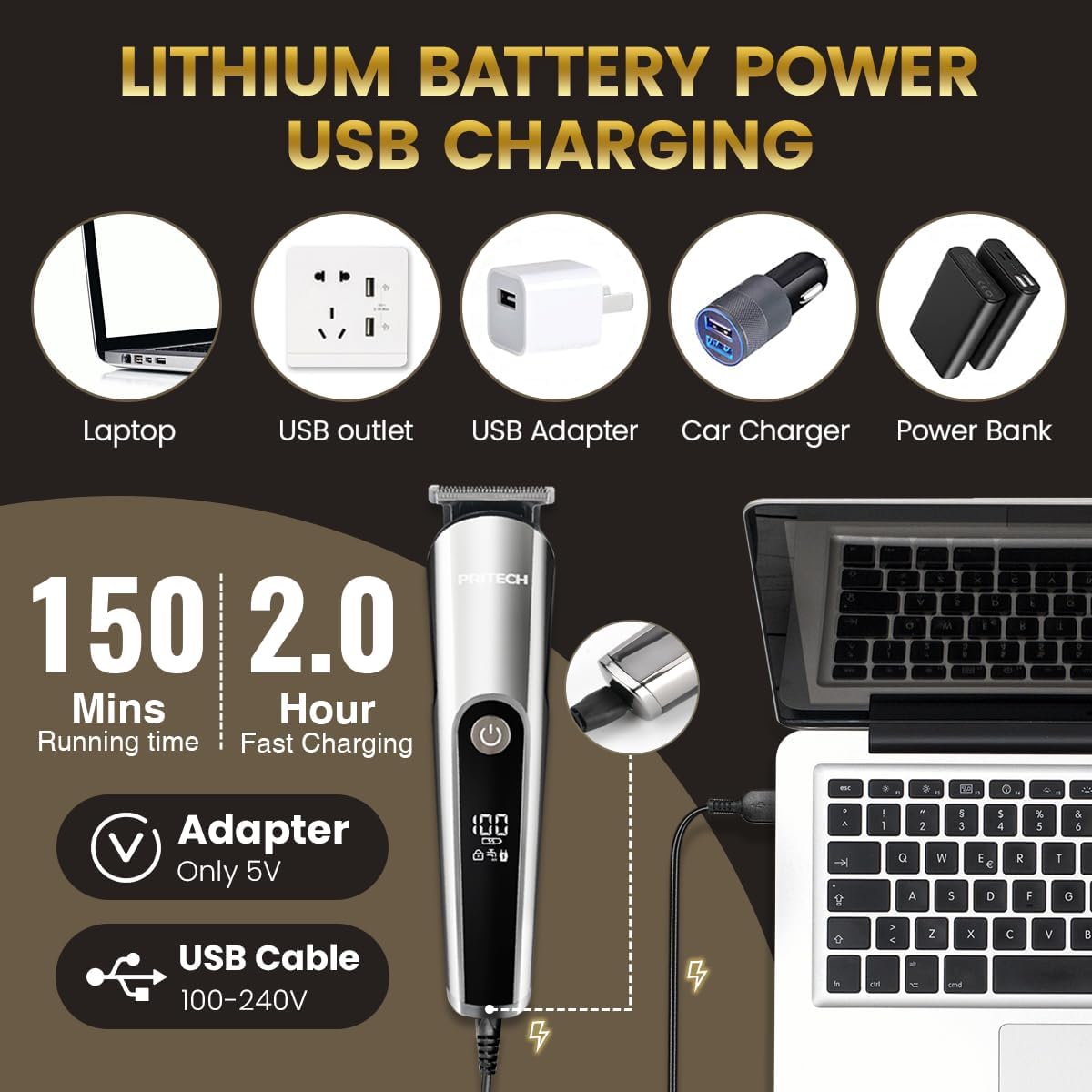
Nọmba 3.1: The PRITECH PR-2990 being charged via USB, illustrating compatibility with various 5V power sources like laptops, USB outlets, and power banks. The image also highlights the 150 minutes running time and 2-hour fast charging.
3.2 Attaching ati Detaching Trimmer Heads
The PR-2990 comes with interchangeable heads for different grooming needs.
- Lati Yọ: Gently push the current trimmer head in the direction of the arrow (usually away from the main body) with your thumb until it detaches.
- Lati So pọ: Align the desired trimmer head with the card slot on the main unit. Push the head firmly towards the body until it clicks into place.

Nọmba 3.2: A step-by-step visual guide demonstrating how to remove and install the trimmer heads on the PRITECH PR-2990 for easy interchangeability.
3.3 Asomọ Itọsọna Combs
For beard trimming, select one of the four guide combs (3mm, 6mm, 9mm, 12mm) to achieve your desired hair length.
- Ensure the beard trimmer head is attached to the main unit.
- Slide the desired guide comb onto the beard trimmer head until it securely clicks into position.
- To remove, gently push the comb upwards and off the trimmer head.
4. Awọn ilana Iṣiṣẹ
4.1 Power On/Off and Travel Lock
- Agbara Tan: Press the power button once to turn on the trimmer. The LED display will illuminate, showing the battery level.
- Agbara Pa: Press the power button again to turn off the trimmer.
- Titiipa Irin-ajo: To activate the travel lock, press and hold the power button for 3 seconds. This prevents accidental activation during transport. To unlock, press and hold the power button for 3 seconds again.
4.2 Irungbọn gige
Use the beard trimmer head with a guide comb for precise beard styling.
- Attach the beard trimmer head and your preferred guide comb (3mm, 6mm, 9mm, or 12mm).
- Tan trimmer.
- Hold the trimmer with the comb flat against your skin and move it against the direction of hair growth.
- For detailing or sharper lines, remove the guide comb and use the beard trimmer head directly on the skin.

Nọmba 4.1: A man using the PRITECH PR-2990 beard trimmer to maintain his beard, demonstrating the product in action for facial hair grooming.
4.3 Imu ati Eti gige
The specialized nose/ear trimmer head is designed for safe and comfortable removal of unwanted hair.
- Attach the nose/ear trimmer head to the main unit.
- Tan trimmer.
- Rọra fi itọpa trimmer sinu iho imu tabi odo eti rẹ. Maṣe fi sii jinna pupọ.
- Move the trimmer in a circular motion to cut hairs.

Nọmba 4.2: A man using the PRITECH PR-2990 with the nose trimmer attachment, illustrating its use for removing unwanted nasal hair.
4.4 Micro Shaving
For a smooth finish on smaller areas or for precise edging, use the foil shaver head.
- Attach the foil shaver head to the main unit.
- Tan trimmer.
- Hold the shaver flat against your skin and move it gently in short, straight strokes.

Nọmba 4.3: A man using the PRITECH PR-2990 with the foil shaver attachment for a close shave or detailing, demonstrating its application for smooth skin.
4.5 Lilo tutu ati gbigbẹ
The PR-2990 is IPX6 waterproof, allowing for both wet and dry grooming.
- Lilo Gbẹ Use the trimmer on dry hair for quick trims.
- Lilo tutu: The trimmer can be used with shaving foam or gel for a more comfortable shave, or rinsed under running water for easy cleaning.
5. Itọju ati Cleaning
Ninu igbagbogbo ṣe idaniloju iṣẹ ṣiṣe to dara julọ ati fa igbesi aye ti trimmer rẹ pọ si.
- Lẹhin lilo kọọkan: Turn off the trimmer and detach the head. Use the provided cleaning brush to remove any loose hairs from the blades and inside the trimmer head.
- Rinsin: Since the trimmer is IPX6 waterproof, you can rinse the trimmer heads and the main unit under running water. Ensure the charging port cover is securely closed before rinsing the main unit.
- Gbigbe: After rinsing, shake off excess water and allow all parts to air dry completely before reassembling or storing. Do not use cloths or abrasive materials on the blades.
- Lubrication: Periodically, apply a small drop of clipper oil (not included) to the blades to maintain smooth operation and prevent rust.


Nọmba 5.1: Icons representing the IPX6 waterproof rating and the included cleaning brush, highlighting key features for maintenance.
6. Laasigbotitusita
If you encounter any issues with your PRITECH PR-2990, refer to the following common problems and solutions:
| Isoro | Owun to le Fa | Ojutu |
|---|---|---|
| Trimmer ko ni tan. | Low battery or travel lock activated. | Charge the trimmer. Deactivate travel lock by pressing and holding the power button for 3 seconds. |
| Išẹ gige ti ko dara. | Blades are dull, clogged with hair, or not lubricated. | Clean the blades thoroughly. Apply clipper oil. Ensure the correct head and comb are attached. |
| Trimmer ṣe ariwo dani. | Hair caught in blades or head not properly attached. | Clean the blades. Reattach the trimmer head securely. |
| Gbigba agbara ko ṣiṣẹ. | USB ti ko tọ, ohun ti nmu badọgba, tabi ibudo gbigba agbara. | Try a different USB cable or power adapter (ensure 5V 1A). Clean the charging port. |
If the problem persists after trying these solutions, please contact PRITECH customer support for further assistance.
7. Awọn pato
| Ẹya ara ẹrọ | Ẹ̀kúnrẹ́rẹ́ |
|---|---|
| Nọmba awoṣe | PR-2990 |
| Orisun agbara | Agbara Batiri (batiri AA kan pẹlu) |
| Akoko gbigba agbara | O fẹrẹ to awọn wakati 2 |
| Akoko Iṣiṣẹ | Titi di iṣẹju 150 |
| Mabomire Rating | IPX6 (Gbogbo ara le wẹ) |
| Iyara mọto | 7500 RPM |
| Ọja Mefa | 7.87 x 4.72 x 2.36 inches |
| Iwọn Nkan | 10.23 iwon (290 Giramu) |
| Olupese | Wenzhou Pritech Industrial Co., Ltd. |
8. Atilẹyin ọja ati Support
PRITECH is committed to providing high-quality products. For warranty information or customer support, please refer to the documentation included with your purchase or contact the seller directly. Keep your proof of purchase for any warranty claims.