
1. Ifihan
O ṣeun fun riraasing the Donner DED-70 Electronic Drum Set. This manual provides essential information for the proper setup, operation, and maintenance of your new instrument. The DED-70 is designed to offer a realistic drumming experience with quiet mesh pads, making it ideal for home practice and learning. Its compact and adjustable design accommodates various users, including children and students.

Figure 1: Complete Donner DED-70 Electronic Drum Set
2. Eto
2.1 Unpacking ati Ṣayẹwo paati
Carefully unpack all components from the box. Verify that all parts listed below are present and undamaged:
- Ilu Module
- Mesh Drum Pads (4x 6-inch)
- Cymbals (3x 8-inch, 360° sensing)
- Tapa ilu efatelese
- Hi-Hat Efatelese
- Drum Rack/Stand
- Drum Throne (Stool)
- Awọn ilu ilu
- Awọn agbekọri
- Adapter agbara
- Awọn okun Asopọmọra
2.2 Awọn ilana Apejọ
- Kó Ìdìpọ̀ Ìlù jọ: Connect the frame components as shown in the diagram. Ensure all joints are securely fastened.
- So paadi ati kimbali: Mount the mesh drum pads and cymbals onto the rack. The 360° sensing cymbals can be positioned for optimal playability.
- Fi awọn Pedals sori ẹrọ: Place the kick drum pedal and hi-hat pedal on the floor in their respective positions. The kick pedal is designed for a realistic foot feel.
- Awọn okun Sopọ: Connect each pad, cymbal, and pedal to the drum module using the provided cables. Refer to the module's input labels for correct connections.
- Set up Drum Throne: Assemble the drum stool and adjust its height for comfortable playing posture.

Figure 2: Adjustable stand for ergonomic playing
2.3 Giga tolesese
The drum frame and drum throne are adjustable to suit different user heights and playing preferences. Loosen the adjustment clamps, set to the desired height, and securely tighten the clamps. This flexibility ensures comfortable use for children and adults alike.
3. Awọn ilana Iṣiṣẹ
3.1 Titan / Pa a
- Agbara Tan: Connect the power adapter to the drum module and a power outlet. Press the Power button on the module.
- Agbara Pa: Press and hold the Power button until the module shuts down. Disconnect the power adapter when not in use for extended periods.
- Mobile Power: The DED-70 can also be powered by a mobile battery (not included) for portable use. Connect the mobile battery to the designated power input on the module. Usage time varies with battery capacity.

Figure 3: Connecting a mobile power source
3.2 Sound Module Functions
The drum module is the central control unit for your DED-70. It features:
- Awọn ohun elo ilu: 12 preset drum kits offering a variety of sounds. Use the 'Kit' button to cycle through them.
- Awọn ohun orin: 68 individual instrument tones. These can be assigned to different pads for customization.
- Awọn orin: Built-in songs for practice. Use the 'Song' button to select and play along.
- Iṣakoso iwọn didun: Adjust the master volume using the dedicated knob.
- Metronome: A built-in metronome helps with rhythm training.

Figure 4: Drum module with various functions
3.3 Quiet Practice with Headphones
For silent practice, connect the included headphones to the headphone jack on the drum module. This allows you to practice without disturbing others, making it suitable for night practice or use in shared living spaces.

Figure 5: Practicing with headphones for quiet sessions
3.4 Pad and Cymbal Response
The DED-70 features high-density, two-layer mesh drum heads that provide a realistic rebound and quiet response. The 8-inch cymbals offer 360° sensing, ensuring consistent sound regardless of where or how they are struck. Integrated buzzers enhance the playing feel and prevent sound loss.

Nọmba 6: Alaye view of a mesh drum pad
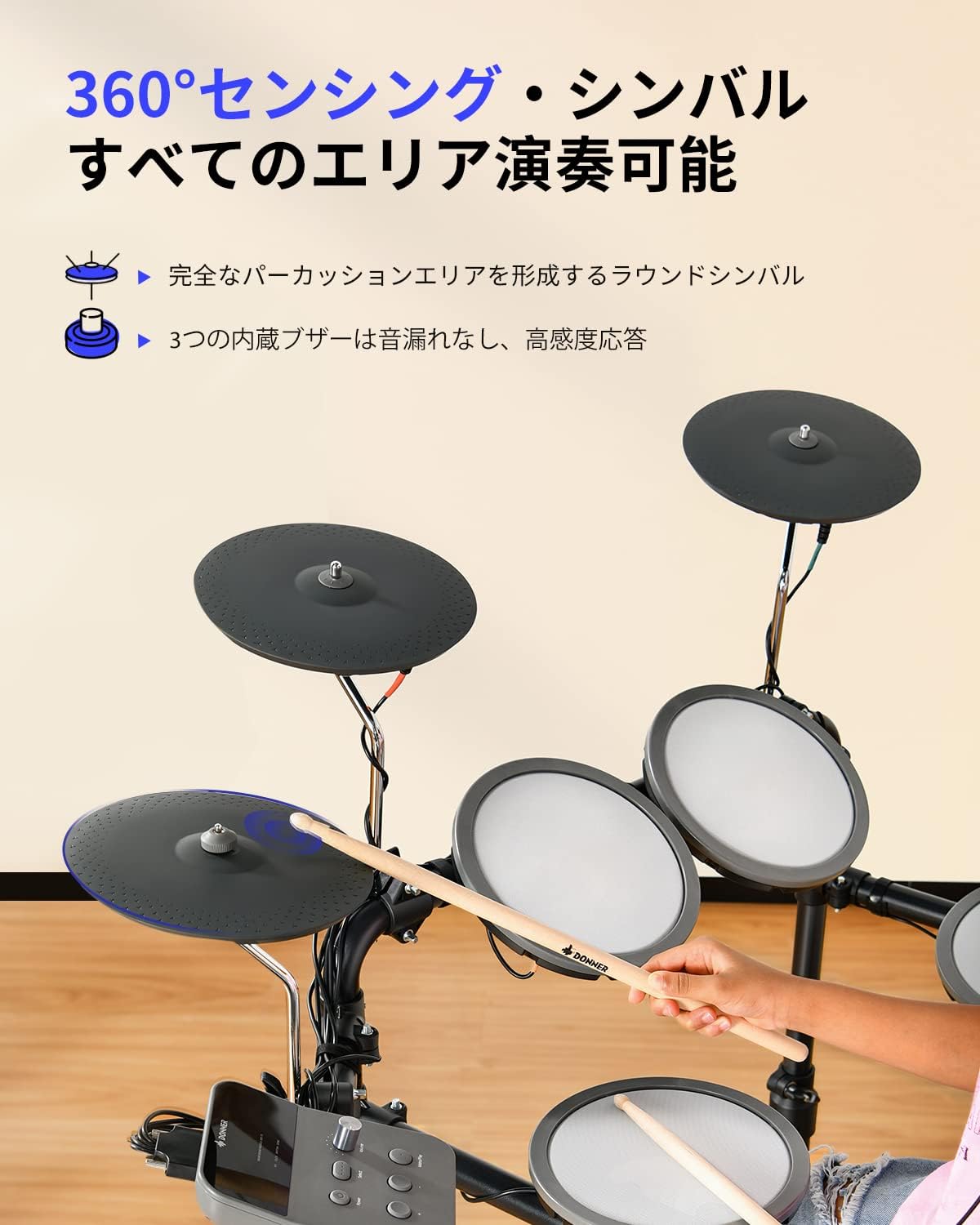
Figure 7: 360-degree sensing cymbal
4. Itọju
4.1 Ninu
- Use a soft, dry cloth to wipe down the drum module, pads, cymbals, and frame.
- Fun idoti alagidi, die-die dampen the cloth with water. Avoid using abrasive cleaners, solvents, or waxes, as these can damage the surfaces.
- Do not spray cleaning liquids directly onto the drum module or any electronic components.
4.2 Ibi ipamọ
- Store the drum set in a cool, dry place away from direct sunlight, extreme temperatures, and high humidity.
- If storing for an extended period, disconnect the power adapter and consider covering the drum set to protect it from dust.
- The foldable design allows for compact storage when not in use.
4.3 Care for Mesh Pads and Cymbals
- Avoid striking the mesh pads or cymbals with excessive force, which can cause damage.
- Use only the provided or recommended drumsticks.
- Regularly check the tension of the mesh pads. If adjustable, ensure they are set to a comfortable playing tension.
5. Laasigbotitusita
If you encounter issues with your DED-70, please refer to the following common problems and solutions:
| Isoro | Owun to le Fa | Ojutu |
|---|---|---|
| No sound from headphones/output. | Volume too low; cables disconnected; headphones faulty. | Increase volume; check all cable connections; test with different headphones. |
| Pad/Cymbal unresponsive or inconsistent. | Cable loose; pad/cymbal damaged; module settings incorrect. | Check cable connections; ensure pads/cymbals are securely mounted; reset module to factory settings if necessary. |
| Drum module not powering on. | Power adapter not connected; power outlet faulty; mobile battery depleted. | Ensure power adapter is fully connected; try a different power outlet; charge or replace mobile battery. |
| Àwọn pedal kò dáhùn. | Pedal cable loose; pedal damaged. | Check pedal cable connection to the module; ensure pedal is placed on a stable surface. |
If the problem persists after trying these solutions, please contact Donner customer support.
6. Awọn pato
| Ẹya ara ẹrọ | Ẹ̀kúnrẹ́rẹ́ |
|---|---|
| Awoṣe | DED-70 |
| Brand | Donner |
| Awọn paadi ilu | 4 x 6-inch Mesh Pads |
| Cymbals | 3 x 8-inch Cymbals (360° sensing) |
| Awọn ohun elo ilu | 12 Awọn ohun elo tito tẹlẹ |
| Awọn ohun orin | 68 Awọn ohun orin |
| Awọn orin | Built-in Practice Songs |
| Ibi ti ina elekitiriki ti nwa | 2-way (AC Adapter, Mobile Battery compatible) |
| Ohun elo | Iron, Rubber |
| Awọn iwọn Ọja (LxWxH) | 97 x 50 x 105 cm |
| Awọn irinše to wa | Drumsticks, Headphones, Drum Throne, Power Adapter, Cables |
7. Atilẹyin ọja ati Support
7.1 atilẹyin ọja Alaye
Donner products are manufactured to high-quality standards. For specific warranty terms and conditions, please refer to the warranty card included with your product or visit the official Donner webojula. Jeki ẹri rira rẹ fun awọn iṣeduro atilẹyin ọja.
7.2 Onibara Support
If you have any questions, require technical assistance, or need to report an issue with your Donner DED-70 Electronic Drum Set, please contact Donner customer support through their official webaaye tabi alaye olubasọrọ ti a pese ninu apoti ọja rẹ.