
Ọrọ Iṣaaju
O ṣeun fun riraasing the Max Power MPD15EQ Portable Rechargeable PA Speaker. This manual provides important information regarding the setup, operation, and maintenance of your speaker. Please read it thoroughly before using the product to ensure proper function and to maximize its lifespan.
Awọn Itọsọna Aabo
- Ma ṣe fi ẹrọ naa han si ojo tabi ọrinrin lati yago fun ina tabi awọn eewu mọnamọna.
- Do not open the speaker cabinet. There are no user-serviceable parts inside. Refer all servicing to qualified personnel.
- Rii daju pe fentilesonu to dara. Ma ṣe dina eyikeyi awọn ṣiṣi atẹgun.
- Lo oluyipada agbara nikan ti a pese pẹlu ẹyọkan.
- Keep the speaker away from heat sources, direct sunlight, and strong magnetic fields.
- Mọ pẹlu asọ gbigbẹ nikan.
Package Awọn akoonu
- Max Power MPD15EQ PA Speaker
- Gbohungbo onina
- Isakoṣo latọna jijin
- Adapter agbara
- Afowoyi Olumulo (iwe-ipamọ yii)
Ọja Pariview
Familiarize yourself with the various parts of your MPD15EQ speaker.
Iwaju Panel
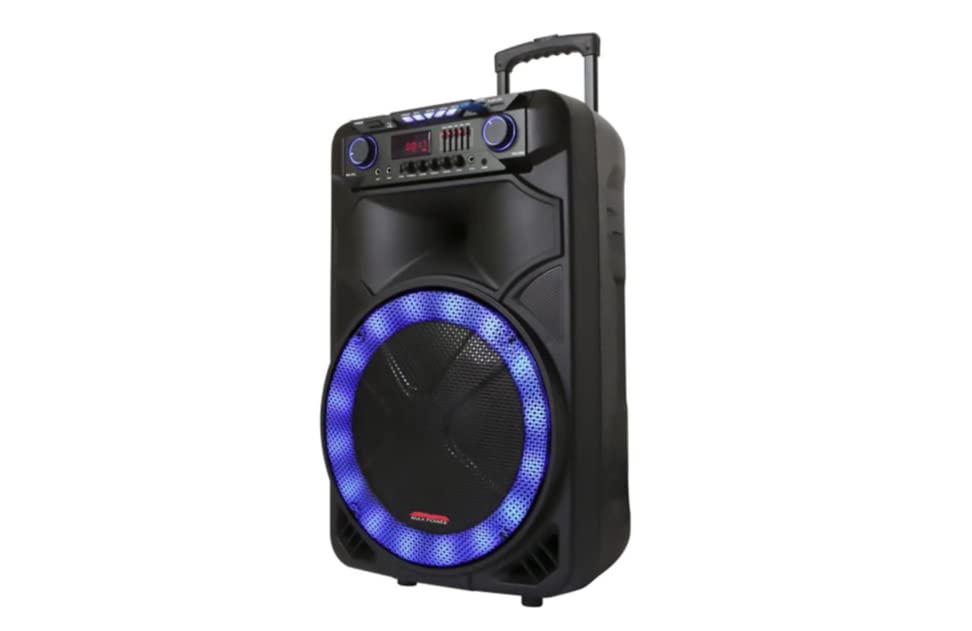
Apejuwe aworan: This image displays the front of the Max Power MPD15EQ speaker. It features a large 15-inch woofer at the bottom, a 5-inch horn tweeter above it, and a control panel with an LED display screen. The speaker grille covers the woofer and tweeter, and the overall design is robust and portable.
- 15" Woofer: Provides powerful bass frequencies.
- 5" Horn Tweeter: Ó ń fúnni ní àwọn ìgbàlódé gíga tí ó ṣe kedere.
- Iboju Ifihan LED: Shows current mode, track information, and settings.
- Ibi iwaju alabujuto: Buttons and knobs for various functions (volume, EQ, mode, etc.).
- LED Light On/Off Switch: Ó ń ṣàkóso ìmọ́lẹ̀ LED tí a ṣepọ.
Igbimọ Ẹyin (Example - specific details not provided in source)
The rear panel typically includes input/output ports and the power connection.
- Iṣagbewọle agbara: Fún síso ohun tí a fi ń ṣe agbára pọ̀ láti gba agbára bátìrì tàbí láti ṣiṣẹ́ ẹ̀rọ náà.
- Ibudo USB: Fun gbigba ohun lati awọn awakọ USB.
- Iho kaadi SD: Fun gbigba ohun lati kaadi SD.
- Iṣawọle gbohungbohun: Fún sísopọ̀ gbohungbohun onírin.
- Iṣawọle Iranlọwọ: For connecting external audio devices via a 3.5mm or RCA cable.
Ṣeto
Ngba agbara si Batiri naa
The MPD15EQ features a built-in rechargeable battery. Before first use, fully charge the speaker for approximately 6-8 hours.
- Connect the supplied power adapter to the speaker's power input port.
- Pulọọgi ohun ti nmu badọgba agbara sinu iṣan ogiri boṣewa kan.
- The LED display or an indicator light will show the charging status.
- Ni kete ti o ti gba agbara ni kikun, ge asopọ ohun ti nmu badọgba agbara.
Agbara akọkọ Lori
- Ensure the speaker is fully charged or connected to power.
- Locate the power switch (usually on the rear or control panel) and turn it to the "ON" position.
- The LED display will illuminate, indicating the speaker is ready for use.
Awọn ilana Iṣiṣẹ
Bluetooth Asopọ
- Turn on the MPD15EQ speaker.
- Press the "MODE" button on the control panel until "BLUETOOTH" or "BT" appears on the LED display.
- Mu Bluetooth ṣiṣẹ lori foonu alagbeka rẹ, tabulẹti, tabi ẹrọ ohun afetigbọ miiran.
- Wa fun available devices and select "MPD15EQ" from the list.
- Once paired, you will hear a confirmation sound, and you can now play audio wirelessly.
Lilo Gbohungbohun Firanṣẹ
- Connect the supplied wired microphone to the "MIC IN" port on the speaker.
- Adjust the microphone volume knob (if available) on the control panel to your desired level.
- Sọ sinu gbohungbohun.
USB / SD Kaadi Sisisẹsẹhin
- Insert a USB flash drive or SD card (pre-loaded with MP3 audio files) sinu ibudo oniwun.
- The speaker should automatically switch to USB/SD mode and begin playing. If not, press the "MODE" button.
- Use the playback controls (Play/Pause, Next, Previous) on the control panel or remote control.
5-Band Graphic EQ Adjustment
The MPD15EQ features a 5-band graphic equalizer to fine-tune your audio output.
- Locate the EQ sliders on the control panel.
- Each slider corresponds to a specific frequency band. Adjust them up or down to boost or cut those frequencies.
- Experiment with the settings to achieve your preferred sound profile.
Awọn imọlẹ LED
The speaker includes integrated LED lights. Use the "LED Light On/Off Switch" to activate or deactivate them.
Latọna Iṣakoso Lilo
The included remote control allows for convenient operation from a distance. It typically includes buttons for power, mode selection, volume, track control, and EQ presets.
Itoju
Ninu
- Pa agbara nigbagbogbo ati yọọ agbohunsoke ṣaaju ṣiṣe mimọ.
- Lo asọ ti o tutu, ti o gbẹ lati pa awọn ita ita.
- Do not use liquid cleaners, aerosols, or abrasive chemicals.
Ibi ipamọ
- Tọju agbohunsoke ni itura, aye gbigbẹ kuro lati orun taara ati awọn iwọn otutu to gaju.
- If storing for extended periods, charge the battery periodically (e.g., every 3 months) to maintain battery health.
Laasigbotitusita
| Isoro | Owun to le Fa | Ojutu |
|---|---|---|
| Ko si agbara | Batiri ti yọ kuro; Okùn agbara ko so pọ; Agbára ti pa. | Charge the battery; Check power cable connection; Turn power switch ON. |
| Ko si ohun | Volume too low; Incorrect input mode; Device not paired (Bluetooth). | Increase master volume; Select correct input mode (Bluetooth, USB, AUX); Re-pair Bluetooth device. |
| Gbohungbohun ko ṣiṣẹ | Microphone not connected; Microphone volume low; Microphone switch off. | Ensure microphone is securely plugged in; Increase microphone volume; Check microphone's ON/OFF switch. |
| Asopọ Bluetooth ko duro | Device too far; Interference; Low battery. | Move device closer to speaker; Avoid obstacles; Ensure speaker battery is charged. |
Awọn pato
- Woofer: Single 15"
- Tweeter: Single 5" Horn
- Idahun Igbohunsafẹfẹ: 40Hz-20KHz
- Ipalara: 4 ohms
- Ifamọ: 93dB
- Awọn iwọn (W x D x H): 19" x 16.75" x 32"
- Ìwúwo: Ni isunmọ 38 poun
- Batiri: Gbigba agbara ti a ṣe sinu
- Asopọmọra: Bluetooth, USB, SD Card, Microphone Input, Auxiliary Input
- EQ: 5 Band Aworan EQ
- Ifihan: Iboju Ifihan LED
- Awọn ẹya ara ẹrọ to wa: Wired Microphone, Remote Control
Atilẹyin ọja ati Support
Max Power products are designed for reliability and performance. For warranty information or technical support, please refer to the warranty card included with your purchase or visit the official Max Power webojula. Jeki ẹri rira rẹ fun awọn iṣeduro atilẹyin ọja.
Ibi iwifunni: Please refer to the packaging or official website for the most up-to-date contact details for customer service.
Awọn fidio ọja osise
No official product videos from the seller were available for embedding at this time. If available, they would appear here with detailed descriptions.