
1. Ifihan
This user manual provides detailed instructions for the safe and efficient operation, maintenance, and troubleshooting of your Hisense DH5020K Dehumidifier. Please read this manual thoroughly before using the appliance and retain it for future reference.
The Hisense DH5020K is designed to remove excess moisture from the air, helping to prevent mold, mildew, and other humidity-related issues in spaces up to 3000 square feet. It features a 35-pint per day dehumidification capacity, three fan speeds, and multiple operating modes for optimal comfort.
2. Alaye Aabo
Nigbagbogbo tẹle awọn iṣọra aabo ipilẹ nigba lilo awọn ohun elo itanna lati dinku eewu ina, mọnamọna, ati ipalara.
- Ka gbogbo awọn itọnisọna ṣaaju lilo dehumidifier.
- Rii daju pe ipese agbara ibaamu voltagàwọn ohun tí a béèrè fún lórí àmì ìdíyelé ẹ̀rọ náà.
- Ma ṣe ṣiṣẹ ẹrọ mimu kuro pẹlu okun ti o bajẹ tabi plug.
- Do not block air inlets or outlets. Maintain at least 8 inches (20 cm) of clearance around the unit.
- Do not use the appliance in wet areas such as bathrooms or laundry rooms where it may come into contact with water.
- Yọọ kuro ni gbogbo igba ṣaaju ṣiṣe mimọ tabi ṣiṣe itọju eyikeyi.
- Pa awọn ọmọde ati awọn ohun ọsin kuro ni ẹyọkan lakoko iṣẹ.
- Ma ṣe gbiyanju lati tun tabi ṣe atunṣe ẹyọ naa funrararẹ. Kan si oṣiṣẹ iṣẹ ti o pe fun atunṣe.
3. Awọn ẹya Ọja
The Hisense DH5020K Dehumidifier is equipped with several features designed for efficient and convenient moisture removal:
- 35-Pint Capacity: Yọ to 35 pints ti ọrinrin fun ọjọ kan.
- Agbegbe Ibo: Effective for spaces up to 3000 square feet.
- Olufẹ-iyara 3: Offers Low, Medium, and High fan speeds for customized dehumidification.
- Humidistat ti o le ṣatunṣe: Allows setting the desired humidity level.
- Awọn ọna Iṣiṣẹ lọpọlọpọ: Includes Manual, Continuous, and Auto-Dry modes.
- Titan/Pa Aago 24-Wakati: Ṣe eto ẹyọ naa lati tan tabi pa laifọwọyi.
- Full-Tank Alert & Auto Shut-off: The unit stops operating and alerts you when the water bucket is full.
- Low Sound Level: A ṣe apẹrẹ fun iṣiṣẹ idakẹjẹ.
- Asọ Washable: Easy-to-clean air filter for improved air quality and unit efficiency.
- Aṣayan Imugbẹ ti o tẹsiwaju: Allows for direct drainage using a garden hose (not included).
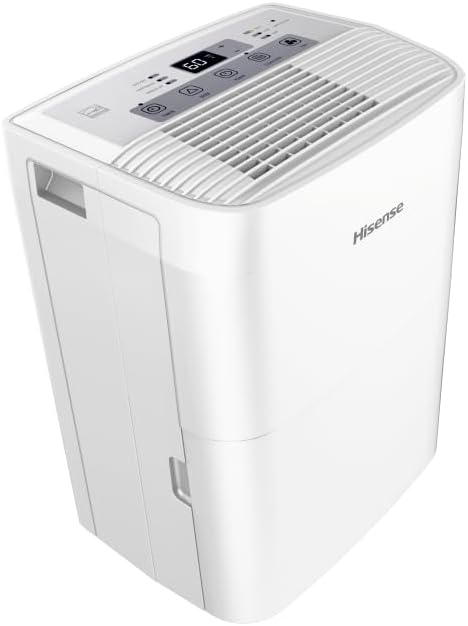
olusin 3.1: Angled view of the Hisense DH5020K Dehumidifier, showing the top control panel and side handles.
4. Eto ati fifi sori
4.1 Ṣiṣii silẹ
- Farabalẹ yọ dehumidifier kuro ninu apoti rẹ.
- Yọ gbogbo awọn ohun elo iṣakojọpọ kuro, pẹlu eyikeyi teepu tabi awọn fiimu aabo.
- Ṣe àyẹ̀wò ẹ̀rọ náà fún ìbàjẹ́ èyíkéyìí nínú ìfiránṣẹ́ ọkọ̀. Tí ó bá bàjẹ́, má ṣe ṣiṣẹ́ kí o sì kan sí olùtọ́jú àwọn oníbàárà.
4.2 Ibi
For optimal performance, place the dehumidifier in a central location within the area requiring dehumidification. Ensure proper air circulation around the unit.
- Place the unit on a firm, level surface that can support its weight when the water bucket is full.
- Maintain at least 8 inches (20 cm) of clearance from walls, furniture, or other objects to allow for proper airflow.
- Má ṣe gbé ẹ̀rọ náà síbi tí ó wà nítòsí àwọn ibi tí ó ń gbóná tàbí sí ibi tí oòrùn bá ń tàn tààrà.
- Ensure the room temperature is within the operating range (38°F - 90°F / 3°C - 32°C).

olusin 4.1: Iwaju view of the Hisense DH5020K Dehumidifier, showing its compact design and integrated casters for easy movement.
4.3 Asopọ agbara
Plug the power cord into a grounded 115V AC, 60Hz electrical outlet. Do not use extension cords or adapter plugs.
4.4 Omi idominugere Aw
The Hisense DH5020K offers two methods for water removal:
4.4.1 Manual Drainage (Water Bucket)
The dehumidifier collects water in an internal bucket. When the bucket is full, the unit will automatically shut off and illuminate the "Bucket Full" indicator. Carefully remove the bucket and empty the collected water. Reinsert the bucket firmly to resume operation.
4.4.2 Ìṣàn omi tó ń tẹ̀síwájú
For continuous operation without emptying the bucket, you can connect a standard garden hose (not included) to the continuous drain port on the side of the unit. Ensure the hose is sloped downwards to allow gravity drainage to a floor drain or suitable receptacle.

olusin 4.2: Apa view of the Hisense DH5020K Dehumidifier, highlighting the continuous drain port for hose connection.
5. Awọn ilana Iṣiṣẹ
5.1 Iṣakoso igbimo Loriview

Figure 5.1: Diagram showing the control panel of the Hisense DH5020K Dehumidifier with various buttons and indicators.
The control panel features an LED display and several buttons for controlling the dehumidifier's functions:
- Bọtini agbara: Yipada ẹyọ naa tan tabi pa.
- Humidity Control Buttons (Up/Down Arrows): Ṣe atunṣe ipele ọriniinitutu ti o fẹ.
- Bọtini Iyara Fan: Cycles through Low, Medium, and High fan speeds.
- Bọtini Ipo: Selects operating modes (Manual, Continuous, Auto-Dry).
- Bọtini Aago: Ó ń ṣètò aago tí a ó máa lò fún wákàtí mẹ́rìnlélógún.
- Ifihan: Ó ń fi ọriniinitutu lọwọlọwọ hàn, ṣeto ọriniinitutu, tabi eto aago.
- Awọn itọkasi: Lights for Bucket Full, Defrost, and Filter Clean.
5.2 Ipilẹ isẹ
- Agbara Tan: Press the Power button to turn on the unit. The display will show the current room humidity.
- Ṣètò ọriniinitutu ti a fẹ́: Use the Up/Down arrow buttons to set your desired humidity level (e.g., 40% - 60% relative humidity is generally recommended for comfort). The unit will operate until the set humidity is reached, then cycle on and off to maintain it.
- Yan Iyara Fan: Press the Fan Speed button to choose between Low, Medium, or High fan speeds. Higher speeds provide faster dehumidification.
- Yan Ipo: Press the Mode button to cycle through:
- Afowoyi: Operates based on the set humidity level and fan speed.
- Tesiwaju: Runs continuously regardless of humidity level, ideal for very damp awọn ipo.
- Auto-Dry: Automatically adjusts operation to maintain a comfortable humidity level.
- Iṣẹ Aago: Press the Timer button to set a delay for the unit to turn on or off (from 1 to 24 hours).
- Agbara Pa: Tẹ bọtini agbara lẹẹkansi lati pa ẹrọ naa.
6. Itọju
Itọju deede ṣe idaniloju iṣẹ ṣiṣe ti o dara julọ ati fa gigun igbesi aye ti dehumidifier rẹ.
6.1 Ninu Ajọ Afẹfẹ
The air filter should be cleaned every two weeks or when the "Filter Clean" indicator illuminates.
- Pa dehumidifier kuro ki o yọọ kuro ni iṣan agbara.
- Locate the air filter, typically on the back or side of the unit.
- Yọ àlẹmọ kuro nipa yiyo jade.
- Wash the filter with warm, soapy water. Rinse thoroughly and allow it to air dry completely before reinstalling. Do not use a dishwasher.
- Tun fi àlẹmọ gbẹ sinu ẹyọ.
- Plug in the unit and press the Filter button (if available) or Power button to reset the filter indicator.
6.2 Fífọ Àpótí Omi
Clean the water bucket periodically to prevent mold and mildew growth.
- Paa ati yọọ kuro.
- Yọ garawa omi kuro.
- Wash the bucket with warm water and a mild detergent. Rinse thoroughly.
- Dry the bucket completely before placing it back into the dehumidifier.
6.3 Unit Ode Cleaning
Mu ese ita kuro pẹlu asọ, damp asọ. Maṣe lo awọn kẹmika ti o lewu tabi awọn afọmọ abrasive.
6.4 Ibi ipamọ
Tí o bá ń tọ́jú dehumidifier fún ìgbà pípẹ́:
- Da omi sinu bokiti naa ki o si nu.
- Mọ àlẹmọ afẹfẹ.
- Allow the unit to dry for at least 24 hours in a well-ventilated area.
- Tọju ẹyọ naa ni pipe ni itura, aye gbigbẹ, kuro lati orun taara ati awọn iwọn otutu to gaju.
7. Laasigbotitusita
Kí o tó kàn sí iṣẹ́ oníbàárà, jọ̀wọ́ wo ìtọ́sọ́nà àtúnṣe yìí fún àwọn ìṣòro tó wọ́pọ̀.
| Isoro | Owun to le Fa | Ojutu |
|---|---|---|
| Dehumidifier ko ṣiṣẹ. | No power; Water bucket full or not properly inserted; Room temperature too low. | Check power connection; Empty and reinsert bucket correctly; Ensure room temperature is above 38°F (3°C). |
| Unit nṣiṣẹ sugbon ko dehumidify. | Air filter clogged; Air inlet/outlet blocked; Humidity setting too high. | Clean the air filter; Ensure proper clearance around the unit; Lower the desired humidity setting. |
| "Bucket Full" indicator is on, but bucket is not full. | Bucket not seated correctly; Float switch malfunction. | Remove and firmly reinsert the water bucket; If issue persists, contact customer service. |
| Ẹka jẹ alariwo. | Kuro ko lori kan ipele dada; Afẹfẹ àlẹmọ dí. | Place unit on a flat, stable surface; Clean the air filter. |
| Frost han lori awọn okun waya. | Iwọn otutu yara kere ju. | The unit has an auto-defrost function. If frost persists, increase room temperature or contact service. |
8. Awọn pato
| Sipesifikesonu | Iye |
|---|---|
| Brand | Hisense |
| Orukọ awoṣe | DH5020K |
| Agbara | 35 Pints fun ọjọ kan |
| Agbegbe Agbegbe | Titi di 3000 Square Ẹsẹ |
| Nọmba ti Awọn iyara | 3 |
| Àwọ̀ | Funfun |
| Ohun elo | Polypropylene (PP) |
| Iwọn Nkan | 34.1 iwon |
| Package Mefa | 21 x 15.5 x 13 inches |
| Ibi ti ina elekitiriki ti nwa | 115V / 60Hz |
| Pataki Awọn ẹya ara ẹrọ | Timer, Automatic Shutoff, Adjustable Humidistat |
| Ipo Isẹ | Manual, Continuous, Auto-Dry |
| UPC | 819130027081 |
9. Atilẹyin ọja ati Support
Hisense products are manufactured to high-quality standards and are backed by a limited warranty. For specific warranty terms and conditions, please refer to the warranty card included with your product or visit the official Hisense webojula.
If you require technical assistance, have questions about your dehumidifier, or need to arrange for service, please contact Hisense Customer Support. Have your model number (DH5020K) and serial number ready when contacting support.
Hisense Customer Support:
- Webojula: www.hisense-usa.com
- Foonu: Refer to Hisense-USA webaaye fun awọn nọmba olubasọrọ lọwọlọwọ.