
Ọrọ Iṣaaju
Thank you for choosing the SURFOU Wireless Doorbell Kit N6. This kit includes two plug-in receivers and one battery-powered transmitter, designed to provide a reliable and convenient alert system for your home or office. With a strong wireless range, multiple melodies, and adjustable volume, this doorbell is built for ease of use and durability.

Image: The SURFOU Wireless Doorbell Kit N6, showing one plug-in receiver and one battery-powered transmitter.
Package Awọn akoonu
Jọwọ ṣayẹwo awọn akoonu package lati rii daju pe gbogbo awọn ohun kan wa:
- Àwọn Olùgbà Àfikún 2 x
- 1 x Battery-Powered Transmitter
- 1 x 12V23A Battery (for transmitter)
- 1 x Screwdriver
- 2 x Sets of Screws
- 2 x Double-Sided Adhesive Tapes
- 1 x Itọsọna olumulo
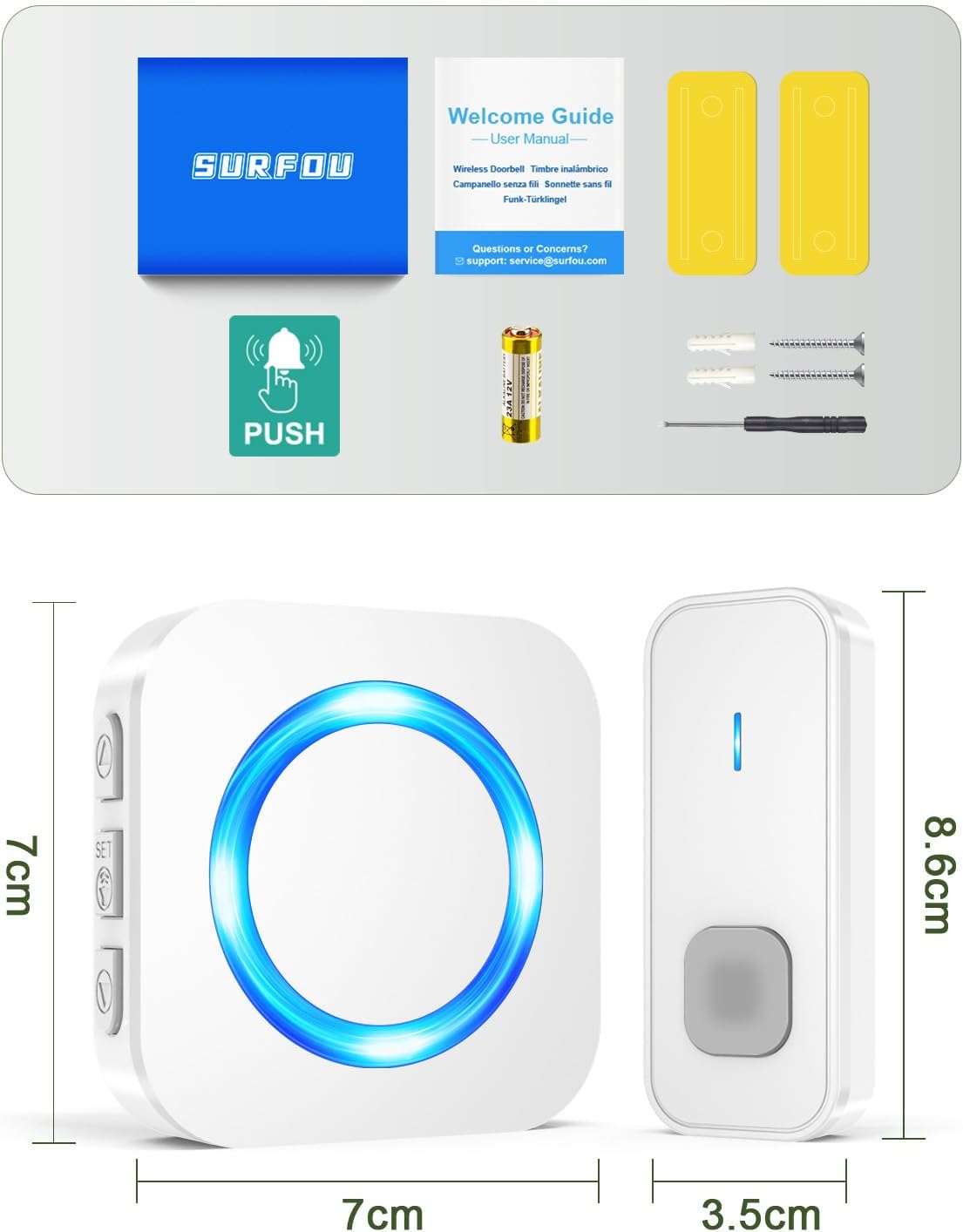
Image: All components included in the SURFOU Wireless Doorbell Kit N6 package, including receivers, transmitter, battery, screwdriver, screws, and adhesive tapes.
Eto ati fifi sori
Follow these steps to set up your SURFOU Wireless Doorbell:
1. Atagba Batiri sori
- Open the back cover of the transmitter using the provided screwdriver.
- Insert the 12V23A battery, ensuring correct polarity.
- Pa ideri ẹhin ni aabo.

Image: A diagram showing the battery compartment of the transmitter and the 12V23A battery.
2. Receiver Placement
Plug the receivers into standard electrical outlets in desired locations within your home. Ensure they are within the 400-meter wireless range of the transmitter, considering walls and obstacles may reduce this range.

Image: An illustration demonstrating the 400-meter wireless range of the doorbell system, with receivers placed inside a house.
3. Gbigbe Atagba
You have two options for mounting the transmitter:
- Ọna Teepu Almora:
- Mọ dada iṣagbesori daradara.
- Peel off one side of the double-sided adhesive tape and attach it to the back of the transmitter.
- Peel off the other side and firmly press the transmitter onto the desired location (e.g., door frame).
- Screw Method:
- Samisi awọn aaye iṣagbesori ti o fẹ lori ogiri.
- Lu awaoko ihò ti o ba wulo.
- So ẹrọ gbigbe naa mọ ogiri nipa lilo awọn skru ti a pese.

Image: Visual guide showing both adhesive tape and screw installation methods for the doorbell transmitter.
Awọn ilana Iṣiṣẹ
1. Awọn orin aladun iyipada
The doorbell offers 55 different melodies. To change the melody:
- Tẹ awọn Bọtini Aṣayan Orin on the side of the receiver to cycle through the available melodies.
- Once you hear a melody you like, stop pressing the button. The doorbell will remember your selection.

Image: A visual representation of the receiver with icons indicating 55 melodies, LED display, and 5 volume levels.
2. Siṣàtúnṣe iwọn didun
There are 5 adjustable volume levels, up to 110 dB. To adjust the volume:
- Tẹ awọn Bọtini iwọn didun on the side of the receiver to cycle through the volume levels.
- The volume will decrease or increase with each press.
- A mute mode (0 dB) is also available, where only the LED indicator will flash.

Image: A graphic illustrating the 5 volume levels (0dB to 110dB) and the mute mode feature.
3. Pairing Additional Transmitters/Receivers (Optional)
If you purchase additional SURFOU doorbell components, you can pair them:
- Plug in the new receiver.
- Tẹ mọlẹ Bọtini iwọn didun on the receiver for 5 seconds until it emits a "ding" sound and the LED flashes. This indicates pairing mode.
- Immediately press the button on the new transmitter. The receiver will ring, confirming successful pairing.
- Repeat for any other additional components.

Image: An illustration showing multiple receivers and transmitters, indicating the system's expandability.
Itoju
- Ninu: Fi aṣọ rírọrùn tí ó gbẹ nu àwọn ẹ̀rọ ìgbọ́rọ̀ ẹnu ọ̀nà. Má ṣe lo àwọn ohun ìfọmọ́ tàbí àwọn ohun èlò ìfọ́mọ́.
- Rirọpo Batiri: When the transmitter's range decreases or it stops working, replace the 12V23A battery.
- Awọn ipo Ayika: The transmitter is IP55 dustproof and waterproof, designed to withstand temperatures from -30°C to 70°C. However, avoid prolonged exposure to extreme conditions or direct submersion in water.

Image: The doorbell transmitter highlighting its IP55 dustproof and waterproof rating, 1-3 years battery life, and operating temperature range of -30°C to 70°C.
Laasigbotitusita
| Isoro | Owun to le Fa | Ojutu |
|---|---|---|
| Agogo ilẹkun ko lu. |
|
|
| Shortened wireless range. |
|
|
| LED olugba naa n tan imọlẹ ṣugbọn ko si ohun ti o dun. | Volume is set to mute (0 dB). | Press the Volume Button to increase the volume. |
Awọn pato
| Ẹya ara ẹrọ | Ẹ̀kúnrẹ́rẹ́ |
|---|---|
| Nọmba awoṣe | N6 |
| Brand | SURFOU |
| Alailowaya Ibiti | Titi di mita 400 (ni awọn agbegbe ṣiṣi) |
| Awọn orin aladun | 55 awọn orin aladun yiyan |
| Awọn ipele iwọn didun | Awọn ipele 5 (0 dB si 110 dB) |
| Idiyele Omi (Olugbeja) | IP55 |
| Awọn iwọn otutu ti nṣiṣẹ | -30°C si 70°C (-22°F si 158°F) |
| Batiri Atagba | 1 x 12V23A (included) |
| Agbara olugba | AC Plug-in |
| Ohun elo | ABS |
| Awọn iwọn (Agbarapada) | Isunmọ 8.6 x 3.5 x 2 cm |
| Awọn iwọn (Olugba) | Isunmọ 7 x 7 x 6.5 cm |
| Iwọn | 92.2 Giramu (iwọn apapọ ti package) |
Atilẹyin ọja ati Support
SURFOU is committed to providing reliable products and excellent customer service. If you encounter any issues or have questions regarding your doorbell kit, please contact our support team. While specific warranty details are not provided in this manual, SURFOU offers 24/7 customer support to assist you.
For support, please refer to the contact information provided with your purchase or visit the official SURFOU webojula.