
1. Ifihan
Thank you for choosing the OREiN Motion Sensor Outdoor Lights. This manual provides essential information for the proper installation, operation, and maintenance of your new flood light. Please read it thoroughly before use and retain it for future reference.

The OREiN Motion Sensor Outdoor Light in White.
Awọn ẹya pataki:
- Dimmable Dusk to Dawn Modes: Offers Manual, Security, and Dimmable Dusk to Dawn modes for versatile lighting control.
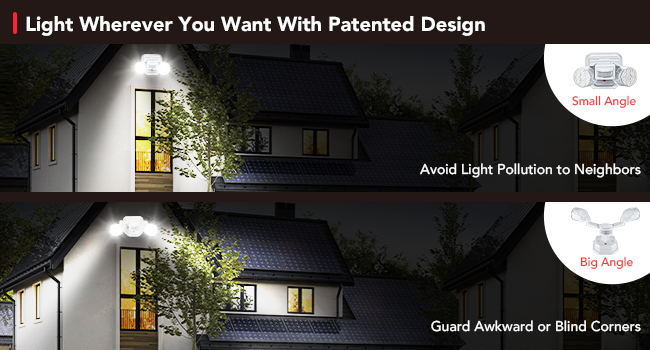
- 450° Superwide Adjustment: Allows precise aiming of light heads and sensor to cover desired areas and avoid light pollution.
- Bright & Efficient LED Spotlights: Provides 1600LM brightness with only 12W power consumption, covering up to 1250 sq.ft.
- Certified and Durable: IP65 waterproof rating and robust Polycarbonate material ensure long-lasting outdoor performance.
- Asopọ Hardwired: Designed for secure, permanent installation to a standard junction box.
2. Eto ati fifi sori
Kini To wa:
- OREiN Motion Sensor Outdoor Light
- Oke Atẹgun
- Awọn skru
- Awọn eso Waya
- Ilana itọnisọna
Awọn igbesẹ fifi sori ẹrọ:
This flood light is designed for hardwired installation to a standard junction box (not included). Ensure power is turned off at the circuit breaker before beginning installation.

Pariview of the light's dimensions and hardwired connection components.
- Mura Apoti Ipade: Ensure your standard junction box (featuring five 1/2-in knockouts and 16 cu. in. capacity) is securely installed and accessible.
- So akọmọ iṣagbesori: Screw the provided mounting bracket to the junction box.
- Asopọmọra Waya: Carefully connect the live wire (black) and neutral wire (white) from the light fixture to the corresponding wires in your junction box using the provided wire nuts. This product is made of solid ABS insulation material and does not require a ground wire.
- Ṣe aabo Imọlẹ naa: Align the light fixture with the mounting bracket and secure it with the provided screws.
- Ṣatunṣe Awọn ori Imọlẹ: Once secured, adjust the two light heads and the motion sensor to your desired angles.
For a visual guide on installation, please refer to the following videos:
Video: Using Instruction of OREiN Flood Light. This video demonstrates the step-by-step process of installing the flood light, including wiring connections and mounting.
Video: Easy to Install. A quick guide showing the ease of installation for the OREiN flood light.
3. Àwọn Ìgbésẹ̀ àti Àtúnṣe Iṣẹ́
Understanding Operating Modes:
Your OREiN flood light offers three distinct working modes:
- 1. Ipo afọwọṣe: The light turns on/off by manual switch control.
- 2. Security Mode: The light turns on only at night after detecting motion.
- 3. Dimmable Dusk to Dawn Mode: The light automatically turns on at 30% brightness at night and increases to 100% brightness upon detecting motion.

Visual representation of the three operating modes.
Ṣíṣe àtúnṣe Ètò Sensọ:
The motion sensor has three adjustable knobs: TIME, SENS, and LUX.

Adjustable sensor settings for TIME, SENS, and LUX.
- Àkókò: Adjusts how long the light stays on after motion is detected (e.g., 8 minutes, 10 seconds).
- SENS (Ifaramọ): Controls the detection range of the motion sensor (up to 40ft).
- LUX (Light Sensitivity): Determines the ambient light level at which the sensor activates. For night-only operation, set the LUX to the 'moon' end for minimum setting.
For a demonstration of the sensor's sensitivity and brightness, watch this video:
Video: Sensitive Detection and Super Bright. This video highlights the motion sensor's responsiveness and the light's powerful illumination.
Adjusting Lighting Angles:
The light features 450° wide adjustment with 3 flexible joints on each light arm, allowing you to direct the light precisely where needed. This helps avoid light pollution to neighbors and illuminates awkward or unreachable directions.

Alaye view of the adjustable joints for precise light direction.

Examples of wide light adjustment for various lighting needs.
See the flexibility of the light's adjustment in this video:
Video: Bright LED Light with Flexible Adjustment. This video showcases the extensive adjustability of the light heads.
4. Itọju
The OREiN Motion Sensor Outdoor Light is designed for durability and minimal maintenance. Its IP65 waterproof rating ensures protection against various weather conditions, including snow, wind, and rain.
The IP65 waterproof design ensures durability in outdoor conditions.
- Ninu: Lẹẹkọọkan nu imuduro ina pẹlu asọ, damp aṣọ láti mú eruku àti ìdọ̀tí kúrò. Yẹra fún lílo àwọn kẹ́míkà líle tàbí àwọn ohun ìfọmọ́ tí ó ń pa ara.
- Ayewo: Regularly check the wiring and mounting for any signs of wear or damage. Ensure all connections remain secure.
- Iduroṣinṣin Ohun elo: The Polycarbonate material is resistant to high temperatures, frost, UV radiation, and breakage, contributing to a long service life of 50,000 hours.
5. Laasigbotitusita
If you encounter issues with your OREiN Motion Sensor Outdoor Light, please refer to the following common troubleshooting tips:
- Light Not Turning On at Night:
- Check the LUX setting on the sensor. Ensure it is set to the 'moon' (minimum) position for night-only operation.
- Verify that the power supply to the light is active.
- Confirm the operating mode is correctly selected (Security Mode or Dimmable Dusk to Dawn Mode).
- Light Stays On Continuously:
- In Manual Mode, the light will remain on until manually switched off.
- In Security or Dimmable Dusk to Dawn modes, check the TIME setting. If set to maximum, the light will stay on longer.
- Ensure there are no constant motion sources within the sensor's detection range.
- Motion Sensor Not Detecting:
- Adjust the SENS (Sensitivity) knob to a higher setting.
- Ensure the sensor is not obstructed by objects or debris.
- Verify the sensor's angle is appropriate for the desired detection area.
- Light Flashes or Behaves Erratically:
- Check for stable power supply. Fluctuations can cause erratic behavior.
- Ensure the light is securely mounted and connections are tight.
- Ti awọn iṣoro ba tẹsiwaju, kan si atilẹyin alabara.
6. Awọn pato
| Ẹya ara ẹrọ | Sipesifikesonu |
|---|---|
| Brand | OREiN |
| Orukọ awoṣe | OL3600140 |
| Nọmba awoṣe | OL36001-A |
| Àwọ̀ | Funfun |
| Ohun elo | Acrylonitrile Butadiene Styrene, Polycarbonate |
| Orisun agbara | Okun Itanna (AC) |
| Voltage | 120 Volts |
| Wattage | 12 watt |
| Imọlẹ | 1600 Lumen |
| Light Awọ otutu | 5000K |
| Agbegbe Agbegbe | 1250 sq. |
| Omi Resistance Ipele | IP65 mabomire |
| Iwọn Nkan | 1.34 iwon |
| Ọja Mefa | 7"L x 6.3"W x 3.94"H |
| Iru fifi sori ẹrọ | Surface Mount (Wall and Soffit Mount) |
| Pataki Ẹya | Dimmable, Sensọ išipopada |
| Ireti aye | wakati meji 50,000 |
7. Atilẹyin ọja ati Support
Alaye Atilẹyin ọja:
The OREiN Motion Sensor Outdoor Light comes with a 2-odun olupese ká atilẹyin ọja.
Atilẹyin Onibara:
For any questions, issues, or support needs, please contact OREiN customer service:
- Atilẹyin foonu: 1-844-506-1530 (available during working hours)
- Iranlọwọ Ayelujara: 7*24 hrs online help is available.
- Itọsọna olumulo (PDF): For a detailed user guide, you can download the PDF version Nibi.