
HOCO EW11 Melody (PQ-LS12-MG7Q)
Ìwé Ìtọ́sọ́nà Olùlò Agbekọri Alailowaya HOCO EW11 Melody TWS
Model: EW11 Melody (PQ-LS12-MG7Q)
Ọja Pariview
The HOCO EW11 Melody TWS Wireless Headset provides a dynamic and crystal-clear sound experience with Bluetooth v5.1 connectivity. This manual will guide you through the setup, operation, and maintenance of your new headset.

Image: The HOCO EW11 Melody TWS Wireless Headset, showing both earbuds and the open charging case with a digital battery display.
Package Awọn akoonu
Rii daju pe gbogbo awọn nkan wa ninu package:
- HOCO EW11 Melody TWS Wireless Headset (Left and Right Earbuds)
- Ngba agbara Case
- Ngba agbara USB (Iru-C)
- Awọn iṣu Eti (oriṣiriṣi titobi)
- Afowoyi Olumulo (iwe-ipamọ yii)
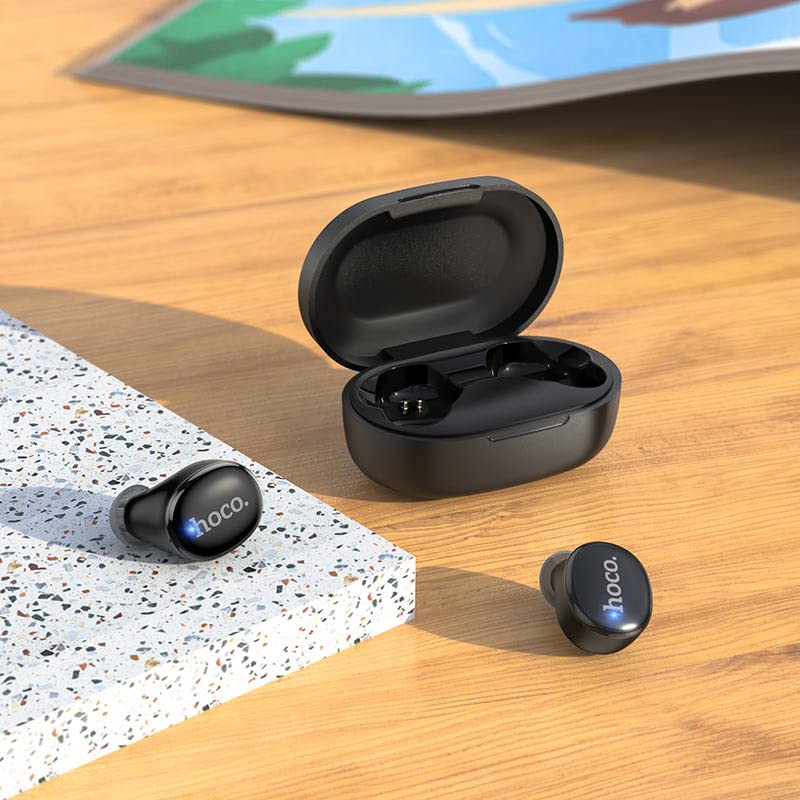
Image: The HOCO EW11 Melody earbuds placed next to the open charging case on a textured surface, illustrating the main components.
Awọn ilana iṣeto
1. Gbigba agbara akọkọ
- Gbe awọn afikọti mejeeji sinu ọran gbigba agbara.
- Connect the provided Type-C charging cable to the charging port on the case and to a USB power adapter (not included).
- The digital display on the charging case will show the battery level. Charge the case and earbuds fully before first use. A full charge typically takes approximately 1.5 hours.
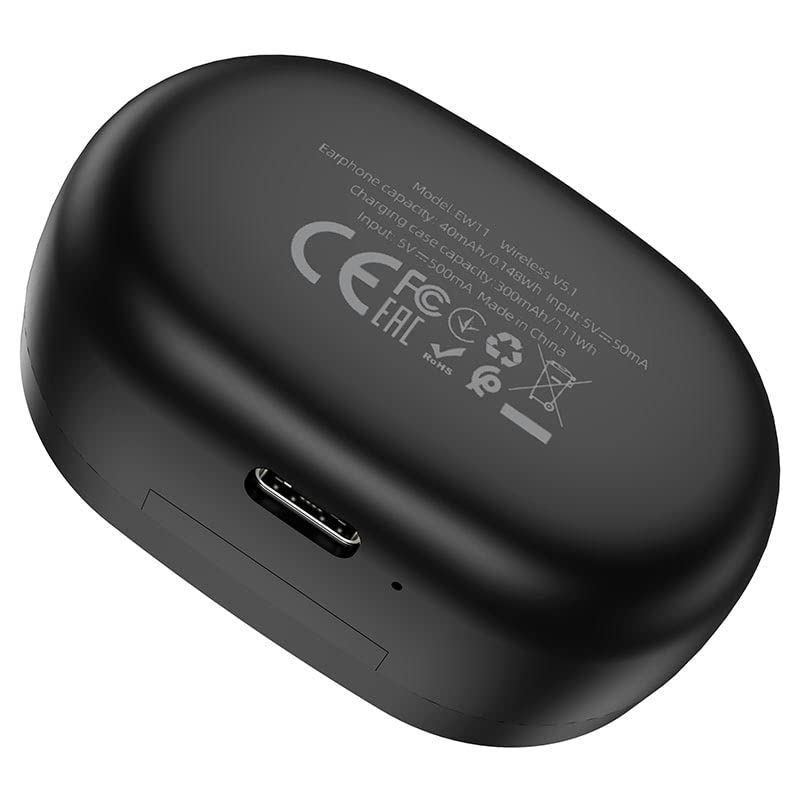
Image: The bottom of the HOCO EW11 Melody charging case, highlighting the Type-C charging port and product information.
2. Sisopọ pẹlu Ẹrọ kan
- Rii daju pe awọn agbekọri ti gba agbara ati gbe sinu apoti gbigba agbara.
- Ṣii apoti gbigba agbara. Awọn agbekọri yoo tan ina laifọwọyi ati tẹ ipo sisopọ pọ sii.
- Lori ẹrọ rẹ (foonuiyara, tabulẹti, ati bẹbẹ lọ), mu Bluetooth ṣiṣẹ ki o wa awọn ẹrọ to wa.
- Select "HOCO EW11 Melody" from the list of found devices.
- Once connected, a voice prompt will confirm successful pairing. The earbuds will automatically reconnect to the last paired device when taken out of the case.
Awọn ilana Iṣiṣẹ
Titan / Paa
- Agbara Tan: Ṣii apoti gbigba agbara, ati awọn agbekọri yoo ṣiṣẹ laifọwọyi.
- Agbara Pa: Place the earbuds back into the charging case and close the lid. They will power off and begin charging.
Sisisẹsẹhin Orin
- Ṣiṣẹ/Daduro: Fọwọ ba boya agbekọri lẹẹkan.
- Orin t’okan: Fọwọ ba agbekọri ọtun lẹẹmeji.
- Tẹlẹ Orin: Fọwọ ba agbekọri osi lẹẹmeji.
- Iṣakoso iwọn didun: Ṣatunṣe iwọn didun taara lati ẹrọ ti o sopọ.
Isakoso Ipe
- Idahun/Ipe Ipari: Fọwọ ba boya agbekọri lẹẹkan.
- Kọ Ipe: Tẹ mọlẹ boya agbekọri fun iṣẹju 2.
Oluranlọwọ ohun
- Mu Oluranlọwọ Ohun ṣiṣẹ: Tẹ lẹẹmẹta boya agbekọri.
Itoju
Itọju to dara ṣe idaniloju igbesi aye gigun ati iṣẹ to dara julọ ti agbekari rẹ.
- Ninu: Lo asọ ti o gbẹ, asọ ti ko ni lint lati nu afikọti ati apoti gbigba agbara. Maṣe lo awọn kẹmika lile tabi awọn ohun elo abrasive.
- Omi Resistance: The earbuds feature water resistance. However, they are not waterproof. Avoid submerging them in water or exposing them to heavy rain. Dry them thoroughly if they get wet.
- Ibi ipamọ: Nigbati o ko ba si ni lilo, tọju awọn afikọti sinu apoti gbigba agbara wọn lati daabobo wọn ki o jẹ ki wọn gba agbara. Tọju ni itura, ibi gbigbẹ kuro lati awọn iwọn otutu to gaju.
- Gbigba agbara: Gba agbara si ẹrọ nigbagbogbo, paapaa ti kii ṣe ni lilo loorekoore, lati ṣetọju ilera batiri.
Laasigbotitusita
Ti o ba pade awọn iṣoro, tọka si awọn solusan ti o wọpọ wọnyi:
- Awọn agbekọri ti ko so pọ pẹlu ẹrọ:
- Rii daju pe Bluetooth ti ṣiṣẹ lori ẹrọ rẹ.
- Make sure the earbuds are charged and out of the case.
- Forget "HOCO EW11 Melody" from your device's Bluetooth list and attempt to pair again.
- Tun ẹrọ rẹ bẹrẹ.
- Agbekọri agbekọri kan ṣoṣo ti n ṣiṣẹ:
- Gbe awọn agbekọri mejeeji pada sinu apoti gbigba agbara, pa ideri naa, duro fun iṣẹju diẹ, lẹhinna ṣi i lẹẹkansi.
- Rii daju pe awọn agbekọri mejeeji ti gba agbara.
- Ko si ohun:
- Ṣayẹwo ipele iwọn didun lori ẹrọ ti a ti sopọ.
- Rii daju pe awọn agbekọri ti sopọ daradara si ẹrọ rẹ.
- Gbiyanju ohun ti ndun lati ohun elo ti o yatọ tabi orisun.
- Apo gbigba agbara ko gba agbara:
- Rí i dájú pé okùn Type-C so mọ́ àpótí àti orísun agbára dáadáa.
- Gbiyanju okun gbigba agbara ti o yatọ tabi ohun ti nmu badọgba agbara.
Awọn pato
| Orukọ awoṣe | EW11 Melody |
| Nọmba awoṣe | PQ-LS12-MG7Q |
| Ẹya Bluetooth | v5.1 |
| Chip Bluetooth | JL AC6973 |
| Agbara Batiri Earbud | 40mAh |
| Ngba agbara Batiri Case | 300mAh |
| Orin/Aago Ipe | O fẹrẹ to awọn wakati 5 |
| Akoko Iduro | O fẹrẹ to awọn wakati 200 |
| Gbigba agbara Port | Iru-C |
| Ohun elo | Ṣiṣu |
| Omi Resistance | Sweatproof (not waterproof) |
| Iwọn Nkan | 250 Giramu (iwọn apapọ ti package) |
Atilẹyin ọja ati Support
This HOCO EW11 Melody TWS Wireless Headset comes with a 365 Day atilẹyin ọja lati ọjọ rira, ibora awọn abawọn iṣelọpọ.
For technical support or warranty claims, please contact your retailer or the HOCO customer service department. Refer to the product packaging or HOCO's official webaaye fun awọn alaye olubasọrọ.
Ask a question about this manual
Ask about setup, troubleshooting, compatibility, parts, safety, or missing instructions. Manuals+ will review the question and use this page’s manual context to help answer it.