
1. Ifihan
Thank you for choosing the Takki S89 Max 99Wh Portable Power Station. This device is designed to provide reliable power for your electronic devices during outdoor activities, emergencies, or as a convenient power source at home. Please read this manual carefully before using the product to ensure safe and optimal operation.

Image: The Takki S89 Max Portable Power Station, a compact and versatile power source.
2. Awọn ilana aabo
Jọwọ tẹle awọn iṣọra aabo wọnyi lati yago fun ipalara tabi ibajẹ si ẹrọ naa:
- Maṣe ṣe titu, tunṣe, tabi yipada ẹya.
- Do not expose the unit to fire or extreme temperatures (above 60°C/140°F).
- Do not use or store the unit in bathrooms or areas exposed to water or high humidity.
- Má ṣe ju sílẹ̀, má ṣe lu, tàbí kí o fi agbára mú ohun èlò náà.
- Jeki kuro ni arọwọto awọn ọmọde.
- Lo awọn ohun elo ati awọn ṣaja ti a ṣeduro nikan.
- Rii daju pe fentilesonu to dara lakoko lilo lati ṣe idiwọ igbona.
- If the unit emits smoke, odor, or any other abnormality, stop using it immediately and contact customer support.
3. Package Awọn akoonu
The following items are included in your Takki S89 Max Portable Power Station package:
- 1 x Takki S89 Max 99Wh Portable Power Station
- 1 x Adaparọ Agbara AC
- 1 x Aṣaja ọkọ ayọkẹlẹ
- 1 x Itọsọna olumulo
4. Eto ati gbigba agbara
Before first use, fully charge your power station. It is recommended to fully charge the unit every 3 months to maintain battery health if not in regular use.
4.1 Awọn ọna Gbigba agbara
- Gbigba agbara ogiri AC: Connect the included AC power adapter to the DC input port on the power station and then plug it into a standard wall outlet. The display will indicate charging status.
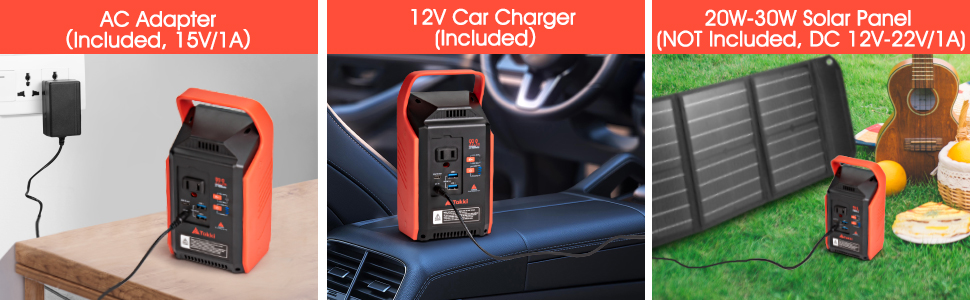
Image: The power station being charged via the included AC adapter from a wall outlet, as depicted in the left panel of the image.
- Gbigba agbara ọkọ ayọkẹlẹ: Use the included car charger to connect the power station to your vehicle's 12V cigarette lighter socket. This is ideal for charging while on the go.
Image: The power station being charged using the car charger in a vehicle, as depicted in the middle panel of the image.
- Solar Panel Charging (Solar Panel NOT Included): The power station supports 12-22 volt solar panels. Connect a compatible solar panel (DC 12V-22V/1A input) to the DC input port for eco-friendly charging under sunlight.
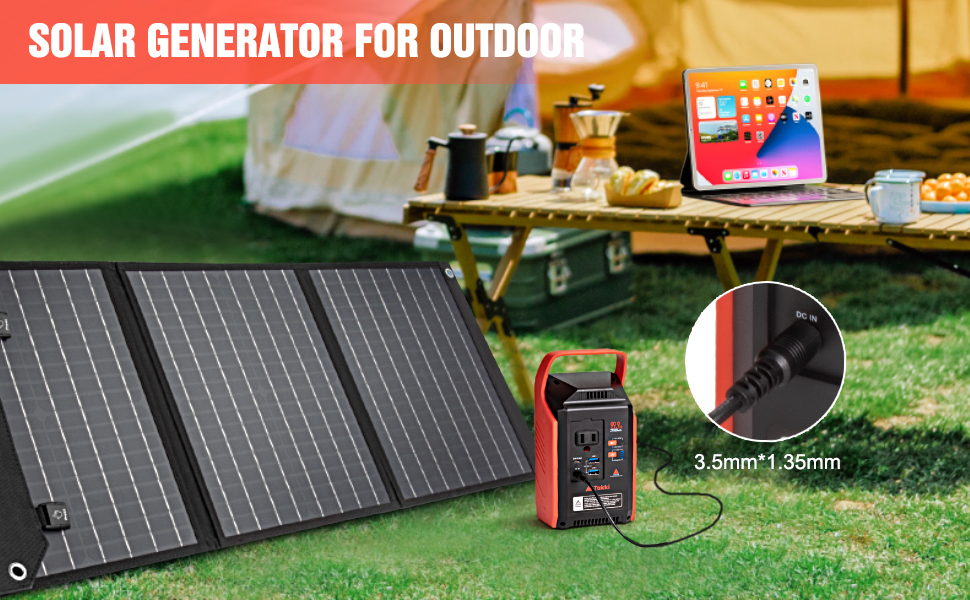
Image: The power station connected to a solar panel for charging outdoors.
5. Awọn ilana Iṣiṣẹ
The Takki S89 Max offers multiple output options to power various devices.
5.1 Awọn ẹrọ agbara

Image: The power station demonstrating multiple output ports in use, charging various devices.
- AC Outlet (80W, Peak 120W): Press the AC power button to activate the AC outlet. Plug in devices such as laptops, mini TVs, or projectors. Ensure the device's power consumption does not exceed 80W continuous (120W peak).

Image: A laptop being charged from the AC outlet of the power station.
- USB Ports (2x 18W QC3.0, 1x 30W PD Type-C): Connect your smartphones, tablets, cameras, or other USB-powered devices to the appropriate USB ports. The Quick Charge (QC3.0) and Power Delivery (PD) ports provide fast charging for compatible devices.
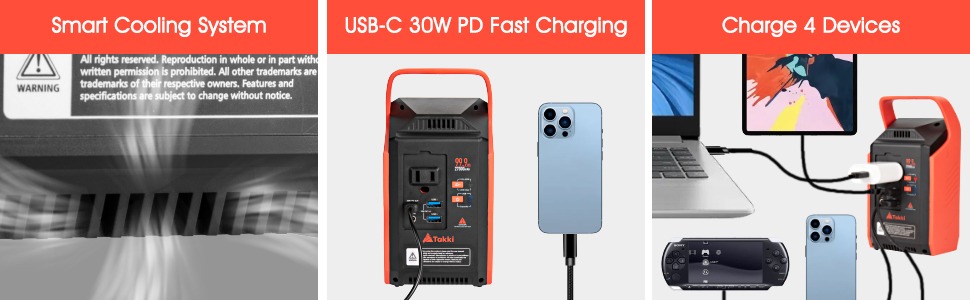
Image: Demonstrates USB-C PD fast charging for a smartphone and the ability to charge multiple devices simultaneously, as shown in the middle and right panels of the image.
5.2 LED Campwọ Light
The power station features an integrated LED light board with multiple brightness levels and an SOS mode.
- Mu Imọlẹ ṣiṣẹ: Single press the light button to cycle through 4 brightness levels.
- Ipo SOS: Long press the light button to activate the SOS flashing mode for emergencies.

Image: The power station's LED light illuminating a tent, showing its use as a campimọlẹ ina.
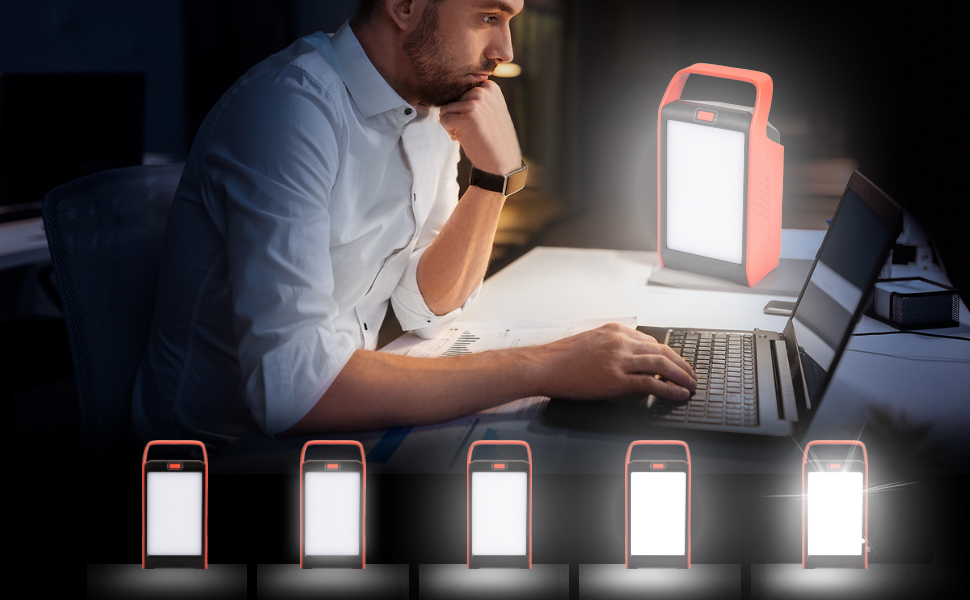
Image: A person working at a desk with the power station's LED light providing illumination, demonstrating its adjustable brightness.
5.3 Awọn oju iṣẹlẹ lilo
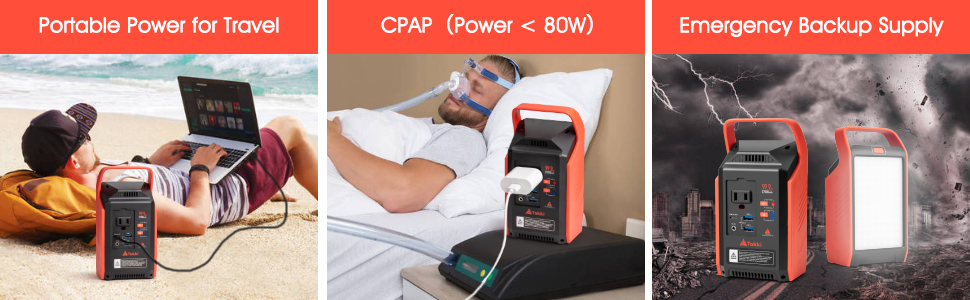
Image: Three scenarios showing the power station used for travel (charging laptop), powering a CPAP machine, and as an emergency backup.
The Takki S89 Max is suitable for various applications:
- Awọn Irinajo Ita gbangba: Power phones, laptops, and small fans during camping, irinse, tabi ipeja irin ajo.
- Ọ́fíìsì Foonu Alagbeka: Keep your laptop and other devices charged for remote work.
- Afẹyinti Pajawiri: Provides essential power during outages for critical devices like CPAP machines (under 80W).
- Irin-ajo: Its compact size and 99.9Wh capacity make it suitable for air travel (check airline regulations).

Image: The power station shown in an airplane cabin, indicating its suitability for air travel.
6. Itọju
- Ibi ipamọ: Tọju ibudo agbara ni itura, aye gbigbẹ kuro lati orun taara ati awọn iwọn otutu to gaju.
- Igbohunsafẹfẹ gbigba agbara: If not used regularly, charge the unit fully every 3 months to prolong battery life.
- Ninu: Use a dry, soft cloth to clean the exterior of the unit. Do not use liquids or abrasive cleaners.
- Eto Itutu: The built-in cooling fans help dissipate heat. Ensure the ventilation holes are not blocked during operation.
Aworan: A sunmọ-soke view of the power station's smart cooling system vents, as shown in the left panel of the image.
7. Laasigbotitusita
If you encounter issues with your Takki S89 Max, refer to the following common problems and solutions:
- Ẹyọ kan ko gba agbara:
- Rí i dájú pé okùn gbigba agbara àti adapter náà so pọ̀ dáadáa.
- Verify the power source (wall outlet, car, solar panel) is functional.
- Ṣàyẹ̀wò bóyá iná àmì ìgbara náà wà nílẹ̀.
- No output from AC/USB ports:
- Ensure the respective output button (AC, USB) is pressed to activate the ports.
- Check if the device you are trying to power is within the power station's output limits (e.g., AC 80W).
- Rii daju pe ẹrọ naa sopọ mọ daradara.
- The power station may have entered protection mode due to overload or short circuit. Disconnect devices, turn off, and restart.
- Ina LED ko ṣiṣẹ:
- Rii daju pe ibudo agbara wa ni titan.
- Press the light button to cycle through modes.
If the problem persists, please contact Takki customer support.
8. Awọn pato
| Ẹya ara ẹrọ | Ẹ̀kúnrẹ́rẹ́ |
|---|---|
| Orukọ awoṣe | Iye ti o ga julọ ti S89 |
| Agbara Batiri | 99.9Wh / 27000mAh |
| Ijade AC | 1x 110V, 80W (Peak 120W) |
| Ṣiṣejade USB-A | 2x 18W QC3.0 |
| USB-C o wu | 1x 30W PD |
| DC Input | 12-22V / 1A (for AC adapter, car charger, solar panel) |
| Imọlẹ LED | 4 Levels Brightness + SOS Mode |
| Awọn iwọn | 3.77"L x 2.87"W x 7.51"H |
| Iwọn | 1.98 iwon |
| Ohun elo | ABS |
| Batiri Iru | Litiumu Iwon |

Image: Infographic detailing the 27000mAh/99.9Wh capacity and approximate number of charges for various devices.
9. Atilẹyin ọja ati Support
Takki provides a limited warranty for this product. For detailed warranty information, please refer to the warranty card included in your package or visit the official Takki website. If you have any questions, concerns, or require technical assistance, please contact Takki customer support through the retailer or the official brand channels.