1. Ifihan ati Loriview
This manual provides comprehensive instructions for the safe operation, maintenance, and troubleshooting of your SJRC F11S 4K PRO Drone. Please read this manual thoroughly before operating the drone to ensure proper functionality and to prevent damage or injury.
The SJRC F11S 4K PRO is a professional-grade foldable brushless quadcopter equipped with a 4K HD camera, 2-axis gimbal with EIS (Electronic Image Stabilization), GPS, and 5G WiFi for extended range and stable image transmission.
2. Key Awọn ẹya ara ẹrọ
- Kamẹra HD 4K: Captures high-resolution video (3840*2160P) and photos (3840*2160P).
- 2-Axis Stabilized Gimbal with EIS: Ensures stable and clear footage by minimizing camera shake.
- Ipo GPS: Provides precise positioning awareness for secure flight, including features like low battery return, return beyond distance, runaway return, and return home.
- Aago Ofurufu ti o gbooro sii: Approximately 26-28 minutes with a fully charged 11.1V 2500 mAh battery.
- Long Remote Distance: Up to 3000 meters (3KM) for the F11S PRO model.
- Gbigbe Aworan 5G WiFi: Real-time image transmission distance up to 3KM.
- Intelligent Tracking System: GPS intelligent tracking for dynamic shooting.
- 5x Image Zoom: Allows for detailed capture from a distance.
- Iyaworan afarajuwe: Enables photo and video capture using hand gestures.
- Point of Interest Shooting: Automatically orbits a designated point for cinematic shots.
- Eto Ilana: Plan custom flight paths via the app.
- Apẹrẹ folda: Iwapọ ati gbigbe fun gbigbe ti o rọrun.
3. Package Awọn akoonu
Nígbà tí o bá ń tú àwọn ohun èlò tí o kọ sílẹ̀, rí i dájú pé gbogbo àwọn ohun èlò tí a kọ sí ìsàlẹ̀ yìí wà ní ipò tó dára:
- SJRC F11S 4K PRO Drone
- Isakoṣo latọna jijin
- Flight Battery (Quantity may vary based on package, e.g., "Three Batteries")
- Propellers (Spare set included)
- Okun Ngba agbara USB
- Screwdriver
- Itọsọna olumulo
- Portable Storage Bag (Included with some packages)
- Camera (Integrated)

Image: Contents of the SJRC F11 4K Pro package, including the drone, remote controller, three batteries, spare propellers, and a portable carrying bag.
4. Eto
4.1 Fifi sori batiri
- Ensure the drone and remote control are powered off.
- Insert the fully charged flight battery into the drone's battery compartment until it clicks securely into place.
- For the remote control, insert the required batteries (refer to the remote control section for type and quantity) into its compartment.
4.2 Propeller fifi sori
Attach the propellers according to the markings (A/B) on the propellers and motor arms. Ensure they are securely fastened to prevent detachment during flight.
4.3 Eto Iṣakoso latọna jijin
Unfold the remote control's phone holder and securely place your smartphone. Power on the remote control by pressing and holding the power button.

Image: The SJRC F11S 4K PRO drone and its remote controller, ready for operation.
4.4 App sori ati Asopọ
Download the official SJRC drone application from your smartphone's app store. Connect your smartphone to the drone's 5G WiFi network (SSID usually starts with "SJRC-F11S-"). Launch the app to view the live camera feed and access flight controls.
5. Awọn ilana Iṣiṣẹ
5.1 Pre-Flight Akojọ ayẹwo
- Rii daju pe drone ati awọn batiri isakoṣo latọna jijin ti gba agbara ni kikun.
- Ṣayẹwo awọn ategun fun eyikeyi ibajẹ ati rii daju pe wọn ti so mọ ni aabo.
- Yan agbegbe ti o ṣii, ti o mọ fun ofurufu, kuro ni awọn idena, awọn eniyan, ati awọn aaye afẹfẹ ti o ni ihamọ.
- Verify GPS signal strength on the app before takeoff.
5.2 Gbígbé àti Ìbalẹ̀
After successful GPS lock, use the one-key takeoff button on the remote or within the app. For landing, use the one-key landing feature or manually descend the drone to a safe, clear area.
5.3 Ofurufu Ipo
The drone supports various flight modes, typically including:
- Ipo GPS: Provides stable hovering and precise positioning. Recommended for beginners.
- Ipo deede: Offers more manual control, suitable for experienced pilots.
- Ipò eré: Increases drone speed and agility for dynamic flight.

Image: The drone in flight, demonstrating its 5G+Repeater technology for real-time image transmission up to 3KM.
5.4 kamẹra isẹ
The integrated 4K HD camera features a 2-axis stabilized gimbal with EIS for smooth video and sharp photos. Control camera tilt and capture photos/videos via the remote control or the app interface.
5.4.1 Aworan Sun
Utilize the 5x image zoom feature through the app to get closer views without physically moving the drone.
5.4.2 Gesture Shooting
Enable gesture shooting in the app settings. Perform specific hand gestures (e.g., V-sign for photo, open palm for video) to trigger camera functions remotely.
5.5 Oye ofurufu igbe
Leverage the drone's intelligent flight modes for enhanced flight experience:
- Ìtọpinpin Ọlọ́gbọ́n GPS: The drone can automatically follow a designated subject (e.g., the remote controller user).
- Ojuami ti o nifẹ si: Set a central point, and the drone will orbit it at a specified radius and altitude, capturing a 360-degree view.
- Route Planning (Waypoint Flight): Draw a desired flight path on the app's map, and the drone will automatically follow it. Ensure the flight path is safe and clear of obstacles.
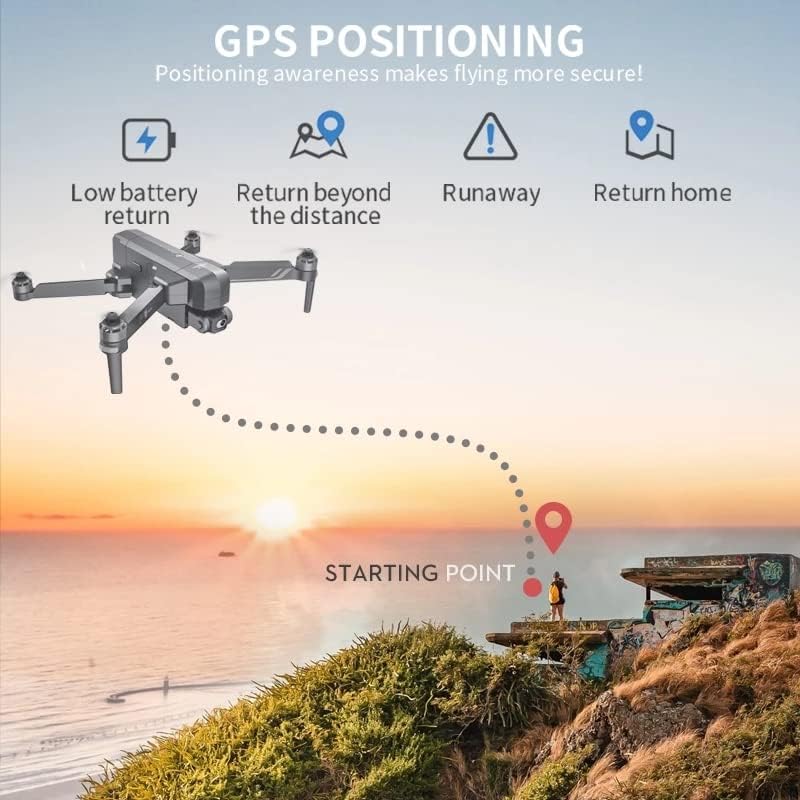
Image: Illustration of GPS positioning features, including low battery return, return beyond distance, runaway protection, and automatic return home.
5.6 Gbigbe Aworan
The 5G WiFi system provides stable and long-range real-time image transmission to your connected smartphone, allowing for FPV (First Person View) flying and monitoring of your shots.
Video: Official product video demonstrating the SJRC F11S 4K PRO drone's features, including flight capabilities, camera stabilization, intelligent tracking, and image transmission range.
6. Itọju
6.1 Ninu
Regularly clean the drone body, propellers, and camera lens with a soft, dry cloth. Avoid using harsh chemicals or solvents.
6.2 Ibi ipamọ
Store the drone in a cool, dry place, away from direct sunlight and extreme temperatures. If storing for an extended period, ensure batteries are charged to approximately 50% to prolong their lifespan.
6.3 batiri Itọju
Always use the provided charging cable and adapter. Do not overcharge or over-discharge batteries. Discontinue use if batteries show signs of swelling or damage.
7. Laasigbotitusita
| Isoro | Owun to le Fa | Ojutu |
|---|---|---|
| Drone ko ni agbara lori. | Batiri kekere tabi ti ko ni agbara; fifi sori ẹrọ batiri ti ko tọ. | Charge battery fully; ensure battery is correctly inserted. |
| No image on app. | Incorrect WiFi connection; app not launched. | Reconnect to drone's 5G WiFi; restart app. |
| Drone drifts nigba flight. | Insufficient GPS signal; uncalibrated sensors. | Fly in open area for better GPS; perform compass calibration. |
| Kukuru flight akoko. | Battery degradation; aggressive flying. | Replace battery if old; fly more conservatively. |
8. Awọn pato
| Ẹya ara ẹrọ | Ẹ̀kúnrẹ́rẹ́ |
|---|---|
| Orukọ awoṣe | SJRC F11S |
| Ipinnu Yaworan fidio | 4K (3840*2160P) |
| Lẹnsi kamẹra | F/2.15 100° FOV |
| Gimbal | 2-Axis Stabilized Gimbal with EIS |
| Asopọmọra Technology | Wi-Fi (5G) |
| Agbara Batiri | 2000 Milionuamp Hours (11.1V 2500 mAh for F11S PRO) |
| Akoko ofurufu | Nipa 26-28 iṣẹju |
| Ijinna jijin | About 3000 M (3KM) |
| Ijinna WiFi | 3000 M (3KM) |
| Iwọn Ọja | 585g |
| Iwọn fireemu | 30 fps |
| Support SD Card | 32-128GB (for F11S PRO) |
| Iṣakoso Iru | Isakoṣo latọna jijin |
| Ibiti ọjọ ori (Apejuwe) | Agbalagba |
| UPC | 717378105069 |

Image: Comparison of specifications between F11 4K PRO and F11S 4K PRO models, highlighting differences in remote distance and WiFi distance.
9. Atilẹyin ọja ati Support
For warranty information, technical support, or service inquiries, please refer to the contact details provided on the product packaging or the official SJRC webojula. Tọju iwe-ẹri rira rẹ bi ẹri rira fun awọn iṣeduro atilẹyin ọja.
For further assistance, you may also contact the seller directly via the platform where the product was purchased.