
Ọrọ Iṣaaju
This manual provides detailed instructions for the setup, operation, and maintenance of your Amazon Basics Projection Alarm Clock. Please read this manual thoroughly before using the product to ensure proper function and to prevent damage.

Image: The Amazon Basics Projection Alarm Clock, showing its digital display and projection lens.
Awọn Itọsọna Aabo
- Ma ṣe fi iṣọkan si awọn iwọn otutu to gaju, oorun taara, eruku, tabi ọriniinitutu.
- Rii daju pe ohun ti nmu badọgba agbara ni ibamu pẹlu ipese agbara agbegbe rẹ.
- Keep the unit away from water or other liquids.
- Má ṣe gbìyànjú láti tú tàbí ṣe àtúnṣe ẹ̀rọ náà. Èyí yóò sọ àtìlẹ́yìn náà di òfo.
- Aṣọ gbígbẹ nìkan ni kí o fi fọ ẹ̀rọ náà. Má ṣe lo àwọn ohun èlò ìfọmọ́ omi.
- Sọ awọn batiri sọnu daradara ni ibamu si awọn ilana agbegbe.
Package Awọn akoonu
- Amazon Basics Projection Alarm Clock
- Adaparọ Agbara AC
- Itọsọna olumulo
Ọja Awọn ẹya ara ẹrọ
- Projection of time onto a wall or ceiling.
- FM Radio with automatic/manual scan and up to 15 preset stations.
- USB port for charging mobile phones or tablets.
- 7-inch high-definition LED display with adjustable brightness.
- Dual alarms for separate wake-up times.
- Snooze function with adjustable duration (2 to 60 minutes).
- Sleep timer for automatic radio shut-off (5 to 90 minutes).
- DST button for Daylight Saving Time adjustment.
- Battery backup (requires 2 AAA batteries, not included) to maintain time settings during power outages.

Aworan: Pariview of key features including sleep timer, radio presets, and snooze function.
Awọn iṣakoso ati Ifihan
Familiarize yourself with the buttons and ports on your alarm clock for optimal use.

Aworan: Apa view illustrating the location of controls, USB charging port, and projection lens.
- Bọ́tìnì Ṣíṣe Àkókò: Ti a lo lati ṣeto akoko lọwọlọwọ.
- Awọn bọtini itaniji idaji 1/2: A lo lati ṣeto ati mu Alarm 1 ati Alarm 2 ṣiṣẹ.
- Snooze/Dimmer Button: Activates snooze during an alarm; adjusts display brightness when not alarming.
- Radio/Sleep Button: Turns FM radio on/off; sets sleep timer.
- Volume/Tune Dial: Adjusts radio volume and tunes FM frequencies.
- Projection On/Off/Flip Button: Controls the projection feature and flips the projected time.
- Projection Focus Wheel: Ó ń ṣàtúnṣe kedere àkókò tí a gbé kalẹ̀.
- Projection Angle Adjuster: Changes the angle of the projected time.
- Ibudo Gbigba agbara USB: Fun gbigba agbara awọn ẹrọ ita.
- Bọ́tìnì DST: Ó máa ń yí àkókò ìfipamọ́ ọ̀sán padà.
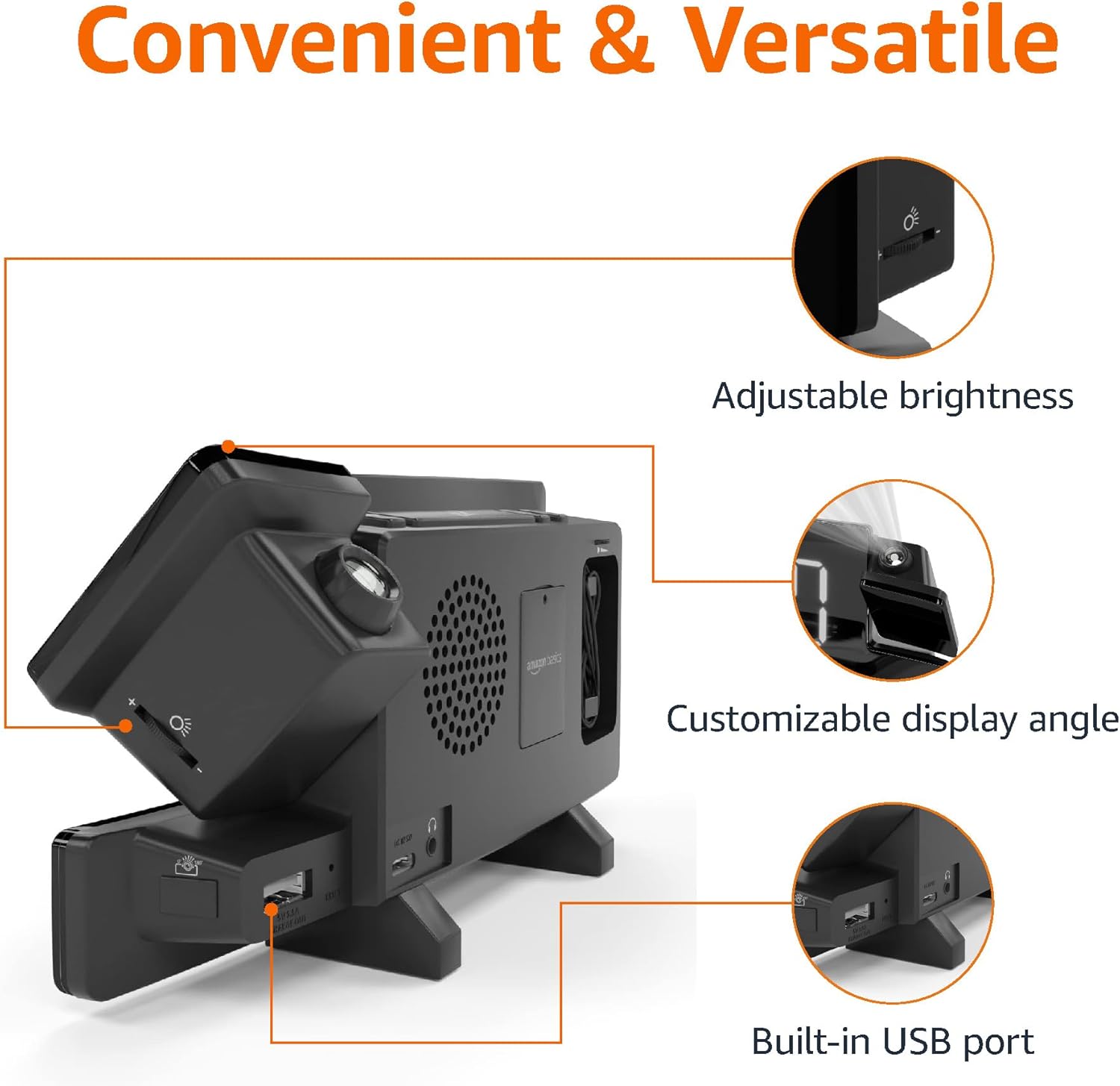
Image: Diagram highlighting the adjustable brightness, customizable projection angle, and USB charging port.
Ṣeto
1. Asopọ agbara
Connect the AC power adapter to the DC IN port on the back of the alarm clock and plug it into a standard wall outlet. The display will light up.
2. Batiri Afẹyinti fifi sori
For battery backup, open the battery compartment on the bottom of the unit. Insert 2 AAA batteries (not included), ensuring correct polarity (+/-). Close the compartment. The battery backup maintains time settings during power outages but does not power the display or alarm functions.
3. Eto Aago Ibẹrẹ
- Tẹ mọlẹ Eto akoko bọtini. Awọn nọmba wakati yoo filasi.
- Lo awọn Volume/Tune Dial lati ṣatunṣe wakati naa. Tẹ Eto akoko lẹẹkansi lati jẹrisi.
- Àwọn nọ́mbà ìṣẹ́jú náà yóò máa tàn yanranyanran. Lo àwọn nọ́mbà ìṣẹ́jú náà. Volume/Tune Dial lati ṣatunṣe awọn iṣẹju. Tẹ Eto akoko lẹẹkansi lati jẹrisi.
- The time format (12H/24H) will flash. Use the Volume/Tune Dial to select your preferred format. Press Eto akoko láti jẹ́rìísí àti láti jáde ní ipò ètò àkókò.
4. Akoko Ifipamọ Oju-ọjọ (DST)
Tẹ awọn DST button to toggle Daylight Saving Time on or off. The DST indicator will appear or disappear on the display.
Awọn ilana Iṣiṣẹ
1. Ṣíṣeto Awọn Itaniji (Alarm 1 ati Itaniji 2)
- Tẹ mọlẹ Itaniji 1 or Itaniji 2 Bọ́tìnì náà. Àwọn nọ́mbà wákàtí ìkìlọ̀ náà yóò máa tàn yanranyanran.
- Lo awọn Volume/Tune Dial to adjust the alarm hour. Press the respective Itaniji bọtini lẹẹkansi lati jẹrisi.
- The alarm minute digits will flash. Use the Volume/Tune Dial to adjust the alarm minutes. Press the respective Itaniji bọtini lẹẹkansi lati jẹrisi.
- The alarm source (FM radio or buzzer) will flash. Use the Volume/Tune Dial to select your preference. Press the respective Itaniji bọ́tìnì láti jẹ́rìísí àti láti mú kí ìró náà ṣiṣẹ́. Àmì ìró kan yóò hàn lórí ìbòjú náà.
- To deactivate an alarm, press the respective Itaniji bọ́tìnì lẹ́ẹ̀kan. Àmì ìkìlọ̀ náà yóò pòórá.
2. Using Snooze
Nigbati itaniji ba ndun, tẹ awọn Didẹ/Dimmer button to temporarily silence the alarm. The alarm will sound again after the set snooze duration. The default snooze duration is 9 minutes. To adjust the snooze duration, press and hold the Didẹ/Dimmer bọtini, lẹhinna lo awọn Volume/Tune Dial to select a duration between 2 and 60 minutes. Press Didẹ/Dimmer lẹẹkansi lati jẹrisi.
3. FM Radio isẹ
- Tan/Pa: Tẹ awọn Radio/Sleep bọ́tìnì láti tan tàbí pa rédíò FM.
- Àwọn Ibùdó Tune: Lo awọn Volume/Tune Dial to manually tune to a desired FM frequency.
- Ṣiṣayẹwo Aifọwọyi: Tẹ mọlẹ Radio/Sleep button to automatically scan and save available FM stations as presets.
- Yan Awọn tito tẹlẹ: Once stations are saved, short press the Radio/Sleep button to cycle through the preset stations.
- Ṣatunṣe Iwọn didun: Yiyi awọn Volume/Tune Dial to adjust the radio volume.
4. Aago oorun
While the FM radio is playing, press the Radio/Sleep button repeatedly to set the sleep timer. Options typically range from 5 to 90 minutes. The radio will automatically turn off after the selected duration.
5. Ẹ̀yà Ìṣàfihàn

Image: The alarm clock projecting the time onto a bedroom ceiling.
- Mu ṣiṣẹ/muṣiṣẹ: Tẹ awọn Projection On/Off/Flip bọtini lati tan tabi pa asọtẹlẹ akoko naa.
- Ṣatunṣe Igun: Manually adjust the projection arm to direct the time onto your desired surface (wall or ceiling).
- Idojukọ: Yiyi awọn Projection Focus Wheel to achieve a clear image.
- Flip Display: Tẹ awọn Projection On/Off/Flip button repeatedly to rotate the projected time 180 degrees, ensuring correct orientation.

Image: The alarm clock on a nightstand, projecting the time onto a wall, demonstrating its use in a bedroom setting.
6. Ngba agbara USB
Connect your mobile phone or tablet's USB charging cable to the Ibudo Ngba agbara USB on the back of the alarm clock. The device will begin charging. This port is for charging only and does not support data transfer.
7. Ifihan Imọlẹ Atunse
Tẹ awọn Didẹ/Dimmer button (when no alarm is sounding) to cycle through different brightness levels for the main LED display.
Itoju
1. Ninu
Wipe the unit with a soft, dry, lint-free cloth. Do not use abrasive cleaners, waxes, or solvents as they may damage the surface.
2. Batiri Rirọpo
If the battery backup is not functioning correctly (e.g., time resets after a power outage), replace the 2 AAA batteries in the battery compartment, ensuring correct polarity.
Laasigbotitusita
| Isoro | Owun to le Fa | Ojutu |
|---|---|---|
| Ifihan jẹ òfo. | Ko si agbara asopọ. | Rí i dájú pé ohun tí a fi ń so AC adapter mọ́ ẹ̀rọ náà dáadáa àti ibi tí ó ń ṣiṣẹ́ lórí ògiri. |
| Itaniji ko dun. | Itaniji ko mu ṣiṣẹ tabi iwọn didun ti lọ silẹ ju. | Check if the alarm icon is visible on the display. Re-set the alarm if necessary. Increase radio volume if FM is selected as alarm source. |
| Akoko akanṣe jẹ blurry. | Projection focus is not adjusted. | Yiyi awọn Projection Focus Wheel titi aworan yoo fi han. |
| Projected time is not visible. | Projection is off or room is too bright. | Tẹ awọn Projection On/Off/Flip button to activate. The projection is best viewed in a dark room. |
| Gbigba redio ko dara. | Antenna position or interference. | Adjust the position of the FM antenna wire. Move the unit away from other electronic devices that may cause interference. |
| Ngba agbara USB ko ṣiṣẹ. | Ìṣòro okùn tàbí àìbáramu ẹ̀rọ. | Ensure the USB cable is functional and properly connected. Try a different cable or device. |
Awọn pato
- Awoṣe: MET8831-US
- Iṣagbewọle agbara: Adapter AC (pẹlu)
- Batiri Afẹyinti: Awọn batiri 2 x AAA (kii ṣe pẹlu)
- Ifihan: 7-inch LED
- Igbohunsafẹfẹ Redio: FM
- Ijade USB: 5V, 1A (for charging)
- Awọn iwọn (L x W x H): 7.1 x 1.6 x 3.7 inches (18.03 x 4.06 x 9.4 cm)
- Ìwúwo: Isunmọ 0.59 lbs (267.62 g)

Image: Product dimensions for the Amazon Basics Projection Alarm Clock.
Alaye atilẹyin ọja
This product is covered by the Amazon Basics warranty. For detailed information regarding warranty terms and conditions, please refer to the official Amazon Basics webojula tabi kan si atilẹyin alabara.
Onibara Support
For further assistance, troubleshooting, or product inquiries, please contact Amazon Basics customer support through the Amazon website or your purchase platform. Have your product model number (MET8831-US) and purchase details ready.