
1. Ifihan
Welcome to the user manual for your GOODTEL G10 10-inch Android 12 Tablet. This guide provides essential information for setting up, operating, maintaining, and troubleshooting your device. The G10 tablet is designed for versatility, featuring an Octa-Core processor, 4GB RAM, 64GB internal storage (expandable), a 10-inch IPS display, and an 8000mAh battery. It comes with a suite of accessories including a Bluetooth keyboard, mouse, stylus, protective case, and screen protector, allowing it to function as a portable workstation.

Aworan 1.1: Pariview of GOODTEL G10 Tablet key features including Android 12 OS, 64GB ROM, 10.1-inch Smart Display, 4GB RAM, 4GB-1TB MicroSD/TF Expansion, Octa-Core processor, 8000mAh Battery, 2-in-1 Tablet functionality with Bluetooth Keyboard and Wireless Mouse, Bluetooth, WiFi, Dual Camera (5MP front, 8MP rear), Screen Record, Parental Controls, SD/TF Card Slot, and Type-C charging/data ports.
2. Eto
2.1 Unboxing ati Ibẹrẹ ayewo
Carefully remove all items from the packaging. Verify that all accessories are present:
- GOODTEL G10 tabulẹti
- Keyboard Bluetooth
- Asin Alailowaya
- OTG Adapter
- Ṣaja
- USB Iru-C USB
- Screen Protector (pre-applied or spare)
- Ọran Idaabobo
- Stylus
2.2 Charging the Tablet and Keyboard
Before first use, fully charge the tablet and the Bluetooth keyboard. Connect the charger to the tablet's Type-C port and to a power outlet. The keyboard typically charges via a Micro USB cable (included).
2.3 Titan / Pa a
- Lati Fi agbara: Tẹ ki o si mu bọtini agbara (nigbagbogbo ni ẹgbẹ) titi iboju yoo fi tan imọlẹ.
- Lati Paarẹ: Press and hold the Power button, then select 'Power off' from the on-screen options.
- Lati Tun bẹrẹ: Tẹ bọtini agbara ki o si dimu, lẹhinna yan 'Tun bẹrẹ' lati awọn aṣayan loju iboju.
2.4 Oṣo oluṣeto akọkọ
Lori agbara akọkọ, tabulẹti yoo ṣe itọsọna fun ọ nipasẹ ilana iṣeto akọkọ:
- Yan ede ti o fẹ.
- Sopọ si nẹtiwọki Wi-Fi kan.
- Sign in with your Google account or create a new one. This is essential for downloading apps from the Google Play Store.
- Review ati ki o gba awọn ofin ati ipo.
- Ṣeto titiipa iboju (PIN, apẹrẹ, tabi ọrọ igbaniwọle).
2.5 Nsopọ Awọn ẹya ẹrọ
Bluetooth Keyboard and Mouse:
- Ensure the keyboard and mouse are charged and powered on.
- Lori tabulẹti, lọ si Eto > Awọn ẹrọ ti a ti sopọ > Bluetooth.
- Tan Bluetooth.
- Táblẹ́ẹ̀tì náà yóò ṣe àyẹ̀wò àwọn ẹ̀rọ tó wà. Yan kííbọọ̀dù àti máìsì láti inú àkójọ náà láti so pọ̀. Tẹ̀lé gbogbo ìbéèrè tó wà lórí ìbòjú.
Stylus: The included stylus is typically a passive capacitive stylus and does not require pairing. Simply use it directly on the screen.
OTG Adapter: The OTG adapter allows you to connect USB devices (like flash drives) to your tablet's Type-C port.
2.6 Inserting a MicroSD/TF Card
To expand storage, locate the MicroSD/TF card slot on the side of the tablet. Gently insert the card with the gold contacts facing down until it clicks into place. The tablet supports up to 256GB expansion.
3. Awọn ilana Iṣiṣẹ
3.1 Basic Navigation and Android 12 Features
The G10 tablet runs on Android 12, offering an intuitive user experience. Use touch gestures for navigation:
- Fọwọ ba: Yan nkan kan.
- Ra: Yi lọ kiri nipasẹ awọn oju-iwe tabi awọn atokọ.
- Fun pọ-si-sun-un: Sun-un sinu tabi jade lori awọn aworan ati web awọn oju-iwe.
- Tẹ gun: Wọle si awọn akojọ aṣayan ọrọ-ọrọ tabi gbe awọn aami.
Android 12 includes features like multi-user support, multi-window mode for multitasking, and enhanced parental controls via Google Family Link.

Aworan 3.1: The GOODTEL G10 Tablet displaying a game, illustrating the smooth performance provided by the Octa-Core processor and Android 12 OS for application processing.
3.2 Ifihan ati Visuals
The 10-inch IPS display provides clear and rich colors. It features flexible response and anti-blue light technology for comfortable viewing.
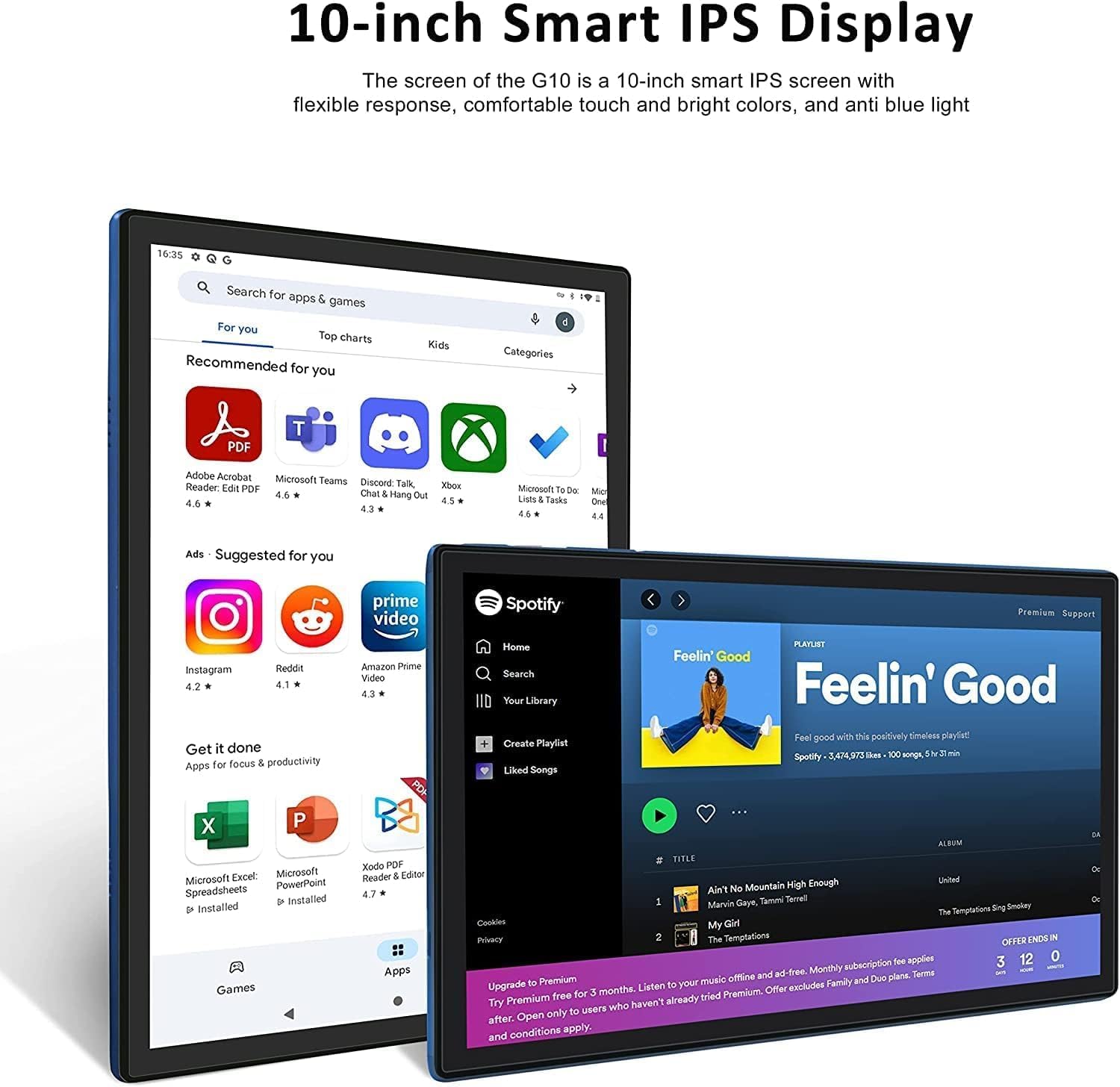
Aworan 3.2: The 10-inch Smart IPS Display of the GOODTEL G10 Tablet, showcasing its ability to render applications like PDF readers, communication apps, and media players with clarity and vibrant colors.
3.3 Asopọmọra (Wi-Fi ati Bluetooth)
Wi-Fi: The tablet supports both 2.4GHz and 5GHz Wi-Fi for faster and more stable internet access. To connect, go to Eto > Nẹtiwọọki & Intanẹẹti > Wi-Fi, turn it on, and select your network.

Aworan 3.3: The GOODTEL G10 Tablet highlighting its 2.4G/5G WiFi support for faster internet access, enabling smoother browsing and application usage.
Bluetooth: For connecting wireless headphones, speakers, or other Bluetooth devices, go to Eto > Awọn ẹrọ ti a ti sopọ > Bluetooth, turn it on, and pair with your desired device.
3.4 Awọn kamẹra
The tablet features a 5MP front camera and an 8MP rear camera. Open the Camera app to take photos or record videos. These are suitable for video calls and casual photography.
3.5 Ibi Management
The tablet comes with 64GB of internal storage. You can expand this by inserting a MicroSD/TF card (up to 256GB, sold separately). To manage storage, go to Eto > Ibi ipamọ. Here you can see storage usage and free up space.
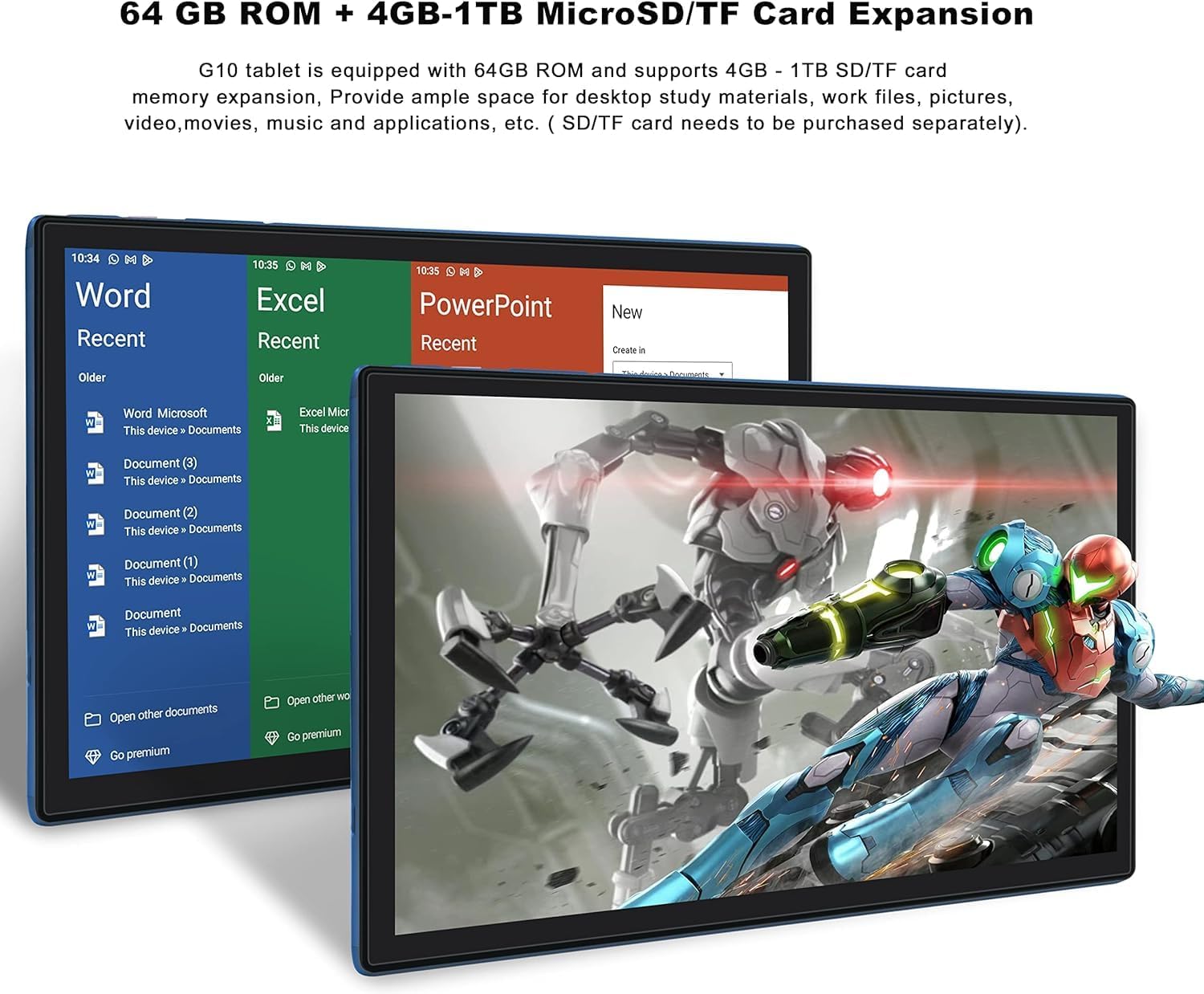
Aworan 3.4: The GOODTEL G10 Tablet illustrating its 64GB ROM and 4GB RAM, with support for 4GB-1TB MicroSD/TF card expansion for additional storage of documents, media, and applications.
3.6 Awọn iṣakoso Obi
Utilize Google Family Link to set up parental controls. This allows remote management of the device, setting usage limits, and content filtering for children's profiles.
4. Itọju
4.1 Ninu ẹrọ naa
Lo asọ ti ko ni lint lati nu iboju ati ara tabulẹti naa. Fun agidi smudges, die-die dampen awọn asọ pẹlu omi tabi a iboju-ailewu ninu ojutu. Yago fun awọn kẹmika lile tabi awọn ohun elo abrasive.
4.2 batiri Itọju
The G10 tablet is equipped with an 8000mAh battery. To prolong battery life:
- Yago fun awọn iwọn otutu to gaju.
- Má ṣe jẹ́ kí bátírì náà máa gbẹ pátápátá nígbà gbogbo.
- Use the provided charger for optimal charging.
- Unplug the charger once the tablet is fully charged.
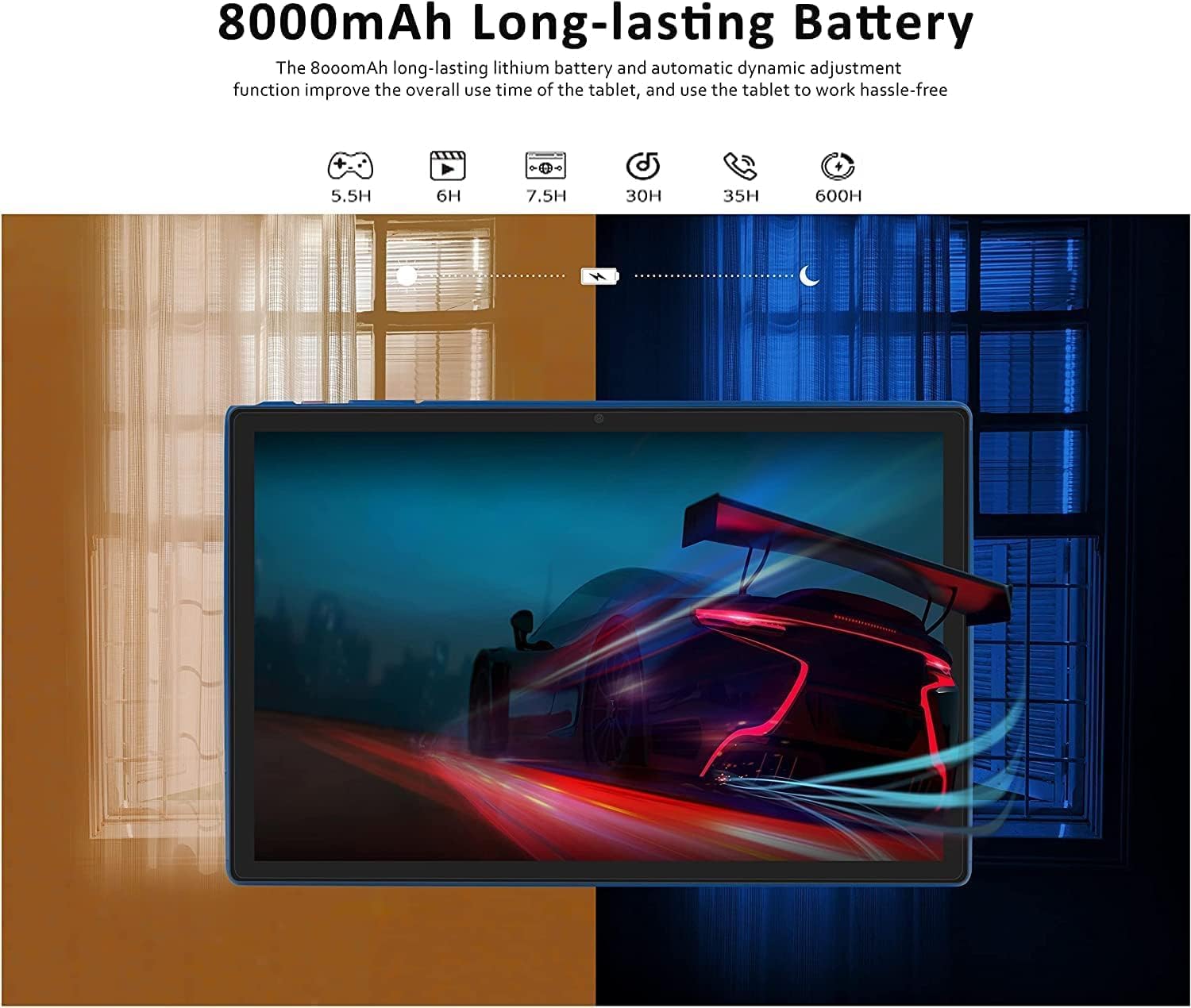
Aworan 4.1: The GOODTEL G10 Tablet highlighting its 8000mAh long-lasting battery, with estimated usage times for various activities such as gaming (5.5H), video playback (6H), web browsing (7.5H), standby (30H), call time (35H), and music playback (600H).
4.3 Software imudojuiwọn
Regularly check for system updates to ensure your tablet has the latest features and security patches. Go to Eto > Eto > Imudojuiwọn eto.
4.4 Ibi ipamọ ti o dara ju
Periodically clear cache data from apps, uninstall unused applications, and transfer large files (photos, videos) to your MicroSD card or cloud storage to maintain optimal performance.
5. Laasigbotitusita
5.1 Wọpọ Oran ati Solusan
- Tabulẹti ko ṣiṣẹ lori: Ensure the battery is charged. Connect the charger and try again. If unresponsive, press and hold the power button for 10-15 seconds to force a restart.
- Awọn oran Asopọmọra Wi-Fi: Ṣayẹwo boya Wi-Fi ti ṣiṣẹ ni awọn eto. Tun olulana rẹ ati tabulẹti bẹrẹ. Gbagbe netiwọki ki o tun sopọ.
- Iṣẹ ṣiṣe ti o lọra: Close unused apps, clear app caches, free up storage space, and restart the tablet.
- Awọn ohun elo kọlu tabi didi: Ko kaṣe app ati data sinu Eto > Awọn ohun elo. Ti ọrọ naa ba tẹsiwaju, yọ kuro ki o tun fi ohun elo naa sori ẹrọ.
- Iboju ifọwọkan ko dahun: Restart the tablet. If the issue continues, ensure the screen is clean and free of debris.
5.2 Factory Tunto (Kẹhin ohun asegbeyin ti)
Tí a kò bá lè yanjú àwọn ìṣòro tó ń bá a lọ, a lè nílò àtúnṣe ilé-iṣẹ́. Ìkìlọ̀: Èyí yóò pa gbogbo dátà lórí tábìlì rẹ rẹ́. Ṣe àfikún pàtàkì files ṣaaju ki o to tẹsiwaju.
- Lọ si Eto > Eto > Tun awọn aṣayan.
- Yan Pa gbogbo data rẹ (atunṣe ile-iṣẹ).
- Jẹrisi ipinnu rẹ ki o tẹle awọn ilana loju iboju.
6. Awọn pato
| Ẹya ara ẹrọ | Sipesifikesonu |
|---|---|
| Awoṣe | G10 |
| Eto isesise | Android 12 OS |
| isise | Octa-Core, 2 GHz |
| Àgbo | 4GB |
| Ibi ipamọ inu (ROM) | 64GB |
| Expandable Ibi ipamọ | MicroSD/TF card up to 256GB |
| Iwọn Ifihan | 10 inches |
| Ifihan ọna ẹrọ | IPS Smart Touchscreen |
| Ipinnu Ifihan | 1280 x 800 awọn piksẹli |
| Kamẹra iwaju | 5MP |
| Kamẹra ẹhin | 8MP |
| Agbara Batiri | 8000mAh Lithium-dẹlẹ |
| Wi-Fi | 2.4G/5G (802.11ac) |
| Bluetooth | Bluetooth 5.0 |
| Awọn ibudo | 1x Type-C, 1x 3.5mm AUX, 1x MicroSD/TF slot |
| Miiran Asopọmọra | Hotspot, AGPS, Gravity Sensor, FM Radio |
| Awọn iwọn (L x W x H) | 26 x 17.6 x 0.9 cm |
| Iwọn | 450 giramu |
7. Atilẹyin ọja ati Support
Specific warranty details are not available in the provided product information. For warranty claims, technical support, or service inquiries, please refer to the documentation included with your purchase or contact GOODTEL customer support directly through their official webaaye tabi alagbata ti o ti ra ọja naa.