
Candy FIDC X625 L
Candy Idea FIDC X625 L Multifunction Oven User Manual
Model: FIDC X625 L
Brand: Candy
Ọrọ Iṣaaju
The Candy Idea FIDC X625 L is a versatile 70-liter electric multifunction oven designed to integrate seamlessly into any kitchen. It features a double glass door for safety, a telescopic guide for ease of use, and a durable stainless steel handle. This manual provides essential information for the safe and efficient operation, installation, and maintenance of your new oven.

olusin 1: Iwaju view of the Candy Idea FIDC X625 L Multifunction Oven.
Ohun ti o wa ninu Apoti
Jọwọ ṣe àyẹ̀wò àwọn ohun tó wà nínú àpótí náà dáadáa. Tí àwọn nǹkan kan bá sọnù tàbí tí wọ́n bá bàjẹ́, pe olùtajà rẹ lẹ́sẹ̀kẹsẹ̀.
- Candy Idea FIDC X625 L Oven Unit
- 1 x Atẹ ti o yan
- 2 x Wire Racks
- Okun agbara
- Ilana Afowoyi (iwe yii)
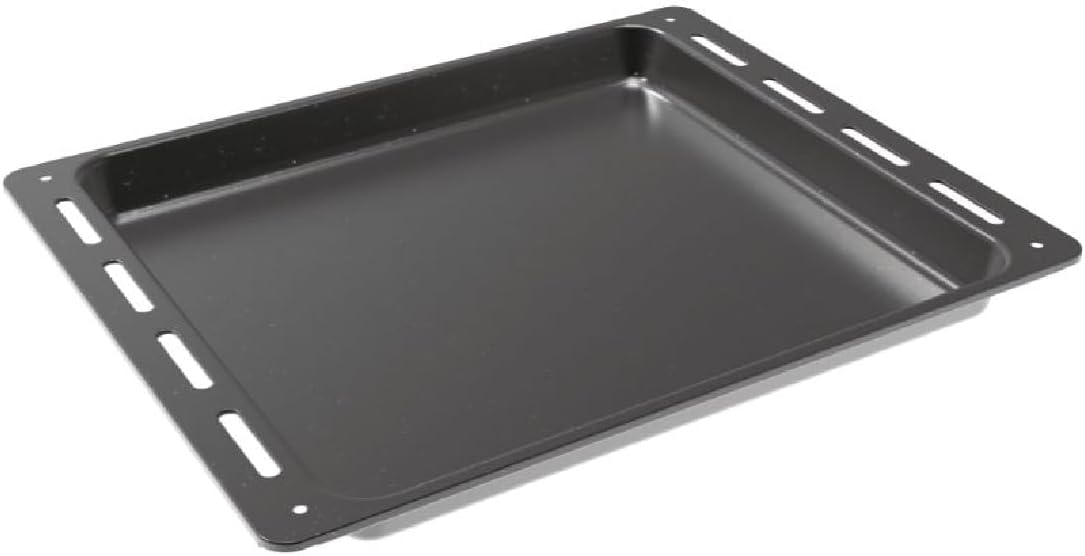
Figure 2: Included baking tray.
Eto ati fifi sori
Fifi sori to dara jẹ pataki fun ailewu ati iṣẹ ṣiṣe ti adiro rẹ. O ti wa ni niyanju wipe fifi sori wa ni nipasẹ ošišẹ ti a oṣiṣẹ Onimọn ẹrọ.
Ṣiṣi silẹ
Remove all packaging materials from the oven and its accessories. Inspect the oven for any signs of damage during transit.
Ibi ati Clearances
The oven is designed for built-in installation. Ensure the cabinet opening dimensions match the oven's requirements. The integration niche size should be approximately 59 cm (Height) x 56 cm (Width) x 56 cm (Depth).

Figure 3: Installation dimensions and clearances. Consult the cooktop manufacturer's guide for adequate clearances if installing below a hob.
Asopọ Itanna
Connect the oven to a suitable electrical supply according to local regulations. The oven operates at 2400 watts. Do not use extension cords or adapters. Ensure the power cable is not trapped or damaged during installation.
Awọn ilana Iṣiṣẹ
Ibi iwaju alabujutoview
The oven features a user-friendly control panel with Push&Pull knobs and a Touch Timer Display for precise control over cooking functions and time.

Figure 4: Detail of the oven's control panel with Push&Pull knobs and digital display.
Basic Operation (Temperature and Functions)
Lati ṣiṣẹ adiro:
- Yan Iṣẹ: Use the left Push&Pull knob to choose one of the 8 available cooking functions (e.g., convection, grill, defrost).
- Ṣeto iwọn otutu: Use the right Push&Pull knob to set the desired cooking temperature.
- Gbigbona ṣaaju: Allow the oven to preheat to the set temperature before placing food inside for optimal results.
Lilo Aago
The Touch Timer Display allows you to set cooking durations or program delayed starts. Refer to the detailed instructions in the full manual for specific timer functions.
Telescopic Awọn Itọsọna
The oven is equipped with telescopic guides for easy and safe insertion and removal of trays and racks. These guides allow you to pull out the tray or rack fully without it tipping.

Figure 5: Oven interior showing the telescopic guides and wire racks.
Ninu ati Itọju
Aquactiva Cleaning System
The Aquactiva steam cleaning system simplifies daily maintenance:
- Pour 300 ml of distilled water into the bottom of the oven cavity.
- Heat the oven at 90°C for 30 minutes.
- Once the oven has cooled down, wipe away any remaining grease or residue with a damp asọ.
Gbogbogbo Cleaning
- Rí i dájú pé ààrò náà tutù nígbà gbogbo kí o tó fi mọ́.
- Nu awọn ita ita pẹlu asọ, damp asọ ati ìwọnba detergent. Yago fun abrasive ose.
- The double glass door can be cleaned with a glass cleaner.
Laasigbotitusita
If you encounter any issues with your oven, please refer to the following common solutions before contacting customer service.
| Isoro | Owun to le Fa | Ojutu |
|---|---|---|
| Lọla ko ni tan. | Ko si ipese agbara; Circuit fifọ tripped. | Check power connection and circuit breaker. Ensure oven is properly plugged in. |
| Ààrò kò gbóná dáadáa. | Eto iwọn otutu ti ko tọ; ilẹkun ko tii ni deede. | Verify temperature setting. Ensure oven door is fully closed. |
| Ifihan ko ṣiṣẹ. | Idilọwọ agbara; Iṣakoso nronu oro. | Reset power to the oven. If issue persists, contact service. |
For issues not listed here, or if solutions do not resolve the problem, please contact Candy customer support.
Awọn pato
| Ẹya ara ẹrọ | Ẹ̀kúnrẹ́rẹ́ |
|---|---|
| Brand | Suwiti |
| Nọmba awoṣe | FIDC X625 L |
| Awọn iwọn Ọja (D x W x H) | 56.8 x 59.5 x 59.5 cm |
| Iwọn Ọja | 22.3 kg |
| Agbara | 70 liters |
| Àwọ̀ | Irin Alagbara ati Black |
| Alapapo Ọna | Gbigbawọle |
| Epo Iru | Itanna |
| Iru fifi sori ẹrọ | Ti a ṣe sinu |
| Wattage | 2400 watt |
| Defrost Eto | Ara-defrosting |
| Ilu isenbale | Tọki |
Atilẹyin ọja ati Support
Your Candy Idea FIDC X625 L oven comes with a manufacturer's warranty. Please refer to the warranty card included with your purchase for specific terms and conditions. For technical assistance, spare parts, or service requests, please contact Candy customer support through their official webaaye tabi alaye olubasọrọ ti a pese ninu iwe atilẹyin ọja rẹ.
Always use genuine Candy spare parts for repairs to ensure safety and maintain product performance.
Ask a question about this manual
Ask about setup, troubleshooting, compatibility, parts, safety, or missing instructions. Manuals+ will review the question and use this page’s manual context to help answer it.