
1. Ifihan
O ṣeun fun riraasing the Gevi 4-in-1 Smart Coffee Maker, Model GV9002. This innovative appliance combines a coffee grinder, digital scale, temperature-controlled kettle, and automatic brewer into a single unit, designed to provide a professional-level coffee brewing experience. Please read this manual thoroughly before use to ensure safe operation and optimal performance.
2. Awọn Ilana Aabo pataki
Nigbati o ba nlo awọn ohun elo itanna, awọn iṣọra aabo ipilẹ yẹ ki o tẹle nigbagbogbo lati dinku eewu ina, mọnamọna, ati/tabi ipalara si eniyan, pẹlu atẹle naa:
- Ka gbogbo awọn itọnisọna ṣaaju ṣiṣe ẹrọ.
- Maṣe fi ọwọ kan awọn aaye ti o gbona. Lo awọn ọwọ tabi awọn koko.
- Lati daabobo lodi si ina, ina mọnamọna, ati ipalara si awọn eniyan, maṣe fi okun, plugs, tabi ohun elo naa bọ inu omi tabi omi miiran.
- Abojuto sunmọ jẹ pataki nigbati eyikeyi ohun elo ba lo nipasẹ tabi sunmọ awọn ọmọde.
- Yọọ kuro lati inu iṣan nigbati ko si ni lilo ati ṣaaju ṣiṣe mimọ. Gba laaye lati tutu ṣaaju fifi sii tabi mu awọn ẹya kuro, ati ṣaaju ki o to nu ohun elo naa.
- Ma ṣe ṣiṣẹ ohun elo eyikeyi pẹlu okun ti o bajẹ tabi pulọọgi tabi lẹhin aiṣe ohun elo, tabi ti bajẹ ni eyikeyi ọna. Pada ohun elo pada si ile-iṣẹ iṣẹ ti a fun ni aṣẹ fun idanwo, atunṣe, tabi atunṣe.
- Lilo awọn asomọ ẹya ẹrọ ti a ko ṣeduro nipasẹ olupese ohun elo le ja si ina, mọnamọna, tabi ipalara si awọn eniyan.
- Maṣe lo ni ita.
- Ma ṣe jẹ ki okun duro lori eti tabili tabi counter, tabi fi ọwọ kan awọn aaye ti o gbona.
- Ma ṣe gbe sori tabi sunmọ gaasi ti o gbona tabi ina ina, tabi ni adiro ti o gbona.
- Nigbagbogbo so plug to ohun elo akọkọ, ki o si pulọọgi okun sinu ogiri iṣan. Lati ge asopọ, tan eyikeyi iṣakoso si “pa,” lẹhinna yọ plug kuro ni iṣan ogiri.
- Ma ṣe lo ohun elo fun miiran ju lilo ti a pinnu lọ.
3. Ọja irinše
The Gevi 4-in-1 Smart Coffee Maker consists of several integrated parts:
- Main Unit (Base with controls)
- Omi omi
- Ni ìrísí Hopper
- Integrated Grinder (Flat cutter type)
- Dimu Ajọ
- Gilasi Carafe
- Digital Scale (Integrated into the base)
- Kettle (Integrated, 850ml capacity)
- Dripper

4. Ni ibẹrẹ Oṣo
4.1 Ṣiṣii silẹ
- Ni ifarabalẹ yọ gbogbo awọn paati kuro ninu apoti.
- Retain packaging materials for future storage or transport.
- Ṣayẹwo pe gbogbo awọn paati ti a ṣe akojọ wa ati ti ko bajẹ.
4.2 Ibi
Place the coffee maker on a stable, flat, heat-resistant surface, away from water sources and direct heat. Ensure adequate ventilation around the unit.
4.3 Ni ibẹrẹ Cleaning
Before first use, clean all removable parts (hopper, hopper lid, carafe, filter, dripper) with a neutral detergent and a soft sponge. Rinse thoroughly and dry completely. Wipe the exterior of the main unit with a slightly damp asọ.
4.4 Apejọ
- Gbe awọn akọkọ kuro lori kan idurosinsin dada.
- Attach the water tank and bean hopper securely.
- Insert the filter holder and place the glass carafe on the heating plate.
5. Awọn ilana Iṣiṣẹ
5.1 Agbara Tan / Pa
To power on the device, long-press the power button (usually indicated by a circle with a vertical line). Long-press again to power off.
5.2 Grinder Function
The integrated flat cutter grinder offers 51 levels of fineness adjustment, allowing you to customize the grind for various brewing methods, from French Press to Espresso.

5.3 Digital Scale Function
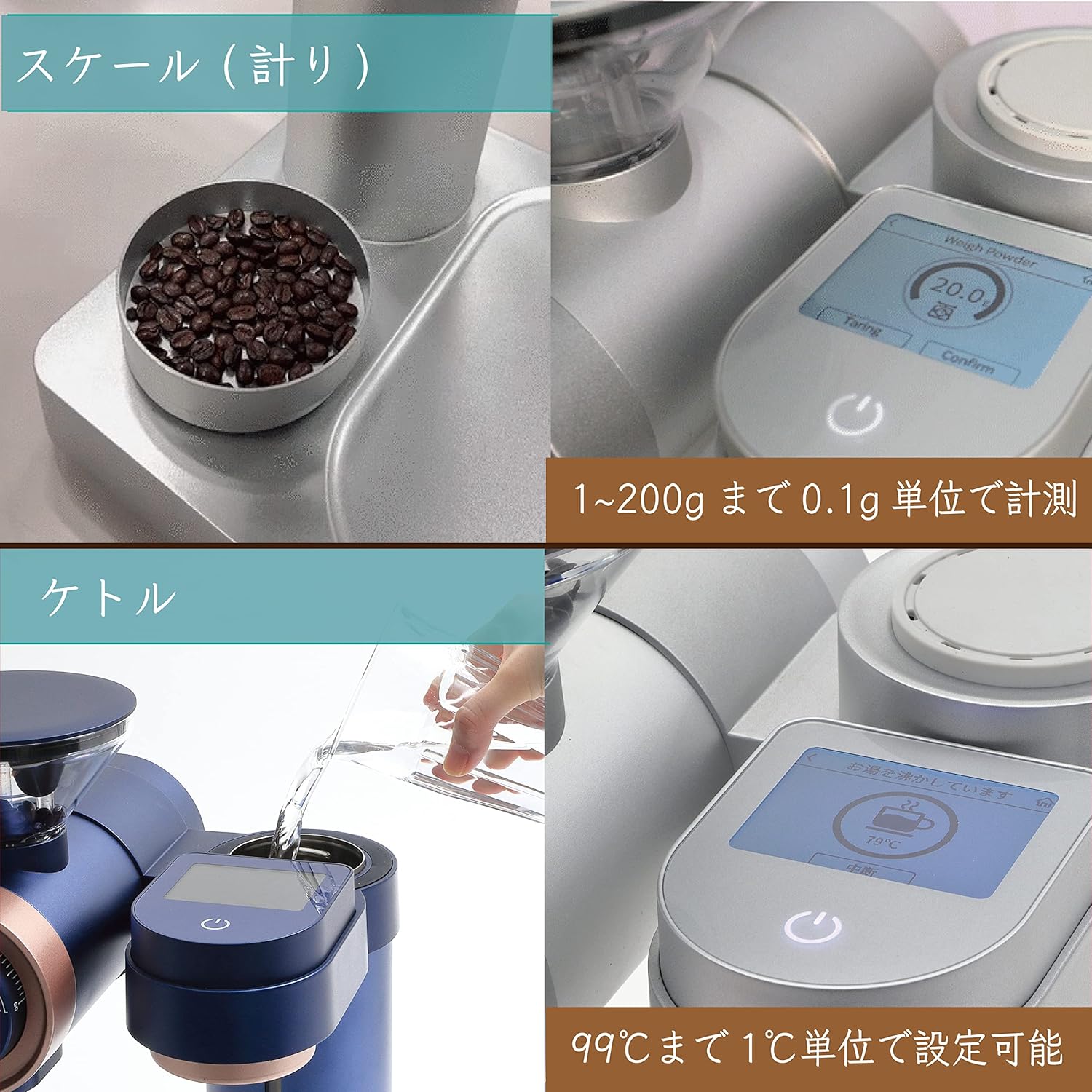
The integrated digital scale can measure coffee beans or grounds with an accuracy of 0.1g, up to a maximum of 2kg. This allows for precise coffee-to-water ratios.
5.4 Kettle Function
The integrated kettle has an 850ml capacity and allows for temperature adjustment from 40°C to 99°C in 1-degree increments. It can also be used independently for other hot water needs.
5.5 Brewer Function
The brewer features three 2.8mm diameter spouts that automatically rotate 360 degrees to ensure even water distribution over the coffee grounds for optimal extraction.

5.6 Brewing Modes
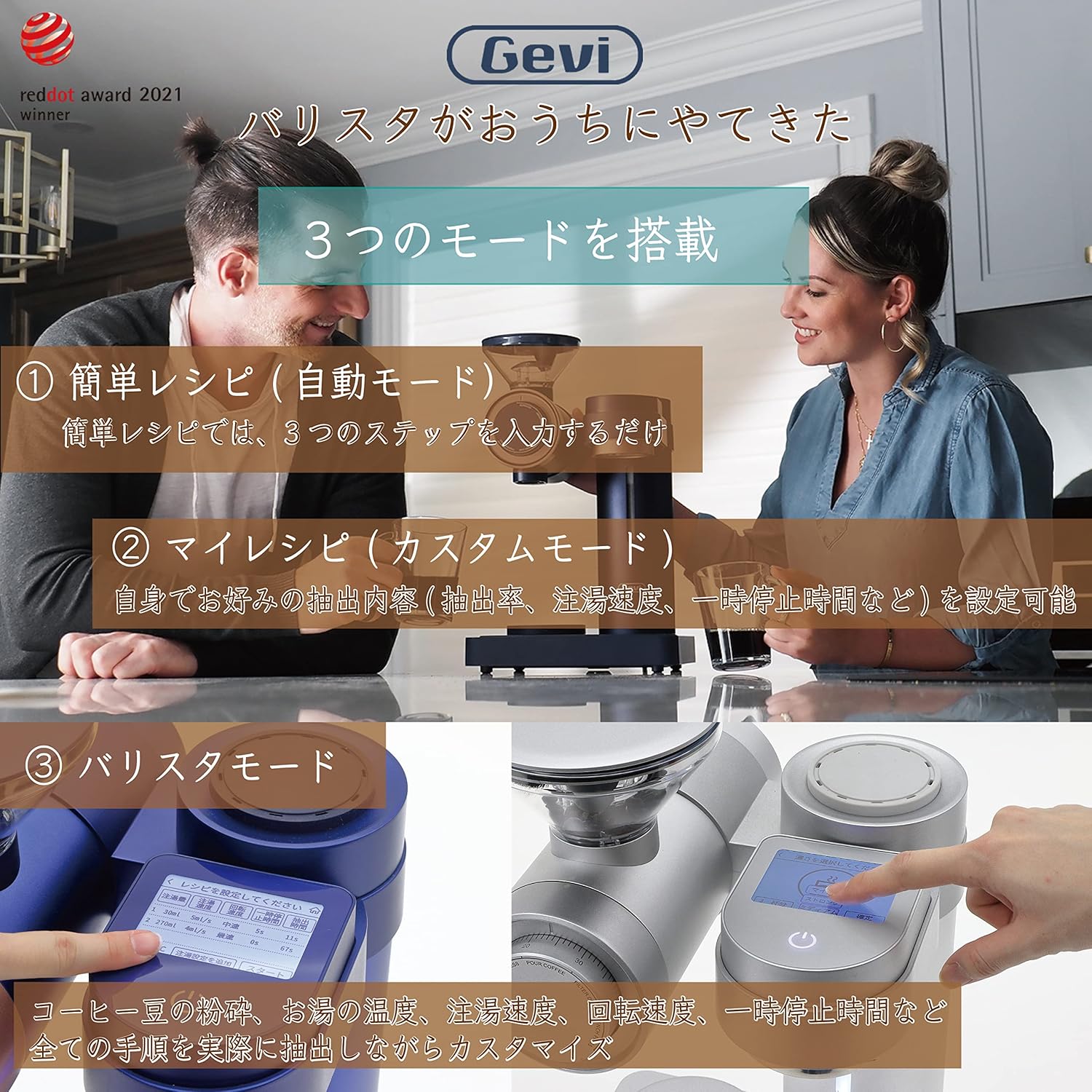
The coffee maker offers three distinct brewing modes:
- Simple Recipe (Automatic Mode): Follows a pre-set 3-step process for quick and easy brewing.
- My Recipe (Custom Mode): Allows users to set preferred extraction rate, pouring speed, and pre-infusion time.
- Ipo Barista: Provides full customization over all brewing parameters, including coffee bean grind, water temperature, pouring speed, rotation speed, and pre-infusion time.
5.7 Cup Selection
You can select to brew 1 to 4 cups of coffee using the dedicated cup selection button on the control panel.
5.8 Jeki Gbona Išė
The coffee maker includes a keep warm function to maintain your brewed coffee at an optimal temperature after brewing.
5.9 Wi-Fi Asopọmọra
The device supports Wi-Fi connectivity, allowing it to connect with a mobile application for additional features, such as accessing and saving custom recipes.
6. Itọju ati Cleaning
Regular cleaning ensures the longevity and optimal performance of your coffee maker.
6.1 Daily Cleaning
- After each use, clean the hopper, hopper lid, carafe, filter, and dripper using a neutral dishwashing detergent and a soft sponge.
- Rinse all parts thoroughly with clean water and allow them to dry completely before reassembling.
- Wipe the exterior of the main unit with a slightly damp asọ. Ma ṣe fi ẹya akọkọ sinu omi.
6.2 mimọ Išė
The coffee maker features a dedicated 'Clean' function for internal cleaning. Refer to the on-screen prompts or the mobile application for detailed instructions on using this function.
7. Laasigbotitusita
If you encounter any issues with your Gevi 4-in-1 Smart Coffee Maker, please refer to the following common problems and solutions:
- Appliance does not power on: Ensure the power cord is securely plugged into a working electrical outlet. Check if the power button has been long-pressed to activate the unit.
- Kọfí kò ń pọn omi: Verify that the water tank is filled to the appropriate level and the carafe is correctly placed on the heating plate. Ensure a brewing mode has been selected and the start button pressed.
- Grinder is not working: Check if the bean hopper contains coffee beans and is properly seated. Ensure no foreign objects are obstructing the grinder.
- Omi ko gbona: Confirm that the kettle is properly placed and the desired temperature is set.
Fun awọn ọran ti ko bo nibi, jọwọ kan si atilẹyin alabara.
8. Awọn pato
| Brand | gevi |
| Nọmba awoṣe | GV9002 |
| Iwọn (D x W x H) | 25.4 cm x 26.2 cm x 43.2 cm |
| Iwọn Ọja | 7.65 kg |
| Agbara | 640 milimita |
| Awọn ohun elo | Gilasi, Irin alagbara |
| Awọn ẹya ara ẹrọ | Integrated coffee grinder, digital scale, temperature-controlled kettle, keep warm function |
| Kofi Ẹlẹda Iru | Drip Kofi ẹrọ |
9. Atilẹyin ọja ati Support
9.1 Olupese ká atilẹyin ọja
This Gevi product is covered by a 1-year manufacturer's warranty from the date of purchase. Please retain your proof of purchase for warranty claims. The warranty covers defects in materials and workmanship under normal use.
9.2 Onibara Support
For technical assistance, troubleshooting, or warranty inquiries, please contact Gevi customer support through the official website or the contact information provided with your product. Please have your model number (GV9002) and purchase date ready when contacting support.