
Ọrọ Iṣaaju
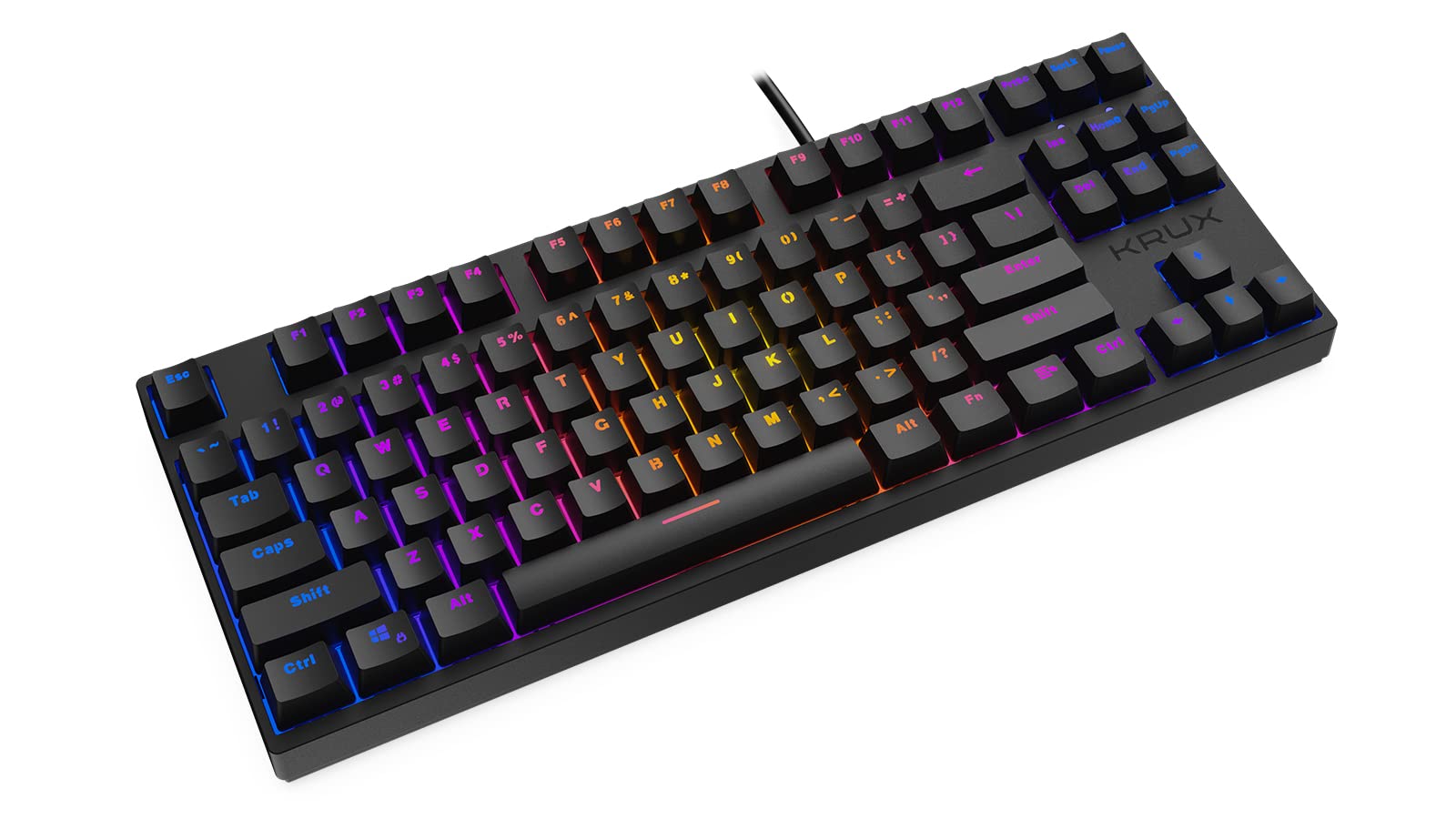
Thank you for choosing the KRUX Atax Pro RGB Outemu Brown KRX0039 Wired Gaming Keyboard. This manual provides essential information for setting up, operating, maintaining, and troubleshooting your new mechanical gaming keyboard. Please read this manual thoroughly before use to ensure optimal performance and longevity of your device.
Ṣeto
Follow these steps to set up your KRUX Atax Pro RGB keyboard:
- Yọ Keyboard kuro: Farabalẹ yọ keyboard kuro lati apoti rẹ. Rii daju pe gbogbo awọn eroja wa.
- Sopọ si Kọmputa: Plug the USB-A connector of the keyboard cable into an available USB-A port on your computer or laptop.
- Fifi sori Awakọ: The keyboard is plug-and-play. Your operating system (Windows, macOS, Linux) should automatically detect and install the necessary drivers. No additional software installation is typically required for basic functionality.
- Ipo: Place the keyboard on a stable, flat surface. Adjust the rear feet for your preferred typing angle.
Awọn ilana Iṣiṣẹ
The KRUX Atax Pro RGB keyboard offers various functions beyond standard typing:
Ipilẹ Key Awọn iṣẹ
- Awọn bọtini boṣewa: Gbogbo awọn bọtini alphanumeric ati aami boṣewa n ṣiṣẹ bi a ti ṣe yẹ.
- Awọn bọtini iṣẹ (F1-F12): These keys perform their standard functions.
- Akopọ Lilọ kiri: Includes Insert, Home, Page Up, Delete, End, Page Down for document navigation.
- Awọn bọtini itọka: Standard directional control.
RGB Backlighting Iṣakoso
The keyboard features customizable RGB backlighting. Use the following key combinations with the Fn key (located near the right Alt key) to control lighting effects:
- Fn + F1-F12: Specific multimedia or system functions (refer to keycap legends for exact functions).
- Fn + PrtSc: Yiyipo nipasẹ awọn ipo ina RGB oriṣiriṣi.
- Fn + Scrlk: Satunṣe imọlẹ backlight.
- Fn + Pause: Change backlight color or direction in certain modes.

ere Awọn ẹya ara ẹrọ
- N-Kọtini Rollover: The keyboard supports N-key rollover, allowing multiple simultaneous key presses to be registered accurately, which is beneficial for gaming.
- Anti-Ghosting: Prevents unintended key presses from registering when multiple keys are pressed at once.
Itoju
Itọju to peye ṣe idaniloju pe keyboard rẹ yoo pẹ to ati pe yoo ṣiṣẹ:
- Ninu awọn bọtini bọtini: Lo asọ, damp cloth with mild soap and water to gently wipe the keycaps. Avoid excessive moisture.
- Fífọmọ́ lábẹ́ àwọn ìbòrí ìbòrí: For deeper cleaning, you may carefully remove keycaps using a keycap puller (not included) and use compressed air to remove dust and debris from the switches.
- Nsọ ẹnjini naa di mimọ: Wipe the keyboard chassis with a dry or slightly damp asọ.
- Yago fun Olomi: Maṣe da awọn olomi silẹ lori bọtini itẹwe. Ti omije ba waye, lẹsẹkẹsẹ yọọ bọtini itẹwe ki o jẹ ki o gbẹ patapata ki o to tun so pọ.
- Ibi ipamọ: Tọju keyboard ni itura, aye gbigbẹ kuro lati orun taara ati awọn iwọn otutu to gaju.

Laasigbotitusita
If you encounter issues with your KRUX Atax Pro RGB keyboard, try the following solutions:
- Keyboard Ko Dahun:
- Rí i dájú pé okùn USB náà so mọ́ keyboard àti kọ̀ǹpútà dáadáa.
- Gbiyanju lati so bọtini itẹwe sinu ibudo USB ti o yatọ.
- Tun kọmputa rẹ bẹrẹ.
- Ṣe idanwo bọtini itẹwe lori kọnputa miiran lati ṣe akoso ọrọ kan pato ti eto kan.
- RGB Backlighting Not Working:
- Check if the backlight brightness is turned down (Fn + Scrlk).
- Cycle through lighting modes (Fn + PrtSc) to see if it reactivates.
- Rii daju pe keyboard n gba agbara to lati ibudo USB.
- Awọn bọtini kan pato Ko Iforukọsilẹ:
- Remove the keycap and check for any debris or obstruction around the switch. Use compressed air to clean.
- If the issue persists, it may indicate a faulty switch.
- Ghosting or Input Lag:
- Rí i dájú pé àwọn awakọ̀ USB ti kọ̀ǹpútà rẹ ti ṣe àtúnṣe.
- Avoid connecting the keyboard through unpowered USB hubs.
Awọn pato
| Ẹya ara ẹrọ | Ẹ̀kúnrẹ́rẹ́ |
|---|---|
| Brand | KRUX |
| Orukọ awoṣe | Atax PRO RGB Outemu Brown TKL |
| Nọmba awoṣe | KRX0039 |
| Asopọmọra Technology | USB-A (Ti firanṣẹ) |
| Apejuwe Keyboard | Ẹ̀rọ |
| Yipada Iru | Outemu Brown (Tactile) |
| Nọmba ti Awọn bọtini | 87 |
| Imọlẹ ẹhin | RGB |
| Àwọ̀ | Dudu |
| Niyanju Lilo | Ere |
| Iwọn Nkan | 940 giramu |
| Awọn ẹrọ ibaramu | Kọǹpútà alágbèéká, PC |

Atilẹyin ọja ati Support
Atilẹyin ọja: Ọja yi wa pẹlu kan 2-odun olupese ká atilẹyin ọja from the date of purchase. This warranty covers defects in materials and workmanship under normal use. It does not cover damage caused by misuse, accident, modification, or unauthorized repair.
Oluranlowo lati tun nkan se: For technical assistance, warranty claims, or further inquiries, please contact KRUX customer support through their official website or the retailer where the product was purchased. Please have your product model number (KRX0039) and proof of purchase ready when contacting support.